


In this article
Higgsfield Soul 2.0 is Higgsfield’s photorealistic image-generation model, built especially for realistic people, fashion, lifestyle and editorial imagery, and the internet-native visual aesthetics that dominate social feeds. It is the second-generation model in the Higgsfield Soul family, sitting between the original Soul (quick, preset-driven images) and Soul Cinema (cinematic-grade stills). This guide explains what higgsfield soul 2.0 does, how its controls fit together, what it costs, and where it falls short. Pricing was checked on November 18, 2026.
Table of Contents
Higgsfield Soul 2.0 at a Glance
- Developer: Higgsfield, which describes the model as its own foundation image model, built in-house with creative professionals.
- Entity chain: Higgsfield → Soul family → Soul 2.0 → photorealistic, fashion-aware image generation.
- Reported release: February 2026 (a Japanese industry outlet dates it to February 20).
- Controls: presets, Moodboards, Soul ID characters, Soul HEX color palettes, and a reference-image mode.
- Settings: seven aspect ratios, 1.5k or 2k quality, and 1 to 4 images per generation.
- Where to find it: higgsfield.ai → Image → Soul 2.0.
What Is Higgsfield Soul 2.0?
Higgsfield Soul 2.0 is an AI image generator with a deliberately narrow job description. Rather than trying to render everything from product diagrams to watercolor illustrations, it targets the look of styled photography: editorial spreads, street-style frames, flash-lit party shots, lifestyle portraits and campaign imagery.
Higgsfield states that it built the model in-house, in collaboration with creative professionals. Its launch post frames the goal as “taste”: a model that recognizes fashion references, subcultural cues and editorial framing, and responds to niche aesthetic vocabulary with nuance instead of costume-like exaggeration. The company has not published architecture details, training data, parameter counts or benchmark scores, so this guide does not speculate about any of them.
Where It Fits in the Higgsfield Ecosystem
Higgsfield is a multi-model creative platform. Its navigation lists its own Soul models alongside third-party image models such as Nano Banana, Flux 2, Seedream 5, GPT Image 2 and Ideogram 4.5, plus video models and studio tools. Within that catalog, higgsfield soul 2.0 is the model the company positions for fashion-aware, culture-native photography, and the one that carries the full set of style and identity controls.
The Soul Family in One Table
Higgsfield’s Help Center defines three models:
| Model | Best for | Key features |
|---|---|---|
| Soul | Quick preset-driven generation | Style presets, avatar support |
| Soul 2.0 | Full creative control | Presets, Moodboard, Soul HEX, Soul ID, reference image |
| Soul Cinema | Cinematic-grade visuals | Soul HEX, Soul ID, cinematic style built in |
When Was Higgsfield Soul 2.0 Released?
Higgsfield Soul 2.0 reportedly arrived in February 2026. The Japanese site Design Offset reported a release date of February 20, 2026 and described it as the first Soul-line update since June 2025. Higgsfield’s own launch post is the better guide to what shipped, and it is worth separating that from what the Help Center documents today. If you like seeing how quickly AI product timelines shift, our verified ChatGPT release timeline shows why dated claims matter in this category.
Features Described at Launch
The launch post describes three core systems: the base Soul model for text-to-image generation, a Soul Reference mode that analyzes an uploaded image’s composition, lighting, styling and mood to produce variations, and Soul ID for recurring characters. It also mentions more than 20 curated presets, including Warm ambient, Retro BW, Y2K street, Subtle flash, Street photography, Theatrical light, Flash editorial, Digital camera, Candy pop, Frutiger aero and Old smartphone.
Features Documented Later
Moodboards and Soul HEX color control appear in the current Help Center, but they are not mentioned in the launch post, and Higgsfield’s pages do not say when they were added. Treat them as current features of higgsfield soul 2.0 whose rollout date is unverified. The same applies to Soul Cinema, which the Help Center describes as a separate model in the family.
Key Features of Higgsfield Soul 2.0
Photorealistic Image Generation
The headline strength of higgsfield soul 2.0 is photographic feel. Higgsfield says the model responds to references such as phone flash, disposable cameras and digital cinema with believable grain, texture and lighting logic. That is a vendor claim, not an independent test, so judge it by your own outputs.
Fashion-Aware Generation
The model is designed to understand clothing references, styling and era-specific looks. Expect a useful starting point, not guaranteed garment accuracy: small details such as seams, logos and accessories can still change between generations.
Culture-Native and Internet Aesthetics
Higgsfield says higgsfield soul 2.0 understands online slang and niche aesthetic terms inside prompts. In practice that means you can name a vibe, such as a Y2K studio look or a flash-editorial feel, and lean on presets to anchor it.
Reference Images
A reference image acts as visual direction. When you attach one, Soul 2.0 treats it as the primary instruction and the prompt field becomes unavailable. You can still add a Soul ID character and a Soul HEX palette alongside it.
Moodboards
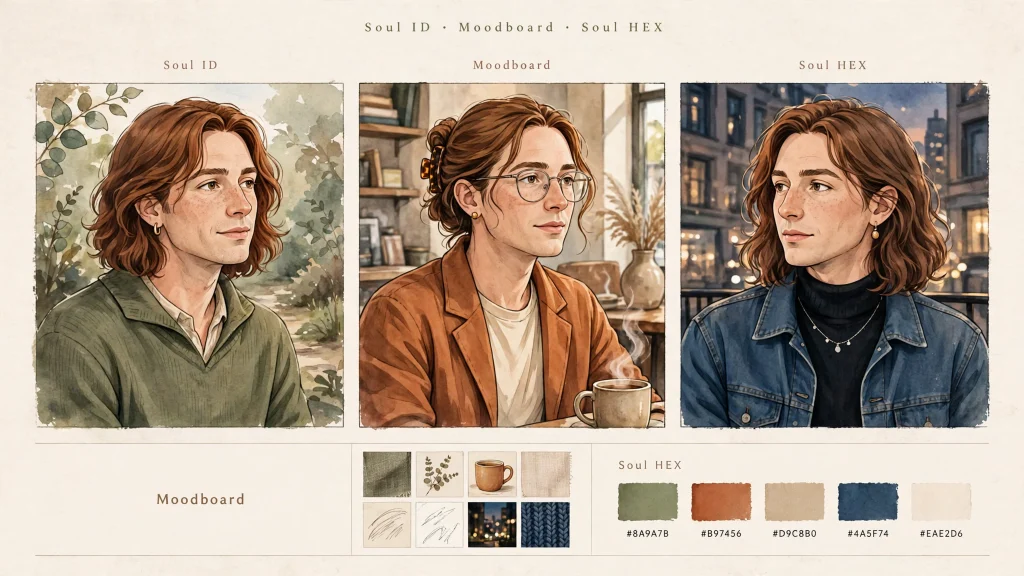
Moodboards are reusable style presets you build from your own images. Soul 2.0 analyzes their lighting, texture, contrast and color, then applies that style across generations. Higgsfield’s Help Center says Moodboards are only available in Soul 2.0, not in Soul or Soul Cinema.
Soul ID
Soul ID is the character-consistency layer. You train it once on photos of one person and reuse that identity across generations and across the Soul family.
Soul HEX
Soul HEX extracts a dominant color palette from a reference image and applies it to your generation, which keeps a series visually coherent. It works in Soul 2.0 and Soul Cinema.
Aspect Ratios, Quality, and Batch Size
Per the current Help Center, higgsfield soul 2.0 offers these settings:
| Setting | Options |
|---|---|
| Aspect ratio | 9:16, 3:4, 2:3, 1:1, 4:3, 16:9, 3:2 |
| Quality | 1.5k, 2k |
| Batch size | 1 to 4 images |
| Color Transfer | Soul HEX palettes |
Nothing in the documentation I reviewed lists 4K output for Soul 2.0. Higgsfield’s own comparison page gives its resolution as up to 2K.
How to Use Higgsfield Soul 2.0: Step-by-Step
The path is higgsfield.ai → Image → Soul 2.0. The steps below follow the official Help Center workflow, and the exact button labels may shift as the interface changes.
- Open Higgsfield and sign in. Go to higgsfield.ai and log in or create an account.
- Go to Image and select Soul 2.0. It sits in the image model list.
- Pick a preset or a Moodboard. Presets are built in. Moodboards are your own saved styles (or curated ones such as Y2K Studio, Digital Camera and Retro BW).
- Write a prompt, if no reference is attached. Treat it like a creative brief covering mood, styling and intent.
- Add a Soul ID character. Choose a trained character from the Character tab if you want a consistent face.
- Apply Soul HEX. Click Color Transfer in the generation bar, then upload a reference or choose a built-in palette.
- Attach a reference image, if you want visual direction. Remember that the prompt field then becomes unavailable.
- Set aspect ratio and quality. Choose one of the seven ratios and 1.5k or 2k.
- Choose a batch size. One to four images per generation.
- Check the credit cost. Higgsfield shows it on the Generate button before you confirm.
- Generate, review and iterate. Compare results, adjust the prompt or preset, and try again.
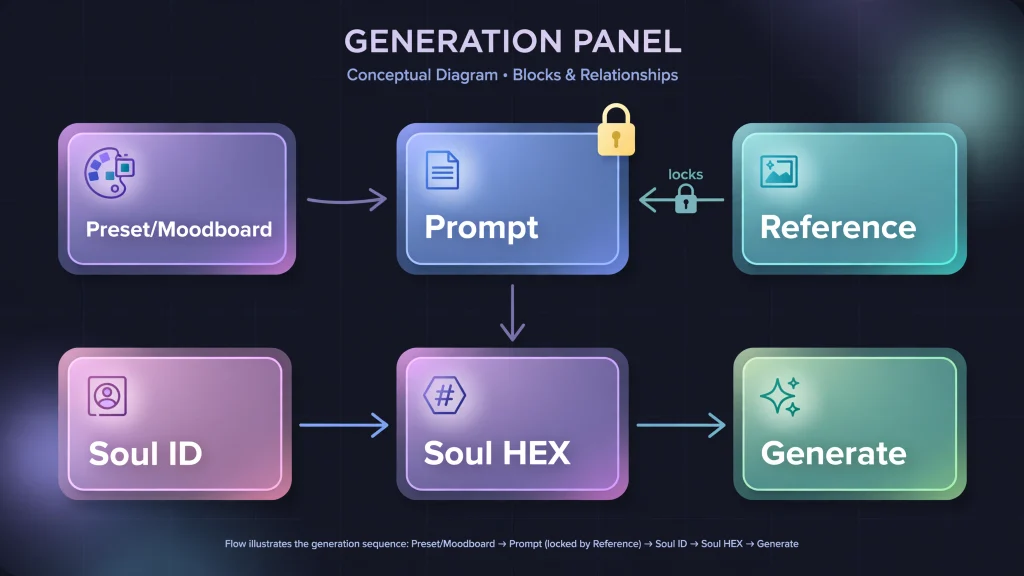
How Higgsfield Soul 2.0 Reference Images Work
Reference images and Soul ID solve different problems. A reference image gives visual direction for one generation; Soul ID gives a character identity you can reuse. Higgsfield’s Soul ID guide says a reference anchors a single generation but can drift across many separate ones, while a trained identity is meant to hold across styles and angles.
At launch, Higgsfield described Soul Reference as a way to keep what you liked about an image while exploring alternatives, analyzing its visual logic rather than copying it. That wording matters: a reference is not a guarantee of an exact duplicate. The practical limitation is the one already noted. With a reference attached, you cannot type a prompt, so use references when you want the model to interpret an existing look, and use prompts plus presets or Moodboards when you want to direct a scene in words.
Higgsfield Soul 2.0 Moodboards Explained
A Moodboard is a custom style preset made from your own images. Higgsfield describes two kinds: Curated Moodboards (built-in looks such as Y2K Studio, Digital Camera and Retro BW) and Personal Moodboards (styles you create).
How to Build a Personal Moodboard
According to the Help Center, open Soul 2.0, click the Moodboard icon, choose to build your moodboard, and upload images from your device or from Assets. For a strong result, Higgsfield suggests aiming for 20 or more images in one cohesive aesthetic, without faces, while avoiding blurry or low-quality images and unrelated styles. Treat that as guidance rather than a hard requirement.
Why Moodboards Help
Consistent references teach the model a recognizable lighting, texture, contrast and color signature. For brands and recurring series, that is the point: one Moodboard can make a whole set of images feel shot on the same day. Higgsfield’s own tips recommend keeping one Moodboard per series.
Soul ID and Character Consistency in Higgsfield Soul 2.0
Soul ID is a trained identity layer. Higgsfield’s guide says to open Soul and choose Train new character, then upload 20 or more photos of one person (up to 80), well lit, with varied angles and expressions, at least one full-height shot, and ideally recent photos from the last four to five months. Training takes a few minutes, and you then select the character in the Character tab.
What Soul ID Does Well
Soul ID helps maintain character identity across outfits, scenes and presets, which is why it suits fashion campaigns, digital brand ambassadors and ongoing creator content. A trained character also works across the Soul family, so the same person can appear in higgsfield soul 2.0 and Soul Cinema. Higgsfield adds that trained characters carry into Seedance video as Elements.
Realistic Limits
Higgsfield itself says to expect “clearly the same person” rather than a pixel-identical face. Weak photo sets produce weak identities, extreme style shifts can introduce small drift, one Soul ID holds one person, and the trained character is not exportable as a file. I could not verify a credit price for training, so check what Higgsfield shows in the product. Only train on photos of yourself or of someone who has given permission.
Soul HEX and Color Control in Higgsfield Soul 2.0
Soul HEX is not ordinary color prompting. Instead of describing “dusty pink” in words, you give the model a reference image and it extracts that image’s dominant palette, then applies those colors to your generation. Higgsfield’s own advice is to use Soul HEX rather than relying only on color descriptions in the prompt.
To use it, click Color Transfer in the generation bar and either upload a reference or pick a built-in palette: Film colors, Lime Jam, Candy pink, Nostalgic blue, Soft palette or Black gloss. Soul HEX works in higgsfield soul 2.0 and Soul Cinema, which makes it useful for brand color systems and visual series that need to match.
Higgsfield Soul 2.0 Prompting Guide
Higgsfield advises approaching a prompt like a creative brief. A reliable structure covers: subject, clothing, pose, environment, lighting, camera perspective, composition, mood, photography style, materials, color palette and background. Add an age range only when it is appropriate and safe, and keep subjects to adults. Prompts shape results but never guarantee exact outputs, so plan on iteration. Remember that prompts apply only when no reference image is attached.
7 Original Example Prompts
- Fashion editorial: “Adult model in an oversized charcoal wool coat on an empty rooftop at dusk, low three-quarter angle, soft overcast light, muted teal and rust palette, editorial composition, grainy film texture.”
- Streetwear campaign: “Two adult friends in coordinated cargo pants and boxy jackets leaning on a graffiti wall, midday sun, wide-angle street-photography look, bold cobalt and cream colors.”
- Lifestyle portrait: “Adult woman laughing at a sunlit kitchen table with coffee and a linen shirt, natural window light, shallow depth of field, warm honey tones, candid framing.”
- Beauty campaign: “Close-up of an adult model with dewy skin and glossy coral lip, clean seamless peach backdrop, soft beauty-dish light, tight crop, high-end magazine style.”
- Travel-style portrait: “Adult traveler in a straw hat on a whitewashed Mediterranean staircase, golden-hour backlight, relaxed walking pose, cinematic but natural color grade.”
- Product and lifestyle composition: “A hand holding a ceramic mug beside a folded knit sweater on a wooden bench, morning light, tactile textures, neutral earth palette, uncluttered background.”
- Social-media aesthetic: “Adult creator in a bedroom mirror selfie with subtle on-camera flash, layered thrift-store outfit, slightly overexposed highlights, nostalgic digital-camera feel.”
Use Cases for Higgsfield Soul 2.0
The model suits fashion photography concepts, editorial imagery, social content, Instagram-style visuals, TikTok campaign imagery, UGC-style visuals, advertising concepts, brand moodboards, product-lifestyle campaigns, character-based content, storyboards, creative direction, concept art and personal projects. Keep one distinction clear: this is AI-generated concept and creative content. It does not automatically replace professional photography or full production, especially where real garments, real products or legal clearances are involved.
Higgsfield Soul 2.0 for Marketers and Brands
Marketers can use higgsfield soul 2.0 for campaign concepts, social ad variations, product-lifestyle scenes and rapid visual experiments. A Personal Moodboard can encode a brand look, Soul HEX can lock a palette, and Soul ID can create a recurring character for a campaign.
Responsible use matters here. Check your brand guidelines, confirm you hold the rights to every uploaded asset, obtain consent for anyone’s likeness, and think through trademark and copyright exposure before publishing. This is general information, not legal advice. Higgsfield’s pricing guide also marks commercial use as unavailable on the Free plan and available on paid plans.
Higgsfield Soul 2.0 for Fashion Creators
Fashion is the clearest strength Higgsfield claims for the model. Creators can explore editorials, streetwear looks, runway-inspired concepts, outfit visualizations, lifestyle campaigns and magazine-style frames, then hold color and style steady with Moodboards and Soul HEX.
Plan for iteration. As with most image generators, logos, on-garment text, jewelry details, hands and accessories may need rerolls, and clothing can change between generations. Higgsfield’s own comparison page adds Soul-specific cautions: text rendering is not a core strength, product-mockup and object editing are limited, and background crowds can be weaker, with a trained face sometimes cloned onto background people. Pair higgsfield soul 2.0 with another model when a shot depends on readable packaging or precise object edits.
Higgsfield Soul 2.0 vs Soul
| Feature | Soul | Soul 2.0 |
|---|---|---|
| Main focus | Quick preset-driven generation | Full creative control |
| Photorealistic generation | Higgsfield’s earlier fashion-aware photo model | Fashion-aware, culture-native, realistic |
| Presets / Moodboards | Presets only (categories include TikTok Core, Instagram Aesthetics, Beauty, Camera Photo); no Moodboards | 20+ presets at launch plus Moodboards |
| Soul ID | Works across the family | Works across the family |
| Soul HEX | Not available | Available |
| Reference images | Supported per the FAQ (prompt field locks) | Supported; prompt field locks |
| Creative control | Lighter | Prompt, preset or Moodboard, Soul ID and Soul HEX combined |
| Best for | Fast, simple generations | Controlled, repeatable aesthetics |
Higgsfield Soul 2.0 vs Soul Cinema
The difference is built-in look versus flexible control. Higgsfield Soul 2.0 is oriented toward flexible, fashion-aware image creation. Soul Cinema bakes in a cinematic, atmospheric aesthetic.
| Feature | Soul 2.0 | Soul Cinema |
|---|---|---|
| Main focus | Fashion-aware, culture-native visuals | Cinematic, atmospheric visuals |
| Presets | Yes | No |
| Moodboards | Yes | No |
| Soul HEX | Yes | Yes |
| Soul ID | Yes, shared across the family | Yes, shared across the family |
| Prompt with reference image | No | No |
| Cinematic aesthetic | Not built in | Built in |
| Best use cases | Full creative control | Cinematic output, video keyframes |
Higgsfield says Soul Cinema also works well as a starting keyframe for AI video in Kling or Seedance.

Higgsfield Soul 2.0 vs Other AI Image Generators
Higgsfield also hosts rival models, so you can compare without leaving the platform. The table below mixes Higgsfield’s own comparison with independent reporting, so read the attributions.
| Tool | Main Strength | Character Consistency | Reference Control | Best For |
|---|---|---|---|---|
| Higgsfield Soul 2.0 | Editorial, fashion and cinematic realism, up to 2K | Trained Soul ID (Higgsfield says it holds across a series) | Reference mode, Moodboards, Soul HEX | Recurring characters and styled campaigns |
| Nano Banana Pro | Style range, object editing, text rendering, up to 4K (per Higgsfield) | Higgsfield says it drifts without a trained identity | Single reference, multi-image fusion, pose control | Text-heavy images and edits |
| ChatGPT image generation | Tom’s Guide rated it best overall, noting text on images | Not assessed here | Conversational editing | Quick, general-purpose images |
| Gemini image generation | Tom’s Guide says it excels at keeping characters recognizable | Described as strong by Tom’s Guide | Image-to-image prompts | Character-consistent scenes |
I verified only vendor-published and reviewer statements, not independent benchmarks, so no tool here is declared best. Soul 2.0 is most useful when you want style presets, Moodboards and a trained recurring face in one place. If you are weighing subscription tiers for tools like these, our guide to ChatGPT subscription plans and prices shows how that side of the market is priced.
Is Higgsfield Soul 2.0 Free?
Not reliably. Higgsfield’s pricing guide lists a Free plan with no credits, limited use of Nano Banana Pro and FLUX.2 Pro, and one Character generation, with no commercial use. Soul 2.0 is not named as a free-tier model there.
What does exist is a pool of free generations on some paid plans. Higgsfield’s Help Center says certain plans include a one-time pool of free generations for Soul 2.0 and Soul Cinema, that the pool does not renew when your subscription renews, and that the exact pools appear in the Unlimited & Free Gens section of each plan card. Higgsfield’s pricing guide reports 5,000 free Soul V2 and Cinema generations on Ultra. Free generations apply only on higgsfield.ai, not through MCP, CLI or other automated tools.
Higgsfield Soul 2.0 Pricing and Credits
Higgsfield is credit-based, and the cost of each generation appears on the Generate button before you confirm. Subscription credits reset each billing cycle and do not roll over, and credit packs expire 90 days after purchase.
Soul 2.0 Credit Cost
Higgsfield’s pricing explainer puts a higgsfield soul 2.0 image at 2K at 0.125 credits, so 1,000 credits equal about 8,000 images, assuming one try each. Completed generations are not refunded even if you dislike them, while failed ones are usually refunded automatically. Costs are not necessarily identical at 1.5k, and Higgsfield did not state a 1.5k figure on the pages I read. Some third-party guides to the MCP connector report higher per-image numbers, so trust the Generate button.
Plans, as of November 18, 2026
Plan names and prices differ by source, region and promotion. This is the honest picture:
| Source | Plans reported |
|---|---|
| Higgsfield pricing explainer (October 24, 2026) | Free $0; Starter $15 (200 credits); Plus $49 (1,000); Ultra $129 (3,000); Team $79/seat; Scale $215/seat |
| Higgsfield pricing guide (November 2026, US) | Starter $19 (270 credits); Plus $59 (1,200); Ultra $129 (3,000) |
| Independent pages (including one viewing from Pakistan on November 14) | Basic $9 (120 credits); Plus $49; Ultra $129, plus Black Friday discounts |
Some earlier observers saw Basic, Pro and Max labels. I could not read the live pricing cards, so confirm your own price, region and any sale on higgsfield.ai/pricing. Credits work across other Higgsfield models too, and Soul 2.0 is one of the cheaper models per image. Do not treat promotional annual pricing as permanent.
Higgsfield Soul 2.0 Quality and Limitations
Strengths: photorealistic people, fashion-aware styling, strong preset-led direction, Soul ID workflows, Moodboard style control, Soul HEX color consistency and reference-driven generation.
Limitations: results vary between generations, so expect prompt iteration and credit spend. The prompt field disappears when a reference image is attached. Higgsfield documents weaker text rendering, limited object editing and a 2K ceiling. Anatomy and detail imperfections can still appear, features change over time, and every output should be reviewed before publishing. Higgsfield’s claims are not independent benchmarks, and this guide includes none.
Who Should Use Higgsfield Soul 2.0?
It is likely to suit fashion creators, AI artists, social media creators, marketers, agencies, brand teams, digital creators, visual storytellers, photographers experimenting with AI and beginners drawn to realistic imagery, thanks to its presets.
Other tools may fit better if you mainly want cinematic stills (consider Soul Cinema), need heavy text rendering or object editing, want a model Higgsfield does not host, or need local, offline generation. If you already use AI agents, note that Higgsfield connects to Claude through MCP, though credits are always deducted there; our Claude in Chrome guide covers another way Claude reaches into your workflow.
Is Higgsfield Soul 2.0 Worth It?
Higgsfield Soul 2.0 may be worth considering if you need a recurring character, a consistent branded look and fast fashion-style concepts, and if the low per-image credit cost matches your volume. It may not be worth it if you only need occasional general images, need accurate on-image text, or dislike credit-based billing.
The balanced view: image quality and control look promising, character consistency is a real selling point with honest limits, and pricing is cheap per image but confusing at the plan level. Test it within your plan, and decide on your own outputs.
Safety, Copyright, and Responsible Use of Higgsfield Soul 2.0
- Rights to inputs: use only reference images and photos you have the right to use.
- Likeness and consent: train Soul ID only on yourself or someone who has given permission, as Higgsfield’s guide states.
- Public figures: avoid recreating celebrities or public figures, and avoid deceptive deepfakes.
- Characters, trademarks and logos: do not prompt for copyrighted characters or branded marks you lack rights to.
- Commercial use: AI output is not automatically copyright-free or risk-free. You are responsible for lawful use.
- Privacy: uploaded images may be stored and processed, so read Higgsfield’s current Terms of Use and Privacy Policy before uploading personal photos.
Frequently Asked Questions About Higgsfield Soul 2.0
What is Higgsfield Soul 2.0?
Higgsfield Soul 2.0 is Higgsfield’s photorealistic image model for fashion, lifestyle, editorial and internet-native visuals, with presets, Moodboards, Soul ID, Soul HEX and reference images.
Is Higgsfield Soul 2.0 free?
Not on the Free plan as documented. Some paid plans include a one-time pool of free Soul 2.0 generations, listed on each plan card.
How much does Higgsfield Soul 2.0 cost?
Higgsfield’s pricing explainer lists 0.125 credits per 2K image, about 8,000 images per 1,000 credits. Plan prices vary by region and date.
What can Higgsfield Soul 2.0 create?
Realistic people, fashion editorials, street style, lifestyle portraits, beauty and campaign-style images, and social aesthetics.
How does Soul 2.0 compare with the original Soul?
Soul is built for quick presets. Soul 2.0 adds Moodboards, Soul HEX and fuller creative control.
What is Soul ID in Higgsfield?
A character-consistency layer trained on 20 or more photos of one person and reusable across Soul models.
What is Soul HEX?
A color tool that extracts a palette from a reference and applies it to your generation. It works in Soul 2.0 and Soul Cinema.
What are Soul 2.0 Moodboards?
Reusable style presets built from your own images. They are available in Soul 2.0 only.
Is Soul 2.0 better than Soul Cinema?
Neither is universally better. Soul 2.0 offers presets and Moodboards; Soul Cinema has a built-in cinematic look.
Sources & References
- Higgsfield Help Center, “How do I use Soul to generate images?” — https://higgsfield.ai/creator-hub/help-center/ai-models/how-do-i-use-soul-to-generate-images
- Higgsfield Help Center, “How do I create and use a Soul ID character?” — https://higgsfield.ai/creator-hub/help-center/ai-models/how-do-i-create-and-use-a-soul-id-character
- Higgsfield Help Center, “How do I use Soul Cinema?” — https://higgsfield.ai/creator-hub/help-center/ai-models/how-do-i-use-soul-cinema
- Higgsfield Help Center, “How do credits work?” — https://higgsfield.ai/creator-hub/help-center/credits/how-credits-work
- Higgsfield Help Center, “What are Unlimited models?” — https://higgsfield.ai/creator-hub/help-center/credits/what-are-unlimited-models-and-which-plans-include-them
- Higgsfield, “SOUL 2.0 Realistic AI Image Generator for Creative Direction” — https://higgsfield.ai/blog/SOUL-2.0-Realistic-AI-Image-Generator-for-Creative-Direction
- Higgsfield, “Higgsfield Pricing Explained” — https://higgsfield.ai/blog/higgsfield-pricing-explained
- Higgsfield, “Soul 2.0 vs Nano Banana Pro” — https://higgsfield.ai/blog/soul-2-vs-nano-banana-pro
- Higgsfield pricing guide — https://geo.higgsfield.ai/higgsfield-ai-pricing-guide
- Higgsfield About page — https://higgsfield.ai/about
- Design Offset, “Higgsfield Soul v2.0 release” — https://design-offset.com/20260220-higgsfield-soul-v2-0/
- Tom’s Guide, best AI image generators — https://www.tomsguide.com/ai/ai-image-video/i-put-7-leading-ai-image-models-to-the-test-with-the-same-prompt-heres-the-winner
- aiforesight360, Higgsfield AI pricing — https://aiforesight360.com/higgsfield-ai-pricing/
 Daniel Carter
9 comments