

In this article
Higgsfield Seedance 2 is the everyday search phrase for Seedance 2.0, ByteDance’s multimodal AI video model, as it runs inside the Higgsfield platform. You write a prompt, optionally add images, short video clips and audio files, and the model returns a 4 to 15 second clip with sound generated alongside the picture. One current-version note matters before anything else: ByteDance has since released Seedance 2.5, which Higgsfield added on August 6, 2026, so higgsfield seedance 2 is no longer the newest Seedance option. It is still a live, separately priced model with its own strengths, and this guide to higgsfield seedance 2 sticks to what official sources confirm.
Checked on November 20, 2026 against Higgsfield’s Seedance 2.0 page, its help center, its October 24, 2026 pricing guide and ByteDance Seed’s own publications. Credit costs and plans change often, so confirm anything that affects a purchase on the live pricing page.
Table of Contents
What Is Higgsfield Seedance 2?
Higgsfield Seedance 2 generally refers to Seedance 2.0, ByteDance’s multimodal AI video model, available through the Higgsfield platform. The model is not a Higgsfield invention. ByteDance’s Seed team announced Seedance 2.0 on February 12, 2026, describing one architecture that produces picture and sound together and accepts text, images, audio and video as inputs. Higgsfield is the US-based creative platform where you reach that model in a browser, pay for it in credits, and combine it with other tools. If the platform name itself is new to you, our explainer on what Higgsfield.ai actually is covers the basics.
Three layers are easy to blur, so here they are separately:
- ByteDance builds the Seedance model family.
- Seedance 2.0 is one release in that family, with its own limits on clip length, references and resolution.
- Higgsfield is the workspace and storefront. It runs Seedance beside rival models such as Kling and Veo, all billed from one credit pool.
Is Higgsfield Seedance 2 the Same as Seedance 2.0?
Yes, for practical purposes. Higgsfield Seedance 2 is search shorthand, and the entry you pick in Higgsfield’s video menu is labelled Seedance 2.0. The confusion comes from several similar names sitting side by side:
| Name | What it means |
|---|---|
| Seedance 2 | Casual shorthand for Seedance 2.0 |
| Seedance 2.0 | ByteDance’s model, announced February 2026, clips of 4 to 15 seconds |
| Higgsfield Seedance 2.0 | That same model, used on Higgsfield and billed in Higgsfield credits |
| Seedance 2.0 Fast and Mini | Quicker 2.0 variants, limited to 480p and 720p on Higgsfield |
| Seedance 2.5 | A newer ByteDance model on Higgsfield since August 2026, with clips up to 30 seconds |
So these are not four unrelated products. They are one family with a platform in front of it. Seedance 2.5 is a different, newer model, and its numbers should never be applied back to 2.0.
What Can Seedance 2.0 Do?
Based on official descriptions from ByteDance and Higgsfield, higgsfield seedance 2 can handle the following:
- Text-to-video. Describe a scene and receive a clip with matching sound.
- Image-to-video. A still image acts as an anchor for a character, product or location.
- Video references. A short clip can guide camera path, pacing or body movement, not only appearance.
- Audio references. An audio file can steer rhythm, mood or mouth movement.
- Multi-shot scenes. One prompt can describe several moments that the model edits together.
- Native audio. Speech, ambience, music and effects arrive in the same pass as the video.
- Camera presets. Higgsfield offers presets for camera control, framing and VFX, plus a General option for hand-written control.
- Flexible framing. Aspect ratios are Auto, 16:9, 9:16, 4:3, 3:4, 1:1 and 21:9.
ByteDance’s launch post also mentions editing and extension at the model level. Higgsfield’s own comparison table, though, lists region-level edits only for Seedance 2.5, and its 2.5 launch write-up says 2.0 regenerates the entire clip for a correction. On this platform, treat precise editing as a 2.5 strength.
Higgsfield Seedance 2 Input Types and Reference Limits
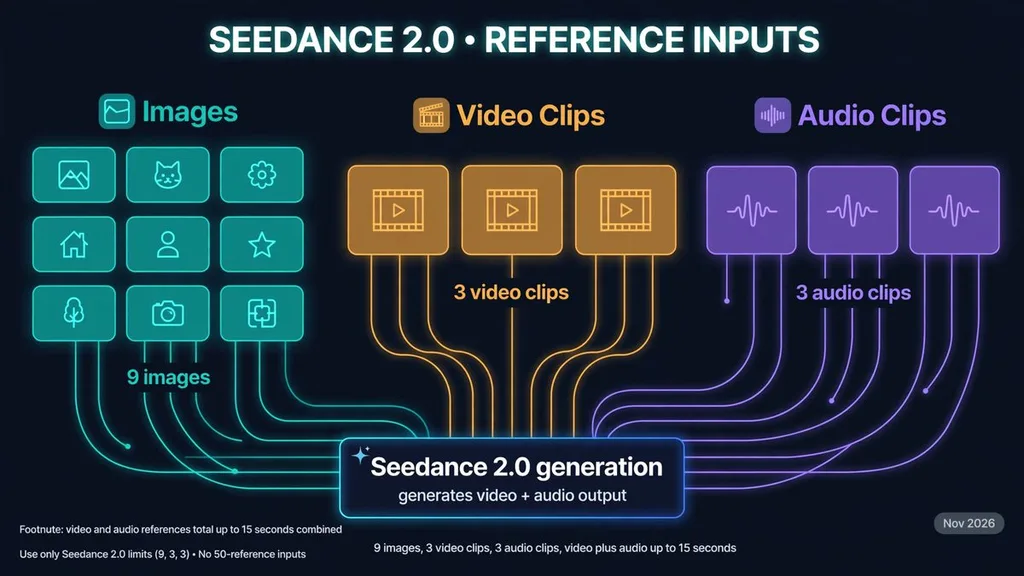
The reference system is the main reason people choose higgsfield seedance 2 over a text-only generator. These are the limits Higgsfield publishes for Seedance 2.0:
| Input | Limit on Seedance 2.0 | Typical job |
|---|---|---|
| Text prompt | Always used | Action, setting, camera, mood |
| Images | Up to 9 | Faces, outfits, products, locations |
| Video clips | Up to 3 | Camera moves, motion patterns |
| Audio clips | Up to 3 | Music timing, voice, ambience |
| Video plus audio length | Up to 15 seconds combined | Keeps references short |
Seedance 2.5 raises the ceiling to 50 references, which Higgsfield’s help center splits into 30 images, 10 video clips and 10 audio files. Do not carry that figure back to 2.0. One more wrinkle: a third-party guide from Luma Labs mentions a combined cap of 12 files, a limit Higgsfield’s own pages never state. If you plan to fill every slot, check the upload panel before you build a project around it.
How Long Can Seedance 2.0 Videos Be?
A single higgsfield seedance 2 generation runs from 4 to 15 seconds, and you choose the length. ByteDance’s technical overview gives the same range, so the ceiling belongs to the model, not to Higgsfield’s interface. Seedance 2.5, by contrast, reaches 30 seconds.
Anything longer than 15 seconds on 2.0 means generating several clips and joining them in an editor. Plan for that early. Write each clip as its own beat with the same wardrobe, light and location, and reuse the same references so the cuts feel related. Longer clips also cost more credits, so a failed 15-second attempt hurts more than a failed five-second one. That ceiling is the main constraint to plan around with higgsfield seedance 2.
Does Higgsfield Seedance 2 Support 4K?
Higgsfield says yes. Its Seedance 2.0 page lists 480p, 720p, 1080p and 4K, and calls 4K native output. Two details deserve care.
First, the variants differ. Higgsfield’s help center lists standard Seedance 2.0 at 480p up to 4K, while Fast and Mini stop at 720p.
Second, the sources do not fully agree on how 4K is produced. ByteDance Seed’s April 2026 technical overview states native output of 480p and 720p for the model, while Higgsfield markets native 4K on its own page. I could not find a document that reconciles the two, so describing 4K as “Higgsfield-reported” is the safest wording.
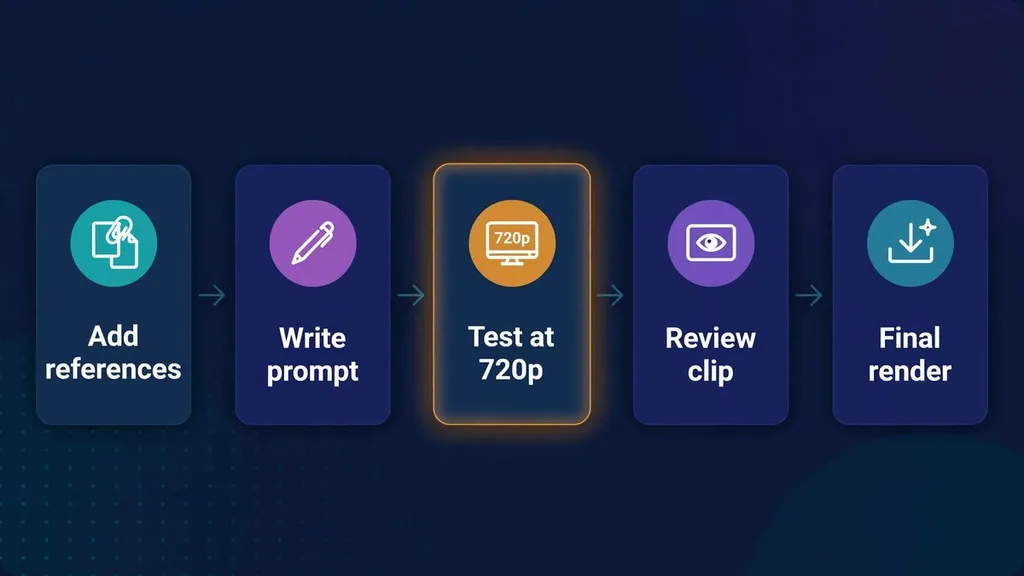
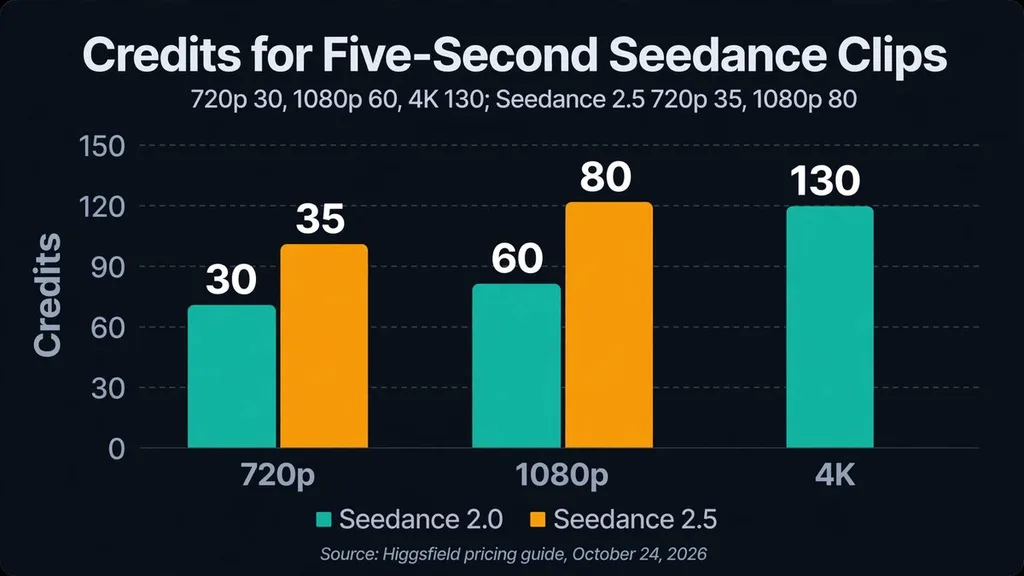
Cost is the practical limit. In Higgsfield’s October 24, 2026 pricing guide, a five-second Seedance 2.0 clip costs 30 credits at 720p, 60 at 1080p and 130 at 4K. The same guide’s prose says 1080p almost triples the price while its table shows a doubling, so trust the number the generator displays before you press the button. Higgsfield’s own tutorials suggest testing at 720p first because motion, pacing and camera behavior already read correctly there. A sensible habit with higgsfield seedance 2 is to spend 4K credits only on the take you plan to keep.
Does Seedance 2.0 Generate Audio?
Yes. Higgsfield Seedance 2 produces sound in the same pass as the picture, so no separate audio tool is needed afterwards. ByteDance describes two-channel stereo output and parallel tracks for music, ambience and voices aligned with the visuals. Higgsfield adds that lip sync works in several languages and that uploaded audio clips can serve as references.
For direction, name the sound you want (rain on glass, a muffled crowd, one piano note) and say whether you want speech, music or silence. Do not treat the result as finished, though. Higgsfield’s own side-by-side test of the two versions reported weaker close-up lip sync on 2.0 and, in one case, music that sounded distant. That test was run by the vendor with one generation per prompt, so it is anecdotal, but it matches common sense: listen to the whole clip on headphones before publishing.
How Does Character Consistency Work in Higgsfield Seedance 2?
There are two separate problems here, and Higgsfield handles them differently.
Inside one generation, reference images pin down a character’s face and outfit. Higgsfield’s help center describes four reference tags:
| Tag | What it does |
|---|---|
@character | Holds a face steady within a single generation |
@style | Applies lighting, palette and mood from an image or film still |
@motion | Reads camera behavior and movement from a video clip |
@audio | Syncs visuals to sound, drives lip sync, matches ambience |
Across separate generations, a reference alone is not enough. Higgsfield recommends saving the character as an Element, then calling it by typing @ in the prompt field or using the Elements button, so you skip re-uploading for every clip. Soul ID, Higgsfield’s trained-character feature, needs a paid plan, and the platform’s tutorial pairs it with Seedance for identity across clips.
Higgsfield itself says results may vary, so read “consistent” as “more likely to match,” not “guaranteed to match.” If a reference shows a real person, make sure you have permission and that the use fits Higgsfield’s current policies. A sharp, front-facing, evenly lit still works best. Higgsfield Soul 2.0 is the platform’s image model, so it is a convenient place to create an original character still first, and our Soul 2.0 explainer shows how that model works.
How to Use Higgsfield Seedance 2
This workflow follows Higgsfield’s tutorial and its Seedance 2.0 page. Interface labels shift between updates, so treat the names below as guides.
- Open Higgsfield and go to Video. The input panel holds the prompt box, reference slots and a resolution selector.
- Select Seedance 2.0 from the model list, not 2.5, Fast or Mini, unless you want those.
- Add references. Start with one sharp, front-facing image. Higgsfield suggests image-to-video before text-only because it is more predictable.
- Write the prompt. Cover action, setting, camera and mood.
- Pick a preset. Choose one for camera control, framing or VFX, or pick General for manual control.
- Set duration and aspect ratio. Any length from 4 to 15 seconds works; early tests under eight seconds save credits.
- Start at 720p. Raise the resolution only after the shot works.
- Set audio as needed.
- Check the credit cost shown before generating, then generate.
- Review the entire clip. Change one variable, then run it again.
- Export under your plan’s terms. Higgsfield’s guide says paid plans include commercial use, while free-plan output can carry a visible watermark.
How to Write Better Prompts for Higgsfield Seedance 2
Higgsfield’s tutorial calls specificity the single biggest lever and says the model reads cinematic camera language directly. A dependable prompt shape, which is my editorial suggestion rather than an official template, has four parts: subject and action, setting and lighting, camera movement, then mood and sound.
Higgsfield lists these camera terms as readable by the model:
- Dolly in: the camera physically travels toward the subject.
- Truck left: the camera slides sideways along the scene.
- Arc shot: the camera curves around the subject.
- Push in: a slow move closer that stresses a moment.
- Pull back wide: a retreat that reveals the surroundings.
- Handheld follow: loose, human-feeling tracking.
- Crane up: the camera rises as if on a crane.
- Orbital move: a full circle around the subject.
The examples below are original and use fictional subjects.
Cinematic scene: A lighthouse keeper in a yellow oilskin climbs a spiral stair during a storm, lantern swinging, salt spray hitting a round window. Cold blue storm light with one warm lamp. Slow push in from behind, then crane up to reveal the lamp room. Tense mood, wind and a distant foghorn.
Product advertisement: A matte green thermos on a wet slate counter at dawn, steam curling from the lid. Soft window light, shallow depth of field. Orbital move around the bottle, ending on a close-up of the lid being twisted. Calm, premium mood. Kettle click and a soft hiss of steam, no music.
Social media video: Vertical 9:16. A baker tips a tray of cinnamon rolls from the oven, steam and flour in the air. Handheld follow at chest height, then a quick push in on the glaze. Warm kitchen light, playful mood, oven door clunk and an upbeat acoustic loop.
Character action: A courier with a silver backpack sprints across a rain-slick rooftop, leaps a gap between two buildings and rolls on landing. Handheld follow, then an arc shot as she stands. Neon reflections in puddles, urgent mood, audible footsteps and breathing.
Image-to-video: Use @Image1 as the opening frame, a paper boat on a pond. The boat drifts slowly toward the camera while ripples spread. Very slow dolly in, golden hour light, quiet birdsong. Keep the boat’s colors and the water texture unchanged.
Dialogue scene: Two astronomers in a cramped observatory at midnight, medium two-shot, slow push in. The younger one whispers, “It moved again.” The older one answers, “Then we are not alone.” Clear lip sync, low red lamp light, machinery hum, tense mood.
Seedance 2.0 Prompting Best Practices
These habits apply to any higgsfield seedance 2 project, whether it is a five-second test or a full 15-second take.
- Be specific about action. “Walks” is weaker than “walks fast, glances back twice, stops at the curb.”
- Define camera movement. Pick one move per shot from the list above.
- Describe environment and light. Time of day, weather and light source shape the whole look.
- State the mood and the sound. Both steer pacing and audio.
- Use references with a job. Say what each reference is for, for example “@Image1 is the face” or “take the camera move from the clip.”
- Avoid changing many variables at once. If you swap the character, setting and camera together, you will not know what helped.
- Test small first. Drafting at 720p is a practical workflow, not a universal rule, but it is the one Higgsfield’s own guides recommend.
- Review the entire clip. Watch from the first frame to the last, then listen again with sound on.
- Iterate one major variable at a time. It is slower per step and faster overall.
Higgsfield Seedance 2 Pricing and Credits
Higgsfield Seedance 2 has no flat price. Every generation draws credits, and the amount depends on resolution, clip length and the variant you pick. The generator shows the exact cost before you confirm, so that number outranks any table, including the one below. These figures come from Higgsfield’s October 24, 2026 pricing guide:
| Model and setting | Credits |
|---|---|
| Seedance 2.0, 5 seconds, 720p | 30 |
| Seedance 2.0, 5 seconds, 1080p | 60 |
| Seedance 2.0, 5 seconds, 4K | 130 |
| Seedance 2.5, 5 seconds, 720p | 35 |
| Seedance 2.5, 5 seconds, 1080p | 80 |
| Seedance 2.5, 30 seconds, 720p | 210 |
Plans. Per the same guide, Starter costs $15 a month for 200 credits, Plus $49 for 1,000 and Ultra $129 for 3,000, with Team at $79 per seat and Scale at $215 per seat. Higgsfield points anyone who wants Seedance 2.0 or 2.5 to Plus or Ultra, while Starter gets selected models. The live pricing page loads its plan cards dynamically, so I could not read them directly; verify there before buying.
Credit rules worth knowing. Failed generations are usually refunded automatically, but finished ones are not, even if you dislike the result. Monthly credits do not roll over, and credit packs expire after 90 days. The Higgsfield API uses a separate dollar balance, whereas Higgsfield’s MCP page says plan credits work through connected agents. Seedance also runs inside Canvas and Supercomputer, but I found no document stating how those are billed, so check in the product.
What “Unlimited” means. Unlimited is a toggle that waives credit charges on certain models. In the October 24 guide, the 365-day Unlimited set covers image models only, and the 7-day Unlimited that includes Seedance 2.0 (720p, up to 15 seconds) appears only on the annual Team plan. Higgsfield also ran time-limited Seedance Unlimited promotions in August 2026, so check whether one is active. Independent reporting from WION, published August 18, 2026, argued that unlimited usage runs on a slower queue under Higgsfield’s terms and cited customer complaints about long waits. Treat that as one outlet’s reporting, but note that even Higgsfield’s guidance suggests drafting on Unlimited at 480p or 720p and using credits for faster 1080p work.
Seedance 2.0 is also sold elsewhere. API hosts such as fal.ai list per-second pricing, around $0.30 per second at 720p with audio when I checked, so compare the cost of a finished clip rather than the headline plan price.
Is Higgsfield Seedance 2 Free?
No, not in any practical sense. Higgsfield’s own FAQ says Seedance 2.0 uses credits, and that new accounts receive 10 free credits once at sign-up, which is less than one Seedance 2.0 video needs. Keep four ideas apart:
- Free account: open to everyone, with a limited set of models, no monthly credits and a possible watermark.
- Free credits: the one-time 10-credit gift, not enough for a Seedance 2.0 clip.
- Unlimited: a billing toggle on selected models, not a free tier.
- Paid subscription: required for monthly credits, Unlimited models and Soul ID.
Higgsfield Seedance 2 vs Seedance 2.5
This comparison matters because the newer model changes several limits. Figures come from Higgsfield’s Seedance 2.0 page, help center and 2.5 launch article.
| Feature | Seedance 2.0 | Seedance 2.5 |
|---|---|---|
| Version | ByteDance release, announced February 2026 | Newer ByteDance flagship, added to Higgsfield August 6, 2026 |
| Maximum duration | 15 seconds (4 to 15) | 30 seconds |
| Resolution | 480p to 4K on standard; Fast and Mini to 720p | Generates at 480p to 1080p; Higgsfield describes 4K through upscaling |
| Audio | Native, same pass | Native, same pass |
| References | 9 images, 3 video clips, 3 audio clips | Up to 50 (30 images, 10 videos, 10 audio) |
| Editing | Full regeneration for fixes | Region-level edits through Seedance 2.5 Edit |
| Availability | Plus and Ultra recommended | Plus and Ultra |
| Best use | Short clips, small reference sets, 4K output | Longer takes, many references, small fixes |
Seedance 2.5 is not automatically the better pick. Higgsfield claims roughly 20 percent better prompt adherence for 2.5, but I found no independent test confirming the number. Meanwhile, 2.0 is cheaper per clip on the October 24 table (30 versus 35 credits at 5 seconds and 720p, and 60 versus 80 at 1080p), and Higgsfield lists 4K for 2.0 on its own page. Choose higgsfield seedance 2 when a clip fits inside 15 seconds and nine images are enough. Choose 2.5 when you need longer shots, large reference sets or fixes that avoid a full rerun.
How Higgsfield Seedance 2 Compares With Other AI Video Generators
Comparison intent is strong around this keyword, so here is a restrained look at how higgsfield seedance 2 stacks up against two widely used rivals. The specs come from third-party comparisons by API resellers (WaveSpeed and fal.ai), which sell access to these models, so treat them as indicative rather than official. Versions and limits move quickly.
| Factor | Seedance 2.0 | Kling 3.0 | Veo 3.1 |
|---|---|---|---|
| Developer | ByteDance | Kuaishou | |
| Reported max clip | 15 seconds | 10 seconds | 8 seconds |
| Reference inputs | 9 images, 3 videos, 3 audio | 1 to 2 images | 1 to 2 images |
| Audio | Native | Native | Native |
| Resolution | Higgsfield reports up to 4K; some comparisons say 1080p | Reported at 1080p, with some claims of 4K | Reported at 1080p |
On those sources, Seedance 2.0 is the one that accepts video and audio files as references, which gives it an edge in input flexibility and clip length. fal.ai’s listings put Kling 3.0 Pro cheaper per second with audio, and describe it as strong on structured multi-shot control. Veo 3.1 is usually praised for polish, though its clips are shorter. Higgsfield also now hosts Kling 4.0, which I did not compare because I could not verify its specifications. I left Sora out as well, since one comparison lists Sora 2 as deprecated and I could not confirm its current status. Which tool is best depends on your job, not on a leaderboard.
Pros and Cons of Higgsfield Seedance 2
Here is a balanced view of higgsfield seedance 2, drawn from official specifications and independent reporting.
Pros
- Accepts text, images, video and audio together, which few rivals do.
- Native audio generated with the picture.
- Selectable length up to 15 seconds.
- Resolution choices from 480p to 4K on the standard variant.
- Multi-shot prompting and camera presets.
- One credit pool shared with many other models.
Cons
- A 15-second ceiling forces stitching for anything longer.
- Credits are charged on every completed generation, including misses.
- Higher resolutions cost much more, and 4K is 130 credits for five seconds.
- Version sprawl: 2.0, Fast, Mini, 2.5 and 2.5 Edit all live in one menu.
- Output varies, so expect several attempts.
- Lip sync and audio can slip, especially in close-ups.
- Independent reporting raises concerns about Unlimited speed and support.
Who Should Use Higgsfield Seedance 2?
It suits creators who want control rather than a lucky roll: short-film makers testing scenes, social teams producing vertical clips, marketers building product teasers, agencies mocking up campaigns, and designers or product teams who need quick motion concepts. Teams that already hold a Higgsfield subscription also benefit, because adding higgsfield seedance 2 to a workflow means spending credits rather than opening a new account.
It is a poorer fit if you only need a few simple clips, since the reference system adds work you may never use. It is also a weak choice if your videos regularly need to run past 15 seconds in one take, in which case Seedance 2.5 or a different tool deserves a look.
Is Higgsfield Seedance 2 Worth It?
The facts first: higgsfield seedance 2 offers broad inputs, native audio, up to 4K on the standard variant and a 15-second ceiling, billed per generation. The opinion comes now. For short, reference-driven clips, it is a strong value when you iterate at 720p and save high-resolution credits for finals. It is a weaker value if you chase perfection through many 1080p or 4K reruns, or if you depend on Unlimited for speed. Because Seedance 2.5 now exists, newcomers should price both before committing.
In short, higgsfield seedance 2 is a capable, reference-friendly video model whose value depends on how disciplined your testing is, and the newer 2.5 option deserves a look before you pay.
It is not universally the best AI video tool, and no source I read supports that claim. For a wider view of the platform and what paying customers say, read our Higgsfield AI reviews roundup.
Rights and Safety Notes
AI output is not automatically free of copyright problems. Avoid prompts that imitate protected characters, logos or celebrities, and get permission before using anyone’s likeness. Seedance 2.0’s launch drew public backlash from Hollywood, according to a New York University Shanghai summary, which is a reminder that rights questions around this model are live. Follow Higgsfield’s current terms and policies, and keep your own records of what you generated.
Common Questions About Higgsfield Seedance 2
What is Higgsfield Seedance 2?
Higgsfield Seedance 2 generally refers to Seedance 2.0, ByteDance’s multimodal AI video model, available through the Higgsfield platform. It turns text, images, video clips and audio references into short clips with native sound.
Is Higgsfield Seedance 2 the same as Seedance 2.0?
Yes. Higgsfield Seedance 2 is shorthand for Seedance 2.0 used on Higgsfield. Seedance 2.5 is a different, newer model.
What is Seedance 2.0?
It is ByteDance’s video generation model, announced on February 12, 2026. ByteDance describes a unified architecture that generates audio and video together from text, image, audio and video inputs.
Who created Seedance 2.0?
ByteDance, through its Seed research team. Higgsfield provides access to the model but did not build it.
Can Seedance 2.0 generate 4K video?
Higgsfield says its standard Seedance 2.0 supports 480p, 720p, 1080p and 4K, while Fast and Mini stop at 720p. ByteDance’s April 2026 technical overview lists native 480p and 720p, so describe 4K as Higgsfield-reported.
How long can Seedance 2.0 videos be?
A higgsfield seedance 2 clip runs from 4 to 15 seconds per generation. Seedance 2.5 reaches 30 seconds, but that limit does not apply to 2.0.
Does Seedance 2.0 generate audio?
Yes. Audio is generated in the same pass as the video, and uploaded audio clips can be used as references. Review the sound yourself, because lip sync and ambience can contain errors.
Can Seedance 2.0 use image references?
Yes. Higgsfield Seedance 2 accepts up to 9 images, 3 video clips and 3 audio clips in one generation, with video and audio references totaling up to 15 seconds.
Is Seedance 2.0 free on Higgsfield?
No. Higgsfield Seedance 2 uses credits. New accounts get 10 free credits once, which is not enough for a Seedance 2.0 video, and regular use needs a paid plan.
What is the difference between Seedance 2.0 and 2.5?
Seedance 2.5 offers clips up to 30 seconds, up to 50 references and region-level edits, while Seedance 2.0 offers 4 to 15 seconds and up to 9 images, 3 video clips and 3 audio clips. Higgsfield’s help center also notes 2.5 as the latest version.
Sources & References
- Higgsfield, Seedance 2.0 page: https://higgsfield.ai/seedance/2.0
- Higgsfield Help Center, How do I use Seedance?: https://higgsfield.ai/creator-hub/help-center/ai-models/how-do-i-use-seedance
- Higgsfield, Generating with Seedance 2.0 tutorial: https://higgsfield.ai/blog/generating-with-seedance-2-0
- Higgsfield, Higgsfield Pricing Explained (October 24, 2026): https://higgsfield.ai/blog/higgsfield-pricing-explained
- Higgsfield, Seedance 2.5 on Higgsfield (August 6, 2026): https://higgsfield.ai/blog/seedance-2-5-on-higgsfield-2026
- Higgsfield, Seedance 2.5 vs Seedance 2.0 test: https://higgsfield.ai/blog/seedance-2-5
- Higgsfield, AI video credits explained: https://higgsfield.ai/blog/ai-video-credits-explained
- Higgsfield, MCP page: https://higgsfield.ai/mcp
- ByteDance Seed, Official Launch of Seedance 2.0: https://seed.bytedance.com/en/blog/official-launch-of-seedance-2-0
- ByteDance Seed, Seedance 2.0 technical overview: https://seed.bytedance.com/en/public_papers/seedance-2-0-advancing-video-generation-for-world-complexity
- WION, How Higgsfield sells unlimited Seedance 2.5 (August 18, 2026): https://www.wionews.com/world/how-higgsfield-sells-unlimited-seedance-2-5-that-barely-generates-anything-1786998832812
- WaveSpeed, Seedance 2.0 vs Kling 3.0 vs Sora 2 vs Veo 3.1: https://wavespeed.ai/blog/posts/seedance-2-0-vs-kling-3-0-sora-2-veo-3-1-video-generation-comparison-2026
- fal.ai, Seedance 2.0 vs Kling 3.0: https://fal.ai/learn/tools/seedance-2-0-vs-kling-3-0
- fal.ai, image-to-video API pricing: https://fal.ai/explore/image-to-video-apis
- Luma Labs, Seedance 2.0 Complete Guide: https://lumalabs.ai/learning-center/articles/seedance-2.0-complete-guide
- NYU Shanghai RITS, Seedance 2.0 overview: https://rits.shanghai.nyu.edu/ai/seedance-2-0-bytedances-multimodal-audio-video-ai-model
 Daniel Carter
5 comments