

In this article
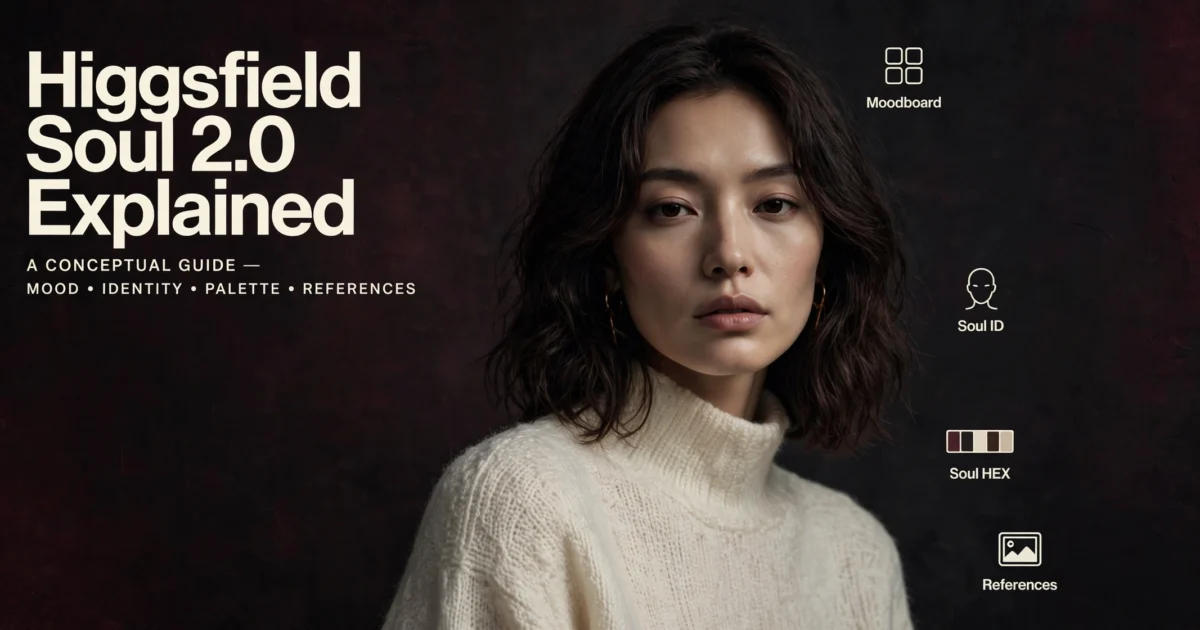
What is Higgsfield Soul 2.0? It is the image model Higgsfield trained in-house for pictures of people that look art-directed instead of generic: fashion frames, lifestyle portraits and the visual slang of social feeds. A prompt box is only the starting point. Soul 2.0 adds reusable Moodboard styles, a trained Soul ID face, Soul HEX color palettes and reference-image generation on top of it.
If you are asking what is higgsfield soul 2.0 before spending credits, this guide sticks to what Higgsfield documents and labels everything else as opinion or third-party reporting. Every fact was checked against Higgsfield’s Help Center, changelog, pricing explainer and Terms of Use on November 19, 2026. Features and prices move quickly in this category, so treat the dates in this article as part of the answer. For a longer, settings-focused walkthrough afterward, our complete Higgsfield Soul 2.0 guide covers the same model from a different angle.
Table of Contents
What Is Higgsfield Soul 2.0 in Seven Facts?
- Maker: Higgsfield, which calls Soul 2.0 its own photorealistic image model.
- Job: realistic, fashion-aware, culture-native pictures, built around people.
- Release: listed in Higgsfield’s changelog on February 19, 2026.
- Control layers: Moodboards, Soul ID, Soul HEX and reference images.
- Settings: seven aspect ratios, 1.5k or 2k quality, one to four images per run.
- Cost: every generation spends credits, and the price appears on the Generate button before you confirm.
- Limits: text inside images is not a core strength, and identity consistency is “clearly the same person,” not a pixel-perfect copy.
What Is Higgsfield Soul 2.0, Exactly?
Higgsfield Soul 2.0 is a foundation image model. In plain terms, that means one large model trained as the core engine, with the surrounding tools (presets, Moodboards, Soul ID) built around it instead of bolted on as filters over someone else’s output. Higgsfield describes it as a model for creative, fashion-aware, culture-native generation, and its changelog calls it the second version of the company’s own photorealistic model, retrained on fashion references, subcultural codes and internet aesthetics. I found no published details on its architecture or training data in the sources I reviewed, so this article does not guess at either.
The model lives inside the broader Higgsfield platform, which is a multi-model workspace. Its menus list Soul next to third-party image models such as Nano Banana, FLUX 2, Seedream 5, GPT Image and Ideogram, plus video tools. If the platform itself is unfamiliar, our explainer on what higgsfiled.ai means and how Higgsfield works covers the company and its studios. Within that catalog, the answer to what is higgsfield soul 2.0 is simple: it is the model Higgsfield recommends when the picture is about a person, a look and a mood.
What “fashion-aware” means in practice
Fashion-aware does not mean the model knows your brand’s exact garment. It means the model was trained to recognize styling vocabulary and visual references, such as streetwear silhouettes, runway posture or a thrifted layered outfit, and to carry that look into a new image. Higgsfield’s changelog says Soul 2.0 can pick up a style from a reference image without a written description, from streetwear and runway to online aesthetics.
What “culture-native” means
Culture-native is Higgsfield’s phrase for a model that understands current internet-era references. Its product page says the model handles fashion terms, online slang and cultural references. Practically, you can name a mood such as “Y2K studio” or “digital camera” and expect a closer match than a general-purpose generator might give. That is a vendor claim, so test it with your own prompts.
How it differs from a generic text-to-image generator
A generic generator treats a face, a landscape and a logo as equal jobs. Soul 2.0 narrows the job to styled photography and gives you handles for repeatable output: a Moodboard for the look, Soul ID for the person, Soul HEX for the palette. If you want one picture of anything, a general model is fine. If you want twenty pictures that feel shot on the same day, the added controls are the point.
When Was Higgsfield Soul 2.0 Released? The Launch Timeline
Higgsfield’s official changelog lists Soul 2.0 on February 19, 2026. Some third-party reports give February 17 or 20; anyone researching what is higgsfield soul 2.0 should anchor on the changelog entry and not print the others as fact.
The week matters because the controls arrived in a sequence. According to the same changelog:
- February 19: Soul 2.0 itself, with reference-led style pickup. Characters made with the first Soul model were upgraded separately.
- February 25: Soul HEX, a color style extracted from your own images.
- February 26: Moodboards, which replace Presets and keep the old presets as Curated Moodboards.
- February 27: Soul Photodump, a 15-image set of one Soul ID character in varied poses and settings.
That is why people who ask what is higgsfield soul 2.0 sometimes get conflicting answers: a launch-day description lacks Moodboards and Soul HEX, which came days later. The original Soul model remains available as the quick, preset-driven option, and Soul Cinema now sits beside both. I could not verify an official release date for Soul Cinema, so I do not state one.
Key Features: What Is Higgsfield Soul 2.0 Able to Do?
Photorealistic image generation
The model aims at believable photography: skin, fabric, flash, film grain and available light. Higgsfield markets this as “natural textures and life-like authenticity.” There is no independent benchmark behind that wording, so judge realism by generating your own test set rather than trusting any single sample image. When people ask what is higgsfield soul 2.0 good at, realistic people is the first honest answer.
Built-in styles and presets
Soul 2.0 ships with a library of 20-plus curated looks, including Y2K Studio, Digital Camera and Retro BW. One wrinkle worth knowing: the Help Center still describes “presets” alongside Moodboards, while the February 26 changelog says Moodboards replaced Presets and that the earlier presets became Curated Moodboards. In the interface you simply pick a curated look or your own. A beginner asking what is higgsfield soul 2.0 will meet these looks before anything else.
Moodboards, Soul ID and Soul HEX
These are the three controls that separate Soul 2.0 from a plain prompt box, and each has its own section below. In one sentence each: a Moodboard locks a visual style, Soul ID locks a face, and Soul HEX locks a color palette.
Reference images
You can start from a text prompt or from an uploaded reference image. Higgsfield describes the reference as a style and composition guide. There is a catch covered in the how-to section: attaching a reference disables the prompt field.
Settings you can verify today
The Help Center lists these generation settings for the Soul family:
| Setting | Options |
|---|---|
| Aspect ratio | 9:16, 3:4, 2:3, 1:1, 4:3, 16:9, 3:2 |
| Quality | 1.5k, 2k |
| Batch size | 1 to 4 images |
| Color control | Soul HEX palettes via Color Transfer |
I found no 4K option for Soul 2.0 in the documentation, and I would not promise one.
What Is Soul ID?
Higgsfield Soul ID is the character-consistency layer. You train it once on photos of one person, and that face can then appear across styles, poses and lighting. Higgsfield’s guide says a trained Soul ID works across the Soul family, so the same character is available in Soul 2.0 and Soul Cinema, and it also carries into Seedance video as an Element.
How training works, per the Help Center: open Soul, choose Train new character, upload 20 or more photos of the same person (up to 80 are supported), name the character and wait a few minutes. Good photo sets show varied angles and expressions, clear lighting, at least one full-height shot and recent images. Sunglasses, hats, group shots and repeated identical poses weaken the result.
Why it beats a single reference: a reference image anchors one generation but tends to drift across separate ones, whereas a trained identity is meant to hold across many.
What it cannot do: Higgsfield’s own guidance sets the expectation at “clearly the same person,” not a pixel-identical face. Extreme style changes and unusual angles can introduce small drift. One Soul ID holds one person, so scenes with several consistent characters need Elements instead. The trained identity is not exportable as a file.
Understanding what is higgsfield soul 2.0 means understanding Soul ID first, because identity is what turns a one-off image into a series.
Privacy and consent: only train on photos of yourself or of someone who has agreed. Higgsfield’s Terms of Use also say you must hold the consents for anyone’s likeness you upload, and they state that inputs and outputs may be used to improve Higgsfield’s models for standard accounts. Read the current privacy policy before uploading personal photos.
What Are Soul 2.0 Moodboards?
A Moodboard is a reusable style you build from your own reference images. Higgsfield says Soul 2.0 analyzes the lighting, texture, contrast and color of those images and applies the resulting look to later generations, so you do not have to describe that look in every prompt.
There are two kinds. Curated Moodboards are built in, for example Y2K Studio, Digital Camera and Retro BW. Personal Moodboards are the ones you create: open Soul 2.0, click the Moodboard icon, choose to build your moodboard, then upload from your device or from Assets.
How many images? Official sources differ slightly, so I will not state one number as a rule. The February 26 changelog says a personal Moodboard needs at least 10 images in one consistent style, ideally without faces, while the Help Center advises aiming for 20 or more cohesive images without faces. Treat 10 as the floor and 20-plus as the better target, and avoid blurry or mixed-style images.
How it differs from a preset: a preset is a style someone else defined. A Moodboard is a style you define. Moodboards exist only in Soul 2.0, not in Soul or Soul Cinema, and they work together with Soul ID and Soul HEX.
A second answer to what is higgsfield soul 2.0 is “a style engine,” and Moodboards are the reason.
When to use one: whenever a series needs a house look: a brand’s recurring campaign, a creator’s feed, or a lookbook that should feel photographed in one session.
What Is Soul HEX?
Despite the name, Higgsfield Soul HEX is not a hexadecimal color picker where you type a code. It is a color-transfer tool: you upload a reference image, Soul HEX extracts its dominant palette, and the palette is applied to your generation. The February 25 changelog adds that a color style can be built from up to 15 of your own images and saved under a name, such as “Blue Haze,” with included palettes like Vibrant, Muted, Neon and Earthy.
In the interface you click Color Transfer in the generation bar, then upload a reference or choose a built-in palette: Film colors, Lime Jam, Candy pink, Nostalgic blue, Soft palette or Black gloss. The Help Center lists Soul HEX for both Soul 2.0 and Soul Cinema, although the original changelog entry described it as Soul 2.0 only, so the documentation has clearly moved on since launch.
Color is the third control in the system behind what is higgsfield soul 2.0, after style and identity.
Why color consistency matters: audiences recognize a brand by palette before they read a logo. A skincare brand with dusty pink and cream, or a streetwear label with cobalt and bone, can lock that palette across product shots, social posts and campaign concepts without retyping color names.

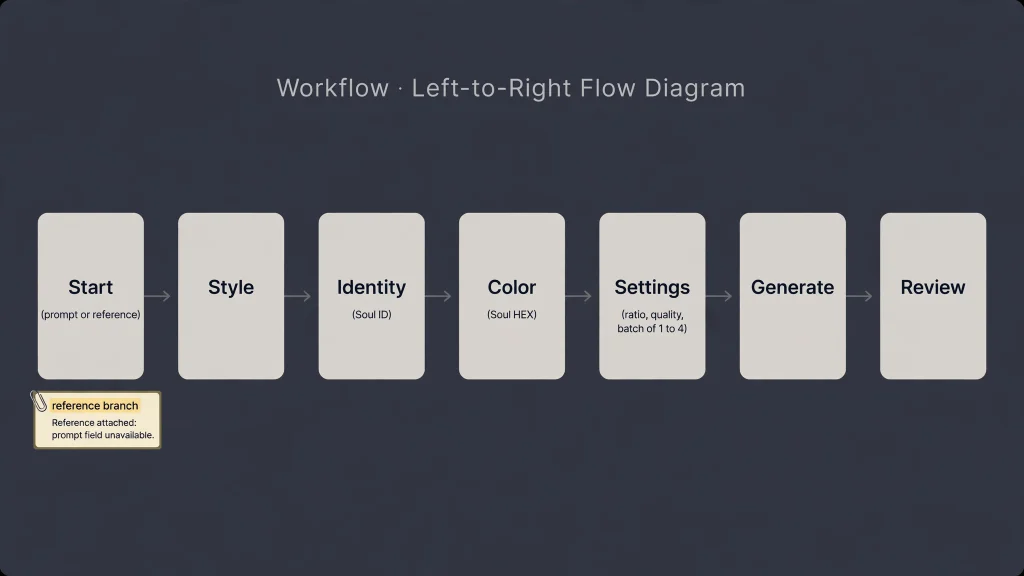
How to Use Higgsfield Soul 2.0, Step by Step
This is the workflow behind most answers to what is higgsfield soul 2.0 in practice. The labels below come from the Help Center; if your screen differs, follow your screen.
- Open Higgsfield and sign in at higgsfield.ai.
- Go to Image, then choose Soul 2.0 from the model list.
- Decide your starting point: a text prompt, or a reference image.
- Pick a look: choose a curated style or click the Moodboard icon to use or build your own.
- Add a Soul ID by selecting a trained character in the Character tab if you need the same face again.
- Apply Soul HEX by clicking Color Transfer and uploading a palette reference or choosing a built-in palette.
- Set the aspect ratio (seven options) to match where the image will be used.
- Choose quality: 1.5k or 2k.
- Set the batch size: one to four images.
- Write your prompt if no reference image is attached.
- Check the credit cost on the Generate button, then generate.
- Review the results for hands, garment details, accessories and background faces.
- Refine: adjust the prompt, swap the Moodboard or tighten the palette, and run again.
- Download or reuse the winners from your generations and assets.
The reference-image rule: the Help Center says that when a reference image is attached in Soul 2.0, the prompt field becomes unavailable and the reference becomes the primary direction. A Soul ID character and a Soul HEX palette can still be applied alongside it. Without a reference, prompt, style or Moodboard, Soul ID and Soul HEX can all be combined. Because interfaces change, confirm this behavior on your own screen before building a workflow around it. Anyone mapping what is higgsfield soul 2.0 into a workflow should note this rule, because it decides whether you plan words or pictures first.
How to Write Better Soul 2.0 Prompts
Prompting is where what is higgsfield soul 2.0 becomes practical. There is no single guaranteed formula, but strong briefs tend to answer the same questions: who is in the frame, what are they wearing, where are they, how is the light behaving, where is the camera, and what should the image feel like. Add color, texture and background only where they matter, and name one visual reference rather than five. Keep subjects adult and fictional, and remember the prompt field exists only when no reference image is attached.
Six original starting points to adapt:
- Fashion editorial: “Adult model in a structured burgundy trench with a silk scarf, standing in a concrete stairwell, hard side light through a narrow window, low three-quarter angle, deep reds against cool grey, visible fabric weave, magazine framing.”
- Street photography: “Adult skateboarder crossing a rain-slick crosswalk at night, neon shop reflections on the asphalt, 35mm street-photo feel, slight motion blur, teal and magenta glow, heavy grain.”
- Lifestyle portrait: “Adult man repotting a fern on a small balcony, overcast morning, soft diffused light, linen apron, shallow depth of field, calm mood, sage and terracotta palette.”
- Product campaign: “Adult hand holding a ceramic perfume bottle against a bare shoulder, seamless peach backdrop, large softbox glow, tight crop, clean high-key beauty style.”
- Social creator: “Adult creator laughing on a laundromat bench in a layered thrifted-denim outfit, on-camera flash, slightly overexposed highlights, camera-roll candid feel.”
- Cinematic portrait: “Adult woman beside a train window at dusk, passing lights reflected across her face, warm tungsten against blue shadows, quiet expression, wide soft bokeh.”
If you want a prompt-led contrast from another tool, our Gemini birthday prompts for women show how a conversational image generator handles a different style of brief.
What Can You Create With Soul 2.0?
Once you understand what is higgsfield soul 2.0, the use cases follow. Higgsfield’s Soul ID guide names AI influencers and UGC creators, fashion and clothing brands, and personal branding as best-fit uses. Those are platform-positioned uses, not promises of business results. In everyday terms, the model suits fashion photography concepts, editorial layouts, creator content, personal branding, character-led storytelling, album or event artwork, concept photography and creative direction boards.
Soul 2.0 for fashion
For fashion, what is higgsfield soul 2.0 really offering? Three things: a look, a palette and a face. Fashion is where the model’s training claim is strongest: editorial shots, streetwear, runway-inspired concepts, outfit visualization, brand moodboards and consistent models across a lookbook. Moodboards hold lighting and texture, Soul HEX holds the palette, and Soul ID holds the model. Treat the results as concepts.

Seams, logos, jewelry and hands may need rerolls, and generated images do not replace a real shoot when the actual garment must be shown accurately.
Soul 2.0 for social media
For social teams, what is higgsfield soul 2.0 in one line? A repeatable look generator. Instagram carousels, TikTok cover frames, Pinterest boards, YouTube thumbnails and creator feeds all benefit from a repeatable look. The 9:16 ratio fits Stories and short-video covers, while 1:1, 3:4 and 16:9 cover feeds and thumbnails. Follow each platform’s current AI-labeling and ad-disclosure rules where they apply; this article does not summarize those policies because they change and differ by platform. Higgsfield’s own terms also tell users to disclose AI-generated output where the law requires it.
Soul 2.0 for businesses and marketing
For businesses, what is higgsfield soul 2.0 compared with a photo studio? A faster concept tool, not a substitute. Marketers can test campaign concepts, social-ad variations, lifestyle scenes and brand looks quickly, with a Moodboard acting as a style guide and Soul HEX as a palette guide. Keep a clear line between concept and final asset: a generated frame can brief a photographer or win an internal approval, but real packaging, real product details and legal clearances still need real production. Nothing about the model guarantees commercial success.
Is Higgsfield Soul 2.0 Free?
Not as a standing free tier. Anyone checking whether what is higgsfield soul 2.0 includes a free plan will find that Higgsfield’s own pricing explainer describes the Free plan as having no credits, limited use of Nano Banana Pro and FLUX.2 Pro, and one character generation, and it does not name Soul 2.0 there. The Help Center adds that some paid plans include a one-time pool of free Soul 2.0 and Soul Cinema generations. That pool does not renew when the subscription renews, the exact amounts are listed on each plan card, and it works only on higgsfield.ai, not through MCP, CLI or other automated tools. Older articles about daily free Soul images describe past promotions, so do not present them as the current answer to is higgsfield soul 2.0 free.
What Is Higgsfield Soul 2.0 Pricing? Credits Explained
Higgsfield bills in credits. The Help Center says the cost is shown on the Generate button before you confirm, subscription credits reset each cycle and do not roll over, and failed generations are usually refunded automatically.
Higgsfield’s own pricing explainer (dated October 24, 2026, and showing a recent update when I read it) lists these individual plans:
| Plan | Price per month | Credits per month | Commercial use |
|---|---|---|---|
| Free | $0 | None (limited use) | No |
| Starter | $15 | 200 | Yes |
| Plus | $49 | 1,000 | Yes |
| Ultra | $129 | 3,000 | Yes |
The same explainer puts one Soul 2.0 image at 2K at 0.125 credits, which works out to about 8,000 images per 1,000 credits if every image is a one-try success. Real spending is higher because completed generations are charged even when you reject them.
Two cautions. First, I could not read the live pricing page, which loads its cards dynamically, and several third-party guides report different figures (for example $19 for 270 credits on Starter and $59 for 1,200 on Plus), apparently reflecting regional plan sets or earlier price lists. Second, Higgsfield’s changelog says limited-time discounts currently cover Plus, Ultra, Team and Scale plans, with annual plans up to 60% off, that Starter is excluded and that discounted plans renew at the regular price. Confirm your own price, region and any sale on higgsfield.ai/pricing before paying, and never treat a promotion as the permanent answer to what is higgsfield soul 2.0 pricing.
Can Soul 2.0 Images Be Used Commercially?
For agencies, commercial terms matter as much as what is higgsfield soul 2.0 can render. Two official sources need to be read together. Higgsfield’s Terms of Use (last updated October 23, 2026) say the company does not claim ownership of your inputs or outputs and does not restrict commercial use of outputs. Its pricing explainer, however, marks commercial use as unavailable on the Free plan and available on paid plans. If you plan commercial work, use a paid plan and read the current plan terms.
The same Terms leave important responsibilities with you:
- You must hold the rights, releases and consents for anything you upload, including anyone’s face.
- Outputs may not be unique, and Higgsfield does not perform clearance checks, so you are responsible for avoiding third-party copyrights, trademarks and celebrity likenesses.
- You may not represent AI output as human-generated, and you may not remove provenance markings Higgsfield may apply.
This is general information, not legal advice. For client or campaign work, have counsel review the Terms and the specific outputs.
What Is Higgsfield Soul 2.0 vs Soul? The Real Difference
The Help Center frames the original Soul as quick, preset-driven generation and Soul 2.0 as the more controllable option.
| Feature | Soul | Soul 2.0 |
|---|---|---|
| Main purpose | Quick preset-driven images | Full creative control |
| Creative control | Lighter | Combine prompt, style, Soul ID and Soul HEX |
| Presets | Yes (General, TikTok Core, Instagram Aesthetics, Beauty, Mood, Camera Photo, Graphic Art) | Curated looks; Moodboards replaced the old presets |
| Moodboards | No | Yes, Soul 2.0 only |
| Soul ID | Shared across the Soul family | Shared across the Soul family |
| Soul HEX | No (Soul 2.0 and Soul Cinema only) | Yes |
| Reference images | Supported; prompt field locks | Supported; prompt field locks |
| Best for | Fast, simple generations | Controlled, repeatable aesthetics |
What Is Higgsfield Soul 2.0 vs Soul Cinema?
Soul Cinema is Higgsfield’s cinematic image model. Its cinematic style is built in, so unlike Soul 2.0 it has no preset panel and no Moodboards. It does support Soul HEX and Soul ID. In both models, attaching a reference image disables the prompt field.
| Feature | Soul 2.0 | Soul Cinema |
|---|---|---|
| Focus | Fashion-aware, culture-native styling | Cinematic-grade visuals |
| Presets or Moodboards | Yes | No |
| Soul HEX | Yes | Yes |
| Soul ID | Yes | Yes |
| Prompt with reference image | No | No |
| Best for | Editorial, lifestyle, social aesthetics | Film-like stills, mood-heavy scenes |
Neither is “better.” If you want to steer the style yourself with Moodboards, choose Soul 2.0. If you want a film-like look without building one, try Soul Cinema. This is why the answer to what is higgsfield soul 2.0 changes slightly once Soul Cinema enters the comparison: Soul 2.0 is the flexible, style-building model.
What Is Higgsfield Soul 2.0 vs Other AI Image Generators?
I found no independent benchmark ranking these tools, so the table below summarizes how Higgsfield and the model makers describe each, not a winner. Higgsfield is a vendor with a stake in this comparison.
| Tool | How it is positioned | Most useful when |
|---|---|---|
| Soul 2.0 | Photorealistic people, Moodboards, Soul ID, Soul HEX | Recurring characters and styled campaigns |
| Nano Banana Pro / 2.1 (Google) | Broader style range, object editing, reliable text, per Higgsfield | Edits and text-heavy images |
| GPT Image 2.x (OpenAI) | Text accuracy and precise edits, per OpenAI | Packaging, layouts, typography |
| Ideogram 4.5 | Repeated edits and text replacement, per Ideogram | Design work with words |
| Midjourney | Artistic, stylized visuals, per Higgsfield’s guide | Illustrative looks |
Higgsfield’s own comparison says Soul 2.0 is stronger on cinematic realism, ready-made looks and holding one face across a series, while Nano Banana Pro is stronger on style range, object editing and text. Many creators combine them: generate the person in Soul 2.0, then edit the scene elsewhere. Pricing, editing depth and commercial terms differ by tool, so verify each before committing.
Advantages of Soul 2.0
Seen against competitors, what is higgsfield soul 2.0 best at? These strengths:
- Focused on photorealistic people, which suits fashion and lifestyle work.
- Style control you own, through Moodboards built from your references.
- Palette control, through Soul HEX, without typing color names.
- Repeatable faces, through Soul ID, with honest limits.
- Beginner-friendly entry, because curated looks reduce prompt complexity.
- Low listed per-image credit cost, according to Higgsfield’s pricing explainer.
These are capabilities, not guarantees.
Limitations of Soul 2.0
An honest answer to what is higgsfield soul 2.0 must include its limits:
- Text rendering: Higgsfield’s own comparison says legible text is not a core strength.
- Identity drift: documented by Higgsfield; extreme style shifts can change a face slightly.
- Prompt lock: a reference image disables the prompt field.
- Credits: every completed generation costs credits, so iteration adds up.
- Plan and region variation: prices, plans and free pools differ by source and location.
- Change risk: Higgsfield’s Terms say models and features may be changed or retired.
- Observed, not documented: common user-reported issues in AI image tools include hand, jewelry and accessory errors. Check every output before publishing.
Who Should Use Soul 2.0?
If you are still deciding what is higgsfield soul 2.0 worth to you, match yourself to these profiles:
- Beginners: curated looks lower the barrier.
- Social creators and AI influencers: Soul ID and Photodump-style sets support consistent feeds.
- Fashion creators and small brands: Moodboards and Soul HEX hold a look and palette.
- Marketers and agencies: fast concept variations, with human review.
- Designers and photographers: useful for creative direction boards and pre-visualization.
- Professional teams: reasonable for concepting, but verify terms, rights and plan limits first.
Who Should Not Use Soul 2.0?
The flip side of what is higgsfield soul 2.0 is knowing when to skip it:
- Anyone who needs accurate text in the image: a text-focused model fits better.
- Anyone who needs heavy object editing: choose an editing-first model.
- Anyone who needs a pure video tool: Soul 2.0 makes still images.
- Enterprise buyers with fixed workflows: check Higgsfield’s Enterprise terms and alternatives.
- Anyone tied to one model ecosystem: Soul 2.0 lives inside Higgsfield.
Common Mistakes
Most mistakes come from misunderstanding what is higgsfield soul 2.0 was designed to do.
- Vague prompts. “Pretty fashion photo” gives the model nothing to hold. Name the light, the camera angle and the mood.
- Weak reference photos. Blurry or cropped images produce weak styles and weak identities.
- Mixing unrelated Moodboard images. One Moodboard should carry one aesthetic.
- Expecting perfect identity. Plan for “clearly the same person.”
- Overloading the prompt. Five lighting setups in one sentence cancel each other out.
- Ignoring aspect ratio. Choose 9:16 or 1:1 before generating, not after.
- Skipping the review. Check hands, logos and background faces.
- Assuming every feature is on every plan. Check your plan card.
- Confusing Soul 2.0 with Soul Cinema. One has Moodboards; the other has a built-in film look.
Frequently Asked Questions
What is Higgsfield Soul 2.0?
Higgsfield Soul 2.0 is Higgsfield’s in-house image model for realistic, fashion-aware, culture-native pictures, with Moodboards, Soul ID, Soul HEX and reference-image generation. That is the short answer to what is higgsfield soul 2.0.
Is Higgsfield Soul 2.0 free?
Not as a permanent free tier. The Free plan is documented with no credits, and some paid plans include a one-time pool of free Soul 2.0 generations. Check your plan card.
What can Soul 2.0 create?
Realistic people, fashion editorials, street and lifestyle shots, beauty and campaign visuals and social-media aesthetics. It makes still images, not video.
How do I use Higgsfield Soul 2.0?
To start with what is higgsfield soul 2.0 in practice, go to higgsfield.ai, open Image, select Soul 2.0, choose a style or Moodboard, add Soul ID and Soul HEX if needed, set ratio, quality and batch size, then generate.
What is Soul ID in Higgsfield?
In answering what is higgsfield soul 2.0, Soul ID is the identity layer: a trained character that keeps one person’s face consistent across generations. Higgsfield asks for 20 or more photos, up to 80.
What is Soul HEX?
A color-transfer tool that extracts a palette from a reference image and applies it to your generation.
What are Soul 2.0 Moodboards?
Moodboards, one more answer to what is higgsfield soul 2.0, are reusable styles built from your own reference images, available only in Soul 2.0.
Can I use Soul 2.0 images commercially?
Higgsfield’s Terms say it does not restrict commercial use of outputs, and its pricing explainer marks commercial use as a paid-plan feature. You remain responsible for rights and likeness.
What is the difference between Soul and Soul 2.0?
Soul is quick and preset-driven. Soul 2.0 adds Moodboards, Soul HEX and fuller control.
What is the difference between Soul 2.0 and Soul Cinema?
Soul Cinema has a built-in cinematic look and no presets or Moodboards. Soul 2.0 lets you build the style yourself, which is the practical meaning of what is higgsfield soul 2.0 versus Cinema.
Final Verdict: What Is Higgsfield Soul 2.0 Best At?
So, what is higgsfield soul 2.0 at its core? It is a specialist: an image model tuned for styled people, with three control layers that make a series look consistent. It is strongest for fashion, lifestyle and social aesthetics, weaker for text and object editing, and priced through credits whose exact plan figures you should confirm before paying. Weighing what is higgsfield soul 2.0 against its price? Test it with a small batch, read the commercial terms and treat every output as a concept that needs human review.
Sources & References
- Higgsfield Help Center, “How do I use Soul to generate images?” — https://higgsfield.ai/creator-hub/help-center/ai-models/how-do-i-use-soul-to-generate-images
- Higgsfield Help Center, “How do I create and use a Soul ID character?” — https://higgsfield.ai/creator-hub/help-center/ai-models/how-do-i-create-and-use-a-soul-id-character
- Higgsfield Help Center, “How do I use Soul Cinema?” — https://higgsfield.ai/creator-hub/help-center/ai-models/how-do-i-use-soul-cinema
- Higgsfield Help Center, “How do credits work?” — https://higgsfield.ai/creator-hub/help-center/credits/how-credits-work
- Higgsfield changelog (What’s new) — https://higgsfield.ai/creator-hub/changelog
- Higgsfield, “Higgsfield Pricing Explained” — https://higgsfield.ai/blog/higgsfield-pricing-explained
- Higgsfield, Soul 2.0 product page — https://higgsfield.ai/soul-intro
- Higgsfield Terms of Use Agreement (last updated October 23, 2026) — https://higgsfield.ai/terms-of-use-agreement
- Higgsfield, “Soul 2.0 vs Nano Banana Pro” — https://higgsfield.ai/blog/soul-2-vs-nano-banana-pro
- Higgsfield, “Best AI image generators 2026” — https://higgsfield.ai/blog/best-ai-image-generators-2026
- Higgsfield pricing page (dynamic; not readable at time of research) — https://higgsfield.ai/pricing
 Daniel Carter
1 comment