
Checked against OpenAI’s published pages on November 2, 2026. Menus, plans and limits change often, so confirm anything that affects a purchase or a workflow inside your own account.
What is agent mode in ChatGPT? It was a ChatGPT feature, introduced on July 17, 2025, that let the assistant carry out an online task from start to finish on its own virtual computer. Instead of answering a question and stopping, it could open websites, run code, read your files, pull from connected apps and hand back a finished report, spreadsheet or slide deck, pausing to ask before anything consequential.
The twist for 2026 is that the feature has been retired. OpenAI’s Help Center now says “ChatGPT agent is no longer available,” and points people to ChatGPT Work for longer jobs and to a cloud browser for supported website workflows.
That change is why this guide exists. Plenty of search results still explain what is agent mode in ChatGPT as though you could type /agent today. You can’t. Below you’ll find what the feature did, why it mattered, which current tools inherited its jobs, and how to run a comparable task right now without following instructions for a menu that has vanished.
Table of Contents
What Is Agent Mode in ChatGPT? The Quick Facts
If you only have a minute, here is what is agent mode in ChatGPT, reduced to the facts that matter:
- Launched: July 17, 2025, presented by OpenAI as one system that merged the website skills of Operator with the research skills of deep research.
- Status: Retired, which is the key fact for anyone asking what is agent mode in ChatGPT today. OpenAI’s help article on ChatGPT agent opens with a notice that it is gone. Outside reports place the removal in early August 2026, though the notice I saw carries no date.
- Successors: ChatGPT Work, announced July 9, 2026, for longer multi-step jobs that end in finished files, plus the cloud browser inside Work for supported website tasks.
- Related shutdown: The standalone Atlas browser, which had its own agent mode, was scheduled to stop working on August 9, 2026, according to OpenAI’s Business release notes.
What Is ChatGPT Agent Mode and Why Does It Matter?
Agent mode mattered because it changed the working relationship with ChatGPT. You described an outcome, and the system chose its own route: a text browser for quick reading, a visual browser for clicking through pages, a terminal for calculations and connected apps for your own data. OpenAI’s launch post framed this as a toolbox the model picks from rather than a fixed script.
Its influence survives in three places. Work keeps the “set a goal, then supervise” pattern. Scheduled tasks keep the habit of repeating a job daily, weekly or on a trigger. And the safety vocabulary of confirmations, browser takeover and prompt-injection awareness still defines how any browsing agent should be handled. Knowing what is agent mode in ChatGPT therefore helps you judge any newer tool that promises to do things for you.
How Did ChatGPT Agent Mode Work?
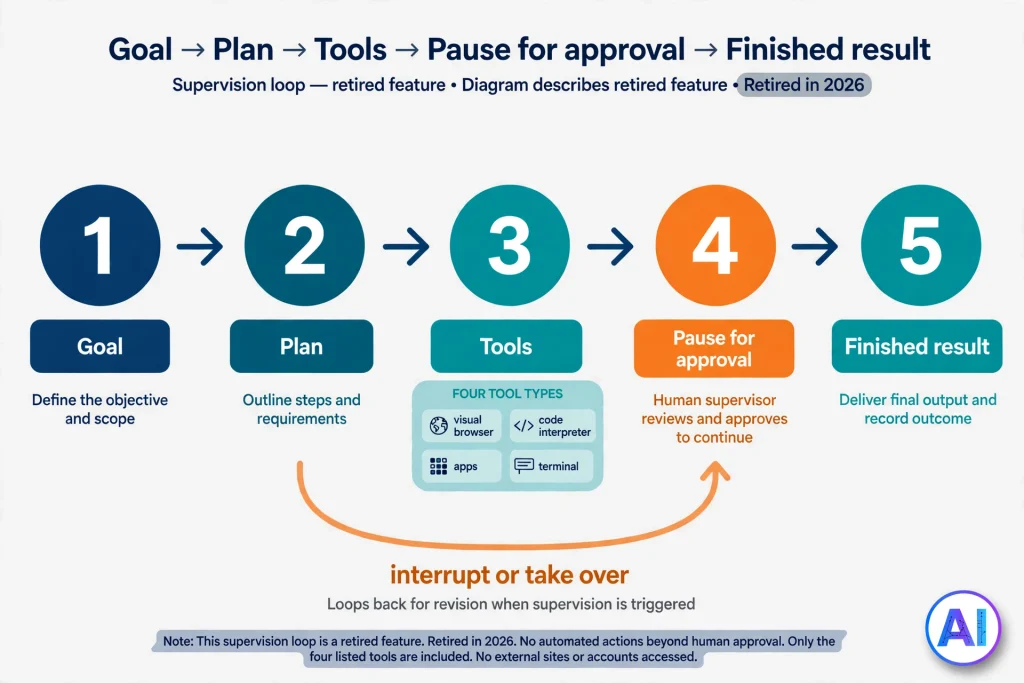
To grasp what is agent mode in ChatGPT at a technical level, start with its toolkit. OpenAI’s help documentation listed four tool types: a visual browser for interacting with sites, a code interpreter for analysis, apps that served as data sources, and a terminal for supported commands.
The agent took screenshots of its virtual browser window to understand each page, which is how it knew where to click or type. Most tasks finished somewhere between five and thirty minutes.
A typical run had five beats. You described the goal. The agent planned and started working in its own environment. It paused when it needed a clarification, a login or an approval. You could interrupt or take over the browser. Finally it delivered output with source links or screenshots.
That supervision loop is the part worth remembering, because Work reuses it. If you want the model-level background, our explainer on how ChatGPT works covers the basics.
How to Access and Enable Agent Mode in ChatGPT Today
The honest answer to how you enable what is agent mode in ChatGPT is that you can’t. Older tutorials told you to open the tools menu or type /agent, and those routes belonged to the retired feature. What exists now:
- Work on web and mobile: open ChatGPT and choose Work. It runs in the cloud and is offered on eligible paid plans.
- Work in the desktop app: pick ChatGPT from the app menu, then use the toggle to switch to Work. OpenAI’s launch post said desktop Work is available on every plan, including Free, while the Help Center adds that it depends on what your plan and workspace include.
- Cloud browser: available inside Work on paid plans excluding Free and Go, in supported regions, and availability can vary during rollout.
If the toggle is missing, update the app and check your plan first. On a company account, ask your admin, because Work Cloud and Work Local are separate workspace settings.
Step-by-Step Guide to Using Agent Mode (Now Called Work)
If you first learned what is agent mode in ChatGPT from an older tutorial, these steps translate that workflow to Work. They follow OpenAI’s Work documentation and launch material. Button labels can differ by device, so I’ve kept them general.
- Find Work. On web or mobile, select Work in ChatGPT. On desktop, use the ChatGPT menu and its Work toggle.
- Choose your supervision level. Plan mode makes ChatGPT gather context, ask questions and propose a step-by-step plan that you can change or approve before anything runs. Use it whenever the outcome has real consequences.
- Write the instruction as an outcome. State the goal, the audience, the format and the limits. “Compare three project tools for a five-person agency and give me a one-page recommendation with source links” beats “research project tools.”
- Attach or connect only what the job needs. Upload relevant files or reference a connected plugin. OpenAI says typing @ followed by an app name directs ChatGPT to that source.
- Approve website access. For cloud browser steps, ChatGPT may ask permission to visit a site. If a login is required, it offers a secure sign-in form where you finish any two-factor prompt.
- Monitor progress. OpenAI says you can follow what Work is doing, answer its questions, change direction and approve important actions.
- Answer prompts with care. Clarifying questions are cheap. Approval requests deserve a genuine read before you click.
- Review the result. Check figures, links and anything the system inferred, then ask for revisions in the same chat.
- Redirect when needed. Send a new instruction to steer the task, and decline any approval that looks wrong.
Five Prompts to Try After Learning What Is Agent Mode in ChatGPT
- “Find three train or flight options from Lisbon to Porto for a Friday morning trip, compare price, duration and flexibility in a table, and cite each source.”
- “Research five invoicing tools for a solo designer, build a comparison spreadsheet, and recommend one with reasons.”
- “Clean this contact spreadsheet: merge duplicates, standardize phone formats, and list every change you made.”
- “Using my calendar and email, prepare a one-page brief for tomorrow’s client meeting. Ask me before you include anything private.”
- “Every Monday at 8 a.m., check these two competitor pricing pages and send me a short summary of any changes.”
What Tasks Could ChatGPT Agent Mode Perform?
Put simply, what is agent mode in ChatGPT best known for? Jobs that mix reading, deciding and doing. Across OpenAI’s documentation, the agent was positioned for tasks like these:
- Researching a topic across many pages and compiling the findings.
- Filling in web forms and moving through multi-page flows.
- Editing spreadsheets and producing slide decks.
- Summarizing an inbox or calendar through connected apps.
- Repeating a finished task on a daily, weekly or monthly schedule.
It was never a master key. Some sites were blocked, the agent refused categories of high-risk work such as bank transfers, and OpenAI openly said early slideshow output could look rudimentary. Any claim that it could use every website or service was wrong then and is wrong now.
How Agent Mode Used Websites and Browsers
When people ask what is agent mode in ChatGPT doing on a website, the answer starts with screenshots. The original agent navigated through a visual browser, reading screenshots and then clicking, typing and scrolling. A lighter text-based browser handled simple reading.
When a site needed your login, the agent paused and invited you to take over; while you were in control, OpenAI said it did not capture what you typed. Cookies persisted between sessions, much like an ordinary browser.
The cloud browser plays this role now. OpenAI describes it as a separate browser on a remote computer, used for tasks you delegate through Work, able to read pages, click buttons and fill forms on supported public and signed-in sites.
It does not borrow the accounts already signed in on your own device, and it cannot promise to finish every task: a site may block automation, or a final transaction step may be left for you.
How Agent Mode Worked With Files, Documents and Data
Files are where the answer to what is agent mode in ChatGPT shifts from chatbot trick to work tool. Uploaded files were first-class inputs. With a code interpreter and spreadsheet editing, the agent could analyze a table, reshape it and return a file you could keep working in, rather than prose describing what you should do.
One practical note from the Enterprise documentation: apps that sync content, such as Google Drive, were not directly readable by the agent, although deep research could still reach that material.
Work extends the idea. OpenAI says it can produce documents, spreadsheets, presentations and Sites, and that it follows your templates and reference files. On desktop, it can also work with local files and applications. The caution is unchanged: only hand over files you are comfortable processing in a cloud service, and treat every deliverable as a draft.
How Agent Mode Helped With Research and Reporting
The feature was born from combining two earlier tools. OpenAI explained that Operator could click through sites but could not write detailed reports, while deep research wrote strong reports but could not interact with pages.
So when readers ask what is agent mode in ChatGPT good at in research, the answer is doing both in one run: visit, filter, extract, analyze and summarize.
Outputs carried source links or screenshots, which made checking easier. A good habit is to ask for a table that lists each claim beside its source and a note on anything the system could not confirm. For formal, citation-heavy reports with no website interaction, deep research is often the cleaner choice, as the comparison below explains.
How Agent Mode Helped With Business and Productivity
For business use, what is agent mode in ChatGPT really good at? Dull, valuable chores. OpenAI’s examples were mundane in the best way: rearranging meetings, preparing for client calls using calendar data, updating a financial spreadsheet while keeping its formatting, and generating a metrics report every Monday. Those are the tasks that eat hours because they are repetitive, cross several tools and need only light judgment.
Work pushes this further with scheduled tasks that run once, repeat, fire on a trigger or watch for changes. For example, it can check dashboards each morning, summarize what changed and send a note. The productivity gain is real only when you remain the reviewer of record.
Practical Examples of ChatGPT Agent Mode in Everyday Work
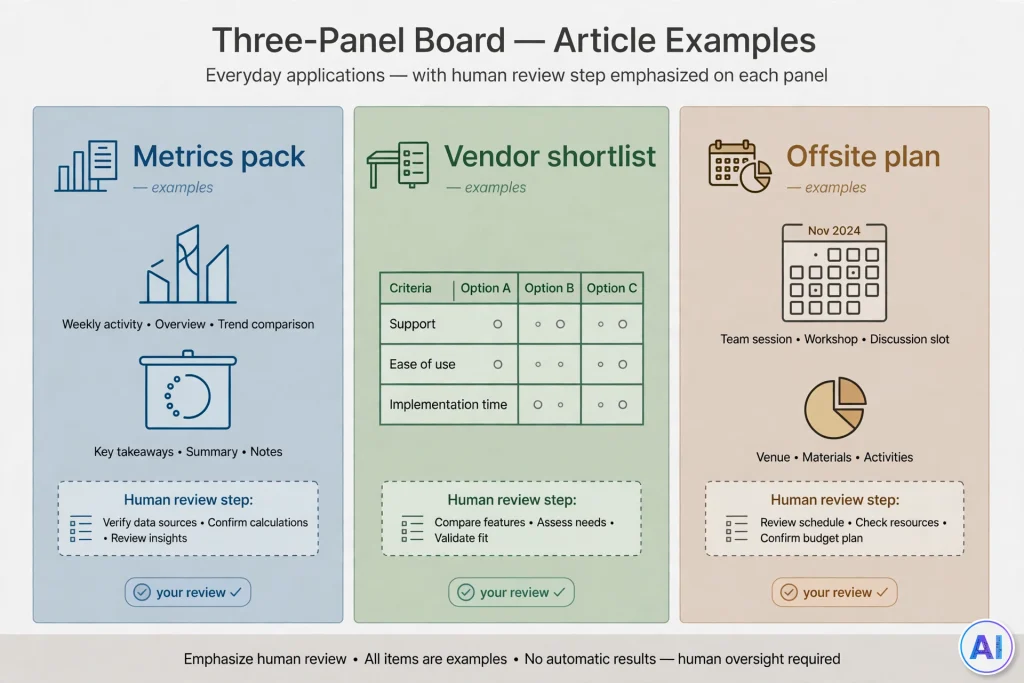
Three end-to-end scenarios answer what is agent mode in ChatGPT for in daily practice, and show where the same pattern now lives in Work:
- The Monday metrics pack: pull last week’s numbers from a spreadsheet, chart the trend, draft three talking points and save the result as a slide. You approve the plan once, then review the finished draft.
- The vendor shortlist: gather pricing and cancellation terms for six suppliers from their public pages, rank them against your criteria and flag any page that would not load.
- The offsite plan: compare venues, check availability on public pages, draft an agenda and prepare a budget sheet, stopping for your approval before any inquiry is sent.
ChatGPT Agent Mode for Students and Researchers
For learners, what is agent mode in ChatGPT useful for? Mostly the research side: gathering sources, building a reading matrix, tidying a bibliography draft. Your institution’s integrity rules still apply, so use the output to organize your thinking rather than to submit unexamined work.
Researchers should verify every citation against the original paper, since a source link proves where text came from, not that a claim is correct. OpenAI’s Study Mode and standard Chat remain better fits for learning a concept.
ChatGPT Agent Mode for Professionals and Freelancers
For independent workers, what is agent mode in ChatGPT really about? Time back. Freelancers can offload prospect research, invoice reconciliation and client-update drafts. Professionals benefit when a task spans three tabs and a spreadsheet.
The risk to watch is quiet error: a wrong figure inside a polished table travels farther than a wrong sentence. Our guide to using ChatGPT at work lays out a verification routine you can adopt for deliverables like these.
ChatGPT Agent Mode for Business Owners and Teams
For owners asking what is agent mode in ChatGPT could do for a team, the benefits are shared processes and fewer manual hand-offs. Enterprise and Edu workspaces had admin controls: owners could switch agent access on or off, limit which apps were available and request website blocks. Work adds separate cloud and local switches for workspaces.
Compare your options in our ChatGPT Business plan review and the ChatGPT Enterprise overview before you assign a team task that touches customer data.
ChatGPT Agent Mode vs. Regular ChatGPT
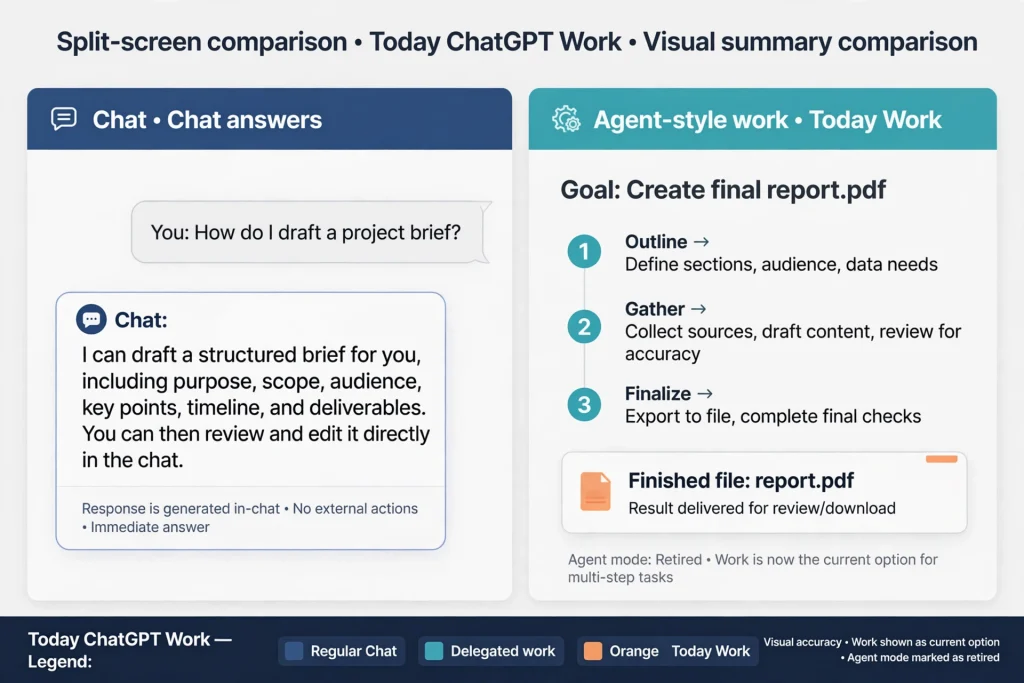
The simplest way to understand what is agent mode in ChatGPT is to set it beside everyday Chat. Regular Chat is built for conversation: questions, drafts, brainstorming and quick search. Agent mode was built for delegated work. The table compares them, and adds the current Work column so you can see where the capabilities went.
| Feature | Regular ChatGPT | ChatGPT Agent Mode (retired) | ChatGPT Work today |
|---|---|---|---|
| Answers questions | Yes, including web search with links | Yes, as a by-product of tasks | Yes, but aimed at bigger jobs |
| Multi-step tasks | Handles short sequences within a conversation | Planned and carried out longer sequences, typically 5 to 30 minutes | Longer, more involved projects, with optional plan review |
| Website interaction | Searches and cites; does not operate pages for you | Visual browser that clicked, typed and filled forms | Cloud browser on supported sites; built-in browser on desktop |
| Browser-based workflows | Not its role | Core feature, with takeover for logins | Cloud browser, with paid-plan and region limits |
| File handling | Uploads and analysis within plan limits | Uploads, code analysis, spreadsheet editing | Documents, sheets, slides and Sites, plus local files on desktop |
| Research and reporting | Quick summaries | Research plus action in one run | Research plus finished deliverables |
| User supervision | You read each reply | Confirmations, takeover, interruptions | Plan mode, check-ins and approvals |
ChatGPT Agent Mode vs. Deep Research
Anyone asking what is agent mode in ChatGPT compared with deep research should know these two were never interchangeable. Deep research focuses on investigation: it can propose a research plan you edit, read many sources and return a structured report with citations or source links, in Chat or, where your account allows, in Work and Codex.
The agent focused on action: it could log in through takeover, click through a booking form or update a file. OpenAI itself kept deep research available as a separate option after the agent launched.
Choose deep research when the end product is an argument backed by sources, and an action-capable tool when the end product is a changed file or a completed web step.
ChatGPT Agent Mode vs. Other ChatGPT Tools and Features
Another way to see what is agent mode in ChatGPT is to compare it with the rest of the toolbox:
- Search in Chat: a fast answer with links, no task execution.
- Canvas: a shared editing surface for drafts and code; see our ChatGPT Canvas guide.
- Projects and custom GPTs: persistent context and instructions, not autonomous action.
- Scheduled tasks: timing for recurring jobs, which agent mode and Work can use.
- Codex: OpenAI’s software-engineering agent, now sharing the desktop app with Chat and Work.
- Workspace agents and dots: team-built or always-on agents that continue between conversations, introduced in 2026.
Which ChatGPT Plans Supported Agent Mode?
Plan history comes first, since many readers asking what is agent mode in ChatGPT also ask who could use it. OpenAI’s help article listed Pro, Plus, Business, Enterprise and Edu, and said Free was not included. At launch, Pro, Plus and Team came first. The Go plan was not named in that article.
For today’s replacement, OpenAI’s Work page lists Plus, Pro, Business, Enterprise and Edu on web and mobile, and all plans on desktop.
A caution: when I retrieved OpenAI’s pricing page, the Plus and Pro descriptions still mentioned agent mode, which conflicts with the Help Center notice. Treat the Help Center as the newer signal and confirm inside the app. For a plan-by-plan comparison, see our ChatGPT subscriptions guide.
Agent Mode Usage Limits and Availability
The old limits are now historical, but they show how the feature was metered when people first asked what is agent mode in ChatGPT. Plus and Business or Enterprise accounts received 40 agent messages a month, Pro received 400, and flexible-pricing workspaces paid 30 credits per message.
Only your first request counted, clarifications did not, and scheduled runs did. Concurrency limits also applied. You should not use these numbers to plan current work.
Work uses a different system. OpenAI says it follows the same usage structure as Codex, that usage varies with the amount of work, and that complex tasks can consume more of your allowance. No fixed monthly message count was given in the announcement I read. Check the current Help Center article for your plan.
Privacy, Security, Permissions and User Control
What OpenAI documented for the retired agent. If you’re asking what is agent mode in ChatGPT doing with your data, start here. Screenshots of the virtual browser helped it navigate. Chats, browsing history and screenshots stayed until you deleted them, and OpenAI said deleted chats were removed from its systems within 90 days.
Plus and Pro data was handled under OpenAI’s privacy policy, with model training controlled by the “Improve the model for everyone” setting. Business, Enterprise and Edu data was not used for training by default. A limited number of authorized staff and service providers could access content for abuse investigation, support, legal matters or model improvement unless you opted out.
Where the controls sat. Confirmations covered high-impact actions, a watch mode required supervision on certain sites, and you could take over the browser for logins. Since June 4, 2026, Lockdown Mode, available to all logged-in users, limits network-enabled capabilities such as live browsing, deep research and agent mode. These handling details describe the retired feature, so read the cloud browser and Work pages for current rules.
General advice, not OpenAI policy. Share the minimum data a task needs. Keep passwords out of prompts. Disconnect apps you are not using, and clear browser data after sensitive sessions. Our Is ChatGPT safe? guide puts these habits in a wider context.
Risks, Limitations and Tasks That Require Human Approval
The biggest technical risk behind what is agent mode in ChatGPT is prompt injection: hidden instructions on a web page or in a document that try to steer the agent. OpenAI’s own example described a malicious comment that tried to make an agent fetch a reset code from email and send it elsewhere.
Safeguards reduce the danger, and OpenAI states they do not remove it.
Treat these actions as approval-only: purchases, sending messages, sharing files, changing account settings and anything legal, medical or financial. Other limits are mundane: blocked sites, failed logins, misread pages and confident mistakes. No version of this technology should be described as error-free.
Tips for Getting Better Results From ChatGPT Agent Mode
These habits apply to whichever tool now inherits what is agent mode in ChatGPT used to offer.
- Specify the outcome, format and deadline in the first message.
- Give boundaries: which sites, which files, what not to touch.
- Start with a task you already understand, so you can judge the result honestly.
- Ask for a sources column and an “unverified” list.
- Break a large job into stages, approving each.
- Avoid vague commands such as “handle my inbox.”
- Reuse prompts that work. Our ChatGPT prompts guide has templates worth adapting.
Common Agent Mode Problems and Troubleshooting
Most complaints about what is agent mode in ChatGPT today come from stale instructions. Common cases:
- The /agent command does nothing: the feature is retired; use Work.
- No Work toggle: update the app, confirm your plan and ask an admin if you use a company workspace.
- The site won’t load or blocks automation: try another source or complete the final step yourself.
- Sign-in loops: use the secure sign-in form and finish two-factor steps; remember the cloud browser does not share your device’s sessions.
- A task stalls: send a shorter instruction, narrow the scope or restart with a plan.
- Old scheduled tasks behave oddly: review them at chatgpt.com/schedules and rebuild any that matter in Work.
The Future of ChatGPT Agent Mode
The named switch is gone, yet the idea is widening. OpenAI’s 2026 release notes describe always-on agents called dots, parallel agents for eligible Pro users, desktop Computer Use and a Chrome extension. I read those as direction, not promises, because plans and names have shifted quickly. The lesson from asking what is agent mode in ChatGPT, and watching its short life, is to learn the skills, not the menu: write outcomes, supervise, verify.
Conclusion
So, what is agent mode in ChatGPT in 2026? Put plainly, it is a retired but influential feature that taught ChatGPT to act, not just answer. Its job now belongs to ChatGPT Work and the cloud browser, with deep research still available for source-heavy investigation. Start small, keep approvals on, protect sensitive data and verify every deliverable.
FAQs
What Is Agent Mode in ChatGPT?
What is agent mode in ChatGPT, briefly? It was a feature that used a virtual computer to complete multi-step online tasks, from browsing to file work. OpenAI has retired it in favor of ChatGPT Work and a cloud browser.
How do I turn on Agent Mode in ChatGPT?
You can’t: ask what is agent mode in ChatGPT today and the answer is a retired feature. Select Work on web or mobile, or use the Work toggle in the desktop app.
Is ChatGPT Agent Mode free?
No. Anyone who asks what is agent mode in ChatGPT will find the same answer on cost: OpenAI’s help article said it was available only on paid plans. Work is offered on desktop across plans, but web, mobile and cloud browser access need an eligible paid plan.
Which ChatGPT plans include Agent Mode?
None now. Previously Pro, Plus, Business, Enterprise and Edu did. Work covers Plus, Pro, Business, Enterprise and Edu on web and mobile.
What can ChatGPT Agent Mode actually do?
Research across sites, fill forms, analyze files, edit spreadsheets, build slides and repeat tasks on a schedule, always with limits and approvals.
Can ChatGPT Agent Mode browse websites?
Yes. When people ask what is agent mode in ChatGPT using to browse, the answer was a visual browser. Today’s cloud browser handles supported public and signed-in sites, but some sites block automation.
Is ChatGPT Agent Mode different from Deep Research?
Yes. Deep research produces cited reports from investigation. The agent also acted on sites and files. OpenAI kept deep research as its own option.
Is ChatGPT Agent Mode safe to use?
No tool is completely safe. OpenAI added confirmations, watch mode and prompt-injection monitoring, and says risks remain, so supervise and limit what you share.
Can ChatGPT Agent Mode complete tasks automatically?
As for autonomy, what is agent mode in ChatGPT able to do unattended? It ran with less input but paused for logins, clarifications and consequential actions. Work uses a similar approval model.
Does ChatGPT Agent Mode have usage limits?
It had monthly limits, such as 40 for Plus and 400 for Pro. Work follows Codex-style usage that varies with task size.
Sources and References
- OpenAI, Introducing ChatGPT agent, July 17, 2025.
- OpenAI, ChatGPT is now a partner for your most ambitious work, July 9, 2026.
- OpenAI Help Center, ChatGPT agent.
- OpenAI Help Center, ChatGPT Work and Codex.
- OpenAI Help Center, Using cloud browser in ChatGPT.
- OpenAI Help Center, Deep research in ChatGPT.
- OpenAI Help Center, ChatGPT release notes.
- OpenAI Help Center, ChatGPT Business release notes.
- OpenAI, ChatGPT pricing.
- OpenAI, ChatGPT Work.