
Prices and plan details were checked against OpenAI’s published sources on October 31, 2026. All dollar figures are US list prices. OpenAI changes plans often, so confirm everything at checkout before paying.
The ChatGPT Business Plan is OpenAI’s self-serve subscription for organizations: one company-owned workspace, seats that an owner assigns, a single billing account, and a commitment that workspace content is not used to train OpenAI’s models by default. A Standard seat costs $25 per user per month on monthly billing or $20 per user per month on annual billing, and a new workspace needs at least two paid seats. This guide explains what the ChatGPT Business Plan includes, what it leaves to Enterprise, how its billing behaves, and how to judge whether it earns its price for your team.
Quick answers about the ChatGPT Business Plan
- Cost: $25 or $20 per Standard seat per month; $125 or $100 per Premium seat per month (monthly or annual billing).
- Minimum: two paid seats, in any mix of Standard and Premium.
- Ceiling: up to 200 paid seats on subscriptions created since August 24, 2026.
- Training: workspace data is excluded from model training by default.
- Not included: OpenAI API usage, SCIM provisioning, data residency, and custom retention.
Table of Contents
What Is the ChatGPT Business Plan?
The ChatGPT Business Plan is a team subscription in which the organization, rather than each employee, owns the account. OpenAI’s help center describes it as a self-serve plan with centrally managed members, seats, and billing. Whoever completes checkout becomes the workspace owner, invites colleagues, and decides who gets which seat.
Until August 2025 this product was called ChatGPT Team. OpenAI renamed it ChatGPT Business, and the pricing page now uses that name. An older article quoting “ChatGPT Team pricing” at $25 to $30 describes the same product before the rename and before OpenAI’s reported April 2026 price cut.
It is also worth stating what it is not. It is not API access, which is a separate developer platform. It is not ChatGPT Enterprise, which is sold through OpenAI’s sales team on custom contracts. And it is not simply Plus for several people. Each distinction gets its own section below.
Who Is the ChatGPT Business Plan Designed For?
OpenAI positions the ChatGPT Business Plan for startups and growing businesses that want a secure, collaborative workspace without negotiating a contract. That means groups of two to roughly two hundred people where several colleagues already use ChatGPT, someone needs to control access and billing, and the company would rather not have client or internal material sitting in personal accounts.
Realistic fits include a bookkeeping practice drafting client letters, an online retailer whose support desk shares tone guidelines, and a property-management office turning maintenance logs into standard reports. Nonprofits may qualify for up to a 75% discount through OpenAI’s nonprofit program, arranged by contacting sales.
It is a poor fit for a solo freelancer, who would pay for a second seat they may not need; for a large or tightly regulated organization that needs Enterprise-grade controls; and for any company building its own software on OpenAI models, which needs the API.
What the ChatGPT Business Plan Includes
Standard and Premium seats both include ChatGPT, ChatGPT Work, and Codex, according to OpenAI’s help center. The ChatGPT Business Plan features below come from OpenAI’s plan comparison and Business help articles. Some entries are marked “coming soon,” and availability can differ by account, region, and rollout stage.
Shared workspace and collaboration
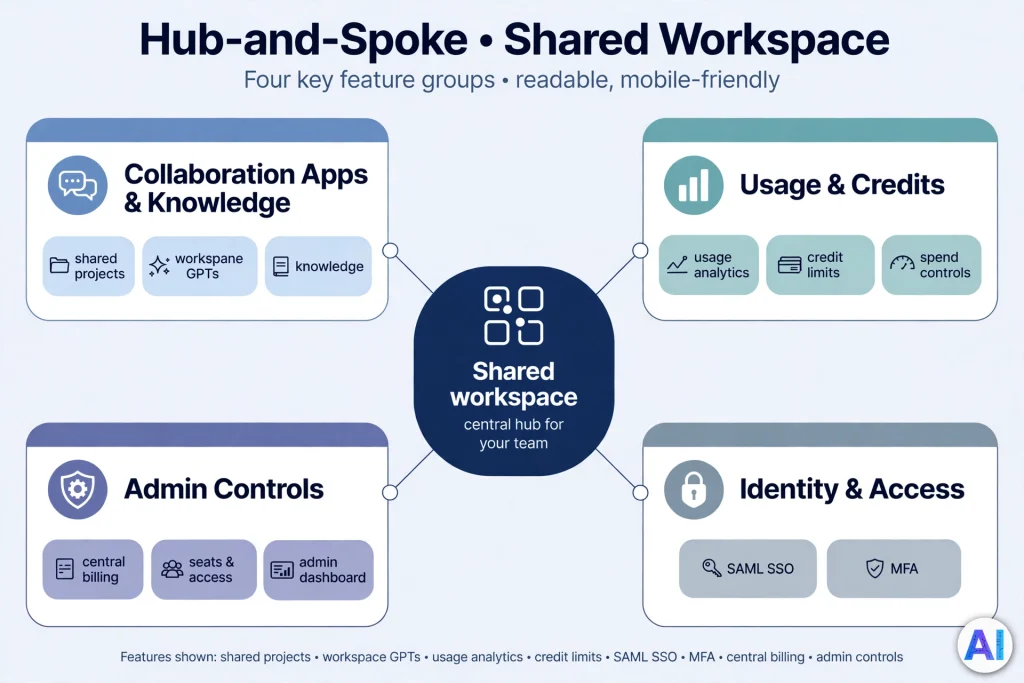
The plan gives you a dedicated workspace with projects, shared projects, canvas, data analysis, file uploads, image generation, deep research, scheduled tasks, and record mode. Its most distinctive collaboration feature is custom GPTs shared with the whole workspace, which OpenAI’s grid marks as available on Business but not on Plus. The value is consistency: a team can build one GPT that carries its house style instead of passing prompts around. Collaboration is opt-in, though. Each person keeps their own chat history, and memory drawing on past chats is listed as “coming soon.”
Apps, company knowledge, and connected tools
OpenAI advertises more than 60 apps, including Slack, Google Drive, SharePoint, GitHub, and Atlassian, and lists company knowledge plus Excel and Google Sheets extensions as included. The value is asking questions against documents people can already read. The caution is that a connected app extends what ChatGPT can reach, and what it can see depends on how your administrator configures it. A connector registry for central control is listed as Enterprise-only.
Models, usage limits, and credits
On the ChatGPT Business Plan, core chat is marked “unlimited” with an asterisk: usage must be reasonable and policy-compliant. Heavier reasoning and Pro-level models are marked “flexible,” meaning included usage can run out and workspace credits can extend it. Premium seats carried five times Standard usage with no five-hour limit when OpenAI announced them, though OpenAI adjusts allowances over time.
Owners and admins can set monthly credit limits by seat type and per person, but OpenAI’s help article says no limits exist by default. Model names and allowances change quickly, so check the model picker in your workspace rather than any article.
Admin and security controls
For the ChatGPT Business Plan, OpenAI lists an admin console, admin roles, bulk member management, domain verification, unified billing, user analytics, GPT analytics and management, SAML single sign-on, and multi-factor authentication for Business. Together these let one person manage who is in the workspace, what they can do, and what it costs.
ChatGPT Business Plan Pricing: How Much Does It Cost?
Pricing was checked on October 31, 2026. One note on method: when I loaded OpenAI’s pricing page directly, its dollar amounts did not render, so the figures below rest on OpenAI’s help-center articles and its Premium seats announcement. Prices are in US dollars, and OpenAI does not say they apply identically in every country.
| Billing option | Verified price (USD) | Important details |
|---|---|---|
| Standard seat, monthly billing | $25 per user per month | Baseline usage for ChatGPT, ChatGPT Work, and Codex |
| Standard seat, annual billing | $20 per user per month | Billed annually: $240 per seat per year |
| Premium seat, monthly billing | $125 per user per month | Five times Standard usage at launch, no five-hour limit; allowances can change |
| Premium seat, annual billing | $100 per user per month | Billed annually: $1,200 per seat per year |
| Minimum purchase | 2 paid seats | Two of either type, or one of each |
| Maximum, new subscriptions | 200 paid seats | Applies since August 24, 2026; older workspaces keep their earlier limit |
Credits for extra usage are optional and billed separately. In the ChatGPT Business Plan, the $20 and $100 annual figures are monthly equivalents of a yearly charge, not what you would pay by leaving after a month.
Monthly vs Annual ChatGPT Business Plan Billing
Annual billing is 20% cheaper on both seat types. What you give up is flexibility: OpenAI’s billing guide says seat reductions take effect at the start of the next annual cycle, while added seats are charged immediately on a prorated basis. On annual billing, buy for the team you have and add seats later.
An illustration for an operations team of nine, with seven Standard and two Premium seats:
- Annual billing: (7 × $20) + (2 × $100) = $340 per month, or $4,080 per year.
- Monthly billing: (7 × $25) + (2 × $125) = $425 per month, or $5,100 per year.
That $1,020 gap is arithmetic, not a forecast of what your team will use.
Minimum Seats for the ChatGPT Business Plan and the 200-Seat Ceiling
A workspace needs at least two paid seats, and OpenAI’s pricing page says Business plans start at two users. From August 24, 2026, a subscription can hold up to 200 paid seats, support cannot raise that limit, and larger organizations are pointed to Enterprise. Billing counts seats, not activity: each cycle you pay for every paid seat, assigned or not.
Taxes, currency, and payment methods
OpenAI’s pricing page says self-serve plans can be bought with any major credit card, and that invoicing is discussed with sales for Enterprise. The list prices for the ChatGPT Business Plan do not mention tax. OpenAI’s help center has separate articles on multi-currency billing and on updating a Tax ID or VAT ID, so your total may differ by location. I could not confirm local-currency prices from official pages and have not converted any figure.
Changing or Cancelling the ChatGPT Business Plan
Only workspace owners can buy, add, reduce, or reassign seats. To cancel, the owner opens Workspace settings, then Billing, then Manage plan, and selects Cancel subscription; cancellation normally takes effect at the end of the current billing period. Seats are generally non-refundable once you commit to a count, though OpenAI says support can review a verified seat-count error or an accidental annual renewal.
How to Sign Up for the ChatGPT Business Plan
OpenAI’s sign-up article describes the flow, and the “Get started” button under Business on the pricing page leads into it. Labels can change, so follow the on-screen wording.
- Open the Business sign-up and choose Standard seats, Premium seats, or both.
- Enter the seat count. A new account must add at least two paid seats.
- Pick monthly or annual billing and review the total.
- Pay by card. You receive the workspace and the owner role.
- Invite your team. Owners add capacity under Workspace settings, then Billing, and assign seats under Members. New capacity is charged immediately, prorated.
Seat quantity and seat type are separate: buying extra Standard seats does not upgrade your own seat to Premium.
How to set up a ChatGPT Business Plan workspace
Treat the first week as configuration time:
- Limit owner and admin rights to as few people as possible.
- Secure sign-in with SAML single sign-on and domain verification.
- Review apps and decide who may enable more.
- Set credit limits by seat type before heavy users find the pool.
- Write a one-page usage policy on what may be pasted into prompts.
How Team Members Collaborate in the ChatGPT Business Plan
Members work in private chats and meet in shared spaces: shared projects for common files and instructions, workspace GPTs for repeatable tasks, and canvas for drafting together. Promote a prompt into a shared GPT only after two or three people have reused it, so the shared library stays small enough to be used.
ChatGPT Business Plan Privacy and Security
This section describes OpenAI’s published commitments. It is not a guarantee that your data is risk-free, and your own compliance obligations remain yours.
Is ChatGPT Business Plan data used to train OpenAI models?
By default, no. OpenAI’s help center says Business workspace data is excluded from training by default, including when the workspace uses Codex. The pricing grid contrasts this with Free, Go, Plus, and Pro, where content may be used for training unless the user opts out.
Four kinds of data to keep apart
- Data used for training. Excluded by default on Business.
- Data stored to provide the service. Chats are kept so you can return to them. OpenAI’s pricing page lists custom retention policies under Enterprise, not Business, and legal obligations can require retention, so do not treat deletion as instant erasure.
- Data visible to administrators. OpenAI’s help article says other members do not automatically see your chats. One independent review found OpenAI’s pages inconsistent on what admins can view and export, which I could not confirm from the pages I could open, so ask OpenAI to confirm in writing.
- Data passed through connected apps. What ChatGPT reaches follows that app’s permissions, and the third party’s terms govern what it holds.
Security protections
OpenAI states that data is encrypted in transit with TLS 1.2 or higher and at rest with AES-256, that its security team has round-the-clock on-call coverage, and that it runs a bug bounty program. The Business plan lists SOC 2 Type 2 compliance and support for GDPR and CCPA compliance. These describe OpenAI’s controls and do not make your own use automatically compliant.
What the plan does not give you
Region-specific data residency and the Compliance API are Enterprise-only in OpenAI’s comparison. OpenAI’s security page says it offers a Data Processing Addendum and a Business Associate Agreement, but those are contract terms, so confirm with OpenAI whether a self-serve workspace qualifies before uploading health records, privileged legal material, or regulated financial data. On any plan, careless pasting, broad share links, and over-permissive app connections can still expose information.

ChatGPT Business Plan vs Other ChatGPT Plans
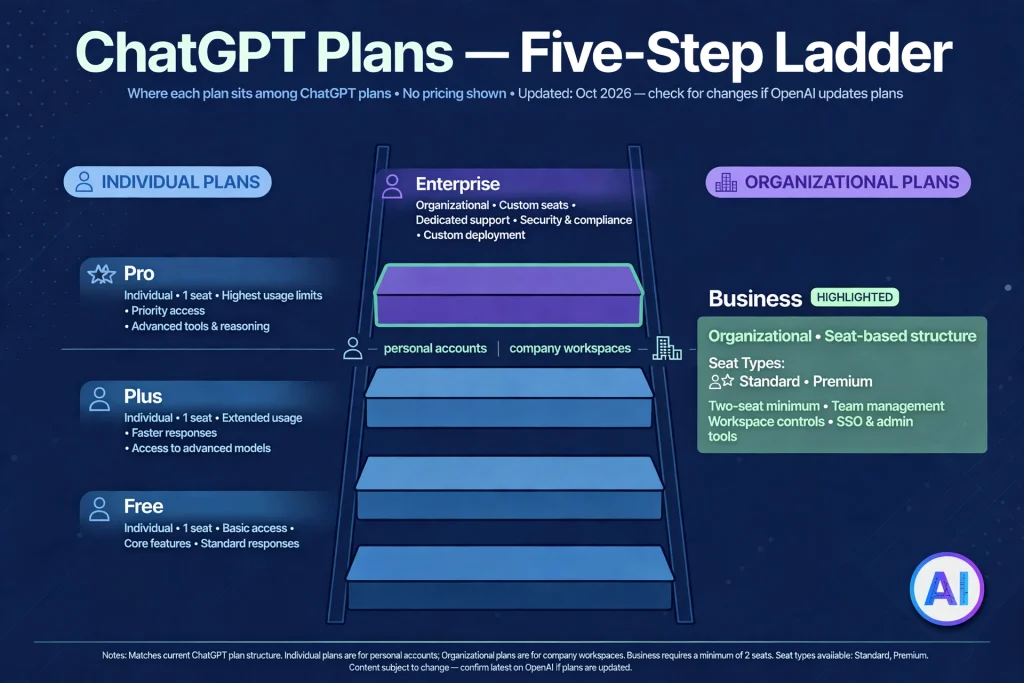
| Plan | Intended audience | Main purpose | Workspace and administration | Pricing (USD) |
|---|---|---|---|---|
| Free | Individuals | Trying ChatGPT | None | $0 |
| Plus | Individuals | Regular personal use | None | $20 per month, monthly billing only |
| Pro | Individuals with heavy use | Higher allowances | None | $100, $200, or $500 per month |
| Business | Teams of 2 to 200 | Shared workspace | Admin console, roles, SAML SSO, domain verification | $20–$25 Standard seat, $100–$125 Premium seat, per month |
| Enterprise | Large or regulated organizations | Governed deployment | Adds SCIM, role-based access, key management, residency | Custom quote through sales |
ChatGPT Business Plan vs Free
Free is open to everyone with limited tools and no administration, and content may be used for training unless the user opts out. The ChatGPT Business Plan adds a dedicated workspace, central billing, company knowledge, and a no-training default. Free remains a sensible way to trial ChatGPT before involving procurement.
ChatGPT Business Plan vs ChatGPT Plus
Plus is the individual subscription; Business is the organizational one. On OpenAI’s grid, Plus lacks a dedicated workspace, admin console, SAML SSO, company knowledge, and sharing GPTs with a workspace. A Standard seat on annual billing costs the same $20 per month as Plus, but the two-seat minimum means the smallest annual commitment is $480. For one person, see our analysis of whether ChatGPT Plus is worth it.
ChatGPT Business Plan vs ChatGPT Pro
Pro is a personal plan with three monthly tiers, offering much larger individual allowances. It has no team administration, so it does not replace a workspace. Premium seats are the Business Plan’s route for heavy users, but OpenAI publishes no like-for-like comparison with the Pro tiers. Our ChatGPT Pro review covers the individual side.
ChatGPT Business Plan vs ChatGPT Enterprise
Enterprise is sales-led, with custom pricing and contract terms. OpenAI’s grid lists SCIM, enterprise key management, role-based access controls, IP allowlisting, region-specific data residency, a Compliance API, enhanced support, and dedicated onboarding as Enterprise-only. Our guide to ChatGPT Enterprise features, pricing and security explains when those additions justify a sales process. For a wider view across tiers, read our guide to ChatGPT subscriptions.
ChatGPT Business Plan vs the OpenAI API
The API is a developer platform for building your own software, billed by usage rather than by seat. OpenAI’s FAQ states that API credits and rate limits do not transfer to a Business workspace, and that workspace subscriptions and credits are separate from API billing. Buying seats gives your staff a chat product; it gives your developers nothing to call from code.
Practical Ways to Use the ChatGPT Business Plan
These are possible uses, not promised outcomes. Every output a customer, regulator, or court might see needs human review, and none of these examples guarantees more revenue, lower cost, or saved time.
- Marketing: outlining a content calendar, brainstorming campaign angles, summarizing competitor pages, and drafting first-pass copy for an editor.
- Customer support: drafting replies from approved guidance, organizing recurring questions, and preparing help-center articles that a person verifies.
- Sales: drafting outreach and proposals, summarizing meeting notes, and researching an account before a call.
- Operations: documenting processes, organizing internal knowledge through connected tools, and analyzing spreadsheets with data analysis.
- Human resources: drafting job descriptions, preparing interview questions, and rewording internal announcements.
- Small businesses: handling routine administration, planning, and content so owners spend less time on first drafts.
Advantages of the ChatGPT Business Plan
- A company-owned workspace, so access and history do not leave with a departing employee’s personal account.
- Central billing and seat management under one owner.
- A no-training default for workspace content, stated in OpenAI’s help center.
- SAML single sign-on and domain verification without an enterprise contract.
- Shareable custom GPTs and shared projects for repeatable team work.
- A published price and self-serve purchase, with no sales call.
Disadvantages and Limitations
- Two-seat minimum. The ChatGPT Business Plan cannot be bought for one person.
- “Unlimited” has conditions. Guardrails apply, heavier models draw on credits, and no credit limits exist by default.
- Seat commitments are sticky. Unassigned seats are billed, reductions wait for the next cycle, and seats are generally non-refundable.
- Card payment and a 200-seat ceiling. Invoicing and larger deployments sit in Enterprise territory.
- Identity gaps. SCIM, role-based access controls, key management, and IP allowlisting are Enterprise-only.
- Uneven rollouts. Some features are marked “coming soon,” and model names change often.
- AI still errs. Output can be wrong or biased, and the subscription does not verify anything for you.
Is the ChatGPT Business Plan Worth It?
It depends on whether you need what the plan adds, not on the sticker price alone. A Standard seat costs $240 per year on annual billing, so the useful test is simple: would the work each person does in ChatGPT plausibly be worth that over twelve months? Measure rather than assume, for instance by tracking which tasks people actually run for a month.
Team size shifts the answer. At two to ten people, a shared workspace and single invoice are the main benefits. At ten to fifty, administration and sign-in controls start to matter. Between fifty and two hundred, check seriously whether identity provisioning, retention, or residency requirements push you toward Enterprise. Above two hundred seats on a new subscription, Business is no longer an option.
Who should choose the ChatGPT Business Plan
Choose it if several colleagues already use ChatGPT for work, if business content is landing in personal accounts, or if you want central control without a sales process.
Who should avoid it
Avoid it as a solo user (Plus or Pro is simpler), as a developer who needs the API, or as an organization whose rules demand data residency, custom retention, or contract-level terms that Business does not offer.
Before you buy: a checklist
- Who will own the workspace and its billing?
- Which seat type does each person need, starting mostly with Standard?
- Which apps may be connected?
- What spend limit will you set for credits?
- What may never be pasted into a prompt?
- Has legal reviewed OpenAI’s current terms?
Frequently Asked Questions
What is the ChatGPT Business Plan?
It is OpenAI’s self-serve ChatGPT subscription for teams, formerly called ChatGPT Team. An owner buys seats, assigns them to members, and manages billing in one shared workspace.
How much does ChatGPT Business cost?
Standard seats cost $25 per user per month on monthly billing or $20 on annual billing. Premium seats cost $125 monthly or $100 annually. These are US dollar list prices checked on October 31, 2026.
Is ChatGPT Business billed monthly or annually?
Either. You choose at checkout. Annual billing is 20% cheaper per seat but ties seat reductions to the next annual cycle, so size the ChatGPT Business Plan carefully.
How many users can join a ChatGPT Business workspace?
New subscriptions can hold up to 200 paid Standard and Premium seats combined. Larger organizations should look at Enterprise.
Does ChatGPT Business have a minimum seat requirement?
Yes. A workspace needs at least two paid seats, which can be two of one type or one of each.
Is ChatGPT Business better than ChatGPT Plus?
Not automatically. The ChatGPT Business Plan adds a workspace, administration, and a no-training default, but costs at least two seats. For one person, Plus is simpler.
Does ChatGPT Business include ChatGPT Pro features?
No. Pro is a separate individual plan. Premium seats offer more usage than Standard, but OpenAI does not publish an equivalence with Pro.
Is ChatGPT Business data used to train OpenAI models?
By default, no. OpenAI says Business workspace data is excluded from training. That is not a promise about retention, admin visibility, or what happens in connected apps.
Can small businesses use ChatGPT Business?
Yes, from two people upward. Very small teams should compare the cost against individual Plus subscriptions and decide whether shared administration matters.
Is ChatGPT Business worth paying for?
It can be, if several people use it for real work and you value central control. Test with Standard seats first. Our shorter ChatGPT Business explainer offers another angle on the decision.
Conclusion
The ChatGPT Business Plan is a middle path: more structure than personal subscriptions, less machinery than Enterprise. It suits small and mid-sized teams that want a shared workspace, central billing, and a no-training default at a published price. It is the wrong tool for individuals, API builders, and organizations with strict residency or provisioning needs. Start with Standard seats, set credit limits early, and re-check OpenAI’s pricing and privacy pages before you pay, because the ChatGPT Business Plan has changed several times this year.
Sources and References
Official OpenAI sources consulted (October 31, 2026):
- ChatGPT plans and pricing: https://chatgpt.com/pricing/
- What is ChatGPT Business? https://help.openai.com/en/articles/8792828-what-is-chatgpt-business
- Sign up for ChatGPT Business: https://help.openai.com/en/articles/8980713-sign-up-for-chatgpt-business
- Managing billing and seats in ChatGPT Business: https://help.openai.com/en/articles/8792536-managing-billing-and-seats-in-chatgpt-business
- ChatGPT Business: General FAQ: https://help.openai.com/en/articles/8542115-chatgpt-business-general-faq
- Managing credits and spend controls in ChatGPT Business: https://help.openai.com/en/articles/20001155-managing-credits-and-spend-controls-in-chatgpt-business
- Managing data, sharing, and privacy in ChatGPT Business: https://help.openai.com/en/articles/8798634-managing-data-sharing-and-privacy-in-chatgpt-business
- Premium seats are coming to ChatGPT Business: https://openai.com/index/premium-seats-chatgpt-business/
- Enterprise privacy at OpenAI: https://openai.com/enterprise-privacy/
- Security and privacy at OpenAI: https://openai.com/security-and-privacy/
- About ChatGPT Pro tiers: https://help.openai.com/en/articles/9793128-about-chatgpt-pro-tiers
- Canceling your ChatGPT subscription: https://help.openai.com/en/articles/7232927-canceling-your-chatgpt-subscription