
In this article
Super Claude Code is not an Anthropic product. It is the common search phrase for SuperClaude, an open-source, community-built framework that adds slash commands, specialist agents, behavioral modes and optional MCP integrations to Anthropic’s Claude Code terminal assistant. This guide, verified on November 4, 2026, explains what Super Claude Code does, how to install it, what it costs, and where the real risks sit, so you can decide whether it deserves a place in your AI coding workflow.
Super Claude Code at a Glance
- What it is: a third-party configuration framework for Claude Code, published under the MIT license.
- Who makes it: the SuperClaude-Org community on GitHub, not Anthropic.
- Current stable version: 4.3.0, released on PyPI on March 22, 2026.
- What you get: 30 slash commands, 20 specialist agents, 7 behavioral modes and 8 optional MCP server integrations, according to the project README.
- Price: the framework itself is free, but Claude Code still needs a paid Claude plan or API usage.
- Biggest caution: it changes how Claude Code behaves by installing instruction files, so you should review what lands in your configuration folder.
Table of Contents
What Is Super Claude Code?
Super Claude Code, in practice, means the SuperClaude Framework. Its own description calls it a meta-programming configuration framework that turns Claude Code into a structured development platform through behavioral instruction injection and component orchestration. That wording is dense, so here is the plain version: Super Claude Code is a bundle of markdown instruction files, command templates and a small Python command-line tool that teach Claude Code to follow a more rigid, repeatable process.
Claude Code on its own is a blank, flexible assistant. You type a request and it reads your repository, edits files and runs commands. Super Claude Code adds named routines on top of that. Instead of improvising a plan each time, you can trigger a brainstorming routine, an implementation routine or a testing routine with a short slash command, and the loaded instructions shape how Claude Code approaches the job.
The name causes confusion because nobody officially calls the project “Super Claude Code.” The repository is titled SuperClaude Framework, the PyPI package is superclaude, and the command-line tool is also superclaude. People simply add “Code” because the framework only works with Claude Code. Throughout this article, Super Claude Code refers to that framework unless stated otherwise.
Is Super Claude Code Officially Developed by Anthropic?
No. The project README says plainly that it is not affiliated with or endorsed by Anthropic, and that Claude Code is a product built and maintained by Anthropic. The same disclaimer appears on the PyPI listing.
That distinction matters for three practical reasons:
- Support: Anthropic’s support channels and documentation cover Claude Code, not Super Claude Code. Problems with the add-on go to the project’s GitHub issue tracker.
- Compatibility: Claude Code changes quickly. A third-party framework can fall behind or break after an update, and the maintainers, not Anthropic, decide how fast to respond.
- Trust: Anthropic does not review the framework’s instruction files. You are trusting the maintainers and the contributors who merge changes.
PyPI lists three maintainers for the package, one of whom is NomenAK, the developer credited on early versions of the project. Community funding goes through Ko-fi, Patreon and GitHub Sponsors, which tells you this is a volunteer-driven effort and not a company product.
One Name, Several Projects: Which Super Claude Code Do People Mean?
Searching for the phrase turns up more than one repository, so it helps to separate them.
| Project | What it is | Notes from verification |
|---|---|---|
| SuperClaude-Org/SuperClaude_Framework | The main framework: slash commands, agents, modes, MCP integrations | v4.3.0, MIT, about 23.9k stars, PyPI package superclaude |
| gwendall/superclaude | A Node.js CLI with commands such as commit, changelog, readme, review and docs | Different project; installed with npm; needs Claude Code and the GitHub CLI |
| tony363/superclaude | A “config-first” meta-framework with agent personas and skills | README shows v7.0.0; separate codebase |
| Copies under other accounts | Mirrors or forks that repeat the SuperClaude-Org README | Verify the owner before installing anything |
This article follows the first row because it matches the way most people use the phrase and because it has the most complete documentation. If you land on a repository with a similar name, read its README and check the owner before running any install command.
How Super Claude Code Relates to Claude Code
Think of the relationship as a coat of paint versus a car. Claude Code is the car: Anthropic’s agentic coding tool, with its own permission system, built-in slash commands, subagents, plugins and MCP support. Super Claude Code is closer to a set of driving rules and shortcuts stored in files that the car reads.
Claude Code already supports the building blocks Super Claude Code relies on. According to Anthropic’s documentation, custom slash commands are markdown files that Claude Code can run, organized by project or personal scope, and plugins can bundle commands, agents, hooks and MCP definitions. Super Claude Code uses those same extension points. It does not replace the Claude Code program, and it cannot run without it.
If you want a deeper look at one of those extension points, our guide to Claude Code skills and custom automation explains how reusable instructions work inside Claude Code itself, which is useful background for judging what a framework like this really adds.
Main Features and Capabilities of Super Claude Code
The README organizes Super Claude Code around four ideas.
Slash commands
Super Claude Code installs 30 commands under an sc namespace. After installation and a restart of Claude Code, you invoke them with a prefix such as /sc:research, /sc:brainstorm, /sc:implement, /sc:test or /sc:pm. Typing /sc lists everything available. The project groups the commands by purpose: planning and design, development, testing and quality, documentation, version control, project management, research and analysis, and utilities such as saving and loading sessions.
Specialist agents
The framework ships 20 agent definitions, described as domain specialists such as a project-management agent, a system architect, a security engineer and a frontend architect. These are markdown files that Claude Code can call on, with coordination based on context.
Behavioral modes
Seven modes adjust how Claude Code works: brainstorming, business panel, deep research, orchestration, token efficiency, task management and introspection. A mode is essentially a standing set of instructions about tone, depth or process.
MCP server integrations
Super Claude Code does not bundle MCP servers, but it can help you install several: Tavily for web search, Context7 for documentation lookup, Sequential-Thinking for stepwise reasoning, Serena for session memory, Playwright for browser automation, Magic for UI components, Morphllm-Fast-Apply for code edits and Chrome DevTools for performance analysis. Each one is optional, and each one is a separate piece of software with its own trust considerations.
The README also describes a deep research capability with adaptive planning, up to five search hops and confidence scoring. Treat those descriptions as design intent from the maintainers; this review did not test research quality.
How Super Claude Code Works
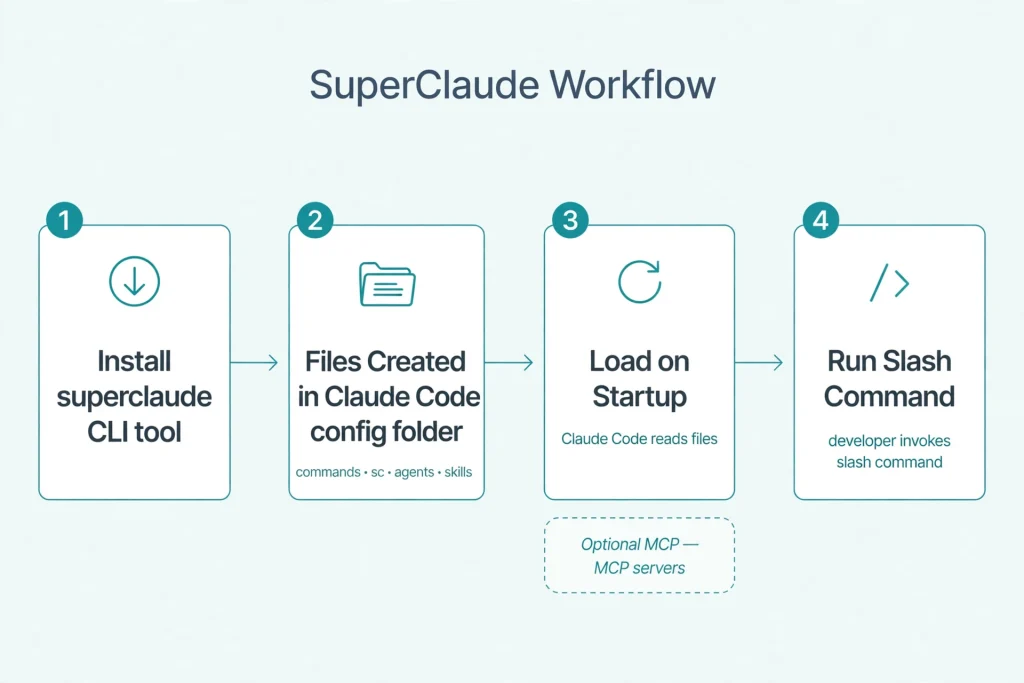
Super Claude Code has no hidden engine. Its mechanism is mostly file placement.
- A Python package named
superclaudeprovides a command-line tool. - When you run its install command, the tool copies markdown files into Claude Code’s configuration directory under your home folder. The project’s own notes show a
commands/sc/folder holding the 30 commands, anagents/folder holding 20 agent files, and askills/folder. - Claude Code reads those files at startup, so the new slash commands and agents become available after a restart.
- When you run a command, the markdown inside it becomes part of the instructions Claude Code follows for that task.
The project also exposes itself as a pytest plugin, which is why its PyPI description mentions testing. That part is separate from the slash-command workflow.
Because the framework works through instructions rather than code that Anthropic controls, its effect depends on how well Claude Code follows those instructions. Results can vary between tasks and between Claude models.
Super Claude Code Installation and Setup
Prerequisites
- A working Claude Code installation that you can already launch and sign in to.
- Python 3.10 or newer, which the package metadata requires.
- pipx, the isolated-environment installer the project recommends. The installation guide shows
python3 -m pip install --user pipxfollowed bypython3 -m pipx ensurepathif you do not have it. - A Linux, macOS or Windows environment. Older documentation for the original version mentioned Linux, macOS or Windows WSL, so Windows users should check the current installation guide for their setup.
Install Super Claude Code with pipx
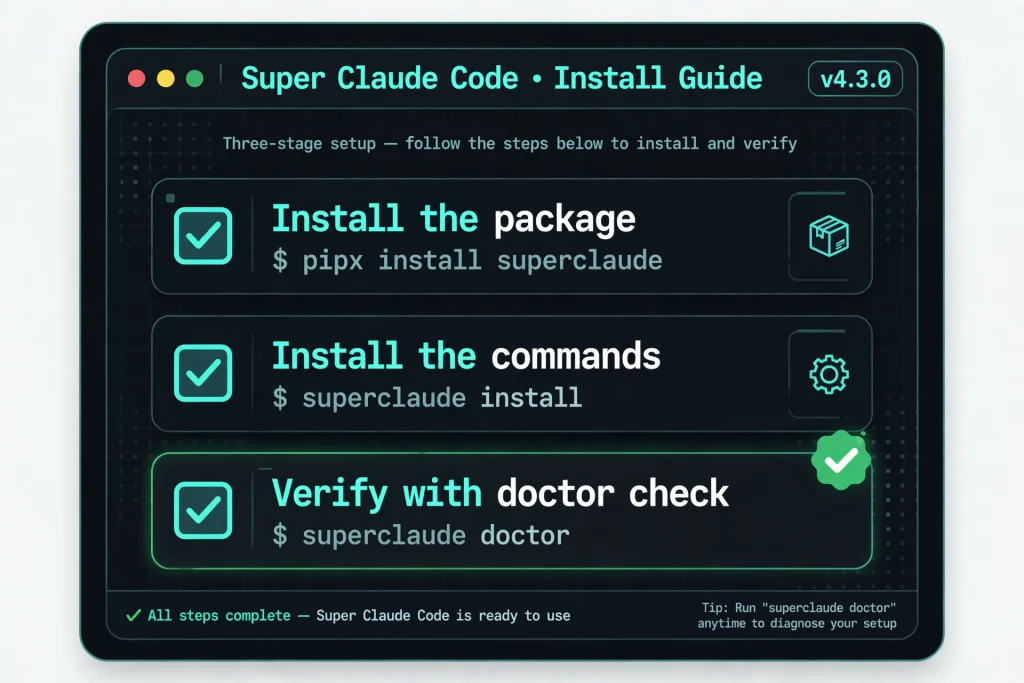
The commands below are copied from the project’s current README for the stable 4.3.0 release:
bash
# Install from PyPI
pipx install superclaude

# Install commands (installs all 30 slash commands)
superclaude install

# Optional: install MCP servers
superclaude mcp --list
superclaude mcp
superclaude mcp --servers tavily --servers context7

# Verify installation
superclaude install --list
superclaude doctor
After the install step, restart Claude Code so it picks up the new commands.
Other documented routes
The README also documents a direct install from Git:
bash
git clone https://github.com/SuperClaude-Org/SuperClaude_Framework.git
cd SuperClaude_Framework
./install.sh
The installation guide additionally lists plain pip and an npm wrapper (npm install -g @bifrost_inc/superclaude), followed by superclaude install. The npm package describes itself as a wrapper around the Python package. Pipx remains the recommended option because it keeps the tool isolated from your system Python.
One thing not to rely on yet: the README mentions a plugin-based install through Claude Code’s /plugin commands, but it labels that path as planned for version 5.0, in development, with no release date. Do not expect those plugin commands to work today.
Confirm that installation worked
Run superclaude install --list to see what was installed and superclaude doctor to run the tool’s built-in diagnostic. Then open Claude Code and type /sc. If the list of commands appears, setup succeeded. If it does not, restart Claude Code and run the doctor command again.
Configuration and First-Time Use
Super Claude Code needs little configuration for basic use. The command files land in your Claude Code folder, and the framework works without any MCP servers. The README states that without MCP servers the framework is fully functional at standard performance.
A sensible first session looks like this:
- Open a small, non-critical repository in your terminal and start Claude Code.
- Type
/scto read the command list. - Run
/sc:brainstormfollowed by a plain description of a feature you are considering, for example “add rate limiting to the public API.” Exact argument handling is covered in the project’s commands reference, so check that page if a command asks for more input. - Read the plan Claude Code produces before approving any edits.
- Move to
/sc:implementfor the actual change and/sc:testto generate or run tests.
Keep Claude Code’s normal permission prompts switched on during this first run. They are your safety net while you learn how the commands behave.
Practical Workflows with Super Claude Code
These patterns follow the command categories in the README. They are illustrations of how the commands fit together, not benchmarked results.
Planning a feature. Start with the brainstorming command to surface questions, then use the design and estimate commands to outline structure and effort. This replaces the habit of asking Claude Code to “just build it” with a short planning pass you can review.
Implementing and testing. Use the implementation command for the change itself, then the test command to cover it. Separating the two steps makes each diff easier to review.
Investigating a bug. The troubleshooting and analysis commands give you a structured way to ask for root causes before any code is edited.
Researching a library. With Tavily and Context7 installed, the research command can pull current web and documentation material into the session. That convenience also means external content enters your context, so review sources before acting on them.
Keeping continuity. The save and load commands are meant to store and restore session state, which helps on projects that span several days.
If a workflow like this burns through more tokens than you expect, remember that longer instruction sets and agent coordination can consume more of your plan’s allowance. Our breakdown of Claude Code pricing, plans and API costs shows how usage translates to cost, and the Claude Max guide covers the higher-limit subscription tier.
Super Claude Code vs. Standard Claude Code
The honest comparison is not a contest. Super Claude Code requires Claude Code, so you are choosing between running Claude Code plain and running it with a framework layered on top.
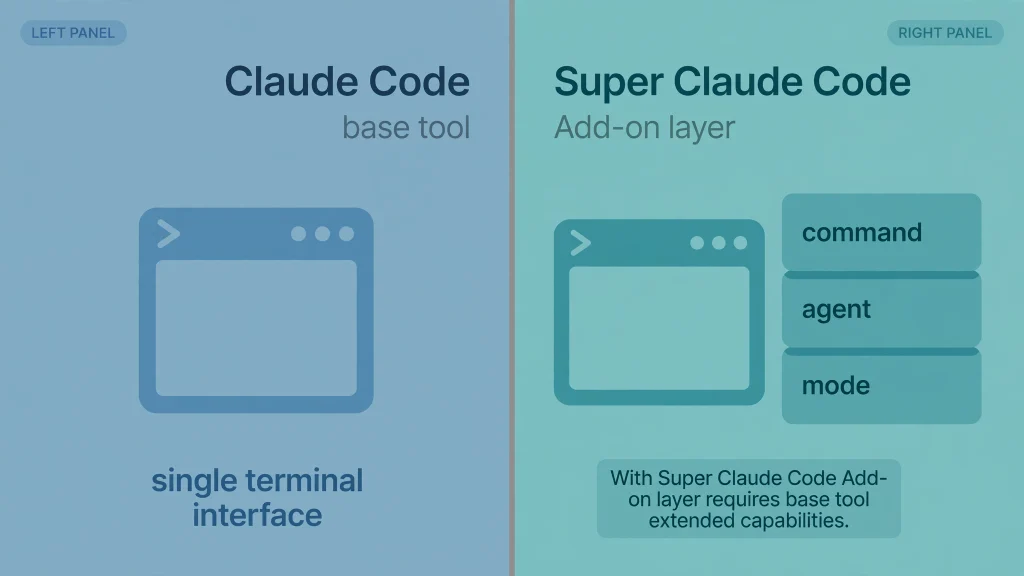
| Factor | Standard Claude Code | Claude Code with Super Claude Code |
|---|---|---|
| Maker | Anthropic | Community (SuperClaude-Org), unaffiliated with Anthropic |
| Purpose | General agentic coding assistant | Opinionated workflow layer on top of Claude Code |
| Setup | Install and sign in | Claude Code plus Python, pipx and an install command |
| Customization | Your own commands, skills, subagents, plugins | Pre-built commands, agents and modes you can edit |
| Automation | Whatever you configure | 30 ready-made commands and 20 agents |
| Cost | Claude plan or API usage | Same, plus optional donations; the framework is free |
| Support | Anthropic documentation and channels | GitHub issues and community |
| Maintenance risk | Maintained by Anthropic | Depends on volunteer maintainers keeping pace |
| Best for | Developers who prefer a clean, minimal setup | Developers who want prescribed workflows out of the box |
No evidence supports declaring one setup superior across all projects. A solo developer who already writes custom commands may gain little from the framework, while someone who wants a ready-made structure may save setup time. The deciding factor is whether the opinionated routines match how you like to work.
Benefits and Limitations of Super Claude Code
Benefits
- Ready-made commands reduce the time spent writing your own prompts and command files.
- Named routines make results more consistent from one session to the next.
- The MIT license lets you read, edit and fork everything.
- Optional MCP integrations extend what Claude Code can reach.
- The project is active, with a visible release history and a documented command reference.
Limitations
- It is unofficial, so Anthropic will not troubleshoot it.
- Documentation is not always consistent. The command list shows names without the
scprefix, while the quick start uses/sc:forms, and the research example uses/research. Expect to experiment. - The README warns that older versions’ files can conflict with version 4, and the older version 2 installer overwrote existing configuration files, so backups matter.
- Performance claims such as faster execution and fewer tokens are self-reported and unbenchmarked.
- More instructions in context can mean more tokens used per session.
- The PyPI page for the 4.3.0 release shows no provenance attestation, so you cannot verify the build trail through that mechanism.
Is Super Claude Code Free? Pricing and Subscription Needs
The framework is free and open source under the MIT license. The maintainers ask for voluntary support through Ko-fi, Patreon and GitHub Sponsors, and they mention that testing on a Claude Max plan costs them about $100 per month. That figure describes their expense, not a fee you pay.
What you do pay for is Claude Code itself. Super Claude Code does not include model access, so you still need whichever Claude plan or API arrangement you already use with Claude Code. Optional MCP servers may carry their own costs; Tavily, for example, is a separate web search service, so check its terms before enabling it.
Is Super Claude Code Safe? Security, Privacy and Risks
Safety here has two layers: Claude Code’s built-in protections and the extra trust you place in the framework.
What Anthropic documents for Claude Code. Claude Code uses read-only permissions by default and asks before editing files or running commands. Writes are confined to the folder where you started it and its subfolders. Anthropic also states that you are responsible for reviewing proposed code and commands before approving them, and that it does not manage or audit MCP servers.
What changes with Super Claude Code. The framework installs instruction files that shape Claude Code’s behavior, which its own README calls behavioral instruction injection. Those files are text, but text is exactly what steers an AI agent. A careless or malicious edit in a future release could nudge Claude Code toward unsafe actions, so treat updates like any dependency upgrade.
Sensible precautions:
- Read the files in the command and agent folders after installing, especially anything that mentions running shell commands or fetching web content.
- Keep Claude Code’s permission prompts on, and use
/permissionsto audit your settings, as Anthropic recommends. - Install only the MCP servers you will actually use, and only from sources you trust.
- Test on a throwaway repository before trusting the framework with production code.
- Install from the SuperClaude-Org repository or the
superclaudePyPI page, and double-check the spelling and owner of any package or repository, since lookalike names exist. - Pin or note the version you installed so you can review changes before upgrading.
Common Installation and Usage Problems
- Commands do not appear. Restart Claude Code after running
superclaude install, then checksuperclaude install --list. superclaudenot found. Runpython3 -m pipx ensurepath, open a new terminal and try again.- Python environment errors with plain pip. Several Linux distributions block system-wide pip installs. The project’s own guidance says pipx is better than forcing the install with system-breaking flags.
- Conflicts after upgrading from version 3. The README says version 3 should be uninstalled first, which means removing its markdown and JSON files and its commands folder, and that leftover version 3 JSON files can cause conflicts.
- Mixed-up command names. Use the
/sc:prefix shown in the quick start and run/scto see the real list on your machine. - MCP flags do nothing. The framework does not include MCP servers. Install them through
superclaude mcpor Claude Code’s own MCP settings. - Diagnosing anything else. Run
superclaude doctorand search the GitHub issues, which listed 60 open items at verification time.
Updating and removing. Older README versions describe upgrading with pipx upgrade followed by the install command again; confirm the current method in the project’s installation guide before relying on it. This review did not find a dedicated uninstall command for the files placed in your Claude Code folder. Removing the pipx package will not necessarily delete those copied files, so inspect the sc command folder and the agents folder manually if you want a clean removal.
Who Should Use Super Claude Code?
A good fit: developers who use Claude Code daily, like structured workflows, are comfortable reading markdown configuration and want to start from a catalog of commands instead of building one.
A weaker fit: beginners still learning Claude Code’s basics, teams with strict software-approval policies, and anyone who prefers a minimal setup they fully understand. If you mostly want reusable instructions, building your own skills may be simpler, as explained in our Claude Code skills guide. For help finding Anthropic’s own reference material, see our overview of where to find official Claude documentation.
Frequently Asked Questions About Super Claude Code
What is Super Claude Code?
Super Claude Code is the popular search phrase for SuperClaude, an open-source framework that adds slash commands, agents, modes and optional MCP integrations to Anthropic’s Claude Code.
Is Super Claude Code an official Anthropic product?
No. The project states that it is not affiliated with or endorsed by Anthropic. Claude Code is Anthropic’s product; Super Claude Code is a community add-on.
Is Super Claude Code free?
The framework is free under the MIT license. You still pay for Claude Code through a Claude plan or API usage, and some optional MCP services may have their own pricing.
How do you install Super Claude Code?
The recommended route is pipx install superclaude, then superclaude install, then a restart of Claude Code. You can verify with superclaude install --list and superclaude doctor.
Does Super Claude Code require a Claude subscription?
It requires a working Claude Code setup, which in turn needs access through a Claude plan or API arrangement. The framework does not supply model access itself.
What is the difference between Super Claude Code and Claude Code?
Claude Code is Anthropic’s coding assistant. Super Claude Code is a layer of commands, agents and instructions that runs inside it. You cannot use it without Claude Code.
Is Super Claude Code safe to use?
It is open source and Claude Code’s permission prompts still apply, but it installs instruction files that influence the AI’s behavior, and Anthropic does not audit it. Review the files, keep permissions on and test on non-critical code first.
Does Super Claude Code work on Windows?
Current documentation lists support for Linux and macOS in its recommended pipx route, and older documentation mentioned Windows through WSL. Check the project’s installation guide for your exact Windows setup, as this review did not test it.
Can I use the /plugin install for Super Claude Code?
Not yet. The README describes a plugin marketplace install as part of a planned version 5.0, with no release date, so use the documented pipx or Git methods.
Final Verdict: Is Super Claude Code Worth Using?
Super Claude Code is a real, actively maintained, community-built framework that makes Claude Code more structured through ready-made commands, agents and modes. It is free, open source and straightforward to install, but it is unofficial, its documentation has inconsistencies, and its performance claims are unproven.
Try it if you already rely on Claude Code, enjoy opinionated workflows and are willing to inspect what you install. Skip it, or build your own commands, if you want a minimal setup, need vendor support or work under strict approval rules. Whatever you decide, start with a disposable repository, keep permission prompts on, and re-check the project’s documentation before every major upgrade.
Sources and References
Third-party project sources (not Anthropic):
- SuperClaude Framework repository (SuperClaude-Org): https://github.com/SuperClaude-Org/SuperClaude_Framework
- superclaude on PyPI (release 4.3.0, March 22, 2026): https://pypi.org/project/superclaude/
- SuperClaude installation guide: https://github.com/SuperClaude-Org/SuperClaude_Framework/blob/master/docs/getting-started/installation.md
- SuperClaude project CLAUDE.md (structure and package notes): https://github.com/SuperClaude-Org/SuperClaude_Framework/blob/master/CLAUDE.md
- Issue #419, native plugin system request: https://github.com/SuperClaude-Org/SuperClaude_Framework/issues/419
- @bifrost_inc/superclaude npm wrapper: https://www.npmjs.com/package/@bifrost_inc/superclaude?activeTab=readme
- ClaudeLog SuperClaude overview: https://claudelog.com/claude-code-mcps/super-claude
- gwendall/superclaude repository: https://github.com/gwendall/superclaude
- tony363/superclaude repository: https://github.com/tony363/superclaude
Anthropic official documentation:
- Claude Code security: https://code.claude.com/docs/en/security
- Claude Code slash commands: https://docs.claude.com/en/docs/claude-code/slash-commands
- Claude Code plugins reference: https://docs.claude.com/en/docs/claude-code/plugins-reference
AIVibesOfficial pages referenced:
 Daniel Carter