
In this article
Checked against Anthropic’s documentation on November 5, 2026. Error wording, version numbers and service status change quickly, so treat this guide as a dated snapshot.
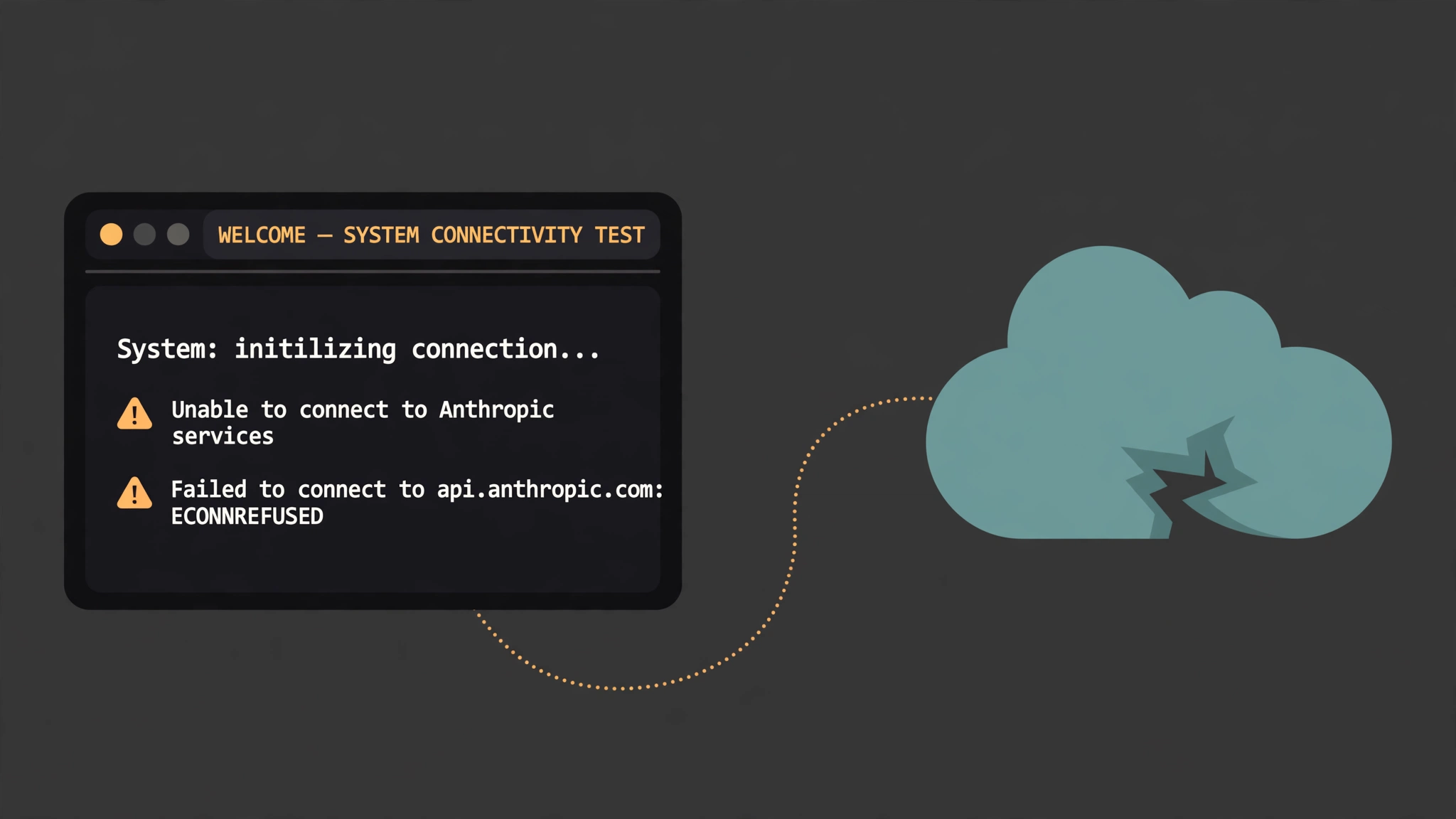
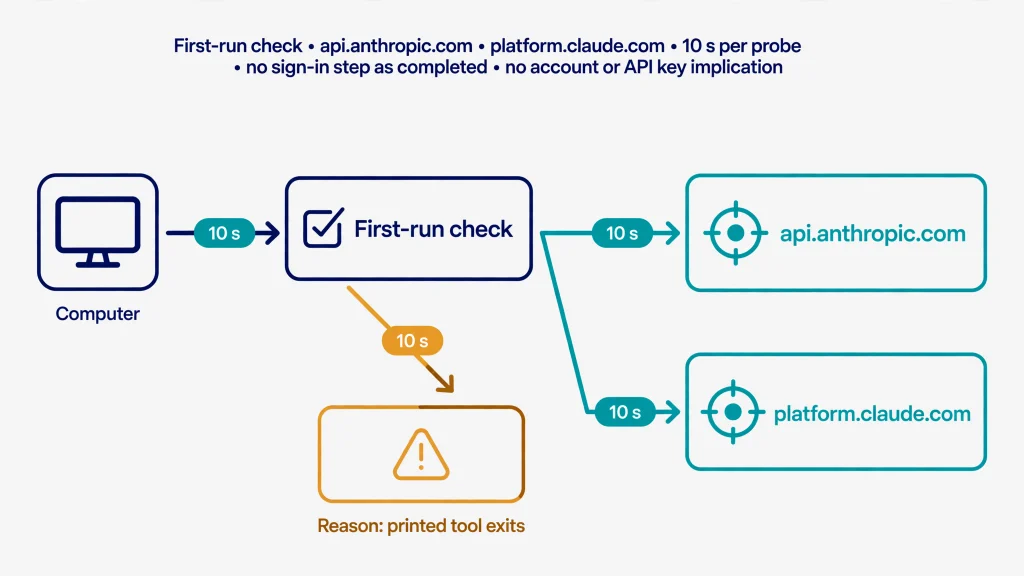
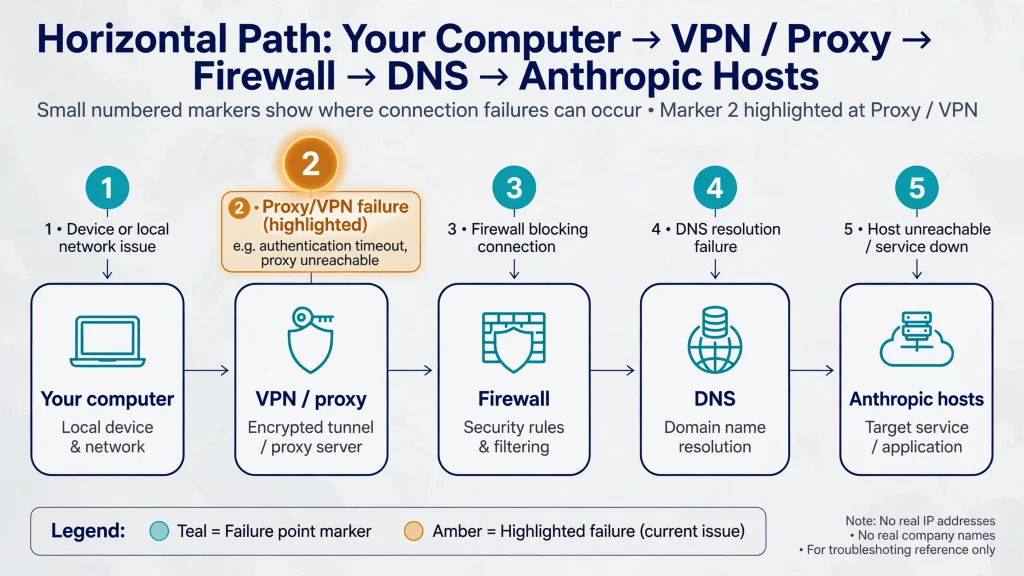
If you are seeing unable to connect to anthropic services, the message almost certainly came from Claude Code, Anthropic’s command-line coding tool, during its very first launch. Before it shows a sign-in step, Claude Code tests whether it can reach api.anthropic.com and platform.claude.com. Each test gets ten seconds, and if either one fails, the tool prints the reason and quits. Your fastest first move is to open the same terminal window and run curl -I https://api.anthropic.com. If that call fails, the problem sits somewhere between your computer and Anthropic: your connection, DNS, a proxy, a firewall, or regional availability. If it succeeds, look at Claude Code’s own settings, then at Anthropic’s status page.
Quick answer: Unable to connect to anthropic services means Claude Code’s startup connectivity check could not reach Anthropic’s servers. Check status.claude.com, test api.anthropic.com from your terminal, review VPN, proxy and firewall rules, remove any stale ANTHROPIC_BASE_URL setting, update Claude Code, and contact Anthropic support if it still fails.
This guide separates the Claude Code case from Claude web and app problems and from Anthropic API connection errors, because the three behave differently and need different fixes.
Table of Contents
What Does “Unable to Connect to Anthropic Services” Mean?
In plain language, the phrase unable to connect to anthropic services is a symptom rather than a diagnosis. It says that your machine tried to open a connection to Anthropic and did not get a usable answer in time. It does not say whether the fault is on your side, on Anthropic’s side, or somewhere in between, which is why a calm, ordered process beats random tweaking.
Where the unable to connect to anthropic services message comes from
Anthropic’s Claude Code error reference places this message in the first-run setup stage. The check runs before sign-in, uses the same proxy configuration as normal API requests, and shows the reason for the failure. The lines underneath typically name the host and a short code, such as a refused connection or a ten-second timeout.
That detail matters for the search results you may have seen. Many articles treat the error as a generic Claude outage. The documentation points instead at a startup test in one specific product. You can therefore skip theories about your Claude account, subscription or API key: none of those are involved yet, because you have not signed in.
How it differs from “Unable to connect to API”
Claude Code has a second, similar message. “Unable to connect to API” appears while you work, after setup, when a model request cannot get through. Claude Code retries transient failures up to ten times with growing delays before it shows that error, and the spinner counts attempts as it goes.
The startup check works differently: according to the reference, each probe gets ten seconds and the result is reported right away. If you see unable to connect to anthropic services, a single blocked or slow host is therefore enough to trigger it. The runtime message names the failure type in front of an error code, and Anthropic’s reference lists wordings such as “Connection refused,” “Can’t reach the API server,” “No internet route,” “Couldn’t connect through your proxy” and “Connection dropped.” Those labels are worth reading closely because they hint at where to look first.
What Claude web and app users see instead
If you use Claude in a browser or in the desktop and mobile apps, you are unlikely to see this exact sentence. I found no official Claude help article that uses the phrase unable to connect to anthropic services for chat. Web and app problems tend to appear as a blank page, a spinning loader or a generic network error, and the causes overlap with this guide: connection, VPN, extensions and blocked hosts. A later section covers them separately.
Is Anthropic Down Right Now? Checking Status When You Are Unable to Connect to Anthropic Services
Check status.claude.com, Anthropic’s official status page for Claude. It lists claude.ai, the Claude Console at platform.claude.com, the Claude API at api.anthropic.com, Claude Code and Claude Cowork as separate components, and you can subscribe to updates by email, text message, Slack, webhook or feed.
Because those components are tracked separately, a status check can end in four different ways:
- Anthropic-wide outage. Several components show an active incident. Waiting is the only fix, and retrying will not help.
- Partial degradation. Some requests fail or run slowly while others succeed. You may see intermittent errors rather than a constant failure.
- Product-specific or model-specific issue. For example, an incident can name a single model while everything else stays healthy.
- No incident at all. Anthropic looks healthy, which makes a local cause more likely.
I tried to read the live status page while preparing this article on November 5, 2026, but the page loads its content dynamically, so I could not capture a reliable live reading. Search results for Anthropic’s status page did surface model-level incidents, such as elevated errors for Claude Sonnet 5.5 posted on October 27, 2026. Do not treat any of that as today’s status. Open the page yourself and look at the component that matches the tool you use.
One caution: a clean status page does not rule out a problem on Anthropic’s side, because incidents are posted after Anthropic detects them. Third-party monitors sometimes flag trouble sooner, but they are less authoritative, so use them only as a hint.
For unable to connect to anthropic services specifically, an outage is the less common explanation. The check is a simple reachability test on two hosts, so a blocked route on your network is a more frequent cause than a failure on Anthropic’s servers.
Common Causes of Unable to Connect to Anthropic Services
The table below summarizes the usual suspects behind unable to connect to anthropic services, with the symptom that usually gives each one away.
| Possible cause | What you may notice | What to try |
|---|---|---|
| Anthropic incident | Status page shows an active incident; other Claude products also struggle | Wait, then retry; subscribe to status updates |
| No or unstable internet | Other sites also fail or load slowly | Fix the connection, switch network, retry |
| DNS failure | Error mentions the server cannot be found or reached | Test with another network or DNS resolver |
| VPN or proxy interference | Works when VPN is off, or only on a different network | Disconnect VPN, set proxy variables correctly |
| Firewall or security software | Works at home, fails at the office | Ask IT to allow api.anthropic.com and platform.claude.com |
| Stale ANTHROPIC_BASE_URL | “Connection refused” even though curl reaches the API | Unset the variable or restart the gateway it points to |
| TLS-inspecting proxy | Certificate wording in the error | Trust your organization’s root certificate |
| Regional availability | The message includes a note about supported countries | Check Anthropic’s supported-countries page |
| Outdated Claude Code | Behavior differs from the current documentation | Update to the latest version |
How to Fix Unable to Connect to Anthropic Services: 10 Steps
Work through these in order. Each step either clears unable to connect to anthropic services or tells you which branch to follow next.
1. Check Anthropic’s service status
Open status.claude.com and look at the Claude Code and Claude API components. If an incident is open, stop here and wait. If everything is green, continue.
2. Confirm your basic internet connection
Open two or three unrelated websites in a browser. If they are slow or failing, fix that first. If you are on a laptop that recently switched from office to home networking, restart the terminal as well, since long-running programs sometimes hold on to the old network state.
3. Test the exact hosts from the same terminal
Run this in the window where Claude Code fails:
curl -I https://api.anthropic.comOn Windows PowerShell, use curl.exe so the built-in Invoke-WebRequest alias does not answer instead. Anthropic’s reference recommends this test. Any HTTP response, even an error status such as 404, proves the route works, because the server answered. A timeout, refusal or “could not resolve host” result proves the problem lies in the path. Repeat the test for https://platform.claude.com, since the startup check needs both hosts.
4. Read the reason printed under the error
When unable to connect to anthropic services appears, the lines below the headline are the most informative part. A refusal suggests something is actively blocking the connection. A message about reaching the server or DNS points to resolution or routing. A timeout after ten seconds suggests traffic is being dropped silently, which is typical of firewalls. A proxy-related wording means Claude Code found a proxy and could not use it.
5. Check your VPN and proxy
Disconnect the VPN for one test. If unable to connect to anthropic services disappears with the VPN off, the VPN or its routing rules are the cause. If you are behind a company proxy, remember that a browser may use system proxy settings that a terminal program ignores. Claude Code reads standard variables such as HTTPS_PROXY and HTTP_PROXY, supports NO_PROXY, and does not support SOCKS proxies. Do not change a proxy your employer manages without asking the network administrator.
6. Check firewall and security software
Anthropic’s network documentation tells administrators to allow api.anthropic.com for API requests, claude.ai for claude.ai sign-in, and platform.claude.com for Console sign-in. Other hosts support specific features such as connectors and installers. If a firewall or endpoint-security product filters outbound traffic, ask your IT team to allow those hosts rather than disabling protection yourself.
7. Check for a leftover ANTHROPIC_BASE_URL
This variable tells Claude Code to send requests somewhere other than api.anthropic.com. Anthropic’s reference warns that a stale value pointing at a local proxy or gateway that is no longer running produces “Connection refused” even when curl reaches Anthropic normally. Print your environment, look for any variable starting with ANTHROPIC, and remove values you did not intend to set. A forgotten gateway address is a classic hidden cause of unable to connect to anthropic services.
8. Update or reinstall Claude Code
The startup check has changed across versions, including when it is skipped for certain gateway setups. Running an outdated build can therefore leave you following documentation that no longer matches your behavior. Update using the method you originally used, then start Claude Code again.
9. Confirm that Claude Code is available where you are
The error text itself reminds you that Claude Code may not be available in every country and links to Anthropic’s supported-countries page. If you are unsure, check that official page. This guide does not recommend routing around regional restrictions, and a VPN that makes a blocked region appear allowed is not a troubleshooting fix.
10. Contact Anthropic support with evidence
If steps 1 to 9 do not help, gather the full error text, your Claude Code version, your operating system, the result of the curl test and whether you use a proxy, VPN or gateway. Then use support.claude.com and describe that you see unable to connect to anthropic services at first launch. Details matter: “it doesn’t work” gives support nothing to investigate.
Unable to Connect to Anthropic Services in Claude Code
Because the message is a Claude Code message, this is the section that matters most for most readers. Everything here applies to Claude Code only, not to chat in the browser. If you are still deciding how you will pay for it, our Claude Code pricing guide covers plans and API usage, although billing plays no part in this startup check. Limit messages such as a session or weekly cap are a separate topic too; our explainer on Claude Max pricing and usage limits shows how those work.
Terminal and command-line installs
The startup check follows the same proxy setup as regular requests. That means a proxy that works for your browser but is not exported into your shell can still break the check. Set the proxy variables in the shell session that launches Claude Code, then try again. A missing export is one of the quieter ways to end up with unable to connect to anthropic services on a machine whose browser works perfectly.
If your organization decrypts HTTPS traffic with a custom certificate authority, Claude Code by default trusts both its bundled Mozilla certificate list and your operating system’s certificate store, according to Anthropic’s network guide. Corporate inspection tools generally work when their root certificate is installed in the system store. For a custom authority that is not in the system store, the documented route is the NODE_EXTRA_CA_CERTS variable. During normal use, certificate failures are reported immediately rather than retried, so they surface quickly.
Claude Code inside the desktop app
Anthropic’s reference says its runtime errors apply across the command line, the desktop app and cloud sessions, because all three wrap the same Claude Code program. Reports on GitHub show people hitting connection trouble in the desktop app’s Code and Cowork features while the claude.ai browser tab kept working. A working browser tab does not prove Claude Code’s traffic is getting through, because they use different paths and may follow different proxy rules. So whether you meet unable to connect to anthropic services in a terminal or a similar failure in the app, test Claude Code’s own path.
Gateways and custom base URLs
If you route Claude Code through an LLM gateway such as LiteLLM, a different problem appears. Several GitHub issue threads describe new users hitting unable to connect to anthropic services because the first-run check reached for api.anthropic.com even though a custom base URL was configured, and a proxy blocked that host. Anthropic’s reference says Claude Code skips the check in some arrangements, for example when a user’s own settings name a gateway with the forceLoginMethod and forceLoginGatewayUrl options on a machine that has no managed settings, and that this behavior changed in specific versions. If you run a gateway, update first, then read the current error reference for your configuration.
You may also find community advice to edit a hasCompletedOnboarding value in the ~/.claude.json file. That is a community-reported workaround from third-party threads, not a documented Anthropic fix, and it is not a way to get around regional availability. Prefer the documented options above.
Unable to Connect to Anthropic Services for Claude Web and App Users
If your problem is in the browser or app rather than in Claude Code, treat it as an ordinary website connectivity issue.
- Reload the page and restart the app.
- Open Claude in a private or incognito window. If it works there, an extension or stored site data is the likely cause.
- Disable ad blockers, privacy tools and script blockers temporarily, then re-enable them one at a time.
- Clear cache and cookies for Claude only, then sign in again.
- Turn the VPN off for a test, and try a second network such as a phone hotspot.
Anthropic’s network documentation adds a useful detail: the claude.ai website and the desktop app load their code from additional Anthropic content hosts, including assets-proxy.anthropic.com. If a filter allows claude.ai but blocks those hosts, you get a blank page instead of an error. So if the page never draws, ask your network administrator about those hosts before assuming Claude is down.
If you reach Claude through the browser extension, our Claude in Chrome guide explains how it works, and the browser checks above are still the place to start. The general browser steps above come from standard troubleshooting practice and third-party guides rather than a dedicated Anthropic help article, so use them as sensible checks rather than guaranteed fixes.
Anthropic API Users: When Your Code Cannot Connect
Developers sometimes search for unable to connect to anthropic services after an SDK or script fails. The wording is different there, but the same first question applies as with unable to connect to anthropic services in Claude Code: was any connection made at all?
- You receive an HTTP status code. Then the request reached Anthropic. Anthropic’s error documentation maps 401 to an authentication problem with your key, 403 to a permission problem, 429 to a rate limit, 500 to an internal error, 504 to a timeout and 529 to temporary overload. Those are not connectivity failures, so network changes will not help.
- You receive no status code. Typical causes are DNS failure, a refused connection, a proxy, a firewall or a TLS problem. Run the curl test from the same machine or container that runs your code, because a laptop test says little about a server in another network.
- Everything works locally but fails in production. Compare the environments: proxy variables, egress rules, container networking and any ANTHROPIC_BASE_URL setting.
Every API response carries a request-id header, and Anthropic asks you to include it when you contact support about a specific request. Never paste your API key into a support message, a public forum or a debugging website; share the request ID and a redacted code sample instead.
Troubleshooting Decision Tree for Unable to Connect to Anthropic Services
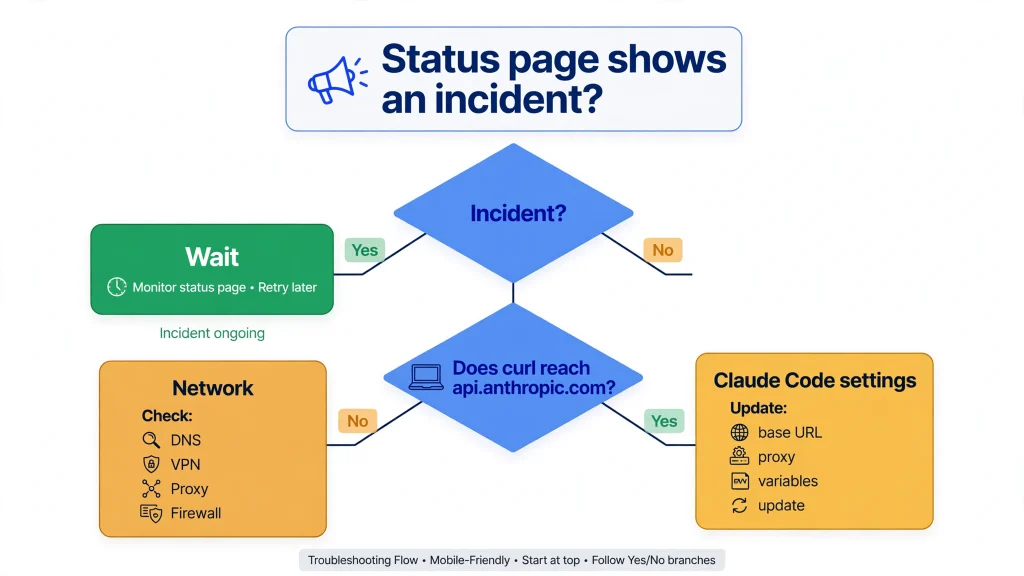
Use this as a quick sorting guide for unable to connect to anthropic services. These are practical inferences from Anthropic’s documentation, not guarantees.
- Status page shows an incident on the matching component → Anthropic-side problem; wait and retry later.
- Works on another network (for example a phone hotspot) → your local network, VPN, DNS or firewall is the likely cause.
- Works with the VPN off → VPN routing or its security filter is the likely cause.
- Curl to api.anthropic.com works but Claude Code fails → Claude Code configuration: proxy variables not exported, ANTHROPIC_BASE_URL, certificates or an outdated version.
- Curl fails to resolve the host → DNS problem.
- Curl times out or is refused → firewall, proxy or routing.
- Claude in the browser works but Claude Code fails → investigate Claude Code and environment-specific settings; browser success does not prove the terminal path works.
- API returns an HTTP status code → not a network problem; read the code.
- Only one browser fails → extensions, cache or cookies in that browser.
Quick Fixes vs. Advanced Troubleshooting
Quick fixes for unable to connect to anthropic services
If you simply want to start Claude Code or use Claude without becoming a networking expert, start here:
- Check status.claude.com.
- Restart the terminal, app or browser.
- Switch networks, or turn off your VPN for one test.
- Update Claude Code.
- Try a private window if the problem is in the browser.
Advanced troubleshooting for unable to connect to anthropic services
These steps apply to command-line, proxy, DNS and developer-tool environments. Ordinary Claude users do not need them.
- Run curl or an equivalent against api.anthropic.com and platform.claude.com from the failing process environment.
- Resolve the hostnames with a DNS tool and compare results on a second network.
- Set HTTPS_PROXY, HTTP_PROXY and NO_PROXY in the shell that launches Claude Code. Remember that SOCKS is not supported, and for proxies requiring NTLM or Kerberos authentication Anthropic suggests considering a gateway service that supports them.
- Avoid hardcoding proxy passwords in scripts; use environment variables or secure credential storage, as the documentation advises.
- Use NODE_EXTRA_CA_CERTS for a custom certificate authority, and check the debug options described in the current Claude Code documentation for more detail.
- Allowlist the documented hosts, and for IP-based firewall rules consult Anthropic’s published API IP address list.
What Not to Do When You See Unable to Connect to Anthropic Services
A connectivity error is an easy moment to make a risky decision. Avoid these:
- Do not share your API key. Never post it publicly or paste it into unfamiliar websites or chat bots.
- Do not run “Claude fix” scripts from strangers. The documented remedies are settings and network changes, not third-party downloads, and an unknown installer or script can steal credentials.
- Do not switch off security software permanently. If a firewall is the cause, ask IT for a narrow allow rule.
- Do not trust support offers in social media replies or direct messages. Use support.claude.com and the official status page.
- Do not use a VPN to disguise your region. It is not a troubleshooting fix, and the error message itself sends you to Anthropic’s supported-countries page instead.
- Do not edit config files blindly. Back up a file before changing it, and prefer documented settings.
When Should You Contact Anthropic Support About Unable to Connect to Anthropic Services?
Contact support when the status page shows no incident, the curl test succeeds, you have updated Claude Code, and the error persists. Also contact them if the problem began suddenly with no network or software change on your side. Include the exact text, version, operating system, network type and test results. If you are unsure which Anthropic site does what, our overview of where to find every official Claude resource explains which address is which. Administrators should check proxy and allowlist rules first, because many corporate blocks sit outside Anthropic’s control.
Frequently Asked Questions
What does “unable to connect to anthropic services” mean?
It means Claude Code’s first-run check could not reach api.anthropic.com or platform.claude.com within ten seconds, so it printed the reason and exited. The cause can be your network, a proxy, a firewall, regional availability or, less often, an Anthropic incident.
Is Anthropic down when I get unable to connect to anthropic services?
Possibly, but not usually. Check status.claude.com first. If the matching component is healthy, a local cause is more likely, especially a VPN, proxy or firewall.
Why does Claude Code show unable to connect to anthropic services before I can sign in?
The connectivity check runs before the sign-in step. Because you have not authenticated yet, your account, plan and API key are not the cause.
Can a VPN cause unable to connect to anthropic services?
Yes, a VPN can alter routing or filter traffic and block the required hosts. Disconnect it for one test. If the error disappears, adjust the VPN rules or ask your administrator for an exception.
Can browser extensions cause Claude connection problems?
For Claude on the web, yes: ad blockers and privacy tools can interfere with page loading. A private window is a fast test. Extensions do not affect Claude Code in a terminal, which is why this error is not usually caused by them.
Why does Claude work on one network but not another?
Different networks have different DNS, proxies, firewalls and routing. If the problem disappears on a hotspot, something on the original network, such as a filter or corporate proxy, is blocking the required hosts.
Why can’t my Anthropic API connect?
First check whether you get an HTTP status code, exactly as you would when diagnosing unable to connect to anthropic services. If you do, read the code. If you get none, test connectivity from the machine that runs your code and review proxies, firewall egress rules, DNS and any custom base URL.
Does unable to connect to anthropic services mean my API key is wrong?
No. A bad key usually gets an HTTP response such as 401, which means the request arrived. This error means no usable connection was made.
When should I contact Anthropic support?
When status looks healthy, the curl test works, Claude Code is up to date and the error continues. Send the full error text, version, operating system and test results, and never include a secret key.
Final Thoughts
Unable to connect to anthropic services looks alarming, but it is rarely mysterious once you know it is a startup reachability test. Check status, test the two hosts with curl, and compare networks. Those three moves separate an Anthropic-side incident from a local blocker in a few minutes, and they give support something concrete if you need to escalate. Remember that no fix works for everyone, so keep notes on what you changed.
Sources and References
- Claude Code Docs, Error reference: https://code.claude.com/docs/en/errors
- Claude Code Docs, Enterprise network configuration (current version, French language page consulted): https://code.claude.com/docs/fr/network-config.md
- Claude Code Docs, network configuration (English page, older text consulted): https://docs.anthropic.com/en/docs/claude-code/network-config
- Claude Platform Docs, API errors: https://platform.claude.com/docs/en/api/errors
- Claude Status, official status page and incident history: https://status.claude.com/history
- Claude Status, incident “Elevated errors for Claude Sonnet 5.5”: https://status.claude.com/incidents/lqhknfdjrcst
- Anthropic Claude Code GitHub issues (community reports): https://github.com/anthropics/claude-code/issues/26935 and https://github.com/anthropics/claude-code/issues/38099
- Claude Support: https://support.claude.com