
Claude Docs is the name people use for the official documentation Anthropic publishes about Claude, and in 2026 it is also the name of a separate feature inside Claude for writing shared documents. Those two meanings now sit side by side, and mixing them up sends plenty of readers to the wrong page. This guide pulls them apart, shows where each official resource lives today, and explains how to use Claude Docs whether you are opening Claude for the first time or wiring it into an application.
Every address, model name and price below was checked against Anthropic’s own pages on November 2, 2026. Anthropic revises its documentation often, so confirm anything time-sensitive on the page itself before you build on it.
Quick answer: The developer-facing Claude Docs live at platform.claude.com/docs. Everyday product help lives in the Claude Help Center at support.claude.com. Claude Code has its own documentation at code.claude.com/docs. The Claude Docs writing feature lives inside Claude itself. The documentation sites can be read without an account.
Table of Contents
What Are Claude Docs?
The short answer is that Claude Docs is a label covering more than one thing. Three meanings matter, and the rest of this article says which one applies whenever the difference changes your next step.
Claude Docs as the developer documentation
When a developer says they are checking Claude Docs, they usually mean the Claude Platform Docs site, which explains how to build with the Claude API. Its home page opens with a “Start building with Claude” headline and splits the material into two paths: Messages, for direct model access where you manage every turn yourself, and Managed Agents, for hosted agent infrastructure. Anthropic’s own Help Center has used the name Claude Docs when pointing people to its API documentation, so this usage is more than community shorthand.
Claude Docs as an in-app writing feature
Separately, Claude Docs is a feature of Claude that lets you draft living documents alongside the people you work with. Ask for a doc in any conversation, begin your request with /docs, or choose a Docs template from the Artifacts tab, and Claude drafts on screen, asks a few questions first and leaves comments explaining its choices. A doc can have several tabs, is stored in your Artifacts tab, can be shared by link, and exports to Word, PDF, Markdown or Google Docs. That makes this version of Claude Docs a product feature rather than documentation about a product, which is why it deserves its own place in any honest explainer.
Claude Docs as shorthand for the wider documentation set
Many people also use Claude Docs loosely for everything Anthropic publishes to explain Claude: the developer site, the Help Center, Claude Code’s documentation and the release notes. That broad reading is fine in conversation, but it becomes a problem when you search for a specific answer, because each resource answers a different kind of question.
What Is Anthropic Claude?
Claude is a family of large language models built by Anthropic, a public benefit corporation whose stated mission is to help the world get safely through the transition to transformative AI. You can talk to Claude in the Claude apps and on the web, build with it through the Claude API, or let it work inside your codebase through Claude Code.
According to the current models overview, the lineup has four named models: Claude Fable 5.1, Claude Opus 5.5, Claude Sonnet 5.5 and Claude Haiku 5.5. If you want a plain-English primer on the technology underneath any chat assistant, our guide to how ChatGPT works explains tokens and language models in terms that carry over to Claude. Claude Docs assumes you already know what you want to do with Claude, so this section simply establishes what the documentation describes.
Where Can You Find the Official Claude Documentation?
Seven official places cover almost everything. Several older addresses still circulate in tutorials and screenshots, so the list below gives today’s destinations and notes the old addresses that now redirect.
- Claude Platform Docs: platform.claude.com/docs/en/home. The old docs.anthropic.com address redirects here. This is the main home of developer-focused Claude Docs.
- API reference: platform.claude.com/docs/en/api/overview. The old docs.anthropic.com/en/api address lands on this page.
- Claude Help Center: support.claude.com. The old support.anthropic.com address redirects here.
- Claude Code documentation: code.claude.com/docs/en/overview. The old docs.anthropic.com/en/docs/claude-code/overview path now ends up here.
- Claude Console: platform.claude.com. The old console.anthropic.com address redirects here.
- Release notes: platform.claude.com/docs/en/release-notes/overview for the API, SDKs and Console, with app release notes kept in the Help Center.
- The Claude Docs guide in the Help Center: Get started with Claude Docs, which covers the in-app writing feature.
Anthropic’s corporate site, anthropic.com, sits alongside these. It carries company news, model announcements and system cards, but it is not where you look up an API parameter.
You do not need an API key or a developer account to read any of the documentation pages above. An account only matters when you want to run requests, open the Console, or use the in-app Claude Docs feature.
How Is the Claude Documentation Website Organized?
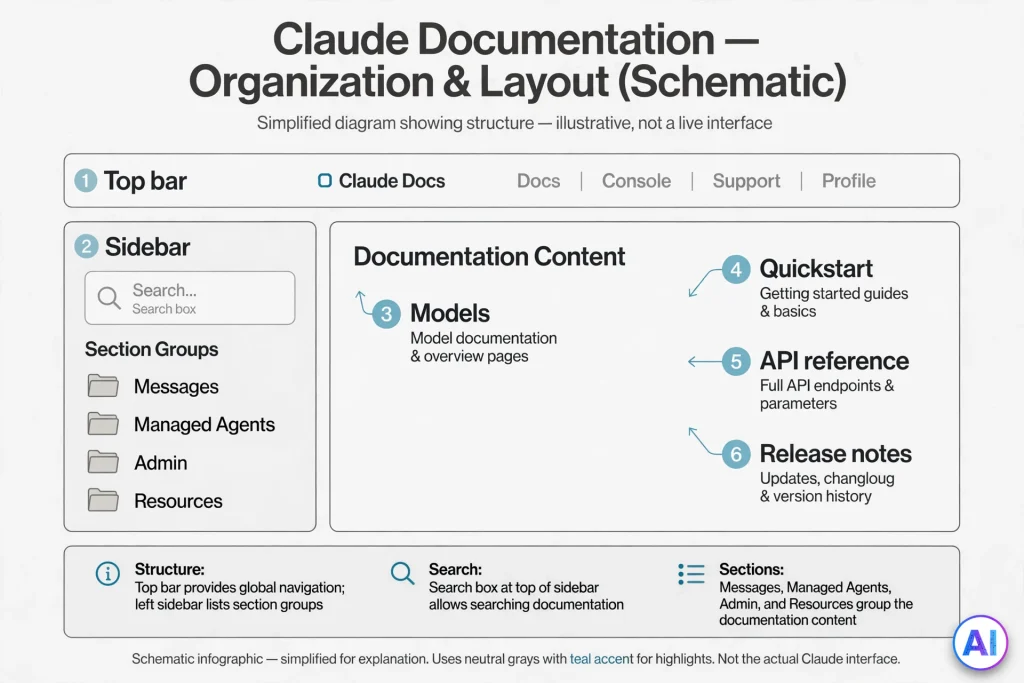
The Claude Platform Docs site follows a consistent layout once you know it. A top bar offers Messages, Managed Agents, Admin and Resources, plus links to the API reference, the Console and log-in. A search box opens with Ctrl K or ⌘K. Most pages carry a “Copy page” button, which is handy for pasting documentation into a chat with Claude.
The left sidebar groups pages by job: First steps, Building with Claude, Model capabilities, Tools, Tool infrastructure, Context management, Working with files, Skills, MCP, OpenTelemetry and Claude on cloud platforms. The home page adds a “From idea to production” journey with four stages: Get started, Build, Evaluate and ship, and Operate. The Resources section on the home page (headed “Keep learning”) links to courses, a cookbook of code samples, deployable quickstart apps, the “What’s new” release notes and Claude Code.
Claude Help Center vs. Claude Developer Docs
The cleanest rule of thumb is this: if the answer involves clicking in an app, look in the Help Center; if it involves writing code or sending HTTP requests, look in the developer Claude Docs.
The Help Center is organized into collections: Claude, Pro, Max and Ultra plans, Team and Enterprise plans, identity management (SSO, JIT, SCIM), Claude Cowork, Claude Code, Claude Desktop, Claude mobile apps, Claude API and Console, Connectors, Claude in Chrome, Claude for Education, Privacy and legal, Safeguards and Amazon Bedrock. It is written for people using Claude, so expect screenshots, settings paths and billing answers.
The developer Claude Docs are written for people building with Claude. They explain endpoints, headers, model identifiers, tool schemas and error codes. The two overlap in one spot: the Help Center’s Claude API and Console collection covers keys, usage and billing screens, while the developer site explains what those keys do inside a request. When a question could live in either place, start in the Help Center for account tasks and in the developer site for anything that touches code.
Claude API Documentation Explained
The API reference describes a RESTful API served from api.anthropic.com. According to the API overview, the main endpoints are:
- Messages API (POST /v1/messages) for conversational requests.
- Message Batches API for large asynchronous jobs at a 50 percent cost reduction.
- Token Counting API for measuring a prompt before you send it.
- Models API (GET /v1/models) for listing available models and their details.
- Files API and Skills API for uploaded files and custom agent skills.
- Beta endpoints for Agents, Sessions and Environments, used with Claude Managed Agents.
Each request carries a handful of headers: an Authorization bearer token (or the legacy x-api-key header, which is still supported), an anthropic-version value, and a JSON content type. Keys that are not tied to one workspace also need an anthropic-workspace-id header. If you use an official SDK, it sets most of these for you.
One detail shows why you should read the page rather than copy an old snippet. The API overview currently gives a 2026 date as its example version value, the navigation lists a migration guide for that version, and yet other pages still show an earlier example value in raw HTTP samples. When examples disagree, open the Versions page in the API reference and follow it.
The overview also lists request size limits (128 MB for Messages, 256 MB for batches, 500 MB for the Files API) and explains how the same models are available through Amazon Bedrock, Claude Platform on AWS, Google Cloud and Microsoft Foundry.
Claude Models and Model Documentation
The Models overview in Claude Docs is the page to bookmark. It compares the four current models and lists the identifier you pass to the API.
| Model | API ID | How the docs position it | Relative speed |
|---|---|---|---|
| Claude Fable 5.1 | claude-fable-5-1 | Demanding reasoning and long-horizon agentic work | Slower |
| Claude Opus 5.5 | claude-opus-5-5 | Long-running agentic coding and knowledge work | Moderate |
| Claude Sonnet 5.5 | claude-sonnet-5-5 | Balance of speed and intelligence | Fast |
| Claude Haiku 5.5 | claude-haiku-5-5 | High-volume, latency-sensitive tasks such as classification and routing | Fastest |
The page states that all four accept text and image input and produce text output, with a 1M-token context window, 128K maximum output and a reliable knowledge cutoff of June 2026. Anthropic suggests starting with Claude Opus 5.5 for most workloads and moving to Claude Fable 5.1 when your own tests at higher effort still fall short.
Two habits make model documentation easier to use. First, open the individual model page, because each lists the platforms where that model is available. Second, query the Models API instead of hard-coding assumptions: it returns token limits and a capabilities object for every model. The Model IDs and versioning page explains how identifiers work, and the Model deprecations page shows lifecycle and retirement status.
How to Use Claude Docs as a Beginner
You do not need to read everything. Follow these ten steps and you will cover the ground that matters.
- Open the site. Go to platform.claude.com/docs. Typing the older docs.anthropic.com address works too, because it redirects.
- Learn the navigation. Use the top bar for the big sections and the left sidebar for individual pages. Press Ctrl K (⌘K on a Mac) to search.
- Find model information. Open Models overview from the sidebar or the home page’s “Choose a model” link.
- Reach the API documentation. Select “API reference” in the top bar, then start at the overview page.
- Read the quickstart. Open “Get started with Claude.” It lists prerequisites, then walks through setting a key, installing an SDK and running a first call, with tabs for several languages.
- Locate authentication guidance. Read “Get your API key” and “Authentication” under First steps.
- Explore prompting advice. Under Evaluate and ship, open “Prompting best practices.”
- Understand tool use and integrations. Open the Tools section, then the MCP pages.
- Find Claude Code. Use the Claude Code card in the home page’s Resources section, which leads to code.claude.com/docs.
- Check what changed. Open “What’s new” in the same Resources section to reach the release notes.
Here are six real questions you can answer with Claude Docs in a few minutes:
- Which model should I start with? The Models overview gives a starting recommendation and a comparison table.
- Why did my request return a 401? The API errors page maps each status code to a cause.
- What will a million tokens cost? The Pricing page lists input and output rates per model.
- How do I let Claude call my own function? The tool use overview shows a complete round trip.
- Can I export something I wrote with Claude? The Help Center’s Claude Docs guide lists Word, PDF, Markdown and Google Docs.
- How do I install Claude Code? The Claude Code overview shows install commands for each operating system.
Claude API Quickstart Guide
The quickstart in Claude Docs is short. Its prerequisites are a Claude Console account and an API key. Then the Python path goes like this: export the key as the ANTHROPIC_API_KEY environment variable, create a project folder with a virtual environment, install the SDK with pip install anthropic, save a short script and run it. Tabs at the top of the step list switch the same walkthrough into cURL, the command-line client, TypeScript, C#, Go, Java, PHP or Ruby.
Below is the short example currently shown on the Claude Platform Docs home page, reproduced here as a minimal illustration. It was checked on November 2, 2026; always compare it with the live page before you rely on it.
python
import anthropic

client = anthropic.Anthropic()

message = client.messages.create(
    model="claude-opus-5-5",
    max_tokens=1024,
    messages=[
        {
            "role": "user",
            "content": "Hello, Claude",
        }
    ],
)
for block in message.content:
    if block.type == "text":
        print(block.text)
The SDK reads your key from the environment, so nothing secret appears in the code. After the first call succeeds, the quickstart points to the Messages API guide, the Models overview, the Features overview and the Authentication page as next steps.
Understanding Claude API Requests and Responses
Three fields do most of the work in a request: model (the identifier from the Models overview), max_tokens (a ceiling on output length) and messages (a list of turns, each with a role and content). The Messages approach is deliberately hands-on. The developer site describes it as direct model access where you construct each turn and manage conversation state yourself, which means you resend earlier turns whenever you want Claude to remember them.
The response is not a single string. It contains a list of content blocks, which is why the example loops over message.content and prints only blocks whose type is text. Other block types appear when you use tools or thinking. Responses also include usage figures for input and output tokens, and every response carries a request-id header. Log that identifier. The errors page asks you to include it when you contact support about a specific request.
For multi-turn conversations, system prompts and stop reasons, the docs point you to “Using the Messages API” and “Stop reasons and fallback” in the Building with Claude group.
Claude Prompt Engineering Documentation
Prompting guidance in Claude Docs is split between a general page and model-specific notes. The Models overview links to “Prompting best practices” for both general and model-specific advice, and it adds a useful nudge: if you want shorter replies, change your prompt to ask for the length you want rather than expecting a parameter to do it.
Related pages live nearby. “Effort” explains how much reasoning a model applies, and the models table shows adaptive thinking with a default effort level for each model. The Evaluate and ship stage links to test development, batch testing and guardrail guidance, which matter once a prompt moves from experiment to product.
Prompt writing also has habits that transfer between assistants, such as stating the task, supplying context and defining the output format. Our ChatGPT prompts guide walks through that structure with templates. Use it for the fundamentals, then rely on the official Claude documentation for anything specific to Claude’s models.
Claude Tool Use and Function Calling Documentation
Anthropic’s documentation uses “tool use” for what other vendors often call function calling. Claude decides, from your request and the tool descriptions, whether to call a tool. It then returns a structured call, and either your application runs it (client tools) or Anthropic’s servers run it (server tools).
The tool use overview walks through a full round trip with a weather lookup: you define a tool with a name, description and input schema, Claude replies with a tool_use block and a stop reason of tool_use, you run the function, and you send the result back in a tool_result block. The same section covers parallel calls, a tool runner that automates the loop in the SDKs, and a strict option that makes tool calls match your schema.
Server tools such as web search, web fetch and code execution run without handler code on your side. Pricing is spelled out: web search costs $10 per 1,000 searches plus token costs, while web fetch adds no extra charge beyond tokens.
Model-specific limits are documented too. According to the errors page, Claude Opus 5.5, Claude Sonnet 5.5 and Claude Fable 5.1 reject forced tool choices and return a 400 error, while automatic and none settings are accepted. That is the kind of detail you only learn by reading the page.
Claude Integrations and Supported Capabilities
The Features overview is the map of everything Claude can do through the API. The sidebar groups the capabilities: streaming, batch processing, structured outputs, citations, vision and PDF support, a Files API, context windows and prompt caching, Agent Skills, and the Model Context Protocol through remote MCP servers and an MCP connector.
Deployment options are documented as well. Claude is available through the first-party API and through Amazon Bedrock, Claude Platform on AWS, Google Cloud and Microsoft Foundry. The API overview warns that feature availability varies by platform, so check the platform’s own page before assuming parity.
Integrations on the consumer side belong to the Help Center. Its Connectors collection explains how Claude links to the tools your team already uses, while the Claude Docs writing feature can draw on connected apps, files, memory and projects when it drafts.
Claude Code Documentation and Developer Resources
Claude Code is Anthropic’s agentic coding tool, and its documentation lives on a separate site, code.claude.com/docs. It is not the same thing as Claude Docs, although people often blur the two.
The overview describes Claude Code as a tool that reads your codebase, edits files and runs commands. It runs in the terminal, in VS Code and JetBrains, in a desktop app and on the web. Most surfaces need a Claude subscription or a Console account. The terminal install is a one-line command for macOS, Linux and Windows, followed by running claude inside a project.
Beyond installation, the site covers quickstarts, common workflows, CLAUDE.md files for persistent instructions, hooks, skills, subagents, MCP connections, GitHub Actions and GitLab CI/CD, the Agent SDK and a changelog. The site also publishes a documentation index at code.claude.com/docs/llms.txt, which is useful when you want a machine-readable list of pages.
Claude SDKs and Developer Tools
Anthropic maintains official client SDKs for Python, TypeScript, C#, Go, Java, PHP and Ruby. The API overview lists their benefits: automatic header management, type-safe requests and responses, built-in retries, streaming support and timeout handling. The errors page adds that the SDK retries transient failures twice by default, honoring the retry-after header when one is sent.
Other tools sit around the SDKs. A command-line client called ant appears in the quickstart’s CLI tab and in the release notes. The Console includes a playground for trying requests in the browser. The home page’s Resources section links to a cookbook of code patterns, a GitHub repository of deployable quickstart apps and Claude Academy courses. Note that the older Workbench in the Console was scheduled to end access on August 17, 2026, so ignore tutorials that still send you there.
Claude API Authentication and API Keys
The Authentication page lists three methods: API keys, Workload Identity Federation and App Attest. API keys suit local development, scripts and servers where you control secret storage. Workload Identity Federation exchanges an identity token from your cloud or CI provider for a short-lived credential, so no static secret needs distributing. App Attest is for iOS and macOS apps that call the API directly.
For keys, the docs describe three types: personal keys, service account keys and legacy workspace keys. Personal keys act as you, service account keys act as a shared workload identity, and the docs recommend identity-backed keys over workspace keys for new work.
Creating a key happens on the API keys page of the Console. You choose an expiration (3 hours, 1 day, 7 days, 30 days, a custom duration, or never) and, optionally, a workspace. Store the key in a secrets manager, set ANTHROPIC_API_KEY for the SDK, rotate it periodically and disable or delete any key you suspect has leaked. An expired key returns a 401 authentication error and cannot be reactivated.
Claude API Pricing and Usage Information
Pricing sits on its own page, and Anthropic points readers to claude.com/pricing for the most current figures. As of November 2, 2026, the Pricing page lists these base rates per million tokens:
| Model | Input | Output |
|---|---|---|
| Claude Fable 5.1 | $10 | $50 |
| Claude Opus 5.5 | $4 | $20 |
| Claude Sonnet 5.5 | $2 | $10 |
| Claude Haiku 5.5 | From $0.10 | From $0.50 |
Haiku 5.5 is priced by prompt length, so prompts over 100,000 tokens cost more. The same page explains prompt caching multipliers, a 50 percent batch discount, a 1.1x multiplier for US-only inference on supported models, and a note that Claude 4.7 and later models use a tokenizer that produces roughly 30 percent more tokens for the same text. Because of that last point, count tokens with the model you plan to use before estimating a budget.
Usage limits are documented separately. Rate limits are organized into tiers with spend limits and request and token limits per minute; the pricing page names the Start, Build and Scale tiers, and you can see your own limits in the Console. Quote prices only with a date, because they change.
Claude Docs for Developers
This section turns the pages above into a working order of operations, so you can read Claude Docs once and then ship.
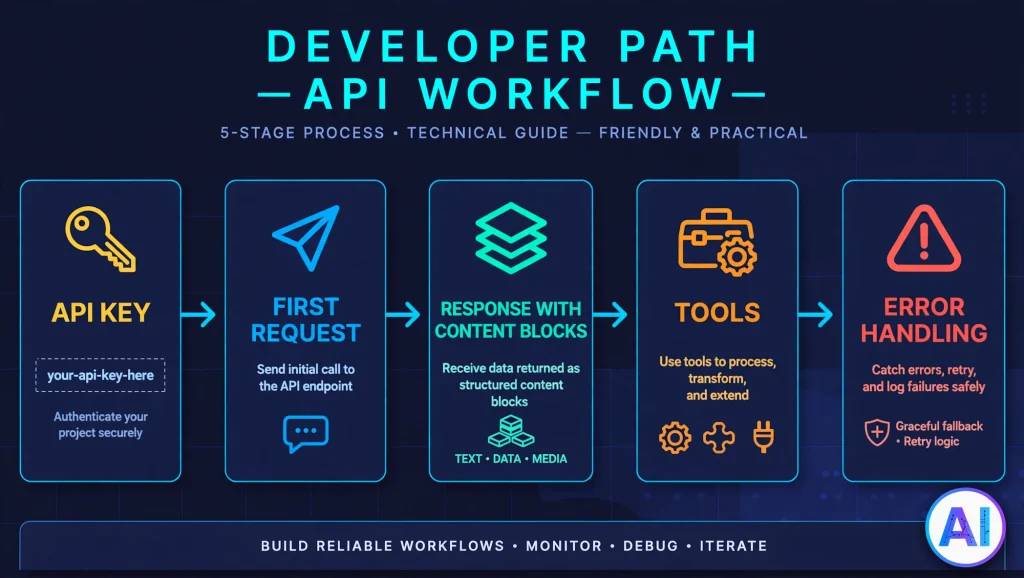
Set up and secure access. Create a personal key for experiments and a service account key for anything shared, give each an expiration, and keep both out of source control. Production workloads on a cloud platform should look at Workload Identity Federation instead of long-lived secrets.
Make a first request. Run the quickstart exactly as written, then change one thing at a time: the prompt, then max_tokens, then the model identifier.
Choose models deliberately. Take identifiers from the Models overview rather than from blog posts, and check each model’s page for platform availability and for behavior changes noted in its migration guide.
Design prompts and system instructions. Put stable instructions in the system prompt, test them with the evaluation pages, and revisit them after any model change.
Handle streaming. The errors page recommends streaming or batches for long-running requests, especially those running past ten minutes, and warns that a streamed response can fail after a 200 status, so mid-stream error events need their own handling.
Add tools carefully. Start with one client tool, confirm the round trip, then add server tools or MCP connections.
Plan for errors. The documented set includes 400 invalid request, 401 authentication, 402 billing, 403 permission, 404 not found, 413 request too large, 429 rate limit, 500 API error, 504 timeout and 529 overloaded. Retry with exponential backoff for transient failures and log the request ID.
Watch limits and cost. Check rate-limit tiers, count tokens before large jobs and consider batches for work that can wait.
Claude Documentation for Businesses and Teams
Teams read Claude Docs differently from individual developers because their questions are about administration, data handling and rollout. The Help Center’s Team and Enterprise plans collection covers workspace setup, seats and organization administration, with a separate collection for single sign-on, just-in-time provisioning and SCIM. Privacy and legal and Safeguards collections explain data handling and safety practices, and Anthropic’s trust site at trust.anthropic.com holds security and compliance material.
The in-app Claude Docs feature has its own admin story. Owners on Team and Enterprise plans can turn it on or off under Organization settings, in the Artifacts section, and Enterprise owners can limit it to groups through custom roles. Sharing rules matter too: on Team and Enterprise plans, docs cannot be shared outside the organization by link or email invitation, and the Help Center currently lists a known limitation that activity inside a doc is not yet recorded in the Compliance API. Read that limitation before you promise anything to your compliance team.
For API deployments, the Console’s workspaces and spend limits help separate environments and control cost, and cloud-platform options let companies keep billing and access control inside AWS, Google Cloud or Azure. If your team is still deciding which assistants are safe for work, our plain-language guide to privacy, security and accuracy lists questions worth asking of any AI vendor, even though it was written about ChatGPT.
Common Claude Documentation Problems and Solutions
- A link from an old tutorial seems dead. Anthropic has moved several sites. Replace docs.anthropic.com with platform.claude.com/docs, console.anthropic.com with platform.claude.com, and support.anthropic.com with support.claude.com.
- You searched for Claude Docs and found something unrelated. Decide which meaning you need (developer documentation, the in-app feature or the wider set) and add a clarifying word such as API, Help Center or “doc editor.”
- A code sample fails. Check the model identifier, the SDK version, your environment variable and the version header, in that order.
- Two pages show different example values. Treat the dedicated reference page, such as Versions, as the source of truth.
- A new model returns a 400 error on settings that used to work. The errors page documents model-specific rules about thinking, forced tool use and assistant prefill.
- You get a 429. It can mean a rate limit or a spend cap; the errors page explains how to tell them apart.
- A third-party article quotes different prices. Compare it with the Pricing page and its date.
- The page is in the wrong language. Use the language selector, since the documentation is published in several languages.
Tips for Finding Information in Claude Docs
- Search before browsing. Ctrl K or ⌘K is faster than expanding the sidebar.
- Use “Copy page” to paste a documentation page into a conversation with Claude and ask questions about it.
- Read the release notes before an upgrade, because breaking changes are listed there.
- Open the model’s own page when a general page seems vague.
- For Claude Code, fetch the documentation index (llms.txt) or the changelog.
- Use the Help Center search for account and billing questions, and the developer search for parameters.
- Note the date you checked anything involving prices or limits.
- If a page has a “Was this page helpful?” prompt, use it. Reporting confusing pages is how documentation improves.
Claude Documentation vs. Other AI Documentation
Many AI vendors separate everyday product help from developer documentation, and Claude Docs follows that pattern with three layers: the Help Center, the Platform Docs and the Claude Code docs. What stands out is how much is machine-friendly and release-driven. Pages carry copy buttons, the Claude Code site publishes a documentation index, and the release notes track model launches, API changes and Console updates in one dated stream.
Comparing vendors is mostly about fit. If you mainly use a chat assistant at work, the Help Center and in-app guides matter most, and our comparison of Gemini and ChatGPT shows how to weigh assistants by task rather than by brand. If you build software, compare each vendor’s quickstart, model pages and error references side by side, and check their own documentation directly, since every vendor reorganizes its sites. It is also worth knowing that the in-app Claude Docs feature has a rough counterpart in other assistants, such as the editing workspace covered in our ChatGPT Canvas guide, although the sharing, export and admin details differ.
How Does Claude Documentation Change With New Releases?
Quickly. The recent record shows the pace. Anthropic’s home page lists Claude Opus 5.5 on September 22, 2026, Claude Sonnet 5.5 on September 28 and Claude Haiku 5.5 on October 7, each with a system card. The developer release notes record API changes, SDK updates and Console changes, newest first, and the API reference now includes a migration guide for a new dated API version.
Addresses move as well, as the redirects in this guide show. The practical habit is simple: when you return to Claude Docs after a few weeks, check the release notes first, then the Models overview, then the pricing page. Treat model identifiers, prices and settings as facts with expiry dates.
Claude Docs Resources at a Glance
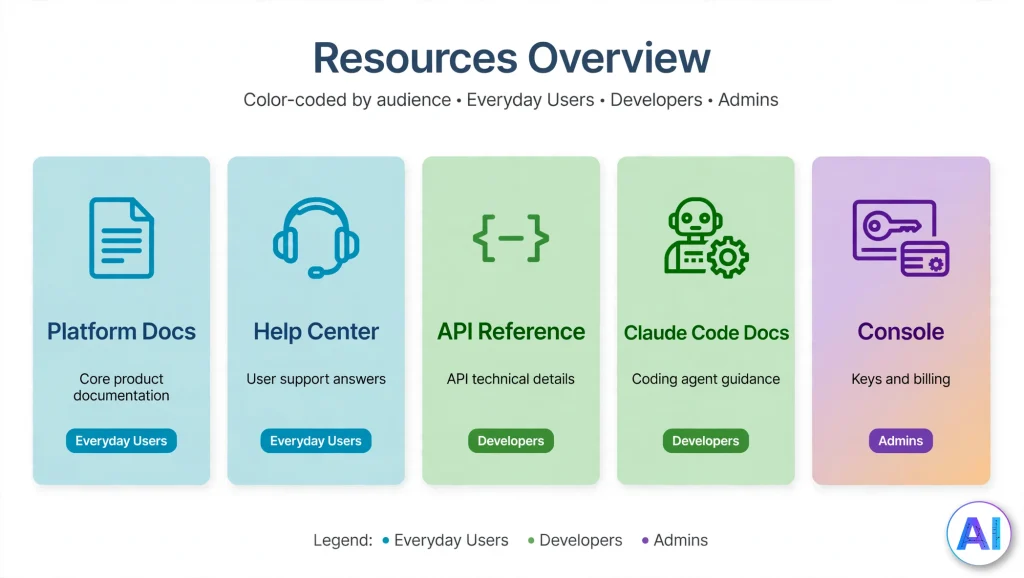
| Documentation Resource | Main Purpose | Best For | What Readers Can Find |
|---|---|---|---|
| Claude Docs (umbrella term) | Names the developer documentation, the in-app writing feature and, loosely, the wider set | Anyone starting a search | Pointers to the resources below; confirm which meaning you need |
| Claude Platform Docs | Explain how to build with the Claude API | Developers and technical teams | Quickstart, models, tool use, prompting, pricing, release notes |
| Claude Help Center | User support | Everyday Claude users and admins | Account, plan, billing, app and connector help, including the Claude Docs writing guide |
| Claude API Reference | API technical details | Developers | Endpoints, headers, parameters, errors, rate limits |
| Claude Code Docs | Coding assistant guidance | Developers | Installation, workflows, settings, MCP, hooks, CI integrations |
| Anthropic Console | API access and management | API users and admins | API keys, workspaces, billing, rate limits and a playground |
Conclusion
Claude Docs is easier to use once you stop treating it as one place. The developer documentation answers how to build, the Help Center answers how to use and administer, Claude Code’s site answers how to code with an agent, the Console is where keys and billing live, and the in-app Claude Docs feature is a tool for writing, not a manual. Start with the Models overview and the quickstart, keep the errors page and release notes within reach, and date-stamp any price or model name you copy.
If you remember one thing, make it this: verify before you depend. Open the official page, check the date and confirm that the model name, header or setting still exists. Do that and Claude Docs will save you far more time than it costs.
Frequently Asked Questions About Claude Docs
What are Claude Docs?
Claude Docs is the common name for Anthropic’s official documentation about Claude, mainly the developer site at platform.claude.com/docs. It is also the name of an in-app Claude feature for writing shared documents, and people sometimes use it loosely for the Help Center and Claude Code documentation as well.
Where can I find official Claude documentation?
Use platform.claude.com/docs for developer material, support.claude.com for product help, and code.claude.com/docs for Claude Code. Older docs.anthropic.com, support.anthropic.com and console.anthropic.com addresses redirect to these destinations.
Are Claude Docs free to access?
Reading the documentation sites costs nothing and does not require an account. Using Claude has costs of its own: API calls are billed by tokens, and the in-app Claude Docs feature counts toward your plan’s usage limits. Anthropic’s pricing page says new API users receive a small amount of free credit.
What is the difference between Claude Docs and the Claude Help Center?
The Help Center explains how to use and administer Claude apps, plans and accounts. The developer Claude Docs explain how to build with the API, including models, headers, tools and errors. Account questions belong in the Help Center; code questions belong in the developer site.
Where can I find Claude API documentation?
Open the API reference at platform.claude.com/docs/en/api/overview. It lists endpoints, authentication headers, SDKs, request limits, response headers, pagination and rate limits, and links to the Messages API reference and the quickstart.
Do I need an API key to read Claude Docs?
No. You can read the documentation pages without signing in. You need a Console account and an API key only when you want to send requests to the Claude API yourself.
Where can developers find Claude API examples?
The quickstart shows a first request in several languages, and the tool use pages include a full round trip with code tabs. The home page’s Resources section also links to a cookbook of code patterns and a repository of deployable quickstart applications.
What is the difference between Claude Docs and Claude Code Docs?
Claude Code Docs live at code.claude.com/docs and explain how to install and use Anthropic’s coding agent in a terminal, IDE, desktop app or browser. The developer Claude Docs explain the Claude API. Different tools, different sites.
How can I learn Claude API integration?
Work in this order: get a Console account and API key, run the quickstart, read the Messages API guide, add one tool, then study errors, rate limits and pricing. Anthropic also links free Claude Academy courses from the documentation.
How do I find the latest Claude model documentation?
Start with the Models overview, then open the page for the model you plan to use. Check the release notes for recent launches, and call the Models API if you want current identifiers and limits from code.
Sources and References
Official Anthropic pages consulted on November 2, 2026:
- Claude Platform Docs home (reached from docs.anthropic.com)
- API overview (reached from docs.anthropic.com/en/api)
- Get started with Claude
- Models overview
- Pricing
- Claude API errors
- Authentication
- Tool use with Claude
- Claude Platform release notes
- Claude Code overview (reached from docs.anthropic.com/en/docs/claude-code/overview)
- Claude Help Center (reached from support.anthropic.com)
- Get started with Claude Docs, Claude Help Center
- Claude Console (reached from console.anthropic.com)
- Anthropic