
In this article
Verified on November 4, 2026 against the project’s GitHub release pages, docs.claude-mem.ai and Anthropic’s Claude Code documentation. This project ships several releases a week, so treat version numbers and settings as a snapshot and confirm them before you install.
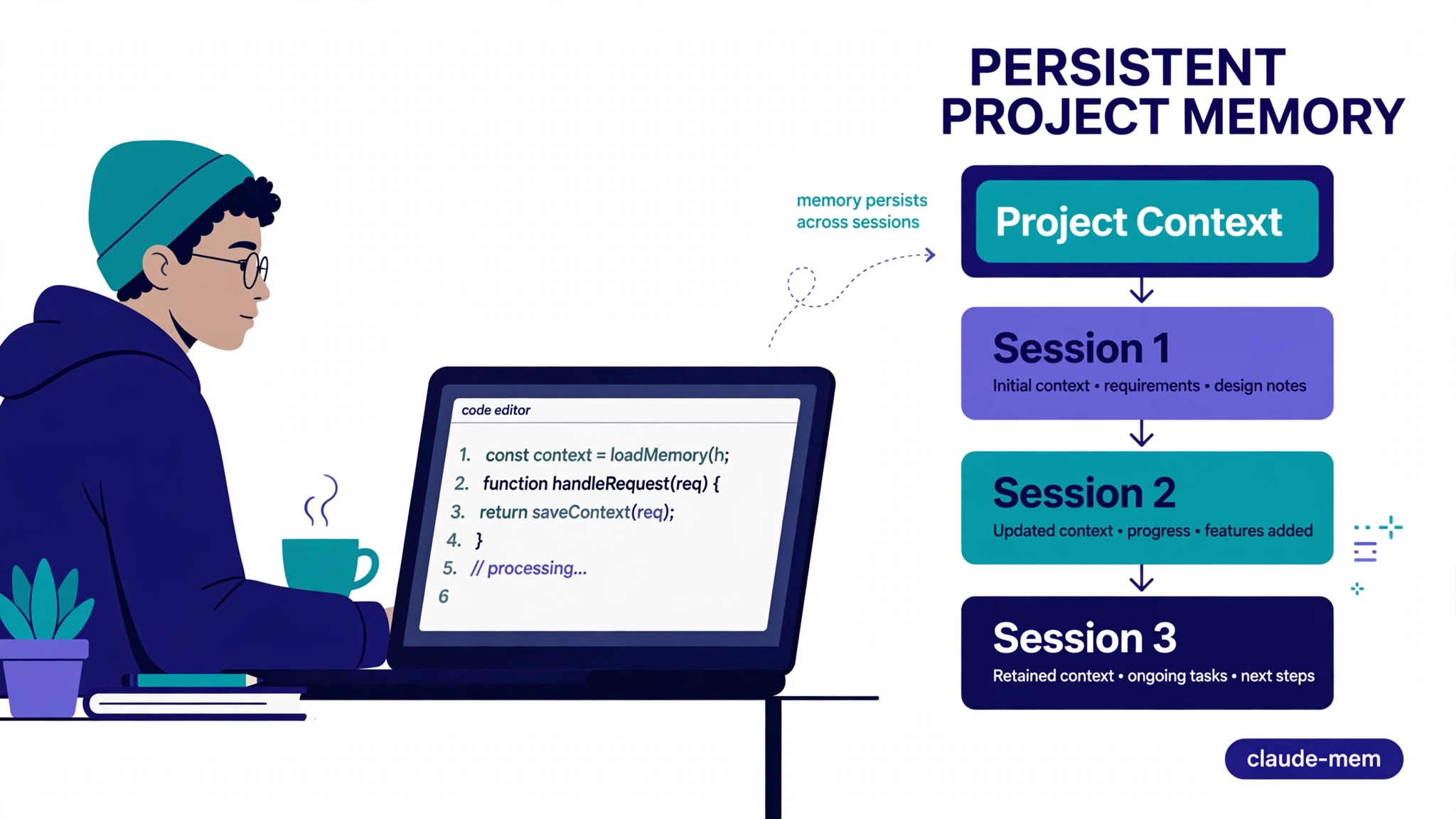
claude-mem is a third-party, open-source plugin that gives Claude Code a searchable long-term memory. It watches what Claude does during a coding session, asks a second model call to condense those events into short notes, stores the notes on your own machine, and hands a compact index of them to your next session. It is written for developers who keep returning to the same codebase and are tired of re-explaining it. This guide covers what claude-mem installs, how its pieces fit together, where it can go wrong, and what you should switch off before trusting it with proprietary code.
Table of Contents
What Is claude-mem and Who Created It?
claude-mem is a community project, not something Anthropic ships. The code lives in the public repository thedotmack/claude-mem, and write-ups from Augment Code and Hora de Codar both credit developer Alex Newman, who uses the handle @thedotmack, as its author and maintainer. An independent hands-on test from ComputingForGeeks lists the license as Apache-2.0, and the official documentation lives separately at docs.claude-mem.ai.
Two details help you avoid confusion. First, the word “Claude” in the name signals compatibility, not ownership; neither the repository pages nor Anthropic’s own memory documentation that I reviewed describe it as an Anthropic product. Second, the project has outgrown its name. Its GitHub description says it works with Claude Code, Codex, OpenCode and several other agents, and it added Antigravity CLI support in v13.10.0 while dropping its Gemini CLI integration. This article stays focused on the Claude Code integration.
On maintenance: the release feed is busy. The pages I checked show v15.2.1 on October 25, 2026 and v15.8.3 on November 2, 2026, the latter marked as the latest release at the time of checking. A project moving this fast gains fixes quickly, but it also changes behavior between versions, which matters for the privacy section below.
Why Do Developers Need Persistent Memory in Claude Code?
Every Claude Code session starts with an empty context window. Anthropic’s memory documentation says so plainly, and the cost shows up in ordinary work:
- Repeated explanations. You describe the migration plan, the naming conventions and the odd legacy module again on Monday, then again on Tuesday.
- Lost architectural decisions. Why did the team pick a queue over a cron job? That reasoning lived in a chat that is now gone.
- Forgotten debugging history. Claude retraces the same dead ends because it never learned you already ruled out the cache layer.
- Drifting preferences. Small corrections you gave last week, such as preferring one test runner over another, have to be repeated.
Persistent memory attacks this by keeping a record outside the conversation. Used well, it shortens the warm-up phase of each session. Used carelessly, it can feed Claude stale or wrong assumptions, so the record needs the same skepticism you would apply to an old wiki page. A memory tool supports human review; it does not replace it.
How Does claude-mem Work?
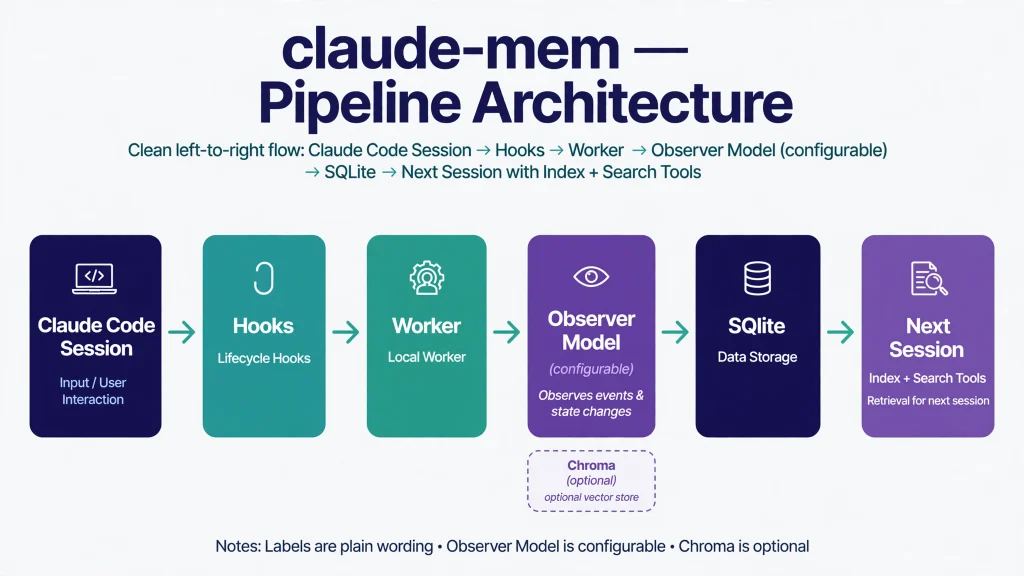
At its core, claude-mem is a capture, compress and retrieve loop built from five parts, according to the architecture overview: lifecycle hooks, a background worker service, a database, search tools and a browser viewer.
Step one: lifecycle hooks watch the session
Claude Code can run commands at fixed moments, called hooks. claude-mem registers hooks for session start, prompt submission, tool use, session stop and session end. Each one runs a small launcher named claude-mem that has to be on your PATH. When Claude reads a file, runs a shell command or edits code, the post-tool hook sends that event to the worker. A pre-read hook can also attach a file’s earlier history as context.
Step two: a worker turns raw events into notes
The worker is a local web service managed by Bun. It passes the events to an “observer” model, by default Claude Haiku 4.5 through the Claude Agent SDK, which writes short structured notes called observations. Each observation is typed, for example as a bugfix, feature, refactor, discovery, decision or change. When Claude stops, a summary hook produces a wrap-up of the request, what was completed and what was learned.
Step three: SQLite holds the memory, with optional vector search
Observations land in a SQLite database at ~/.claude-mem/claude-mem.db, searchable through SQLite’s FTS5 full-text engine. The docs describe Chroma as an optional extra for semantic search, and its troubleshooting page says that if Chroma fails, hybrid search degrades to FTS5 alone. In other words, you can lose the fuzzy matching and still keep keyword search.
Step four: the next session receives an index
On session start, the context hook injects recent observations, 50 by default, drawn from recent sessions in the same project. The injection is deliberately compact: most entries show only a title and token cost, while the newest few expand into full narratives. If Claude needs more, it can call three search tools in order: search for a cheap index, timeline for the surroundings of one hit, and get_observations for the full records. The project calls this progressive disclosure, and its purpose is to avoid dumping the whole history into the prompt. The Claude Code Skills guide on this site explains the skill mechanism that the bundled mem-search skill builds on.
Key Features of claude-mem
Every item below is taken from the current documentation or release notes, not from marketing copy.
Automatic capture of tool activity. Nothing needs to be saved by hand. The practical value is coverage of details no one would write down; the limitation is noise. A single run with many subagents can create hundreds of low-value observations, so the project added settings to skip subagent activity.
Typed, searchable observations. Notes are tagged with types and concepts such as gotcha or trade-off, and the viewer and search tools can filter on them. The limitation is that quality depends on the observer model’s judgment.
Three-layer search. The search, timeline and fetch sequence keeps token use down. It only helps if Claude actually uses it; the docs mention that Claude can recognize natural-language questions about past work and invoke the tools itself.
A local web viewer. The worker serves a live feed of observations with filters and a settings panel. It is the quickest way to see what claude-mem has stored.
Selectable observer providers. The default provider runs on your logged-in Claude plan, but the docs list Codex, Gemini, OpenRouter and any OpenAI-compatible endpoint as alternatives. The trade-off is that whichever model you pick reads your tool output.
Privacy controls. Content wrapped in <private> tags is stripped before storage, and an opt-in redaction feature masks recognized secret patterns. Both have limits, covered below.
Optional extras. Folder-level CLAUDE.md generation (off by default), local database snapshots (off by default), a Notion export and a paid hosted option called CMEM Pro with cloud sync. Treat each as a separate decision rather than part of the base install.
A file read gate. By default claude-mem blocks whole-file reads of code files of 32 KB or larger that already have observation history, steering Claude toward targeted lookups. It saves tokens, but it also changes how Claude behaves, so know that it exists and use CLAUDE_MEM_FILE_READ_GATE_ENABLED if it gets in your way.
claude-mem Installation Requirements
| Requirement | What the sources say |
|---|---|
| Operating systems | macOS, Linux and Windows are all covered by the troubleshooting docs, including a Windows-specific launcher path |
| Node.js | 20.0.0 or higher in the official docs; two independent write-ups (DEV Community, ComputingForGeeks) say 20.12 is the real floor |
| Claude Code | Version 2.1.139 or later, because older versions ignore the hook arguments the launcher needs |
| Bun and uv | Installed automatically by the installer if missing |
| CPU | SSE4.2 support, which Bun needs; some virtual machine templates hide it |
| Disk and memory | One tester measured about 1.2 GB of disk for Bun, uv and Chroma, and roughly 360 MB of RAM for the worker plus Chroma |
| Network | The worker listens on loopback only by default; the observer provider you choose needs its own connectivity |
Git is not listed as a requirement for the marketplace or npx routes; it is only needed if you build from source.
How to Install claude-mem: Step-by-Step Guide
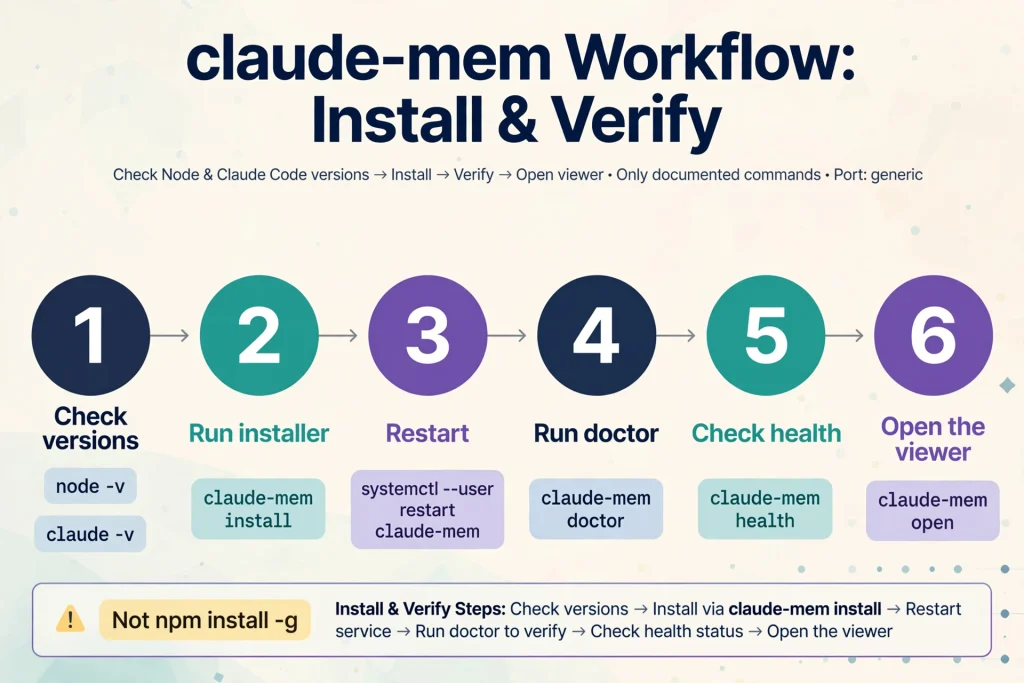
The official documentation offers an npx installer and a plugin-marketplace route. I will list the commands exactly as documented and flag where an independent tester found surprises.
Step 1: Confirm the repository. Use github.com/thedotmack/claude-mem and the docs at docs.claude-mem.ai. Look-alike repositories exist: while researching, I saw a repository carrying the same name under a different GitHub account whose README opened with cryptocurrency trading links. I cannot tell you who runs it or how it relates to the project, so the safest habit is to install only from the official repository and read every installer prompt.
Step 2: Check your versions.
node --version
claude --version
You want Node 20.12 or later and Claude Code 2.1.139 or later. Log in to Claude Code once before installing.
Step 3: Run the installer.
npx claude-mem install --provider claudeThe npx route copies the plugin, installs Bun and uv if absent, places the claude-mem launcher in ~/.local/bin (macOS and Linux) or %LOCALAPPDATA%\claude-mem\bin (Windows), and starts the worker. I chose the --provider claude flag because the plain interactive installer pre-selects CMEM Pro, a hosted observer that sends observation content to cmem.ai on a 30-day trial, as ComputingForGeeks found. The flag keeps memory on your own Claude plan with no cmem.ai account and no cloud sync. If you do run the interactive version, read the provider screen before pressing Enter.
Step 4 (alternative): Use the plugin marketplace. Inside a Claude Code session:
/plugin marketplace add thedotmack/claude-mem
/plugin install claude-mem
Restart Claude Code afterwards. The docs warn that on a marketplace-only install, the first session may run without memory while the launcher compiles.
Step 5: Avoid the common trap. Do not run npm install -g claude-mem as your install. The project’s docs say it installs only the SDK library, with no hooks and no worker. The troubleshooting page adds a second danger: a global npm copy can shadow the real launcher on your PATH, so hooks run the wrong program.
Step 6: Verify the installation.
npx claude-mem doctor
npx claude-mem status
PORT=$(jq -r .CLAUDE_MEM_WORKER_PORT ~/.claude-mem/settings.json)
curl http://127.0.0.1:$PORT/health
doctor checks the runtime, the hook launcher and the worker in one pass; status reports the worker; the last two lines read your configured port and ask the worker for a health reply. Do not assume port 37777, which many older guides cite. The current docs say the default is 37700 plus your user ID modulo 100, so the number differs between accounts.
Step 7: Confirm that capture and recall work. Open http://localhost: followed by your port in a browser, work in Claude Code for a few minutes, and watch observations appear. Then start a fresh session in the same project and ask what happened last time. Capture is asynchronous, so allow a minute or two before concluding it failed.
How to Use claude-mem in Daily Development
After installation there is little to operate. Memory injection and capture are automatic, and the prompts below are illustrations of how you might phrase requests, not official commands.
- Starting a new session: Just begin. The injected index already tells Claude about recent work in this project.
- Returning after a break: “Summarize where we left off on the billing refactor.” Claude can answer from the index, and an independent test found it answered correctly from injected memory with no file reads.
- Recalling a decision: “Search memory for why we chose the queue-based retry design.” This should trigger the search tools.
- Resuming a debugging trail: “What did we already rule out for the flaky checkout test?”
- Forcing the full workflow: “Use the claude-mem search tool to find past work on the rate limiter, then use timeline on the best hit, then fetch only the observations you need.” That is close to the prompt the ComputingForGeeks tester used.
- Keeping something out: Wrap it in
<private>tags.
Treat answers from memory as leads to verify against the code, not as facts. Observations describe the code as it was when they were written.
claude-mem Configuration and Customization
Settings live in ~/.claude-mem/settings.json, which is created with defaults on first run. The docs also let environment variables of the same name override many settings, and a few switches are read only from the hook’s environment. Only options confirmed in the current configuration page are listed here.
| Setting | Default | What it controls |
|---|---|---|
CLAUDE_MEM_PROVIDER | claude | Observer provider: claude, codex, gemini, openrouter or openai-compatible |
CLAUDE_MEM_MODEL | claude-haiku-4-5-20251001 | Model used to compress observations on the Claude provider |
CLAUDE_MEM_CONTEXT_OBSERVATIONS | 50 | How many observations are injected at session start |
CLAUDE_MEM_CONTEXT_PROJECTS | current | current reads this project only; all reads every project |
CLAUDE_MEM_SEMANTIC_INJECT | false | Adds the best-matching observations to each prompt |
CLAUDE_MEM_SEARCH_RECENCY_DAYS | 90 | Date-less semantic search ignores older matches unless widened or set to 0 |
CLAUDE_MEM_SKIP_TOOLS | five low-signal tools | Tools excluded from observations |
CLAUDE_MEM_SKIP_BASH_PATTERNS | empty | Regex of shell commands whose observations are skipped |
CLAUDE_MEM_SKIP_SUBAGENT_OBSERVATIONS | false | Skips every subagent observation |
CLAUDE_MEM_REDACT_ENABLED | false | Opt-in masking of recognized secret patterns before storage |
CLAUDE_MEM_FILE_READ_GATE_ENABLED | true | Blocks whole-file reads of large files that have history |
CLAUDE_MEM_WORKER_PORT | 37700 + (uid % 100) | Worker port |
CLAUDE_MEM_WORKER_HOST | 127.0.0.1 | Worker bind address |
CLAUDE_MEM_DATA_DIR | ~/.claude-mem | Root for the database, logs and settings |
A modest tuning example that trims the injected context, skips noisy shell commands and turns on redaction:
{
  "CLAUDE_MEM_CONTEXT_OBSERVATIONS": "30",
  "CLAUDE_MEM_SKIP_BASH_PATTERNS": "^(ls|cat|pwd|git status)\\b",
  "CLAUDE_MEM_REDACT_ENABLED": "true"
}
Restart the worker afterwards with npx claude-mem restart, the command the project’s own release notes give for that purpose. To disable capture without uninstalling, the docs describe environment switches that Claude Code passes to every hook. Add this to ~/.claude/settings.json:
{
  "env": {
    "CLAUDE_MEM_DISABLE_TOOL_HOOKS": "1"
  }
}
That stops tool-call capture and file-history injection while leaving session-start context and summaries running. CLAUDE_MEM_DISABLE_OBSERVATION and CLAUDE_MEM_DISABLE_FILE_CONTEXT split those two behaviors apart. Do not rename hook keys in hooks.json instead; the docs warn that Claude Code drops the whole plugin hook set when it sees unknown keys.
Memory is also scoped by project name. Inside a git repository the name defaults to the repository folder’s name, and an opt-in CLAUDE_MEM_PROJECT_NAME_SOURCE=git-remote setting uses the org/repo slug of the origin remote instead, which survives folder renames and separates same-named repositories.
How to View, Search, and Manage Memories
Viewing. The worker’s browser viewer at your configured port shows a live observation stream, project filters and a settings panel with a terminal preview of what the next session will receive. The /health endpoint and npx claude-mem doctor cover the plumbing.
Searching. Ask Claude in plain language and let it call the search tools, or name the tools explicitly as in the example above. The troubleshooting docs advise starting with a small limit, filtering by type and fetching only two or three IDs, since pulling everything can hit token limits. Special characters in queries can trigger FTS5 syntax errors, so keep queries simple.
Inspecting the raw data. The database is a plain SQLite file, so sqlite3 ~/.claude-mem/claude-mem.db "SELECT COUNT(*) FROM observations;" works for a quick count. Back it up before experimenting.
Deleting and pruning. The configuration docs refer to delete requests coming from the viewer’s own page, which tells me deletion exists there; check that your installed version exposes it. For bulk cleanup, the troubleshooting page walks through deleting rows older than a date directly in SQLite, rebuilding the FTS5 index afterwards and running VACUUM. An opt-in setting, CLAUDE_MEM_TOOL_USES_RETENTION_DAYS, purges old raw tool input and output records. Local snapshots arrived in v15.3.0 as npx claude-mem backup and npx claude-mem restore, off by default.
Uninstalling. npx claude-mem uninstall removes the plugin and launcher but, in the independent test, preserved ~/.claude-mem, which also holds settings.json and any API key you saved there. Delete that folder yourself if you want the memory gone.
claude-mem vs Claude Code Built-in Memory
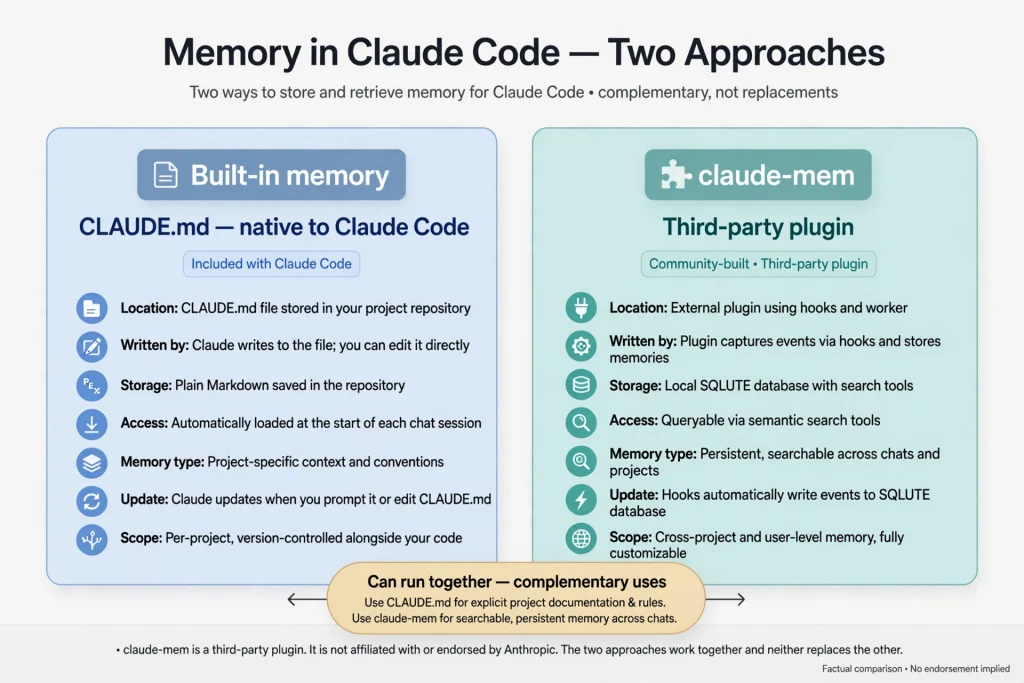
These are different systems with different owners, and one does not replace the other. Anthropic’s documentation describes two built-in mechanisms: CLAUDE.md files that you write, and auto memory, which is notes Claude writes for itself. claude-mem is an external plugin that records tool activity and summarizes it with a model. The installer even leaves Claude Code’s native auto memory switched on by default, so the two can run side by side.
| Dimension | Claude Code built-in memory | claude-mem |
|---|---|---|
| Origin | Anthropic’s own feature | Third-party open-source plugin |
| Purpose | Standing instructions and learned preferences | Searchable history of what happened in sessions |
| Installation | None | npx installer or plugin marketplace, plus Bun and uv |
| What is stored | Your CLAUDE.md files; Claude’s own markdown notes | Typed observations, prompts and session summaries in SQLite |
| Loaded at start | CLAUDE.md in full; the first 200 lines or 25 KB of MEMORY.md | An index of recent observations, 50 by default |
| Retrieval | Claude reads topic files on demand | search, timeline and get_observations tools, optional semantic injection |
| Configuration | /memory, /config, settings such as autoMemoryEnabled | ~/.claude-mem/settings.json and environment switches |
| Maintenance | Edit plain markdown | Run a worker, update the plugin, watch observer cost |
| Privacy | Local files; machine-local auto memory | Local database, but an observer model reads your tool output |
| Best for | Rules, conventions, “always do X” | Long projects where history matters |
The built-in layer is the right home for stable facts such as build commands and naming rules, and Anthropic’s docs say to keep those files short. claude-mem is aimed at the messier material no one writes down. A fair rule of thumb: if a fact will still be true next month, put it in CLAUDE.md; if it is a trail of what you tried, let a history tool hold it. The Claude Docs guide on this site helps you find the official pages for the built-in features.
claude-mem vs Other AI Coding Memory Tools
Comparisons here are deliberately broad, because I verified claude-mem and Claude Code’s native memory directly, and I did not test the other tools.
| Approach | Integration | Storage | Notes |
|---|---|---|---|
| Hand-written CLAUDE.md or AGENTS.md | Built in | Plain files in your repo | Free and transparent; only as good as your upkeep |
| Claude Code auto memory | Built in | Markdown under ~/.claude/projects/ | Machine-local and not shared across machines |
| claude-mem | Claude Code plugin with hooks | Local SQLite, optional Chroma | Automatic capture; extra process and observer cost |
| General memory layers such as Mem0 or supermemory | Separate products | Vendor-defined | Augment Code describes them as standalone tools, in contrast to claude-mem’s plugin design |
| MemoryPlugin | Vendor-built sync across tools and machines | Vendor-hosted | Its own blog positions it as complementary to the built-ins; this is a vendor claim |
No option wins on every axis. A local plugin gives you control of the data at the price of running software; a hosted layer reduces setup at the price of sending context elsewhere.
Privacy and Security Considerations
This is the section to read twice. Facts first, then my recommendations.
Documented behavior.
- The hooks, worker, database and vector index run on your machine, but the observer model reads your tool calls to summarize them. With the default Claude provider that is Anthropic’s model on your plan; with OpenRouter, Gemini, Codex or a custom endpoint, it is that provider.
- The worker binds to
127.0.0.1by default and, per the docs, has no request authentication. Loopback is its only defense. Binding it to0.0.0.0without a token exposes the full API, including provider API keys, to your network. Forwarding the port withssh -Lhas the same effect. <private>tags are stripped at the hook layer before data reaches the database. They protect claude-mem’s storage, not the live session: the main Claude model still sees your whole prompt.- Redaction of recognized secret patterns is opt-in and off by default.
- Cloud sync to cmem.ai, which is part of the paid CMEM Pro option, uploads observation narratives and full prompt text. The docs say not to enable it if that content must stay on your machine.
- Anonymous usage telemetry through PostHog is on by default, according to the independent test. Release notes show the events carry metadata such as provider, observed model and billing-tier category rather than prompt text. Reported off switches are
npx claude-mem telemetry disableor the environment variableDO_NOT_TRACK=1.
A notable privacy fix. The v15.8.3 release notes state that, from v15.2.0 until that release, the browser setup opened by npx claude-mem install scanned local agent histories and uploaded the full text of the last 30 days of prompts, with session IDs, project names, folder paths and timestamps, without asking. The fix adds a consent panel, and the notes say prompts already uploaded by earlier versions are not removed by the update. If you installed between those versions through the browser flow, check your cmem.ai account and consider contacting the project about deletion.
My recommendations, not documented behavior.
- Never type passwords, private keys or access tokens into a session you expect to be remembered, and do not rely on tags or redaction as your only guard.
- Enable redaction, set
chmod 600onsettings.jsonif you store a provider key there, and keep the worker on loopback. - For client or regulated code, decide first whether sending tool output to a second model is acceptable under your agreements. Teams should review this with security staff before rollout.
- Update regularly, because privacy-relevant behavior changed between releases.
Common claude-mem Problems and Troubleshooting
Each fix below comes from the project’s troubleshooting page; none is guaranteed, so check the logs after trying them.
- “Executable not found in $PATH: claude-mem” in hook errors. Run
npx claude-mem install, open a fresh terminal, then restart Claude Code, which inherits the PATH it started with. Runnpx claude-mem doctorand read the Hook launcher row. Remove a shadowing global copy withnpm uninstall -g claude-mem. - Hooks silently do nothing. Claude Code older than 2.1.139 ignores the hook arguments and captures nothing without any error. Check
claude --versionand runclaude update. - Worker not starting or port in use. Look at the worker logs and status commands, then pin a fixed port with
CLAUDE_MEM_WORKER_PORTand restart. - Observations saved but no summaries. Check that the worker is healthy and look for stuck queue items; the docs describe a recovery script and a queue-status API. One tester also saw zero session summaries across headless
claude -pruns and did not determine why, so verify summaries after interactive sessions. - Observer paused after a timeout. The worker keeps queued items and retries with backoff, but queued items sit in worker memory, so a restart before processing can discard them.
- Search returns nothing or errors. Confirm rows exist, check the FTS5 tables, and rebuild them if needed. Avoid special characters in queries.
- Chroma or Python errors. The docs list a Python 3.8 or newer check; if Chroma keeps failing, search falls back to FTS5.
- “Database is locked” or corruption. Stop the worker, check for stale processes, and run
PRAGMA integrity_checkon the database after backing it up. - Windows hook errors mentioning bun. Update through
npx claude-mem install; newer hooks run the launcher directly.
One more warning: the documentation site contains an older “advanced installation” page that mentions Node 18 and flags that conflict with the current pages. When two pages disagree, trust the page that matches the installer you actually ran, and npx claude-mem doctor.
Advantages and Disadvantages of claude-mem
Advantages
- Automatic capture, with nothing to remember to save.
- Memory stays on disk locally, in a database you can query and back up.
- Token-conscious retrieval through the three-layer search.
- Choice of observer provider, including your existing Claude plan.
- Active development and a visible release history.
- Opt-in controls for redaction, skipping tools and disabling hooks.
Disadvantages
- It adds a background worker, a launcher binary and several runtimes. The tester measured roughly 360 MB of RAM and 1.2 GB of disk.
- Every session pays a fixed context cost; the same tester measured about 4,200 extra input tokens on an empty session, around 15 percent on a trivial prompt. That is one lab result, not a benchmark.
- The observer spends your plan’s usage or your API budget.
- Fast releases mean behavior and defaults shift; the October upload issue shows why that matters.
- The worker has no authentication, so safe use depends on keeping it on loopback.
- Memory quality depends on a summarizing model and is not guaranteed to be complete or correct.
Who Should Use claude-mem?
- Solo developers on long-running projects: a strong fit, because history compounds.
- Claude Code power users: worthwhile if you already tune hooks and settings.
- Freelancers juggling several clients: useful, provided you separate projects and respect each client’s confidentiality terms.
- Open-source contributors: helpful for tracking an unfamiliar codebase across weeks.
- Developers working in many short sessions on one codebase: a good match.
- Teams evaluating AI workflows: run a pilot with security review first; there is no team-sharing feature in the base install.
- People who mostly run one-off prompts, or who work with sensitive code under strict data rules: you probably do not need a separate memory tool. A tidy CLAUDE.md and Claude Code’s built-in auto memory may be enough. The Claude Code Pricing guide and Claude Max guide can help you judge whether the extra observer usage fits your plan.
Final Verdict: Is claude-mem Worth Using?
For developers who spend weeks inside the same repository with Claude Code, claude-mem addresses a real irritation: the blank slate at the start of every session. Its strongest points are automatic capture, local storage you can inspect, and a retrieval design that avoids flooding the context window. Its costs are an always-on worker, extra runtimes, observer token spend, and a privacy surface that is larger than a markdown file. It is also a moving target, and the v15.8.3 correction shows that you should read release notes rather than assume.
Before installing, confirm four things: that you are using the official repository, that your Node and Claude Code versions meet the minimums, that you have chosen an observer provider whose data handling you accept, and that telemetry and cloud sync are configured the way you want. Then start with one project, measure what it costs you, and keep CLAUDE.md for the facts that should never change. If the benefit is not obvious after a couple of weeks, npx claude-mem uninstall and deleting ~/.claude-mem returns you to where you started.
FAQs
1. What is claude-mem? claude-mem is a third-party, open-source plugin that records what Claude Code does in a session, condenses it into searchable notes with a model, and injects relevant notes into future sessions.
2. Is claude-mem an official Anthropic tool? No. It is maintained by Alex Newman (@thedotmack) in the repository thedotmack/claude-mem. Anthropic’s own memory features are CLAUDE.md files and auto memory.
3. Is claude-mem free and open source? The code is open source; an independent test lists the license as Apache-2.0. The plugin itself is free, but the summarizing step consumes model usage, and a paid hosted option called CMEM Pro exists.
4. How do I install claude-mem? Run npx claude-mem install --provider claude, or use the two plugin-marketplace commands inside Claude Code and restart. Do not rely on npm install -g claude-mem, which installs only a library.
5. Does claude-mem work with Claude Code? Yes, it was built for it and needs Claude Code 2.1.139 or later for its hooks to run correctly. It also supports other agents such as Cursor and Codex.
6. How does claude-mem remember previous coding sessions? Hooks capture tool activity, a worker summarizes it into observations stored in SQLite, and the next session receives an index of recent observations plus search tools for older ones.
7. Where does claude-mem store memories? By default in ~/.claude-mem/, mainly the SQLite file claude-mem.db, with Chroma data and logs alongside. You can move the root with CLAUDE_MEM_DATA_DIR.
8. Is claude-mem safe to use? It is local-first, but safety depends on your settings. The observer model reads your tool output, the worker has no authentication, and cloud sync and telemetry are separate choices. Keep secrets out of sessions and read the release notes.
9. How is claude-mem different from Claude Code’s built-in memory? Built-in memory is Anthropic’s CLAUDE.md files plus Claude’s own notes. claude-mem is a separate plugin that automatically captures and summarizes session activity into a searchable database.
10. Can I delete or manage memories in claude-mem? Yes. You can browse them in the viewer, query the SQLite database, prune old rows following the troubleshooting guide, use opt-in retention and backup settings, or delete the data folder.
Sources and References
Consulted on November 4, 2026:
- thedotmack/claude-mem releases overview (a cached snapshot older than v15; the repository’s main README page could not be fetched directly)
- claude-mem v15.8.3 release notes
- claude-mem v15.7.0, v15.5.0, v15.3.0 and v13.10.0 release notes
- claude-mem documentation: Introduction and Installation
- claude-mem documentation: Configuration
- claude-mem documentation: Architecture Overview
- claude-mem documentation: Troubleshooting
- claude-mem documentation: Private Tags
- claude-mem documentation: Cloud Sync
- Anthropic: How Claude remembers your project (Claude Code Docs)
- ComputingForGeeks: Install claude-mem for Claude Code, Tested (independent test of v15.0.2, October 2026)
- Augment Code: claude-mem v13.8.0 and persistent memory overview
- DEV Community: Install claude-mem so the next session remembers
- Hora de Codar: Claude-Mem no GitHub
- MemoryPlugin: Claude Code Memory, Explained (vendor blog)
 Daniel Carter