
In this article
Gemini letters are letters drafted with Google’s Gemini AI assistant. You tell Gemini who the letter is for, why you are writing and how it should sound; it returns a draft; you correct the facts and make the voice your own. The method suits a formal complaint, a job application, a thank-you note or a birthday message, and Google documents three places to do it: the Gemini app, Gmail’s Help me write and Google Docs.
The short answer to “can Gemini write a letter?” is yes. The longer answer is that good Gemini letters come from good inputs: the recipient, the purpose, the tone, the length and every fact that must appear. This guide covers where to write them, a reusable prompt formula, ten copy-ready prompts, ways to make the result sound like a person, and the privacy and accuracy checks worth doing before anything is sent.
Table of Contents
What “Gemini Letters” Means (and What It Doesn’t)
Type the bare phrase into a search engine and you will not get one tidy answer. A web search for it on November 13, 2026 returned several unrelated meanings: a sign manufacturer whose dimensional metal and plastic lettering is sold under the Gemini name, astronomy observatory notices asking for letters of intent, auction listings of postal covers from NASA’s Gemini space missions, and zodiac-themed “love letters.”
The AI meaning appears once the query gets longer. Searches such as “how to use Gemini to write a letter” and “Gemini cover letter prompts” lead to Google’s own help pages and to job-search guides. This article uses Gemini letters in that sense: letters written with Google’s AI assistant.
Two quick detours. If you arrived looking for the zodiac sign, our guide to the astrology Gemini personality covers it. If you want to understand the assistant itself before you rely on it, start with these Gemini characteristics.
Can Google Gemini Write Letters?
Yes. Google’s help pages for Gmail and Docs both describe generating new text from a prompt, and Google has used sample prompts such as a thank-you letter after an interview. Gmail’s page lists a birthday invitation and an introduction to a business contact as example drafts. None of this is limited to one genre, so Gemini letters can be formal, friendly, short or long, as long as you describe what you need. Where Gemini letters fall short is judgment: the assistant does not know your history with the recipient unless you say so.
Independent evidence is thin but encouraging on one point. A 2025 linguistics paper in a Yerevan State University journal analyzed ten kinds of business letters generated by Gemini and found that they followed the conventions of human business correspondence. That says the structure tends to be familiar. It does not say the content is accurate, and Google itself warns that Gemini features can suggest inaccurate or inappropriate information.
Gemini letters in the Gemini app
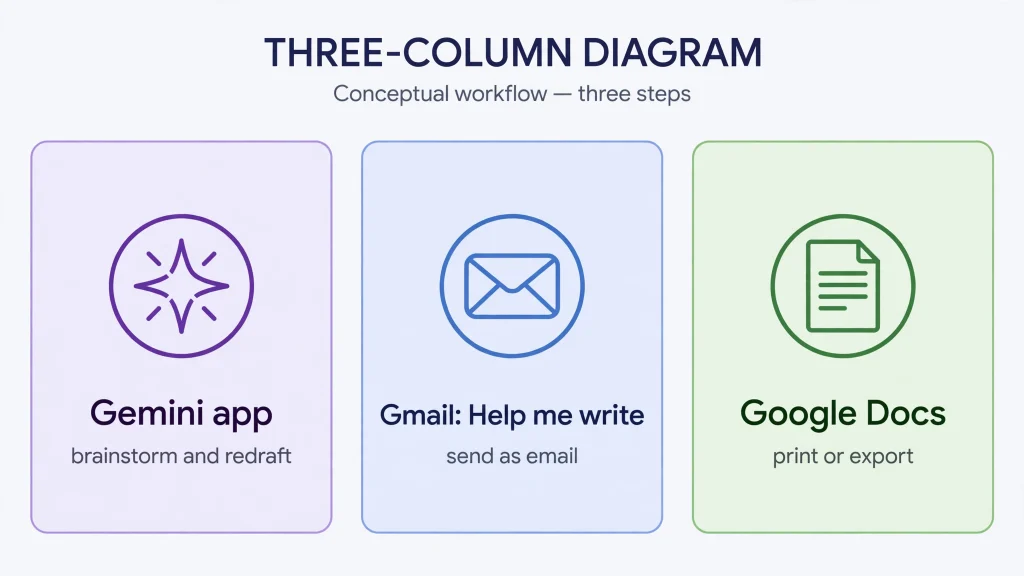
The Gemini app on the web and on mobile is the most open-ended option. You can ask for three versions of an opening line, paste your rough notes, or request a shorter and warmer rewrite in the same conversation. Google’s Workspace guide describes a Share & export option beneath a response that can send text to Docs or begin a Gmail draft. Menu labels change, so look for the option in your own account.
Gemini letters in Gmail
Gmail’s Help me write is built for letters that travel as email. Open Compose, type a prompt in the prompt bar and click Create. To polish the result you can type an instruction such as “Make it more professional,” or use the Formalize, Friendly and Shorten options. Google also says Help me write can pull details from your other emails and Drive files, such as flight times or booking codes, and that a Sources button shows what it used. That is convenient, and it is also a reason to read the draft carefully.
Gemini letters in Google Docs
Docs suits a letter you plan to print, sign or export as a PDF. Gemini in Docs can draft from a prompt, and a Refine menu on selected text offers Rephrase, Shorten, Elaborate, Bulletize, Summarize, More formal and More casual. Suggestions appear in the document, so you accept or reject them one by one. You can also point Gemini at other files in Drive with the @ menu. Matching the writing style of an existing document is listed as a Workspace Experiments feature for personal accounts, so it may not be available to everyone.
Which option fits which letter
| Where you write | Best for | Access note from Google |
|---|---|---|
| Gemini app | Brainstorming, several drafts, rewrites | Feature availability varies by account and region |
| Gmail (Help me write) | Letters sent as email | Needs an eligible Workspace or Google AI plan; personal accounts are limited to the US |
| Google Docs | Printable or formal letters | Needs an eligible Workspace or Google AI plan |
Plan and country rules for Gemini letters change often. Check the current Google Help page for your own account before you build a routine around any one of them.
How to Write Gemini Letters Step by Step
A reliable process matters more than a clever prompt when you write Gemini letters. This is the sequence that produces the fewest rewrites.
- Name the letter’s one job. Is it asking for something, thanking someone, apologizing, inviting or recommending? A letter with two jobs usually does neither well.
- Collect the facts first. Names, titles, dates, order numbers, amounts and deadlines belong in your prompt, not in Gemini’s imagination.
- Pick the place. Use the app to explore, Gmail for email letters and Docs for printable ones.
- Write the prompt with the formula below. Specific beats polite.
- Check every fact. Replace anything Gemini invented, rounded or assumed.
- Refine in short follow-ups. “Cut it to 150 words,” “keep the second paragraph, drop the third” and “make the ask clearer” work better than starting over.
- Read it aloud, then send. Awkward rhythm shows up in your own voice before it shows up in anyone else’s inbox.
A Prompt Formula for Better Gemini Letters
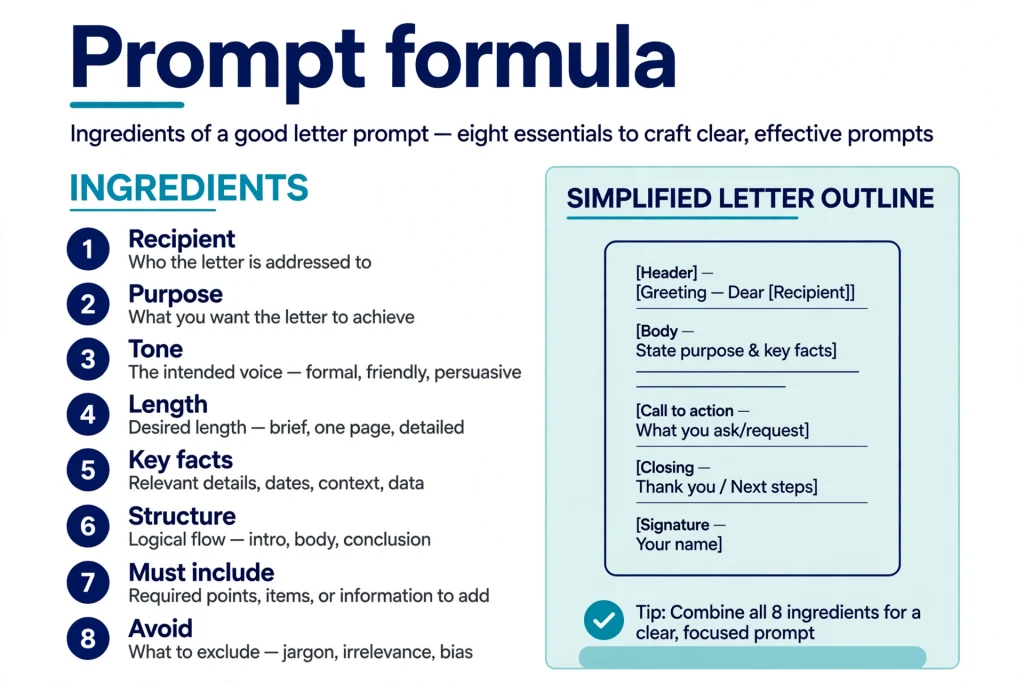
Google’s Prompting guide 101 for Workspace names four things to think about: persona, task, context and format. The guide adds that you do not need all four every time. For Gemini letters, those four translate into a short list of details.
- Recipient and relationship: “my landlord,” “a hiring manager I have never met,” “my sister.”
- Purpose: one sentence on what the letter must achieve.
- Tone: warm, firm but polite, formal, playful, apologetic.
- Length: a word range, which keeps Gemini from padding.
- Key details: dates, amounts, reference numbers, shared memories.
- Structure: salutation, opening line, body paragraphs, closing and sign-off.
- Language: the language or regional spelling you want.
- Must include: the two or three points that cannot be missing.
- Avoid: clichés, claims you cannot support, topics that do not belong.
Here is a reusable template. Brackets mark the parts you replace.
Write a [type of letter] from me to [recipient and relationship]. Purpose: [one sentence]. Tone: [tone]. Length: about [number] words. Include: [facts, dates, reference numbers]. Structure: [salutation, short opening, two body paragraphs, closing]. Language: [language]. Avoid: [phrases or claims to leave out]. If any detail is missing, ask me before guessing.
The last sentence earns its place. It nudges Gemini to ask a question instead of filling a gap with an invention, although no prompt can promise that it will. Treat every template here as a starting point and expect to iterate. When your Gemini letters miss the mark, Google’s own advice is to tell Gemini more, and Gmail’s guidance recommends being specific about the recipient, the subject, the required action and the formality.
10 Gemini Letter Prompts You Can Copy
These ten prompts for Gemini letters are text written for this guide. They are not output captured from a live Gemini session, and no sample replies are shown, because replies differ between runs, accounts and plans. Brackets are placeholders for your own details.
1. Formal request letter
Purpose: Ask an organization for something in writing, such as a record, a refund or a decision.
Prompt:
Write a formal letter from me to [name, title, organization] requesting [what you need]. Explain that [reason]. Keep it under 250 words, polite and direct, with a response deadline of [date]. Use a standard business letter layout and leave placeholders for my address and today’s date.
Customize: The recipient’s exact title, any reference number and a realistic deadline.
Improve it: Ask for a one-line subject heading and a version that is a third shorter. Then check the deadline and every number against your records.
2. Cover letter for a job
Purpose: Turn a resume and a job posting into a tailored one-page application letter.
Prompt:
Write a one-page cover letter for the [job title] role at [company]. Use only the job description and resume text below. Highlight [two or three strengths], each backed by a real example from my resume. Do not invent achievements or numbers. Mark anything you are unsure about with [VERIFY]. Job description: [paste]. Resume: [paste].
Customize: Choose strengths that match the posting, not the longest list you have.
Improve it: Resolve every [VERIFY] tag, then ask Gemini to remove stock phrases and replace adjectives with evidence. Leave your home address and phone number out of anything you paste. The failure readers report most often with AI-written Gemini letters for job applications is a letter that could belong to anyone.
3. Thank-you letter
Purpose: Show gratitude after an interview, a favor, a gift or a kindness.
Prompt:
Write a short thank-you letter from me to [name], who [what they did]. Mention [the specific detail that mattered] and how it helped: [result]. Tone: warm and sincere, not gushing. Maximum 150 words. Do not add facts I have not given you.
Customize: The one concrete detail that proves you noticed.
Improve it: Ask for three alternative opening lines and pick the one that sounds like you. Strip superlatives.
4. Apology letter
Purpose: Take responsibility and repair trust without excuses.
Prompt:
Help me write an apology letter to [name] for [what happened]. I want to take responsibility without making excuses, say what I will do differently: [action], and ask for nothing in return. Tone: calm and sincere. About 200 words. Avoid conditional phrases such as “if you were offended.”
Customize: A real action you will take. An apology with no commitment reads as empty.
Improve it: Ask Gemini to flag any sentence that sounds defensive, then remove anything you would not promise out loud.
5. Birthday letter
Purpose: Write a personal message that goes beyond a card verse.
Prompt:
Write a birthday letter from me to my [relationship], [name], who is turning [age]. Include these shared memories: [two memories]. Mention what I admire about them: [quality]. Tone: warm with a little humor. About 180 words. End with a wish for the year ahead.
Customize: Real memories. Gemini cannot know your history, so anything you leave out becomes generic.
Improve it: Add an inside joke and ask for a version in your usual speaking style. If you would rather make a picture than a note, our collection of Gemini birthday prompts for women covers the image side of the same occasion.
6. Personal or heartfelt letter
Purpose: Say something difficult or tender to a partner, friend, parent or your future self.
Prompt:
Help me tidy a personal letter to [name], my [relationship], about [what I want to say]. My rough notes are below. Keep my wording and phrasing wherever possible, improve the order, and do not add feelings or events I have not mentioned. Notes: [paste].
Customize: The notes carry the emotion. Write them yourself, however messy.
Improve it: Ask Gemini to point out unclear lines rather than rewrite them. For this kind of letter, Gemini letters work best as an editor, not an author.
7. Invitation letter
Purpose: Give guests the event details and an easy way to reply.
Prompt:
Write an invitation letter for [event] on [date] at [time] at [place]. Audience: [guests]. Ask for an RSVP by [date] to [contact]. Tone: [formal or relaxed]. Under 150 words. Put the date, time and place on separate lines so they are easy to find.
Customize: Dress code, parking, dietary notes and a contact who will answer.
Improve it: Ask for a shorter text-message version of the same invitation. Confirm the date and time yourself.
8. Recommendation or reference letter
Purpose: Support someone’s application with specific, honest evidence.
Prompt:
Draft a recommendation letter for [name], whom I have known as their [role] for [duration]. Use only the facts I list: [three specific examples with outcomes]. Tone: professional, specific and honest. About 300 words. Address it to [recipient or “To whom it may concern”].
Customize: Write one only if you can vouch for the person. Gemini knows nothing about them beyond your notes.
Improve it: Swap general praise for examples with results, and ask Gemini to mark any claim you did not supply.
9. Complaint letter
Purpose: Ask a company to fix a problem, with the evidence attached.
Prompt:
Write a firm but polite complaint letter to [company] about [product or service]. Facts: order number [number], purchase date [date], problem [description], steps I already took [steps]. Ask for [specific remedy] within [timeframe]. Do not include threats or legal claims. Under 250 words.
Customize: A single clear remedy. Several demands blur the ask.
Improve it: Keep receipts and screenshots ready to attach. Google says not to rely on Gemini features for legal or other professional advice, so a dispute with real money or rights at stake deserves a qualified human reviewer.
10. School or college letter
Purpose: Request an extension, a leave of absence, a course change or a meeting.
Prompt:
Write a respectful letter from me, a [year] student, to [professor, dean or office] asking for [request]. Reason: [honest reason]. What I will do in return: [plan]. Keep it to 200 words, formal but not stiff.
Customize: The honest reason and a concrete plan. Keep sensitive personal or medical details to the minimum the reader needs.
Improve it: Ask Gemini to check that the request is stated in the first two sentences, and attach any documents the school requires.
How to Make Gemini Letters Sound Human
Even accurate Gemini letters can sound like a form letter. These edits close that gap.
- Add what only you know. A specific memory, a number from your own records or a detail from the recipient’s last message does more than any adjective.
- Feed it your voice. Paste a paragraph you wrote yourself and ask Gemini to match that rhythm. In Gmail, Google says Help me write can draw on your other emails and Drive files for tone, and its Workspace guide notes that tone and style matching needs drafts in English.
- Cut the stock phrases. “I hope this finds you well,” “I am writing to express” and “do not hesitate to contact me” are signs of an unedited draft. Delete them or say the point directly.
- Vary sentence length. Gemini tends to produce even, balanced sentences. Break one in half and join two others.
- Keep the ending yours. The closing line is where recipients decide how much you meant it. Write it yourself.
- Read it aloud. Anything you stumble over, rewrite.
If you are weighing Gemini against other drafting and rewriting software, our AI writing tool guide compares how these tools work and how to choose between them. Whichever tool you pick, Gemini letters improve most from your own edits, not from a longer prompt.
Common Mistakes With Gemini Letters
Most disappointing results with Gemini letters trace back to a handful of habits.
- Prompting with one line. “Write a letter to my boss” forces Gemini to guess the purpose, tone and facts.
- Trusting invented details. Dates, titles, statistics and quotations in a draft are not verified. Google states plainly that Gemini features may produce inaccurate information.
- Sending the first version. The first draft is raw material.
- Mismatching the register. A breezy tone in a complaint, or legal stiffness in a thank-you note, signals the letter was not read.
- Writing a reference for someone you barely know. Specific praise cannot be generated from nothing, and invented praise can hurt the person it is meant to help.
- Using one cover letter for every job. Recruiters notice generic text. Paste the specific posting each time.
- Pasting sensitive details. See the next section.
- Leaving placeholders in. A stray “[Your Name]” or “[VERIFY]” is the quickest way to reveal an unedited draft.
Privacy: What to Keep Out of Your Gemini Letters
Gemini letters often involve account numbers, health matters, addresses and family names, which is exactly what you should think twice about typing into any chatbot. Google’s Gemini Apps Privacy Hub, last updated October 26, 2026 when we checked it, says human reviewers, including trained reviewers from service providers, review some data, and it asks users not to enter confidential information they would not want a reviewer to see.
Several details from that page affect how you draft:
- Keep Activity controls whether your chats are saved to your activity and used to improve Google’s services. The default auto-delete period is 18 months, and you can change it to 3 or 36 months or choose not to auto-delete.
- Reviewed chats are kept separately. Chats that human reviewers have looked at are not removed when you delete your activity. Google says they are kept for up to three years, disconnected from your account.
- Temporary chats and Keep Activity off are retained with your account for 72 hours so Gemini can respond and Google can protect its service. Google says temporary chats are not used to train its models.
- Work and school accounts may be governed by different data-handling terms, which Google points to in its Workspace privacy documentation.
A practical habit follows from this: write the letter with placeholders such as [ACCOUNT NUMBER] or [HOME ADDRESS], then fill them in yourself in Docs or your email client. For a fuller walk-through of the settings above, see our guide to Gemini Apps Activity. Whichever settings you choose, treat Gemini letters containing health, legal or financial details as sensitive until you have reviewed them.
Gemini Letters vs Traditional Letter Writing
Neither approach wins every time. The comparison below shows where Gemini letters and self-written drafts each fit.
| Factor | Gemini letters | Writing it yourself |
|---|---|---|
| Speed to first draft | Seconds to a few minutes | Often much slower |
| Voice | Generic until you edit | Naturally yours |
| Accuracy | Needs a full fact check | You control every fact |
| Structure | Usually conventional and tidy | Depends on your experience |
| Privacy | Depends on account and settings | Stays on your device |
| Emotional weight | Can feel thin if unedited | Strongest for personal letters |
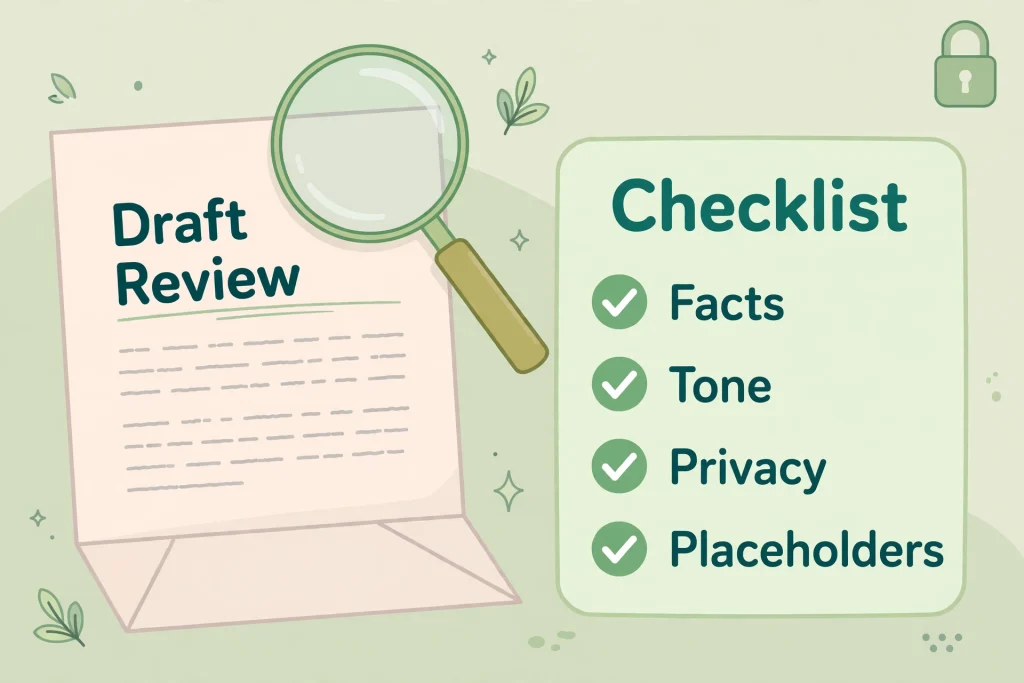
The practical answer is a hybrid. Let Gemini handle the scaffolding, such as layout, order and a first pass at tone, and write the parts that carry meaning yourself: the facts, the specific memory and the closing line. For letters that carry legal weight or deep feeling, give extra time to your own edits.
Final Thoughts
Gemini letters save the most time when you treat Gemini as a fast first drafter and yourself as the editor and the signatory. Give it the recipient, the purpose, the tone, the length and the facts. Check what comes back against your records. Keep private details out of the prompt, and write the sentences that matter most in your own words.
Start with one prompt from the list above, adapt it to a real letter you need to send this week, and note which edits you make every time. Those edits become your personal checklist, and over a few rounds your Gemini letters start to come back sounding like you.
Frequently Asked Questions
What are Gemini letters?
Gemini letters are letters drafted with Google’s Gemini AI assistant. You supply the recipient, purpose, tone and facts, Gemini produces a draft, and you review and edit it before sending. The phrase can also point to unrelated things, such as sign lettering or zodiac content, so context matters.
Can Gemini write a letter for me?
Yes. Gemini can draft formal, personal and professional letters from a prompt, in the Gemini app, in Gmail through Help me write and in Google Docs. You should still check facts, names and dates, because Google warns that Gemini features can produce inaccurate information.
How do I use Gemini to write a letter?
State who the letter is for, what it must achieve, the tone, the length and the facts to include. Then read the draft, correct it and refine it with short follow-ups such as “make it shorter” or “sound warmer.” In Gmail, click Compose, enter a prompt and click Create.
Do I need a paid plan to write Gemini letters?
It depends on where you write. Google says Gmail’s Help me write works with an eligible Workspace or Google AI plan, and that personal Google Accounts get it only in the US. Gemini in Docs also requires an eligible plan. Availability changes, so check Google’s current help page for your account.
Can Gemini write a cover letter?
Yes. Gemini letters for job applications work best when you paste the job description and your resume and ask for a tailored letter that uses only real experience. Tell it to mark anything uncertain, then verify every claim. Edit the result so that it reflects your voice and the specific role.
What should prompts for Gemini letters include?
For Gemini letters, include the recipient and your relationship, the purpose, tone, length, key facts, preferred structure, language and anything to avoid. Google’s prompting guide groups these ideas as persona, task, context and format, and says you do not need all four every time.
Can Gemini write letters in other languages?
Often, but support varies by feature and account. Google publishes a supported-languages list for Workspace with Gemini, and Gmail’s tone matching is described as needing English drafts. For an important letter in a language you do not read well, have a fluent speaker check it.
Is it safe to put personal information in Gemini letters?
Use caution with any Gemini letters that contain private details. Google’s Gemini Apps Privacy Hub asks users not to enter confidential information they would not want a reviewer to see. Use placeholders for account numbers and addresses, review your Keep Activity setting, and consider a temporary chat for sensitive drafts.
Will people know my Gemini letters were written with AI?
No one can promise either way, and nothing in Google’s help pages claims a draft is detectable or undetectable. What readers notice is generic wording and errors. Some employers, schools and publishers have rules about AI assistance, so check them before you submit.
Sources & References
- Google. “Draft emails with Gemini in Gmail.” Gmail Help. https://support.google.com/mail/answer/13955415
- Google. “Write & edit with Gemini in Docs.” Google Docs Editors Help. https://support.google.com/docs/answer/13447609
- Google. “Get started with Gemini for Google Workspace: Write a quick first draft.” Google Workspace Help. https://support.google.com/a/users/answer/14747862
- Google. “Get started with Google Workspace with Gemini.” Google Docs Editors Help. https://support.google.com/docs/answer/13952129
- Google. “Gemini Apps Privacy Hub.” Gemini Apps Help. https://support.google.com/gemini/answer/13594961
- Google Workspace. “Prompting guide 101: How to write effective prompts.” https://workspace.google.com/intl/en_ph/resources/ai/writing-effective-prompts
- Google. “Gemini for Google Workspace: Prompting guide 101” (PDF, April 2024 edition). https://services.google.com/fh/files/misc/gemini-for-google-workspace-prompting-guide-101.pdf
- Yerevan State University, Foreign Languages in Higher Education. “The structural-semantic peculiarities of AI-generated business letters” (vol. 29, no. 2, 2025). https://journals.ysu.am/foreign-lang/article/view/Vol29_no2_2025_070-091
- Gemini Inc. “Gemini’s Simplified Architectural Signage” (sign-lettering manufacturer, background for the ambiguity section). https://www.geminisignproducts.com/en/news-events/gemini_arcat/
- Gemini Observatory. “Letters of Intent for Campaign Science Proposals” (background for the ambiguity section). https://gemini.edu/node/11572

 Daniel Carter