
In this article
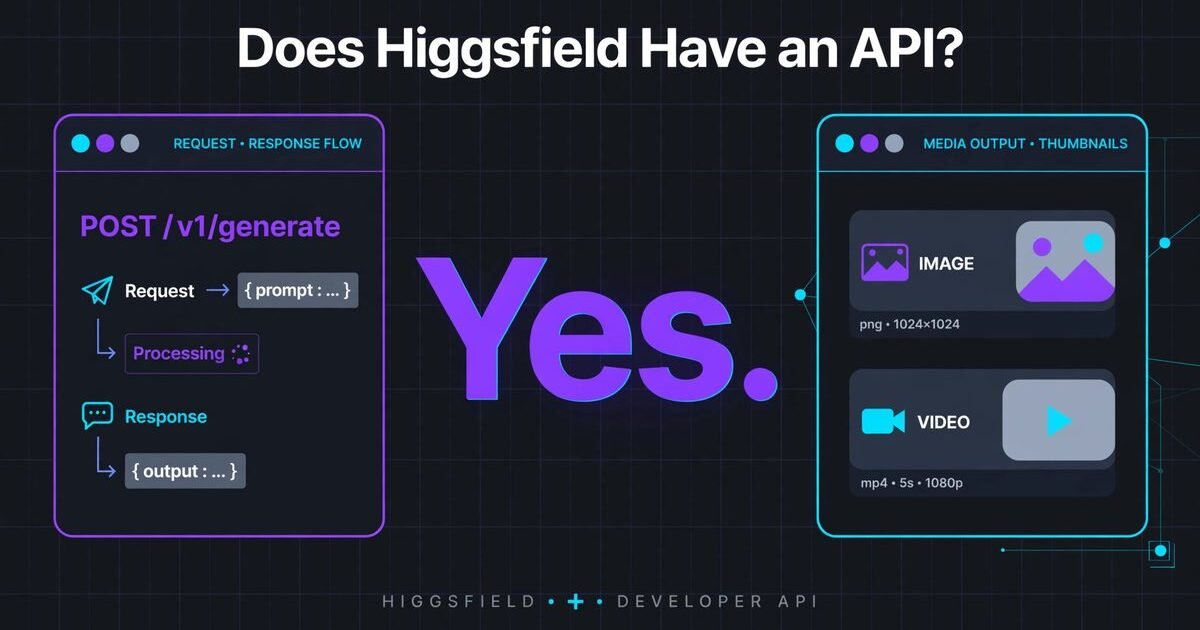
Does Higgsfield have an API? Yes. As of November 23, 2026, Higgsfield sells a standalone developer API that creates images and videos from code. It runs on its own credentials and a prepaid US-dollar balance, so a Higgsfield website subscription neither unlocks it nor pays for it. It is also a different product from the Higgsfield MCP connector and the Higgsfield CLI, both of which spend ordinary plan credits.
That last distinction is where most of the confusion starts. Search for does Higgsfield have an API and you will land on pages that say no, pages that say yes, and pages that fold three separate integration routes into one. Much of the disagreement is simply about dates. Higgsfield’s Help Center article introducing the API is dated September 16, 2026, so anything written earlier, or recycled from earlier material, may still insist that the company has no public API.
This guide is built from Higgsfield’s official documentation, Help Center and Terms of Use, all read on November 23, 2026. No API calls were run while preparing it, which makes it a careful reading of the documentation rather than a hands-on benchmark. When official pages contradict each other, the text says so instead of quietly picking a winner.
Table of Contents
Short Answer: Does Higgsfield Have an API?
Yes. The skimmable version:
- Availability: The API is live and sold as its own product, with a developer console for credentials, balance and usage analytics.
- Credentials: Requests carry a key ID and secret pair in an Authorization header.
- Billing: You top up a prepaid dollar balance (the minimum is $5) and pay for each successful generation.
- Workflow: Generation is asynchronous. You submit a job, receive a request ID, then poll for the result or wait for a webhook.
- Tooling: Plain REST works from any language, and official Python and TypeScript SDKs exist.
- Catalog: More than 50 image and video models, each with its own endpoint, parameters and price.
Everything below expands on those six points. Prices, model names and limits are the parts most likely to move, so treat any figure in this article as a dated snapshot.
What the Higgsfield Developer API Is, and What It Is Not
The Higgsfield API is a pay-as-you-go way to call Higgsfield’s generation models from your own software. Your code sends a prompt, plus optional reference media, to a model’s endpoint. Higgsfield queues and runs the job, and you collect a file URL once it finishes. Higgsfield positions it for teams that want generation built into their own products, not for people who just want to make a clip by hand.
It is not the Higgsfield website with an extra login. It is not a way to spend Starter, Plus or Ultra credits from a script. And it is not unlimited: perks such as Unlimited access to selected models belong to higgsfield.ai, and Higgsfield says they do not follow you into automated tools.
Two naming traps are worth clearing up. First, the API console is branded Open Higgsfield, and Higgsfield’s Help Center says that is the same API product, not a separate one. Different official pages point to console.higgsfield.ai and open.higgsfield.ai, so start from Higgsfield’s own API page and follow its sign-up button instead of trusting an address copied from an old tutorial. Second, an unrelated open-source project on GitHub is also called Open Higgsfield AI and runs through a third-party gateway. It is not Higgsfield’s API, and neither are the “universal API” wrappers that resell access through their own accounts.
Higgsfield API vs the Higgsfield Website Plan
Most people asking does Higgsfield have an API really want to know whether the Higgsfield platform they already pay for can be scripted. Mostly it cannot. The two products sit side by side like this:
| Feature | Higgsfield website plan | Higgsfield API |
|---|---|---|
| Primary user | Creators working in a visual interface | Developers building their own products |
| Interface | Website and apps | HTTP requests or official SDKs |
| Billing | Subscription plus credits | Prepaid USD balance, charged per successful generation |
| Credentials | Account login | Key ID and secret |
| REST API | No | Yes |
| Python and TypeScript SDKs | Not part of the workflow | Yes |
| Spends website plan credits | Yes | No |
| Requires a website subscription | Not applicable | No |
| Built to sit inside your own application | No | Yes |
| Model lineup | The website’s lineup | A separate, curated API catalog |
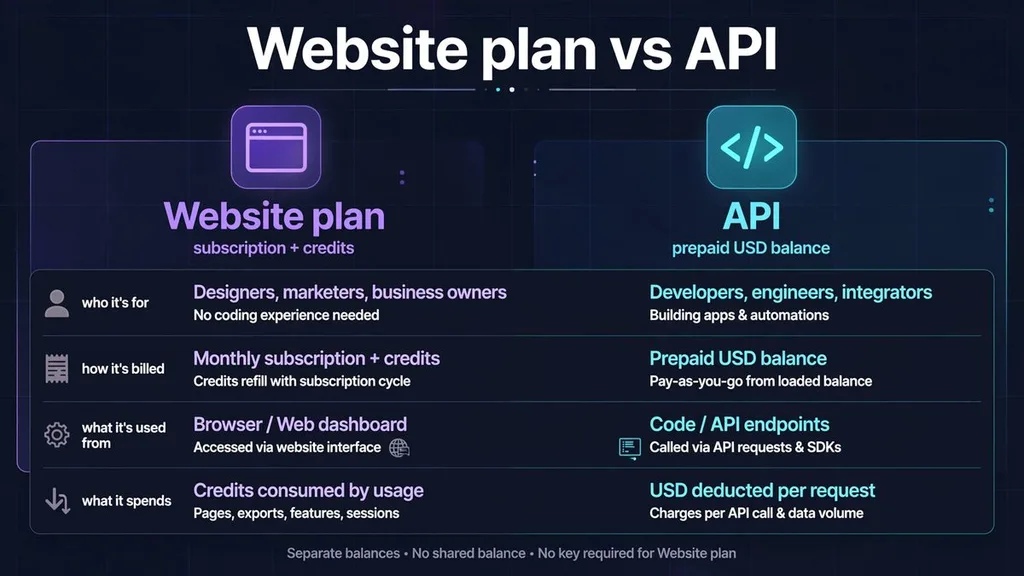
The last row is the one that surprises people. The API ships with its own catalog, so a model you used on the website may be missing from the API, and a model in the API may not appear on the website. Do not assume that every website feature, preset or studio has an endpoint.
Does Higgsfield Have an API Included With a Subscription?
No. Higgsfield’s Help Center describes the website plan and the API as two products with separate billing, and says a plan neither grants API access nor changes API prices. The reverse also holds: you can use the API with no website plan at all.
That means Unlimited website plans do not translate into unlimited API usage. Every API request is charged to the dollar balance at the model’s listed rate.
One sourcing note. Several third-party summaries say the Terms of Service name Team and Scale subscriptions as excluding API access. That wording does not appear in the Terms of Use dated October 23, 2026, whose developer section (Section 11) covers credentials, end users and agent access. The Help Center statement is the one this article relies on.
Does Higgsfield Have an API, an MCP Connector and a CLI? How the Three Compare
Higgsfield now offers three programmatic routes, and they are not interchangeable. MCP attaches chat agents such as Claude to your existing Higgsfield account through an OAuth sign-in, with no key. The CLI and Skills route targets coding agents: you install skills with an npx command and sign in with a login command, again with no key. Both spend regular plan credits at standard rates, and neither honors Unlimited or free-generation perks. The API is the only one with its own key and its own dollar balance.
| Feature | Higgsfield API | Higgsfield MCP | Higgsfield CLI |
|---|---|---|---|
| Main audience | Developers building products | People working in chat agents | Developers using coding agents |
| API key | Yes (key ID and secret) | No (OAuth sign-in) | No (login command) |
| Billing | Separate prepaid USD balance | Plan credits | Plan credits |
| Unlimited or free-generation perks apply | No | No | No |
| REST integration | Yes | No | Not the purpose |
| Build into your own app | Yes | Not designed for it | Not designed for it |
| Claude | Only through code you write | Yes, as a connector | Yes, through Claude Code skills |
| ChatGPT | Only through code you write | Yes, via the official Higgsfield plugin | Codex is listed as compatible |
| Terminal workflow | Possible with curl or an SDK | No | Yes |
Rows that say “through code you write” mean you would build the Claude or ChatGPT experience yourself. Higgsfield’s API model pages offer ready-made setup prompts for coding agents, but the API is not a chat connector. Anyone who only wants Higgsfield inside Claude should start with the MCP route, because it needs no engineering at all.
How the Higgsfield API Works: Submit, Wait, Download
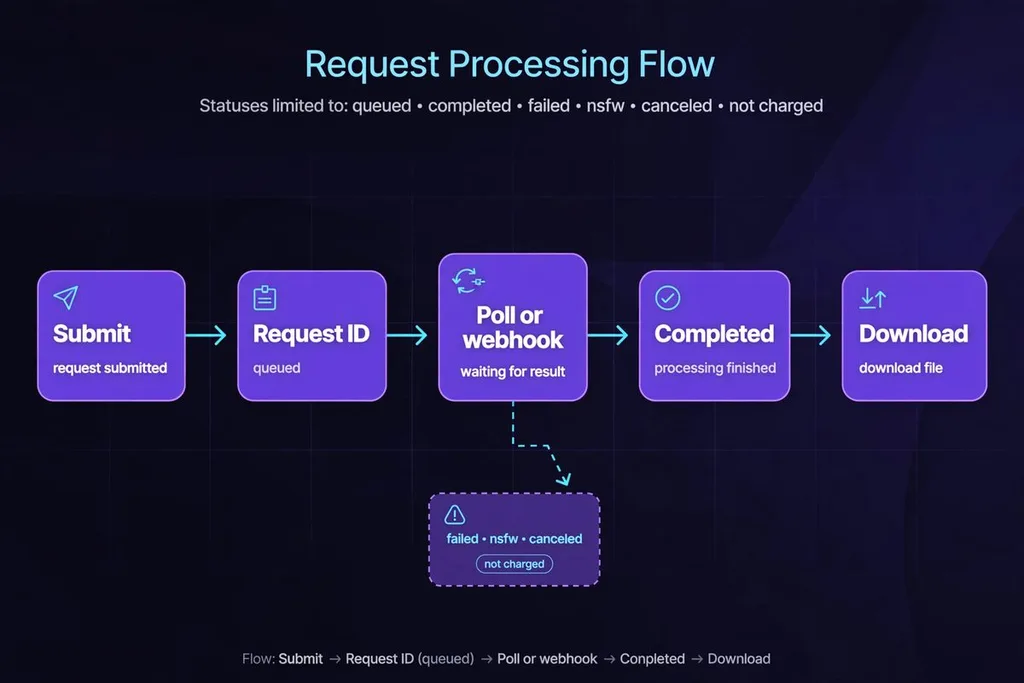
Developers who ask does Higgsfield have an API often picture a single call that returns a video. The real flow is closer to a job queue:
- Submit. POST your parameters to the model’s endpoint.
- Receive a request ID. The response arrives immediately with the status queued, a request ID, and URLs for checking status and cancelling.
- Poll or wait for a webhook. Check the status endpoint with backoff, or pass a webhook address so Higgsfield calls you when the job ends.
- Complete. The terminal states are completed, failed, nsfw (stopped by moderation) and canceled. A completed job returns media URLs.
- Download. Copy the file into your own storage, because hosted outputs are temporary.
Two production details from the documentation deserve attention. Send an Idempotency-Key header with each submission, so retrying after a timeout does not create a duplicate job and a second charge. And remember that a cancellation works only before processing starts.
How to Get a Higgsfield API Key
Once the question of does Higgsfield have an API is settled, the practical one is access. Higgsfield has not published a screenshot-level console walkthrough, so the steps below describe stages without promising particular button labels.
Step 1: Create or open an API account
Sign up through Higgsfield’s API page. The Help Center says you can register as an individual or a company, every account starts as a personal organization, and you can later create a team organization and invite colleagues.
Step 2: Add a payment method
Register a payment method in the console. Funding is prepaid, so nothing generates against a balance that does not exist.
Step 3: Fund the balance
The minimum top-up is $5. Higgsfield’s API page has also advertised launch discounts and a starter balance for verified business emails. Treat those as time-limited promotions and confirm they are still live before counting on them.
Step 4: Generate your credentials
The documentation points to an API keys area inside the Higgsfield Console. Each credential is a key ID plus a secret, and the Help Center says the full key is shown only once, so copy it immediately. A lost key cannot be viewed again; you create a new one and update your integration. According to the Help Center, creating a key also starts your account at 20 concurrent requests.
Step 5: Store the key securely
- Never put it in frontend JavaScript. Higgsfield’s TypeScript client even refuses to run in a browser.
- Never commit it to GitHub, or paste it into support tickets, logs or screenshots.
- Keep it out of mobile and desktop apps that ship to users.
- Load it from environment variables or a server-side secrets manager, and use separate credentials for development and production.
Higgsfield’s Terms of Use go further: embedding keys in client-side or public code breaches the developer terms, and suspected exposure has to be reported within 24 hours.
Step 6: Make your first request
Follow the lifecycle above. The official quickstart submits a Soul 2 image request and then checks its status until it reaches a terminal state. A sample follows in the next section.
Authentication and a Verified First Request
A frequent follow-up to does Higgsfield have an API is how requests are authenticated. The documentation sends credentials in a single Authorization header: the word Key, a space, the key ID, a colon and the secret. A legacy two-header format still works, but new integrations are told to use Authorization.
The quickstart’s environment variables are HF_API_KEY_ID and HF_API_KEY_SECRET, so the example below uses those instead of a single HF_API_KEY placeholder. It mirrors the official quickstart, with a placeholder prompt.
bash
export HF_API_KEY_ID="your-api-key-id"
export HF_API_KEY_SECRET="your-api-key-secret"
export IDEMPOTENCY_KEY=$(uuidgen | tr '[:upper:]' '[:lower:]')

curl --request POST \
  --url https://api.higgsfield.ai/higgsfield-ai/soul/v2/standard \
  --header "Authorization: Key ${HF_API_KEY_ID}:${HF_API_KEY_SECRET}" \
  --header "Content-Type: application/json" \
  --header "Idempotency-Key: ${IDEMPOTENCY_KEY}" \
  --data '{"prompt": "YOUR_PROMPT"}'
The reply contains a request_id. Check on it with:
bash
curl --url "https://api.higgsfield.ai/requests/YOUR_REQUEST_ID/status" \
  --header "Authorization: Key ${HF_API_KEY_ID}:${HF_API_KEY_SECRET}"
Missing or invalid credentials return a 401. Valid credentials do not guarantee model access either: the documentation says a model that is unavailable to your account can return a 404, 423 or 503 depending on its state.
Endpoints: What the Documentation Confirms
So does Higgsfield have an API with stable, documented endpoints? Largely yes. Only paths shown in the current documentation are listed here:
- Base address: https://api.higgsfield.ai
- Generate: POST to the model’s own path, such as /higgsfield-ai/soul/v2/standard. Every model page lists its own endpoint and request schema.
- Status: GET /requests/{request_id}/status
- Cancel: POST /requests/{request_id}/cancel, valid only before processing starts
- Estimate cost: POST /estimate/ followed by the model path
- Upload URL: POST /files/generate-upload-url
- Delete finished data: DELETE /requests/{request_id}
Older tutorials show a different base address (platform.higgsfield.ai). The current documentation uses api.higgsfield.ai, so prefer that, and take the exact route for any model from its own page.
Does Higgsfield Have an API With Python and TypeScript SDKs?
Yes, two official ones. Higgsfield’s documentation says they handle authentication, submission, polling, cancellation and file uploads, and that both belong on trusted servers only.
Python (3.8 or newer) installs with pip install higgsfield-client and reads credentials from an HF_KEY variable shaped like key-id:key-secret.
python
import higgsfield_client

result = higgsfield_client.subscribe(
    "higgsfield-ai/soul/v2/standard",
    arguments={"prompt": "YOUR_PROMPT"},
)
print(result["images"][0]["url"])
An async version, subscribe_async, exists, and submit gives you a controller for explicit polling or cancellation.
TypeScript installs with npm install @higgsfield/client and reads an HF_CREDENTIALS variable in the same key-id:key-secret form.
typescript
import { config, higgsfield } from "@higgsfield/client/v2";

config({ credentials: process.env.HF_CREDENTIALS });

const result = await higgsfield.subscribe("higgsfield-ai/soul/v2/standard", {
  input: { prompt: "YOUR_PROMPT" },
  withPolling: true,
});

if (result.status === "completed") {
  console.log(result.images?.[0]?.url);
}
For error handling, check the terminal status before touching the output, treat failed, nsfw and canceled as distinct outcomes, and respect the Retry-After header on a 429. The documentation suggests subscribe for scripts and prototypes, submit for workers that need lifecycle control, and webhooks with polling as a recovery path for event-driven production systems. Confirm package names and versions in the official repositories before pinning anything, because SDK releases move faster than articles.
Uploading Reference Images and Media
Does Higgsfield have an API route for reference files? Yes. Some models accept reference images, video or audio. If your file is not already at a public HTTPS address, the documented route has three steps: request a presigned upload URL, upload the file to it, then pass the returned public URL in the model’s input field (image_url, video_url or audio_url).
The upload URL expires after an hour, the content type must match the one used to create it, and your Higgsfield credentials must never be sent to the storage address. Documented types include JPEG, PNG, WebP and GIF images, WAV audio and MP4 video. No file-size ceiling appeared in the pages read for this article, so check the model page before building a large-upload feature.
Does Higgsfield Have an API With Webhooks?
Yes. Polling works, but constant status checks waste requests and slow your reaction time. Webhooks let Higgsfield call you instead.
You pass an HTTPS address in an hf_webhook query parameter when you submit. Higgsfield then sends a POST once the request reaches completed, failed or nsfw. Your endpoint must be publicly reachable, accept JSON and answer within ten seconds. The documented envelope carries the request ID, status, any error, an expiry time and a payload holding the media.
For production, three habits matter:
- Verify signatures. Deliveries follow the Standard Webhooks scheme. Reveal the signing secret in the console’s Settings, verify against the raw request body, and reject timestamps more than five minutes old.
- Handle retries. Network failures and 5xx replies are retried for up to two hours, while 4xx replies are treated as final. Duplicates are possible, so deduplicate on the webhook ID.
- Keep polling as a fallback. If delivery fails permanently, or you shortened retention, the status endpoint remains the source of truth.
Which Models Does the Higgsfield API Offer?
Does Higgsfield have an API catalog worth the effort? That depends on the models, and there are many. Higgsfield says one credential opens every model in the catalog, which it describes as more than 50 current image and video models. The Help Center names Seedance, Kling, Wan, MiniMax, PixVerse, LTX and Grok on the video side, Ideogram, Recraft and Qwen on the image side, plus Higgsfield’s own Soul 2, Soul Cinema, DoP and Marketing Studio Image.
The public catalog on Higgsfield’s API page, read on November 23, 2026, listed names such as Seedance 2.5 and 2.0, Kling 4.0 and 3.0, MiniMax H3, Wan 3.0, LTX 2.5, Grok Imagine Video 1.5, Happy Horse, PixVerse 6, Soul 2, Soul Standard, Marketing Studio Image, Ideogram 4.0, Recraft 4.1, Qwen Image 3, Z-Image Turbo and the Genjutsu video tools. Soul Cinema and DoP did not appear in that visible list even though the Help Center names them, so confirm in the console before planning around either one. The separate API documentation also describes Genjutsu endpoints for motion transfer, object swap and restyle.
The catalog is curated apart from the website, and models can be added, renamed or retired. Higgsfield’s Terms of Use say it may change models at any time. Keep model IDs in configuration instead of scattering them through your code, so that a swap stays cheap.
Does Higgsfield Have an API for Image Generation?
Yes, and images are the cheapest place to start. According to the catalog, options include Soul 2 for portraits and fashion-style imagery, Marketing Studio Image for campaign visuals up to 4K, Ideogram 4.0 for multilingual typography, Recraft 4.1 for brand palettes, Qwen Image 3, Z-Image Turbo and Grok Imagine 2.0, which generates and edits. Image models are generally priced per image, and a finished request returns a list of image objects, each with a URL.
Inputs differ by model: some take only text, others accept reference images for editing. Do not assume the website’s image editors or studios exist as endpoints. Read each model page for supported resolution, aspect ratio and edit modes.
Does Higgsfield Have an API for Video Generation?
Yes. Video models cover text-to-video, image-to-video and, on some models, video references and keyframes. Durations vary widely: the catalog describes Kling 3.0 at up to 15 seconds and Seedance 2.5, Kling 4.0 and Wan 3.0 at up to 30. Resolution, aspect ratio and audio options are model-specific. Higgsfield’s own Seedance 2.0 text-to-video example passes a prompt, a resolution, an audio flag, a duration and an aspect ratio, and another model may rename or omit any of those. Copying one model’s request into another is a classic source of validation errors.
Video is billed per second of output, with the rate depending on settings such as resolution and audio. DoP is the documented exception, priced per generation. If you want the website-side view of Seedance, AI Vibes has a separate guide to Higgsfield Seedance 2.
Does Higgsfield Have an API for Audio?
Not as a standalone product, according to the Help Center. It says the catalog contains no standalone audio models, although some video models, including Seedance, Kling, LTX and PixVerse, can generate native audio inside the clip as a setting that changes the rate.
Higgsfield’s own pages are not perfectly consistent here. The API landing page describes the credential as covering image, video and audio, and the webhook documentation mentions audio payloads. Until Higgsfield clarifies, treat the dated Help Center statement as the safer reading, and check the console for any audio model before promising one to a client. Higgsfield Audio does exist on the MCP route, but that is a different product with different billing.
Higgsfield API Pricing and Cost
Anyone asking does Higgsfield have an API cost they can predict should read this section before topping up.
- Pay as you go. The API has no subscription or seat fee.
- Prepaid USD. You add funds in dollars, with a $5 minimum, and each generation deducts its listed rate.
- Rates by model. Video is generally priced per second and images per image, and a model’s rate can change with resolution or audio.
- Estimate first. An estimate endpoint returns the expected cost for the same parameters you plan to submit.
- Success-only billing. Requests that end as failed or nsfw are not charged, and a queued request cancelled before processing is refunded.
- Expiry. Funds expire one year after they are added.
- Empty balance. The balance cannot go negative. New requests wait until you add funds, and an auto top-up option exists to keep production traffic moving.
For orientation only, the catalog on Higgsfield’s API page on November 23, 2026 showed Soul 2 at $0.0032 per image, Z-Image Turbo at $0.015 per image and Seedance 2.0 at $0.0985 per second under a launch discount, listed against $0.1407. Promotional discounts change, so read these as a dated snapshot and not a quote.
Does Higgsfield Have an API Free Tier?
Not as unlimited free access. Higgsfield’s pages say the playground is free to browse, and its launch promotion mentioned a starter balance for verified business accounts, yet any generation through the API spends your balance. No standing free quota was documented.
Does Higgsfield Have an API Spending Cap?
No hard spending cap appeared in the documentation read for this article. What is described is the balance itself acting as a ceiling, an Analytics dashboard with spend and request volume plus CSV export, and the estimate endpoint. Treat any other guardrail as something you build yourself.
Concurrency and Limits
Does Higgsfield have an API limit you will hit early? The Help Center says creating a key starts your account at 20 concurrent requests, and the API landing page repeats the figure. The technical documentation is more cautious: limits depend on the account and the model, and the console is the authority for your own numbers. Both statements can be true, since 20 is a starting point and Higgsfield says higher limits follow volume or a request.
Behavior at the limit is documented clearly. Extra requests are accepted and queue automatically. The queue has its own cap, and when it is full the API returns a 429 with a Retry-After header, with nothing created or charged. Some models also carry limits of their own. No published request-per-minute or file-size figures turned up in the pages reviewed, so none are claimed here.
Commercial Use and Terms
Does Higgsfield have an API licence that allows commercial work? Higgsfield’s Help Center says API outputs can go into commercial products, advertising and client work. The Terms of Use, updated October 23, 2026, say Higgsfield does not claim ownership of inputs or outputs, does not restrict commercial use of outputs, and lets you sublicense them to clients.
Read the fine print before building a business on that:
- Outputs are not guaranteed to be unique, original or free of third-party rights, and clearing rights is your job.
- Models from outside providers can carry those providers’ acceptable-use rules, and the stricter rule governs.
- The terms say content may be used to improve Higgsfield’s models, with different handling under enterprise agreements. The Enterprise API documentation describes a training opt-out in the console.
- You may not resell raw API access or act as a pass-through with no added value.
- You are responsible for your end users, your privacy notices and any AI-disclosure duties, and Higgsfield may embed provenance markings in outputs.
- Protected health data and payment-card data are barred unless Higgsfield agrees in writing.
This is a summary of documents, not legal advice. For a client-facing product, have counsel read the current Terms of Use and any third-party model terms.
What Can You Build With the Higgsfield API?
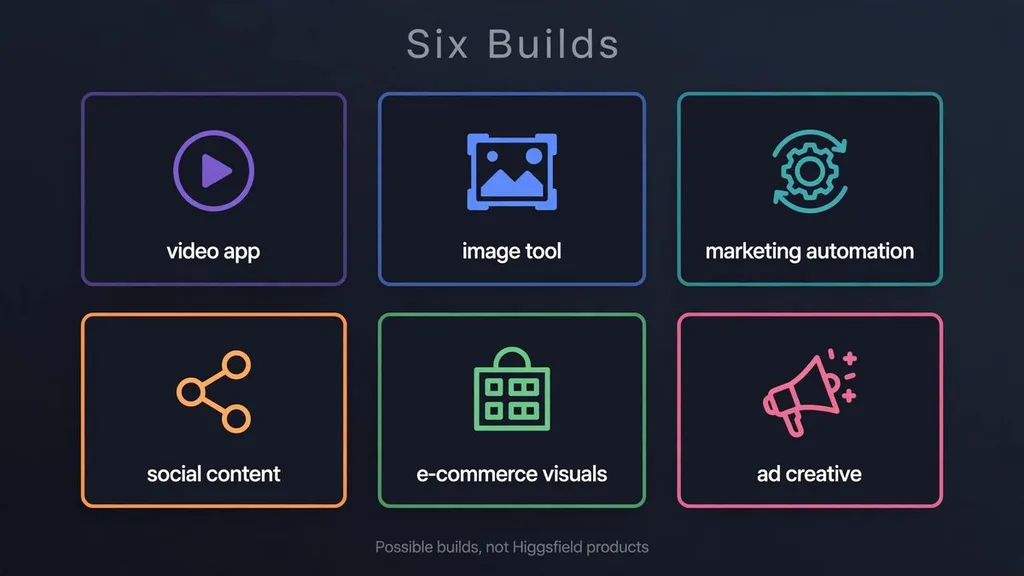
Now that does Higgsfield have an API is answered, the useful question is what to do with it. The API makes the following projects technically possible. None is a finished Higgsfield product, and Higgsfield does not endorse any particular use.
- An AI video generator. A web app where users submit prompts and receive clips, with your own moderation and billing.
- An image tool inside a SaaS product. Generate avatars, hero images or illustrations behind a button.
- Marketing automation. Produce campaign images or short videos from a spreadsheet of briefs.
- Social content tooling. Draft image and video variants for a posting calendar.
- E-commerce creative. Turn product photos into lifestyle images or promotional clips using models built for product imagery.
- Ad-creative platforms. Feed brand colors, copy and product shots into repeatable generation jobs.
- Production pipelines. Connect generation to asset management or review tools your team already uses.
- Specialist content platforms. Wrap a narrow workflow, such as fashion lookbooks, around the catalog.
Is the Higgsfield API Worth Using?
Does Higgsfield have an API worth the money? For the right builder, yes. The case for it, and the case against, are both fairly concrete.
Pros
- One integration reaches many image and video models, more than 50 according to the current documentation.
- It offers REST access, official Python and TypeScript SDKs, and webhooks.
- Pay-as-you-go billing needs no consumer subscription.
- You pay only for successful generations.
- The catalog fits SaaS and application integration.
Cons
- Billing is separate from website plans, so credits you already own do not help.
- Costs add up quickly at scale, especially for long or high-resolution video.
- Model availability and prices can change.
- Every model has its own parameters, so code is not fully portable between them.
- You must handle asynchronous jobs, retries and signature checks.
- Keys need careful server-side storage.
- Hosted files are temporary, so you need your own storage.
- Third-party model terms can add restrictions.
If you are generating a few clips by hand, the API is overkill. If you are shipping generation to other people, it is the intended route. For a consumer-side verdict on the website plans, see our Higgsfield AI reviews.
Who Should Use the Higgsfield API?
Anyone weighing does Higgsfield have an API against the website, MCP or CLI should match the route to the job.
A good fit:
- SaaS developers adding image or video features
- AI startup teams that need many models behind one integration
- Web developers and automation builders
- Content platforms and agencies running repeatable production
- Creative-tech developers building specialist tools
Not necessarily needed for:
- Casual creators who generate manually, since the website is simpler and its plans bundle perks the API never gets
- People who prefer the visual interface
- Users who just want Higgsfield inside Claude or ChatGPT, for whom MCP is the lighter route
Security Best Practices
Does Higgsfield have an API security checklist? The documentation and terms add up to one, and common sense fills the rest:
- Keep credentials on the server. Never ship them in browser JavaScript or app bundles.
- Never commit them to GitHub.
- Use environment variables or a secrets manager.
- Rotate a credential immediately if it may have leaked, and report suspected compromise within 24 hours as the terms require.
- Restrict who can read production secrets, and give contractors their own credentials through a secure channel.
- Use separate credentials per environment. The console supports named keys with expiry and usage analytics by key.
- Avoid logging secrets, URLs that contain them, or presigned storage links.
- Monitor spend and request volume in the console.
No IP allowlist or built-in spending cap was documented in the pages reviewed, so do not plan around either.
Troubleshooting Common Problems
Readers who have confirmed does Higgsfield have an API still hit snags. Exact error bodies can change, so check each against the current documentation.
| Problem | Likely cause | What to check |
|---|---|---|
| Invalid API key | Malformed header, wrong secret, or an expired or revoked credential (401) | Use the Authorization format and look for an expiry message |
| Insufficient balance | Empty balance, so new requests wait | Billing page and auto top-up |
| Wrong endpoint | Old base address or a model your account cannot reach (404, 423, 503) | api.higgsfield.ai and the model page |
| Invalid parameters | Each model has its own schema | The model page for field names |
| Unsupported resolution or duration | Limits are model-specific | The model page |
| File upload failure | Content type mismatch, an expired URL, or credentials sent to storage | Match the content type and re-request the URL |
| Request timeout | Network trouble on submit | Retry with the same Idempotency-Key |
| Failed generation | Job failed or was blocked by moderation | Neither is charged |
| Webhook not received | Endpoint not HTTPS or public, slower than ten seconds, or returning a 4xx | Fall back to polling |
| Expired output URL | Files are deleted seven days after finishing, or sooner if you set a shorter period | Download promptly |
| Rate limit trouble | Queue full returns a 429 | Wait for Retry-After and cap your own submissions |
Frequently Asked Questions
Does Higgsfield have an API?
Yes. Does Higgsfield have an API for developers? It does: a standalone product with its own console, credentials, prepaid dollar balance, REST endpoints and official Python and TypeScript SDKs, documented at docs.higgsfield.ai.
Is the Higgsfield API free?
No, not as a standing free service. Does Higgsfield have an API free of charge? Each successful generation is billed from a prepaid balance with a $5 minimum top-up. Launch promotions and starter balances have been advertised, but they are time-limited, so verify them on the official page.
How do I get a Higgsfield API key?
Sign up for an API account, add a payment method, fund the balance, then create credentials in the console. The full key is shown once, so store it at once in a server-side secret store.
Does a Higgsfield subscription include API access?
No. The website plan and the API are separate products with separate billing. A plan neither grants API access nor changes API rates, and you can use the API without any plan.
How much does the Higgsfield API cost?
Rates vary by model and settings, with video generally priced per second and images per image. Use the estimate endpoint before submitting. Anyone who asks does Higgsfield have an API cheap enough for a side project should compare per-image models first.
What models are available through the Higgsfield API?
More than 50 image and video models from providers such as Higgsfield, ByteDance, Kling, Wan, MiniMax, PixVerse, LTX, Grok, Ideogram, Recraft and Qwen. The catalog is separate from the website, so check the console for what your account can use today.
Can I use the Higgsfield API for commercial projects?
Higgsfield’s Help Center and Terms of Use say outputs can be used commercially. Rights clearance, third-party model terms, likeness and trademark issues remain your responsibility, and this is not legal advice.
Does Higgsfield have an API with Python and TypeScript SDKs?
Yes. Install higgsfield-client for Python or @higgsfield/client for TypeScript, and run both only on a server. Does Higgsfield have an API without an SDK? Plain REST works from any language.
What is the difference between the Higgsfield API and MCP?
The API is for building generation into your own product, using its own key and dollar balance. MCP connects chat agents to your existing Higgsfield account and spends plan credits, with no key.
Does Higgsfield have an API for Claude or ChatGPT?
Not as a chat connector. If your goal is Claude or ChatGPT, MCP or the official plugin is the intended route. The API only reaches those tools through code you write.
Conclusion
Does Higgsfield have an API? Yes: a separate, prepaid, developer-focused product that offers REST access, two official SDKs, asynchronous jobs, webhooks and a catalog of more than 50 image and video models. The details that trip people up are the ones that make it different from everything else Higgsfield sells. It does not use website credits, it is not unlimited, it uses a key ID and secret, and generated files are temporary.
So does Higgsfield have an API that suits you? If you are building a product, probably yes, after you check current prices, model availability and limits in the console. If you only want to make clips or connect Higgsfield to Claude, the website or MCP is simpler. Whichever route you pick, confirm the specifics before spending money, because this part of Higgsfield is moving quickly.
Sources & References
- Higgsfield Help Center, “What is the Higgsfield API, and how do I get started?” (September 16, 2026): https://higgsfield.ai/creator-hub/help-center/integrations/what-is-the-higgsfield-api
- Higgsfield API documentation, Quickstart: https://docs.higgsfield.ai/docs/quickstart.md
- Higgsfield API documentation, Authentication: https://docs.higgsfield.ai/docs/authentication.md
- Higgsfield API documentation, Billing and retention: https://docs.higgsfield.ai/docs/concepts/billing-and-retention.md
- Higgsfield API documentation, Rate limits and Capacity and concurrency: https://docs.higgsfield.ai/docs/concepts/rate-limits.md and https://docs.higgsfield.ai/docs/enterprise/capacity.md
- Higgsfield API documentation, Client libraries (SDKs): https://docs.higgsfield.ai/docs/how-to/sdk.md
- Higgsfield API documentation, Webhooks and File uploads: https://docs.higgsfield.ai/docs/how-to/webhooks.md and https://docs.higgsfield.ai/docs/concepts/file-uploads.md
- Open Higgsfield API page (model catalog and launch offer, read November 23, 2026): https://higgsfield.ai/higgsfield-api
- Higgsfield Terms of Use Agreement, last updated October 23, 2026 (Section 11, Developer Terms): https://higgsfield.ai/terms-of-use-agreement
- Higgsfield Help Center, MCP and CLI articles: https://higgsfield.ai/creator-hub/help-center/integrations/what-is-higgsfield-mcp and https://higgsfield.ai/creator-hub/help-center/integrations/how-do-i-access-higgsfield-via-cli
- Higgsfield API documentation index: https://docs.higgsfield.ai/docs/llms.txt
 Daniel Carter

1 comment