
In this article
Verified on November 4, 2026 against Anthropic’s Claude Code documentation, its pricing page and its help center. Interface labels and plan rules change often, so treat this as a dated snapshot and confirm anything that costs money or touches private code.
What Is Claude Code Web? A Direct Answer
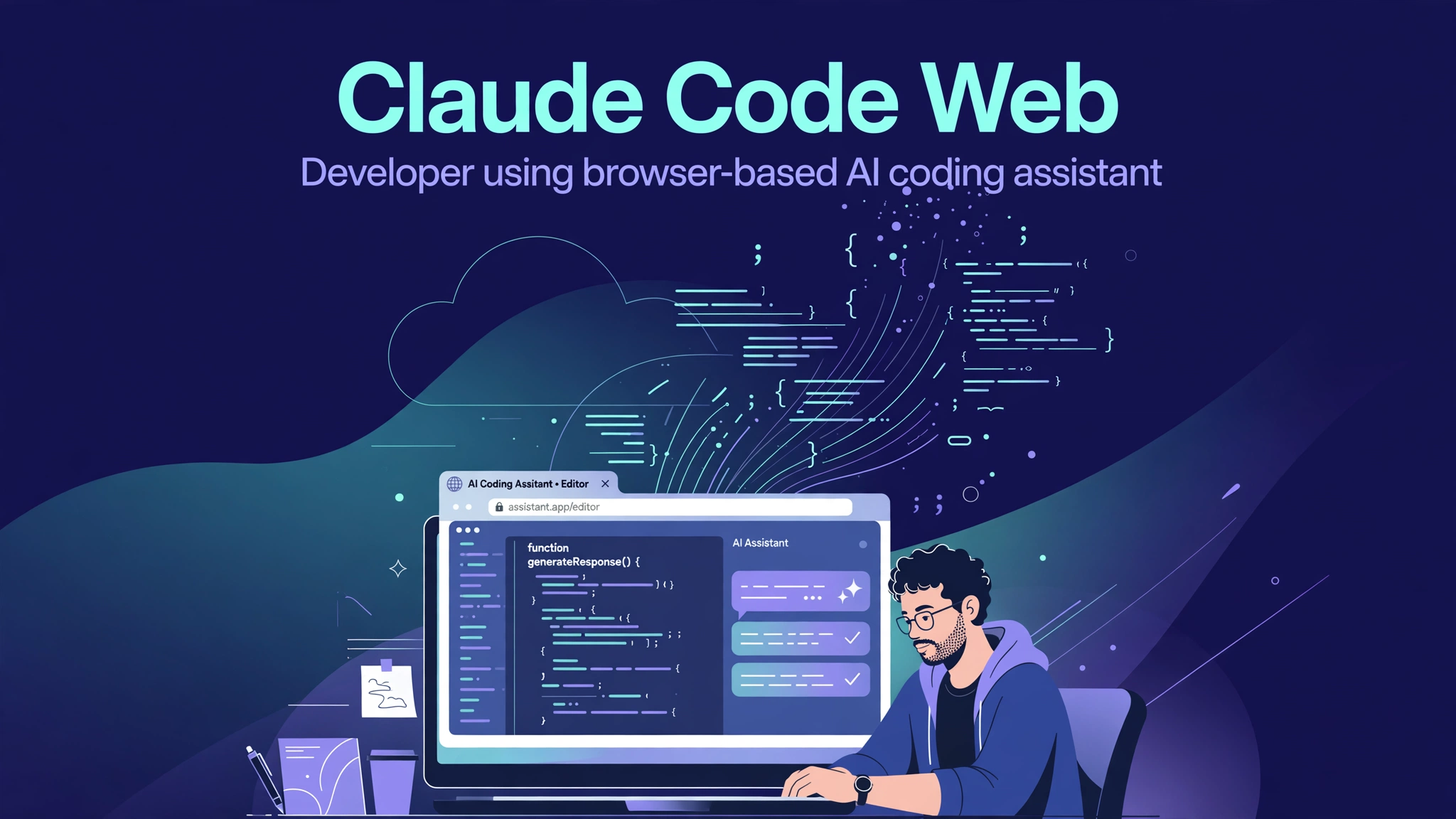
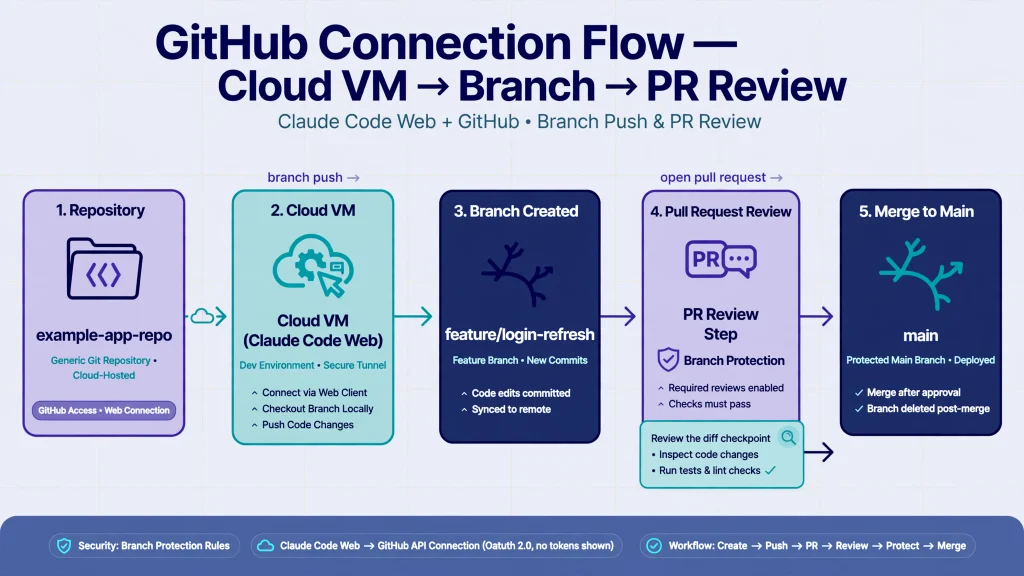
Claude Code Web is the popular name for running Anthropic’s Claude Code coding agent in the cloud, started from a browser tab at claude.ai/code instead of from a terminal on your own machine. You connect GitHub, pick a repository, describe a job, and Claude works inside a disposable virtual machine that Anthropic manages. When it reaches a stopping point it pushes a branch, and you review the changes and, if they look right, open a pull request.
A naming warning before anything else. Anthropic’s documentation now calls this feature “cloud sessions,” and a note added to the original launch post on September 23, 2026 says cloud sessions were previously known as Claude Code on the web. So Claude Code Web is the phrase people type into search boxes, not a formal product name. This guide uses it in that everyday sense and sticks to what Anthropic’s current documentation confirms.
Who is it for? Developers who want to hand off a well-defined piece of work and step away: a bug with a clear reproduction, a missing test, a documentation pass, a question about a repository they have never opened. If your task depends on local tools, a private network or machine-specific configuration, a local session is usually the better home. The comparison table later in this article shows exactly where that line falls.
Three things Claude Code Web is not
- It is not the claude.ai chat window. Chat answers questions in a conversation. Claude Code Web clones your repository into a machine and does the work there.
- It is not a third-party “web UI.” Community packages named claude-code-web exist on npm and wrap a browser front end around a copy of the tool running on your own computer. They are unofficial and separate from Anthropic’s hosted service.
- It is not a different AI. Anthropic’s documentation states that Claude Code behaves the same everywhere; what changes is where the session runs and whether your local configuration is available.
Table of Contents
What Is Claude Code?
Claude Code is Anthropic’s coding agent, and Claude Code Web simply moves that Anthropic coding agent into the cloud. Instead of only replying in a chat box, it works through a codebase: it reads files, edits them, runs commands, runs tests and checks its own work. Anthropic’s overview lists several surfaces for it, including the terminal, IDE extensions, a desktop app and the web, which makes it a single AI coding assistant that can follow you from a laptop terminal to a phone.
In practice that means it can help you understand an unfamiliar codebase, make changes across several files, track down the cause of a failing test, and handle development chores such as updating a changelog. The word “agent” matters here: it takes actions on your code, so the review step you perform afterwards is part of the product, not an optional extra.
How Does Claude Code Web Work?
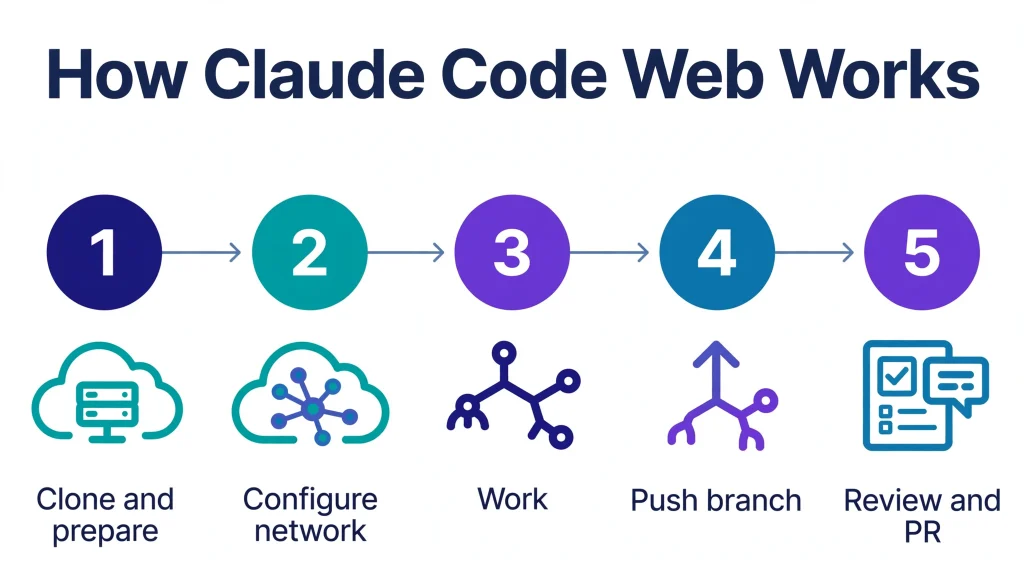
Anthropic’s quickstart describes every Anthropic-hosted run as four stages. Understanding them clears up most of the confusion beginners have about Claude Code Web.
- Clone and prepare. Your repository is cloned onto an Anthropic-managed virtual machine, and your setup script runs if you configured one.
- Configure the network. Internet access is set by the access level of the environment your session uses.
- Work. Claude reads the code, makes changes, runs tests and checks the result. You can watch and steer, or leave.
- Push the branch. At a stopping point Claude pushes its branch to GitHub. You review the diff, leave inline comments, create a pull request, or send another message to keep going.
The session does not end when the branch is pushed. Pull request creation and follow-up edits all happen in the same conversation, so context is not lost between “write the fix” and “address the reviewer.”
What happens when you close the browser tab?
Nothing stops. Anthropic’s documentation says closing the tab does not end a session; it keeps running until Claude finishes the current task, then idles. After a few minutes without activity the virtual machine pauses with its files saved, and a paused machine can later be reclaimed. If you reopen a reclaimed session, a fresh machine is provisioned. Your conversation history comes back, but background work that was still running, such as shell commands or subagents, does not, and Claude can be asked to restart whatever you still need.
Where can you start a session?
The Claude Code browser experience at claude.ai/code is the classic Claude Code online entry point, and it is the one most people mean by Claude Code Web, but it is not the only way in. The documentation lists the Code tab in the Claude mobile app, the Desktop app with a cloud environment selected, the terminal with the claude –cloud flag, and scheduled cloud tasks. All of them create the same kind of cloud session, which is why a task started on a laptop can be reviewed from a phone later. The Claude Code web interface and the mobile app show the same sessions, because sessions persist across devices.
Key Features of Claude Code Web
The table below summarizes what the documentation confirms about Claude Code Web as of November 4, 2026. Anthropic’s launch post carries an update saying cloud sessions are now generally available, so the “research preview” label that appears in older tutorials is out of date. Independent reporting at the time, such as InfoWorld’s coverage of the October 20, 2025 launch, described a beta research preview for Pro and Max users.
| Feature | What it does | Status on Nov 4, 2026 | Main restriction |
|---|---|---|---|
| Remote task execution | Runs Claude Code on an Anthropic-managed VM | Generally available | Plan-dependent; needs GitHub or a bundled local repo |
| Parallel sessions | Each task gets its own session and branch | Available | All sessions draw on one shared usage allowance |
| Cloud environments | Sets network access, variables and setup script | Available | Anyone using an environment can read its variables |
| Diff review | Shows added and removed lines, accepts inline comments | Available | Computed from raw git content, so repository diff drivers do not apply |
| Pull request creation | Opens a full PR, a draft, or GitHub’s compose page | Available | GitHub only |
| Auto-fix | Watches a PR for CI failures and review comments | Available | Needs the Claude GitHub App on the repository |
| Teleport to terminal | Pulls a cloud session into a local checkout | Available | Same account, same repository, clean git state |
The Claude Code cloud environment
In Claude Code Web, every session runs inside a saved configuration called a cloud environment. A Claude Code cloud environment sets the network access level, environment variables and an optional setup script that runs before Claude starts. Per Anthropic’s cloud environment documentation, setup scripts run as root on Ubuntu 24.04, and the result is cached when a script finishes in roughly five minutes, which keeps later sessions quick to start.
Remote execution that survives a closed laptop
The practical value of this remote coding agent is that your computer is no longer the bottleneck or the point of failure. Start a long task, close the lid, and check on it from any device. The limit is that the machine has fixed resources: Anthropic lists approximate ceilings of 4 vCPUs, 16 GB of RAM and 30 GB of disk, and warns that heavy builds or memory-hungry tests may be stopped.
Parallel tasks without juggling worktrees
Each task gets its own session and its own branch, so you can start a second job while the first is still running. Anthropic frames this as running several independent tasks at once without managing multiple local worktrees. The catch is cost in usage terms, not money: running tasks in parallel consumes your allowance proportionally faster.
Repository awareness and your own conventions
Because every session starts from a fresh clone, anything committed to the repository travels with it: the project’s CLAUDE.md instructions, rules, skills, agents and commands, plus hooks and permission rules in the repo’s settings file for single-repository sessions. Things that live only on your own computer, such as a personal user-level instruction file or MCP servers you added locally, do not. If you want to see how skill files are written, our guide to Claude Code Skills walks through the format.
Review, comment and open the pull request
After a push, a Changes card shows lines added and removed, for example +42 -18. Selecting it opens a diff view where you can comment on individual lines and compare against any branch in the repository. Your comments queue up and are bundled with your next message, so Claude knows which file and line you mean. This is the heart of the AI-powered pull requests workflow: the agent drafts, you judge.
Auto-fix for pull requests
Once a pull request exists, Claude can watch it. When a check fails or a reviewer comments, Claude investigates and pushes a fix if one is clear, and asks you first if a comment is ambiguous. GitHub does not send a webhook when a base branch moves and creates a merge conflict, so auto-fix cannot react to conflicts on its own; you ask Claude to rebase instead.
Handing sessions between cloud and terminal
With the Claude Code CLI signed in to the same claude.ai account, claude –teleport pulls a cloud session, its branch and its history into your terminal. Anthropic notes that the hand-off from the terminal is one-way: you can pull a cloud session down, but you cannot push an existing terminal session up. The Desktop app, however, can send a local session to the cloud.
How to Use Claude Code Web: Step-by-Step Guide
The labels below come from Anthropic’s quickstart as of the verification date. If a button has moved when you read this, follow the intent of the step rather than the exact wording.
What you need before you start
- A paid plan that includes cloud sessions: Pro, Max or Team, or an Enterprise seat that includes Claude Code. The Free plan does not include Claude Code.
- A GitHub account and an existing repository. The documentation says cloud sessions work with existing repositories, so a brand-new project needs a repository with a README first.
- For private repositories, the ability to install the Claude GitHub App on the account or organization that owns them. An organization owner may need to approve the installation.
- On Team and Enterprise plans, an Owner must first switch on the GitHub connector in organization settings. Until then the sign-in step shows a message that GitHub access is required.
The steps
- Open claude.ai/code and sign in with your claude.ai account. If you see “Claude Code isn’t available on your account,” your seat does not include Claude Code, and an organization Owner can assign one that does.
- Connect GitHub. Follow the prompt, approve the request on GitHub’s authorization page, and you are returned to claude.ai/code.
- Install the Claude GitHub App if you want to work in private repositories. You can click Skip and do it later.
- Set up your Default environment. On Pro and Max, onboarding creates an environment named Default for you. On Team and Enterprise you see a “Create your first cloud environment” form; keep the prefilled values and click Create & finish. Default uses Trusted network access.
- Choose the repository and branch. Use the repository selector under the input box. You can add several repositories to one session, and a control after the selector lets you start from a feature branch instead of the default.
- Pick a permission mode. Options are Auto (when your organization and model allow it), Accept edits, and Plan, where Claude proposes an approach and waits for approval. Cloud sessions do not offer Manual or Bypass permissions.
- Describe the task and press Enter. Anthropic’s advice is to name the file or function, paste error output if you have it, and describe expected behavior rather than just the symptom.
- Watch, steer, or walk away. If you send a message while Claude is working it queues, and you can take it back by clicking the cross on it before Claude reads it.
- Review the diff. Open the diff from the lines-added-and-removed indicator, leave inline comments, and use Compare against if you want a different base branch.
- Create the pull request. Select Create PR at the top of the diff view and choose a full PR, a draft, or GitHub’s compose page with a generated title and description.
- Verify like you would any teammate’s work. Run the project’s tests and CI, paste failures back into the session, or turn on auto-fix.
- Continue or conclude. The session stays live after the PR. When you are finished, archive it to hide it, or delete it to remove it permanently.
A terminal shortcut for GitHub CLI users
If you already use the GitHub CLI, running /web-setup inside Claude Code reads the token printed by gh auth token, asks you to confirm, and sends it to Anthropic, where it is stored encrypted with your account. That token can reach any repository your gh login can reach, with no GitHub App installation. It is convenient, and it is also broader than the App’s per-repository model, which matters for the security discussion below. On Team and Enterprise plans the command stays hidden until an Owner turns on Quick setup.
Claude Code Web and GitHub Integration
Claude Code GitHub integration is the backbone of Claude Code Web. Cloud sessions need repository access to clone code and push branches, and Anthropic documents two ways to grant it.
| Method | How you connect | What sessions can reach | Best for |
|---|---|---|---|
| Claude GitHub App | Authorize it during web onboarding | Any public repository, plus private repositories where the App is installed | Browser onboarding and teams that want auto-fix |
| /web-setup | Run it in your terminal to send your local gh token | Any repository your gh token can access | Individual developers who already live in gh |
What the Claude GitHub App adds
For private repositories the App is the gate: a private repo appears in the selector only when the App is installed on the owning account or organization and the installation’s repository access includes it. Installing it also unlocks auto-fix, and Anthropic’s project threads need it on every repository they clone.
How pushes and credentials are handled
In Anthropic-hosted environments your GitHub credentials stay encrypted on Anthropic’s servers and never enter the session’s virtual machine. GitHub operations go through a dedicated proxy that attaches the credential on the server side. The proxy rejects branch deletions and pushes of anything other than a branch, such as a tag. Two details deserve honesty. Anthropic’s cloud-environment page says the proxy does not limit which branches a push can update and recommends branch protection rules or rulesets on GitHub, while the security page describes pushes as restricted to the current working branch. Treat your own branch protection as the control you can verify.
The proxy also rejects GitHub’s GraphQL endpoint, so gh subcommands that use GraphQL, such as gh pr and gh issue, fail inside a session. REST calls through gh api work, and the built-in GitHub tools handle reading issues, listing pull requests and fetching diffs.
Protecting sensitive repositories
- Install the Claude GitHub App on selected repositories only. GitHub’s own documentation lets you choose All repositories or Only select repositories, and recommends reviewing installed apps periodically.
- Turn on branch protection and required reviews for any branch you would be unhappy to see changed.
- Check comment-triggered automation before enabling auto-fix. Anthropic warns that Claude can reply to review threads under your GitHub account, which can fire workflows such as Atlantis, Terraform Cloud or custom Actions listening for comment events.
- Keep secrets out of environment variables and out of the repository.
- Think before sharing a session. On Pro and Max, a session set to Public is visible to any signed-in claude.ai user, and sessions can contain code and credentials from private repositories.
Disconnecting access
To remove the credentials cloud sessions use, disconnect GitHub at claude.ai/customize/connectors; Anthropic says this deletes them and cloud sessions lose GitHub access until you reconnect. If you used /web-setup, the underlying token stays valid on GitHub until you revoke it there, under the GitHub CLI entry in your authorized OAuth apps. To cut off the App itself, GitHub’s documentation describes suspending or uninstalling a GitHub App from the account where it is installed.
Real-World Use Cases for Claude Code Web
These scenarios for Claude Code Web are illustrative. They show the kinds of work the documentation recommends, not benchmark results, and no timing or success-rate claims are implied.
- Fixing a small bug. Paste the failing test output, name the module, and ask for a fix plus a regression test. Anthropic notes that for backend work Claude can use test-driven development, which makes the pull request easier to trust.
- Explaining unfamiliar code. Ask how a feature flows from request to database in a repository you have not cloned. The documentation lists code questions and exploration without a local checkout as a good fit.
- Adding a small feature. Describe the behavior, name the files that should change and the ones that must not, and require tests.
- Updating documentation. Anthropic’s own help-center example asks Claude to update a changelog with everything since a given release tag by reviewing commits on the main branch.
- Improving test coverage. Point at one module and ask for tests for specific edge cases, then run them in CI.
- Refactoring a section. Keep the scope narrow, such as moving one logger to structured output, and insist that public signatures stay stable.
- Reviewing an implementation. Ask Claude to read a branch and list risks before a human reviewer does.
- Investigating a reported issue. Paste the report and ask for hypotheses with file references before any edits, ideally in Plan mode.
Claude Code Web vs Claude Code CLI
Both run the same agent. The difference is the place it runs, and therefore what it can see. The table reflects Anthropic’s own comparison plus the details documented elsewhere.
| Dimension | Claude Code Web (cloud session) | Claude Code CLI (local session) |
|---|---|---|
| Access method | claude.ai/code, mobile Code tab, Desktop app with Cloud selected, or claude –cloud | Your terminal, IDE, or Desktop app with Local selected |
| Where code runs | Anthropic-managed VM by default | Your machine |
| Repository access | GitHub required, or bundle a local repo; clones fresh each session | Any local checkout; GitHub not required |
| Terminal and tools | Ubuntu 24.04 VM with preinstalled toolchains; Claude runs every command, you get no shell | Your own shell, tools and configuration |
| Local configuration | Repo contents only | Yes, including user-level settings |
| Developer control | Accept edits, Plan or Auto modes | All modes available in the terminal |
| Network | Configurable per environment | Your machine’s network |
| Keeps running if you disconnect | Yes | No |
| Setup | Sign in, connect GitHub, create an environment | Install Claude Code and sign in |
| Collaboration | Sessions can be shared; Team plans offer team visibility | Work stays on your machine unless you push it |
| Best for | Parallel, well-defined, hand-off tasks and repos you do not have locally | Work needing your tools, secrets handling, private network or tight steering |
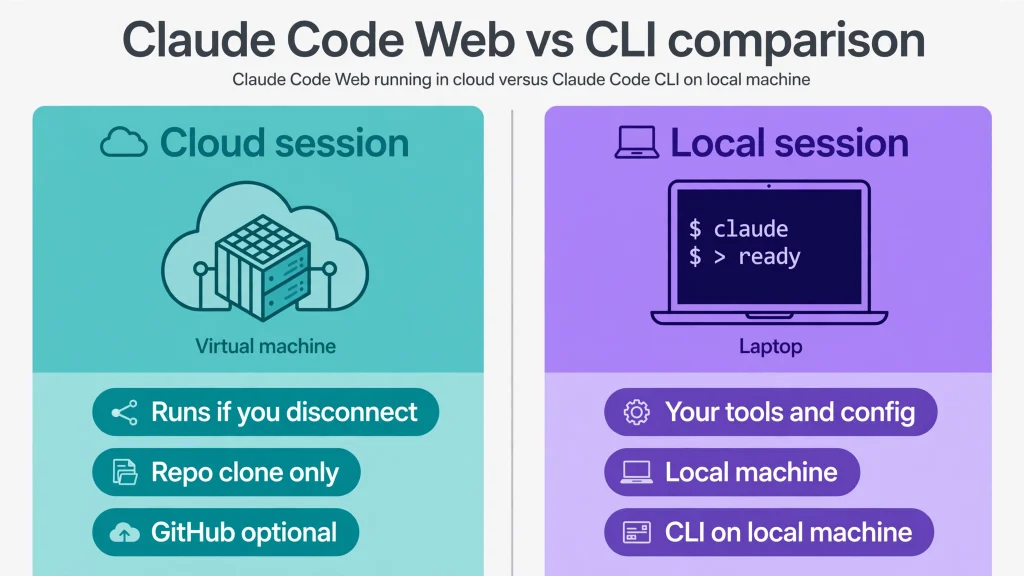
There is also a third option: Remote Control, where your session runs on your own machine and you steer it from a browser or phone. If you want a browser-based coding workflow without moving execution off your hardware, that is the route Anthropic points to.
Claude Code Web vs Claude.ai Chat
The two share an account, a domain and a usage pool, which is why people blur them. They do different jobs. Claude chat is a conversation tool for writing, research, analysis and quick code snippets. Claude Code Web is an AI software development tool that receives a repository, executes commands in a machine, and returns a branch. Anthropic’s pricing page makes the split visible: the Free plan includes chat, projects and artifacts, but Claude Code is marked as not included.
They also differ in what “done” looks like. A chat answer is text you copy. A cloud session produces commits and a diff you can review. A third product, Claude in Chrome, is a browser extension that acts on web pages, and it should not be confused with either; our Claude in Chrome guide explains what it does.
Claude Code Web vs ChatGPT for Coding
The fairest comparison is with Codex, the coding agent OpenAI includes in ChatGPT plans, because it is the closest equivalent of Claude Code Web. OpenAI’s documentation describes Codex cloud as working on tasks in the background, including in parallel, in its own cloud environment connected to your GitHub repositories, and says you can tag @codex on issues and pull requests to start tasks.
| Aspect | Claude Code Web | ChatGPT with Codex cloud |
|---|---|---|
| Repository work | Clones GitHub repos into a VM per session | Connects GitHub and works in its own cloud environment |
| Delivering changes | Pushes a branch; Create PR from the diff view | Can create pull requests from its work |
| Parallel work | Separate session and branch per task | Documented as background and parallel |
| Environment control | Network levels, variables, setup scripts | Environments choose repo, setup steps, tools, and internet access settings |
| GitHub-side triggers | Auto-fix reacts to CI failures and review comments | Tag @codex on issues and pull requests |
| Other hosts | GitHub Enterprise Server on Team and Enterprise; GitLab and Bitbucket only as an uploaded bundle that cannot push back | OpenAI’s docs navigation lists a GitLab (Beta) integration; check its current status if GitLab matters to you |
| Free access | No Claude Code on Free | Free and Go plans include limited Codex access |
On price, OpenAI’s pricing page lists Codex as included in its ChatGPT Free, Go, Plus, Pro, Business, Edu and Enterprise plans, with Free at $0, Go at $8 a month and Pro from $100 a month for 5x or 20x Plus usage. Both vendors tie usage to the subscription rather than charging separately for the cloud machine.
No universal winner can be named here. No independent, controlled benchmark of these two products was reviewed for this article, and results depend on your language, repository, test quality and prompt. Run the same small, well-specified task through each on a throwaway repository and compare the diffs you get. For a broader look at the assistants behind them, see our fair comparison, Is Claude Better Than ChatGPT?
Claude Code Web Pricing and Availability
Prices below were read from Anthropic’s pricing page on November 4, 2026, in US dollars before tax. Anthropic says prices and plans can change at its discretion.
| Plan | Price | Claude Code Web access |
|---|---|---|
| Free | $0 | No |
| Pro | $17 a month billed annually ($200 up front), or $20 monthly | Yes |
| Max | $100 a month, with 5x Pro usage | Yes |
| Ultra | $200 a month | Pricing page says Claude Code is in all paid plans; the cloud-session docs name Pro, Max, Team and Enterprise, so confirm in your account |
| Team, Standard seat | $20 per seat annually, or $25 monthly | Yes |
| Team, Premium seat | $100 per seat annually, or $125 monthly, with 5x Standard usage | Yes |
| Enterprise | $20 per seat a month, billed annually, 20-seat minimum, plus usage at API rates | Yes, for premium seats or Chat + Claude Code seats |
Subscription usage versus API billing
Claude Code Web sessions count toward your plan’s usage limits alongside the rest of your Claude and Claude Code activity, and Anthropic says there is no separate charge for the cloud VM. According to Anthropic’s Pro and Max help article, Pro and Max have a five-hour session limit and a weekly limit, and Max also has a separate weekly limit for Fable. When you hit a limit you can wait, move up a plan, turn on usage credits at standard API rates, or use a Claude Console account for pay-as-you-go API credits. One subtlety: the monthly API credits included with Max cannot be used in Claude Code or the Claude apps.
Cloud sessions also need a claude.ai sign-in. Anthropic states that API-key authentication does not count for claude –cloud or –teleport, and that cloud sessions are not available through third-party providers such as Amazon Bedrock. For the full cost picture, including API token rates, read our Claude Code Pricing guide, and for heavier individual use our Claude Max guide.
Availability and restrictions
Anthropic’s update says cloud sessions are generally available for Pro, Max and Team, and for Enterprise users with premium seats or Chat + Claude Code seats. If custom roles govern access, you also need a role with the cloud sessions permission. Organizations with Zero Data Retention, the HIPAA configuration or customer-managed encryption keys cannot start cloud sessions. Country-by-country availability was not verified for this article; Anthropic’s supported-regions page is the place to check.
Security, Privacy, and Permissions in Claude Code Web
Anthropic’s security documentation describes layers rather than a single wall for Claude Code Web. In Anthropic-hosted environments each session runs in an isolated virtual machine, network access is limited by default and can be disabled, credentials stay outside the sandbox behind a proxy, and operations are logged for audit.
Network access levels
Each environment has one level. None blocks outbound access through the session’s network; Trusted allows package registries, GitHub and cloud SDKs from a published allowlist; Full allows any domain; Custom takes your own list. Anthropic adds a caveat worth remembering: even with network access disabled, Claude Code can still talk to the Anthropic API, which may allow data to leave the machine.
Secrets and environment variables
This is where beginners get hurt. Environment variables are readable by anyone who uses the environment, so they are the wrong place for real secrets. For API keys, Anthropic provides network secrets: you store the key on the environment and a proxy attaches it to requests for hosts you list, after the request leaves the machine. They are unavailable on a few paths, including GitHub, the Anthropic API and public package registries.
If you send a local repository as a bundle, behavior differs by system. On macOS, Linux and WSL, uncommitted changes to files named like credentials or keys, such as .env files, tfvars files and PEM keys, are left out. On native Windows, uncommitted changes to tracked files upload as they are, so stash edits you do not want in the cloud.
Untrusted code and prompt injection
A session installs dependencies and runs code, so a malicious package or a booby-trapped README is a real route to trouble. Anthropic’s security page says plainly that no system is immune to all attacks, that you are responsible for reviewing proposed code, and that sensitive files deserve extra scrutiny. Review dependency changes, not just application code.
Organization controls
Team and Enterprise Owners can switch on the GitHub connector, enable Quick setup, create shared environments with a fixed network allowlist, and manage roles that include the cloud sessions permission. Consumer users manage data-training preferences in their privacy settings. Whatever your plan, do not paste passwords, API keys, private credentials or confidential customer data into a prompt unless the task truly requires it.
Limitations of Claude Code Web
Before you build a routine around Claude Code Web, account for these documented constraints.
- GitHub dependence. Cloning and pull request creation require GitHub. Self-hosted GitHub Enterprise Server is supported on Team and Enterprise. A GitLab or Bitbucket repository can be uploaded as a local bundle, but the session cannot push results back to that remote.
- Shared, faster-burning limits. Cloud sessions share rate limits with all other Claude and Claude Code usage, and parallel work consumes them proportionally.
- No local configuration. User-level instructions, locally added MCP servers and plugins enabled only in your user settings do not carry over. Interactive authentication such as AWS SSO is not supported.
- Fixed resources and timeouts. Roughly 4 vCPUs, 16 GB of RAM and 30 GB of disk. Claude waits two minutes for a foreground command by default and can ask for up to ten; timed-out commands move to the background and can run up to thirty more minutes. A setup script is cached only if it finishes in roughly five minutes.
- No shell access. You cannot open a terminal in the VM. Claude runs every command, so you phrase tasks as requests.
- Startup work. PostgreSQL and Redis are preinstalled but not running, and toolchains such as the .NET SDK need a setup script.
- Network and policy blockers. An organization IP allowlist causes Anthropic-hosted sessions to fail with an authentication error unless Anthropic grants an exemption.
- Idle expiry. Sessions stop after inactivity and background work is not restored.
- Human review is mandatory. Passing tests do not prove correctness, and the agent can misread requirements.
Tips for Getting Better Results from Claude Code Web
Claude Code Web rewards precise requests. A good one answers six questions: what is wrong, where to look, what correct behavior is, what must not change, how to test, and when the job counts as done.
Weak: “fix the login tests.”
Stronger (illustrative): “In tests/test_auth.py, test_refresh_token_expiry fails with an AssertionError (output pasted below). Expired tokens should return 401. Change only src/auth/session.py unless the test itself is wrong, and keep public function signatures stable. Run pytest tests/test_auth.py, then the full suite, before you push. Done means both pass and the pull request description explains the root cause.”
More habits that pay off:
- Use Plan mode for ambiguous work. Let Claude propose an approach, then approve it before it edits.
- Commit your conventions. Put build commands, style rules and “never touch” paths into the repository’s CLAUDE.md so every session starts informed.
- Prepare the environment. Add a setup script for tools the base image lacks, and keep it under about five minutes so it can be cached.
- Use inline comments. Pointing at a line beats describing it.
- Keep tasks small. One reviewable concern per session produces diffs a human can actually read.
Review and test everything. Code from any AI coding assistant can be plausible and wrong, and a green test run only proves the tests you have. Read the diff, run your own checks, and treat the pull request like one from a new contractor.
Who Should Use Claude Code Web?
- Beginner developers: Useful for asking questions about a repository and for small, well-described fixes, provided you read every diff and learn from it rather than merging blindly.
- Experienced engineers: Strong for offloading routine, well-specified work in parallel while you do deeper work locally.
- Open-source contributors: Handy for exploring unfamiliar projects, but remember it needs GitHub access and a repository you may not own.
- Startup teams: The shared environments and team visibility on Team plans suit small groups, with usage limits as the thing to budget.
- Freelance developers: Convenient for juggling client repositories, but check each client’s rules before connecting their private code.
- Browser-first developers: Claude Code Web lets you work from a laptop, a tablet or the Claude mobile app without installing anything locally.
- Developers who need local control: If you need your own toolchain, private network, GPUs or tight step-by-step steering, prefer the Claude Code CLI, Desktop with Local selected, or Remote Control.
Final Verdict: Is Claude Code Web Worth Using?
Yes, for the right kind of work. Claude Code Web is at its best on delegated, well-defined tasks where a test can tell you whether the result is right, and where being able to run several jobs in parallel from any device is worth more than local control. Its important limits are real: it depends on GitHub, it draws on the same usage allowance as everything else, it cannot see your personal configuration, and it runs on a fixed-size machine with timeouts.
Try it if you hold a qualifying paid plan, have a repository with decent tests, and want a low-risk first task such as documentation or a small bug. Prefer the CLI when the work depends on your machine or needs close supervision. Before you connect a repository, check four things: which repositories the GitHub App can see, what branch protection stands between Claude and your main branch, which secrets live in your environment variables, and what comment-triggered automation could fire if auto-fix replies on a pull request.
Frequently Asked Questions About Claude Code Web
What is Claude Code Web?
Claude Code Web is the common name for running Anthropic’s Claude Code agent in the cloud from a browser at claude.ai/code. Anthropic’s documentation now calls it cloud sessions. Claude clones your GitHub repository into a virtual machine, makes changes, and pushes a branch for you to review.
Is Claude Code available in a web browser?
Yes. Anthropic’s overview says Claude Code is available on desktop browsers and in the Claude app for iOS and Android, starting at claude.ai/code. It is also available in the terminal, IDE extensions and the Desktop app.
How do I access Claude Code Web?
Go to claude.ai/code and sign in with a claude.ai account on a plan that includes Claude Code. Connect GitHub when prompted, set up the Default environment, choose a repository and describe a task. You can also start a cloud session from the mobile app’s Code tab, the Desktop app, or the terminal with claude –cloud.
Does Claude Code Web work with GitHub?
Yes, and GitHub is effectively required. You connect through the Claude GitHub App during onboarding or through /web-setup with the GitHub CLI. Private repositories need the App installed on them unless you used /web-setup.
Is Claude Code Web free?
No. Anthropic’s pricing page marks Claude Code as not included on the Free plan. It is included in paid plans, and cloud sessions count against the same usage limits as your other Claude activity, with no separate charge for the virtual machine.
Which Claude plan supports Claude Code Web?
Anthropic’s documentation names Pro, Max and Team, and Enterprise users with premium seats or Chat + Claude Code seats. The pricing page also lists a $200 Ultra plan and says Claude Code is in all paid plans, though the cloud-session documentation does not mention Ultra by name, so confirm in your account.
What is the difference between Claude Code Web and Claude Code CLI?
The agent is the same; the location differs. Claude Code Web runs on an Anthropic-managed VM from a fresh GitHub clone and keeps running if you disconnect. The CLI runs on your machine with your local tools and configuration, and does not require GitHub.
Can Claude Code Web create pull requests?
Yes. After Claude pushes a branch, you select Create PR in the diff view and choose a full pull request, a draft, or GitHub’s compose page with a generated title and description. Pull request creation requires GitHub.
Is Claude Code Web safe for private repositories?
It includes meaningful protections: isolated VMs, limited network access by default, a credential proxy and audit logging. No system is risk-free, though. Install the GitHub App on selected repositories, use branch protection, keep secrets out of environment variables, and review every change before merging.
Is Claude Code Web better than ChatGPT for coding?
There is no verified universal winner. OpenAI’s Codex cloud is the closest rival and offers similar delegation to GitHub repositories, with a limited free tier. Test both on the same small task in a throwaway repository and judge the diffs yourself.
Sources and References
Official Anthropic sources (consulted November 4, 2026)
- Use Claude Code in the cloud, Claude Code Docs: https://code.claude.com/docs/en/claude-code-on-the-web
- Get started with Claude Code in the cloud, Claude Code Docs: https://code.claude.com/docs/en/web-quickstart
- Configure cloud environments, Claude Code Docs: https://code.claude.com/docs/en/cloud-environments
- Security, Claude Code Docs: https://code.claude.com/docs/en/security
- Claude Code overview, Claude Code Docs: https://code.claude.com/docs/en/overview
- Claude Code on the web, Anthropic announcement (October 20, 2025, with a September 23, 2026 update): https://claude.com/blog/claude-code-on-the-web
- Plans & pricing, Claude: https://claude.com/pricing
- Use Claude Code with your Pro or Max plan, Claude Help Center: https://support.claude.com/en/articles/11145838-use-claude-code-with-your-pro-or-max-plan
- Claude Code on the web, Claude Help Center: https://support.claude.com/en/articles/12618689
 Daniel Carter