
In this article
Short answer: claude for small business works well when your company runs on writing, follow-ups, paperwork and numbers that need tidying, and when you are willing to review what the AI produces. As of November 5, 2026, the phrase also names a real Anthropic offering. Claude for Small Business is a plugin that runs inside Claude Cowork, links Claude to tools such as QuickBooks, HubSpot, Canva, Docusign, Shopify and Xero, and prepares work that you approve before anything is sent, posted or paid.
You can benefit from Claude without that plugin, and Anthropic does not sell the plugin as its own plan. This guide pulls the two meanings of claude for small business apart, shows what each one costs, walks through concrete use cases, and stays blunt about where a human still has to watch the work.
Prices and product details below were checked against Anthropic’s official pages on November 5, 2026. Plans change often, so confirm every figure on claude.com/pricing before you buy.
Table of Contents
Is Claude for Small Business Worth It? The Honest Verdict
For most small teams, yes, with conditions. Claude drafts, summarizes, restructures and reasons across long documents well enough to remove hours of low-value text work from a normal week. The newer claude for small business plugin goes a step further by connecting that ability to your accounting, CRM, payments and design tools, so a task can run end to end instead of ending in a chat window.
The conditions matter more than the praise, and they apply to claude for small business whether you use chat or the plugin. You need to check outputs before they reach customers, put confidential data only on a plan whose terms you have read, and begin with jobs where a mistake is cheap to fix. A business that treats Claude as a fast, tireless junior assistant tends to be happy. A business that treats it as an unsupervised employee tends to be disappointed.
What Does “Claude for Small Business” Mean Today?
Search results for this phrase mix two different things, and mixing them causes bad buying decisions.
Meaning one: the Anthropic product. Anthropic launched Claude for Small Business on May 13, 2026, as a package of connectors and ready-to-run workflows. On September 15, 2026, Anthropic said it had grown to 43 workflows and 27 additional integrations, including Shopify, Salesforce, TikTok, Atlassian, Zoom, Xero, Gusto, Square, Stripe and Zapier. Anthropic also reported more than 900,000 installs.
Meaning two: the everyday practice. This is simply a small company using Claude in ordinary chat for writing, research, analysis and planning. It needs no plugin, no connectors and no technical setup.
Both are legitimate ways to use claude for small business. The first suits owners who want repeatable, connected routines. The second suits anyone who wants a capable writing and thinking partner this afternoon.
What Is Claude, and Why Does It Matter for Small Business?
Claude is an AI assistant made by Anthropic, a public benefit corporation. Behind the chat window sits a line of models: Haiku is the fastest and cheapest, Sonnet and Opus handle heavier work, and Fable is currently the top model on Anthropic’s pricing page.
You can reach Claude in four ways: the web, desktop and mobile apps; Claude Cowork, which carries out multi-step tasks using your files and connected tools; Claude Code, which targets programming; and the Claude Platform API, which developers use to build their own products. For a small business owner, the first two matter most.
The Three Doors: How a Small Business Reaches Claude
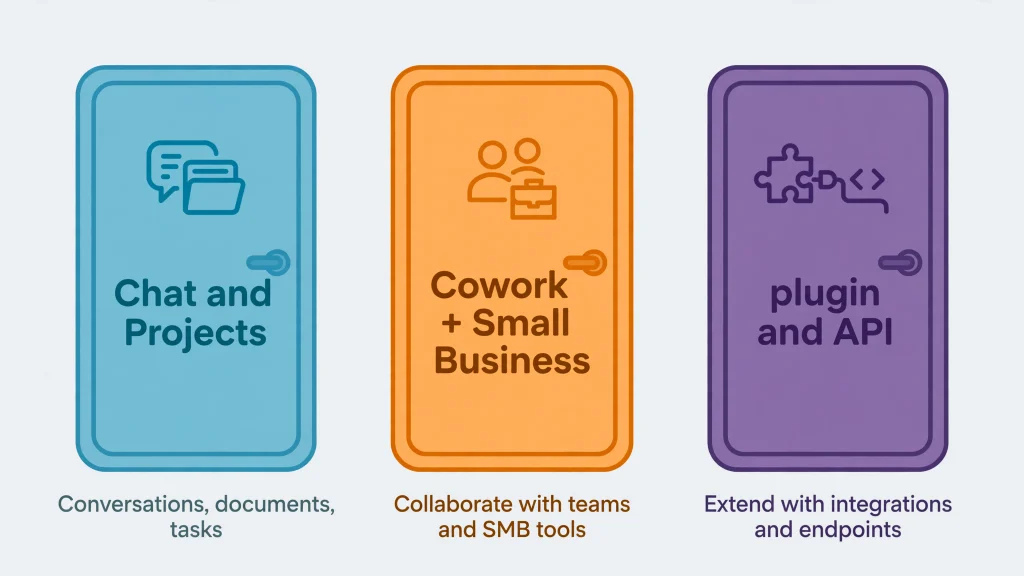
Think of Claude as a building with three entrances. Picking the right one saves money and frustration.
Door 1: Chat and Projects. You or your staff open Claude, paste or upload material, and work through a task. This covers drafting, summarizing, brainstorming and analysis. It is the cheapest and simplest route, and it is where most owners should begin.
Door 2: Cowork plus the Claude for Small Business plugin. Here Claude acts across connected apps and your files. According to Anthropic’s help center, Cowork is available on paid plans, the full experience lives in the desktop app for macOS and Windows, and some web and mobile features exist as well. Anthropic’s Cowork guidance also notes that tasks touching your local files or browser need the desktop app running, so test how your schedule behaves before you rely on it.
Door 3: The API. Developers pay per token to build custom tools, such as a support triage system. Subscriptions are separate, apart from monthly API credits that come with Max, Ultra and Team plans.
Inside the Claude for Small Business Plugin
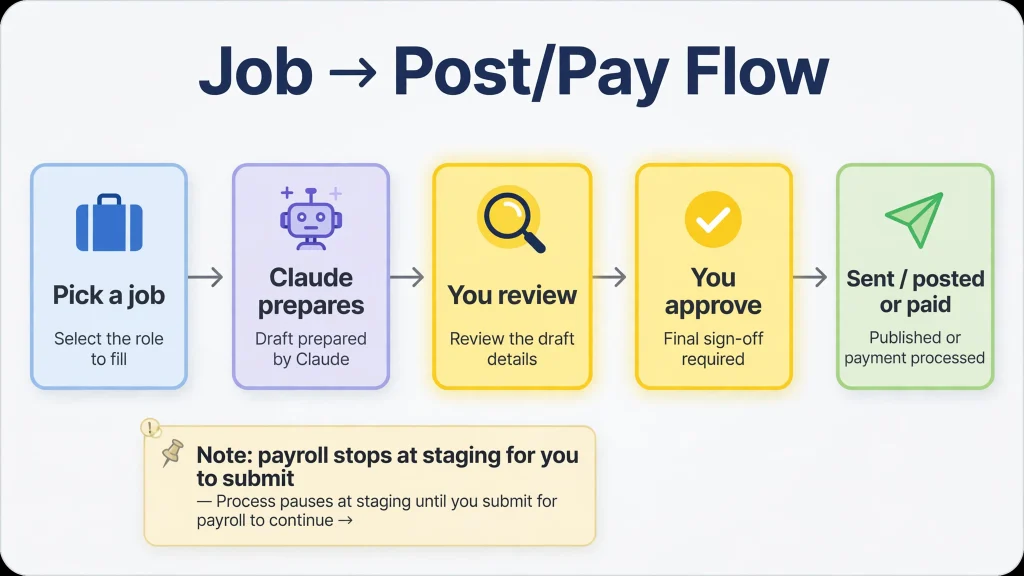
Anthropic describes claude for small business as a toggle install: switch it on inside Cowork, connect the tools you already use, then choose a job. Claude prepares the work and waits for your approval before anything sends, posts or pays. After you trust a workflow, you can let it run on its own, one workflow at a time, and you can switch it back whenever you like.
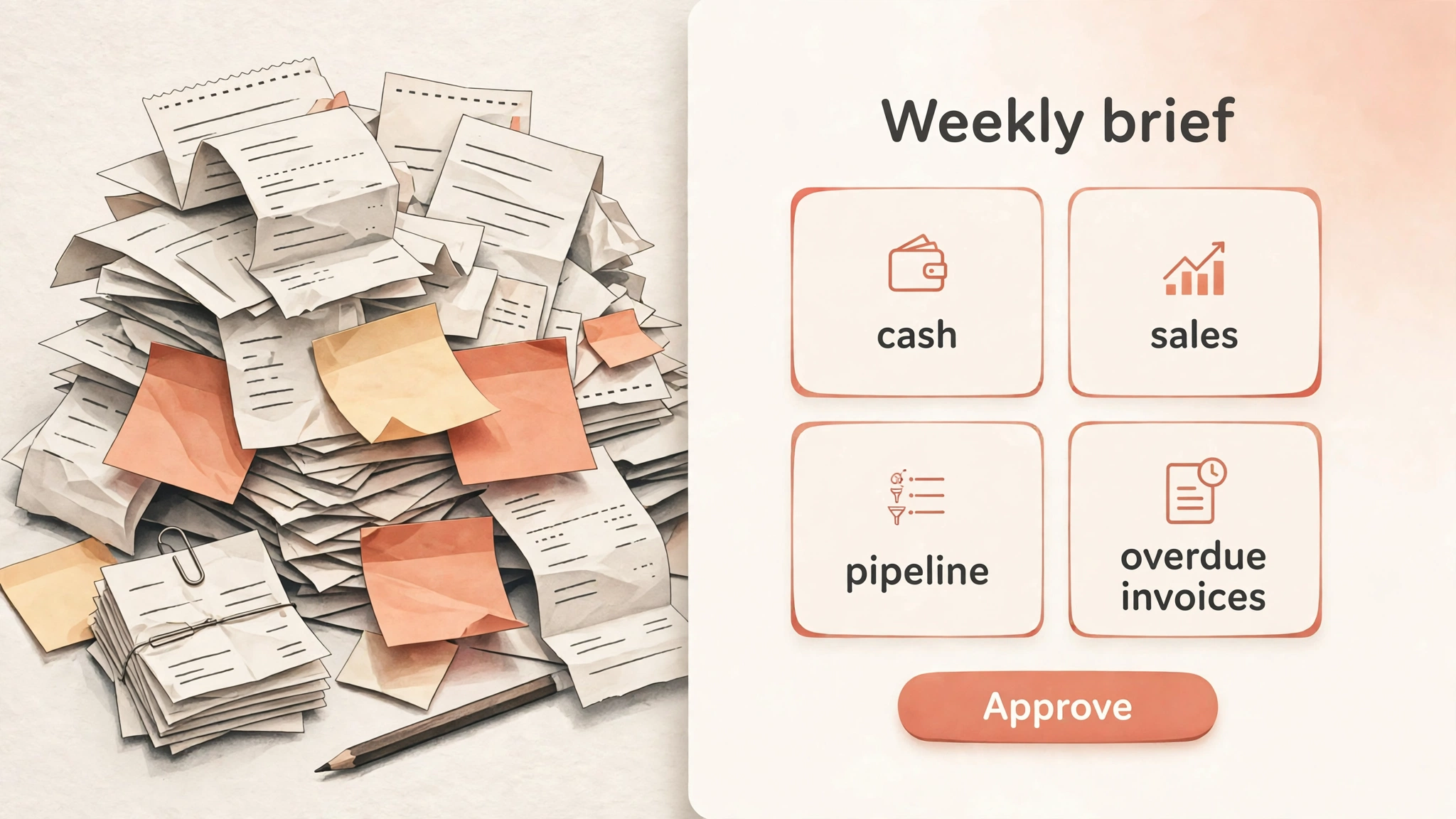
The official materials say claude for small business covers workflows across finance, operations, sales, marketing, HR and customer service. Examples Anthropic highlights include a Monday brief that puts cash, sales, pipeline and overdue invoices on one page, a lead-reply routine, a proposal builder that turns a voice memo into a priced draft, a social content engine, and a month-end close that reconciles books and prepares a packet for your accountant. Each workflow has a command, such as /monday-brief or /close-month, and you can type /smb-onboard to start setup.
Three practical details deserve attention:
- No connector, no problem, up to a point. Anthropic says that without connectors you can upload spreadsheets, statements or past proposals, and Claude works from those files. You then send or file the result yourself.
- Some workflows stop short on purpose. Anthropic gives payroll as an example: Claude stages it in Gusto, and you submit it.
- Counts vary across the web. Launch coverage quoted 15 workflows, and other sites cite 30 or 40 skills. Anthropic’s September 15 post says 43 workflows, so treat older numbers as stale.
One owner story Anthropic published about claude for small business describes a six-café coffee company that pulled point-of-sale, accounting and messaging data into one weekly view and credits part of a rise in in-store margin to tighter scheduling, ordering and inventory reporting. That account is self-reported and vendor-published, so read it as an illustration of what is possible, not a forecast of what you will get.
Claude for Small Business Use Cases That Hold Up
Below are the jobs where claude for small business tends to earn its keep. Every one assumes a person reviews the result, and none requires technical skill beyond clear instructions.
Marketing
For marketing, claude for small business can draft campaign angles, content briefs, social captions, email sequences and customer persona sketches from the notes you give it. It can also compare your messaging with a competitor’s public pages that you paste in. What it cannot do is know your brand by magic: feed it your past best-performing copy and a short voice guide, then edit the output. Anything that makes a factual or legal claim about your product needs your eyes.
Customer Support
For support, Claude can write FAQ answers, reply templates, help-center articles and summaries of long ticket threads. If you connect a help desk through a supported connector, it can work inside that system. Without that setup, Claude is a drafting assistant, not an automatic support desk, and it will not answer customers on its own simply because you opened a chat.
Sales
In sales, Claude handles outreach drafts, follow-up messages, call-note summaries, proposal first drafts and objection practice, where you ask it to play a skeptical buyer. Lead research is useful for structure and ideas, but verify names, titles and company facts before you send anything.
Content Creation
Blog outlines, rewrites, tone adjustments, summaries and repurposing a webinar into five posts are all strong fits. Claude is good at holding a style steady once you show it examples. Our guide to AI writing tools explains how to judge any assistant’s drafts before publishing them.
Research and Business Analysis
For analysis, upload a lease, a supplier contract or a stack of customer reviews and ask for the clauses that matter, the repeated complaints, or a comparison table. Claude is good at structuring messy material. It can still misread a figure or state something confidently that is wrong, so ask it to quote the passage it relied on and check the original.
Internal Documentation
Standard operating procedures, onboarding checklists, employee guides and meeting summaries are among the safest early wins, because the source knowledge is yours. Dictate how a task is done, let Claude organize it, then have the person who does the job fix the gaps. If you want Anthropic’s official reference material for these routines, our Claude Docs guide maps where it lives.
Data and Spreadsheet Work
Claude can clean a messy export, explain a formula, build a summary table or draft a report from numbers you provide, and Anthropic’s pricing page lists file creation and code execution on every plan. It is not a replacement for your accounting system, and arithmetic on large datasets should be spot-checked against the source.
Finance Admin
With the plugin and a connector such as QuickBooks, Xero or Stripe, Anthropic’s examples include invoice follow-up, cash forecasts and close preparation. Treat these as preparation for your bookkeeper or accountant, not a substitute for them.
Coding and Automation
Technical founders use Claude to write scripts, debug code and document an API. This is largely Claude Code and the API rather than the small business plugin, and it carries its own costs. Our breakdown of Claude Code pricing covers that side.
Six Illustrative Scenarios for Claude for Small Business
These are scenarios, not case studies. No figures are claimed, and each shows Claude supporting a person rather than replacing one.
Small ecommerce store. Problem: product descriptions, customer emails and weekly sales checks eat the owner’s evenings. How Claude helps: it drafts descriptions from a spec sheet and, with a Shopify connection, assembles a weekly summary. Human review: the owner approves copy and checks stock numbers. Limitation: Claude can repeat a wrong spec if the input was wrong.
Marketing agency. Problem: every client needs briefs, reports and variations. How Claude helps: it turns a call transcript into a brief and drafts monthly report commentary from exported metrics. Human review: an account lead edits tone and verifies every number. Limitation: client confidentiality means the agency should be on a plan whose terms it has reviewed.
Local service business. Problem: after-hours inquiries go cold. How Claude helps: with a calendar and CRM connected, it can draft replies offering real openings. Human review: the owner approves replies at first. Limitation: it needs accurate availability, or it proposes times you cannot honor.
Freelance consultant. Problem: proposals take a day each. How Claude helps: it converts discovery notes into a structured proposal using past work as a template. Human review: the consultant sets the price and scope. Limitation: Claude does not know your rate strategy unless you say so.
Small software company. Problem: documentation lags behind code. How Claude helps: it drafts docs from code comments and helps debug. Human review: an engineer tests everything. Limitation: generated code can look right and still fail.
Online education business. Problem: lesson outlines and learner emails pile up. How Claude helps: it drafts outlines, quizzes and reminder emails in a consistent voice. Human review: the instructor checks accuracy. Limitation: subject-matter errors can slip in unnoticed.
Claude for Small Business Pricing and Plans (November 2026)
Cost is the part most articles blur, so here is the clean version. Below is the plan structure on Anthropic’s pricing page as of November 5, 2026. Prices exclude tax, may differ by region, and Anthropic states they can change at its discretion.
| Option | Current price (USD, before tax) | Best for | Key features | Important limitations |
|---|---|---|---|---|
| Free | $0 | Testing Claude | Chat, web search, files, memory, Artifacts, Docs, Slides, Design | Limited usage; no Claude Code; paid plan needed for the plugin |
| Pro | $20/month, or $17/month with $200 billed annually | Solo owners, freelancers | More usage, Projects, Research, Claude Code, Chrome and Microsoft 365 | Individual account; no central admin or SSO |
| Max | $100/month | Heavy solo users | 5x Pro usage, Fable up to half your weekly limit, $100 monthly API credits | Monthly billing only; still an individual plan |
| Ultra | $200/month | Very long tasks | 10x Pro weekly usage, no 5-hour limit for verified accounts, $200 API credits | Costly for most small firms |
| Team Standard | $20/seat/month billed annually, $25 monthly | Groups of 2 to 150 | Central billing, SSO, connector admin controls, shared projects, no model training on your content by default | Usage limits still apply |
| Team Premium | $100/seat/month annually, $125 monthly | Power users inside a team | 5x the usage of a standard seat | Pricey for casual users |
| Enterprise | $20/seat/month annually, plus usage at API rates; 20-seat minimum | Larger or regulated firms | SCIM, audit logs, role-based access, custom retention | Seat minimum; costs scale with usage |
| API | Per token; for example Sonnet 5.5 at $2 input and $10 output per million tokens | Developers | Custom builds | Needs technical setup |
Two cautions. First, usage limits operate on a rolling five-hour window plus weekly caps, and Anthropic says there is no fixed message count, because limits depend on model, chat length and file size. Second, on paid plans you can switch on usage credits to keep working at standard API rates after hitting a limit, which means a bill can rise.
Is There a Claude for Small Business Plan?
No separate plan exists for claude for small business. As Anthropic’s own post puts it, the offering is available on every paid Claude plan, and Anthropic recommends the Team plan for businesses with more than one person. I found no separate plugin fee on the official pages I checked, but your connected tools, such as QuickBooks or HubSpot, keep their own subscriptions, and Claude connects to them rather than replacing them.
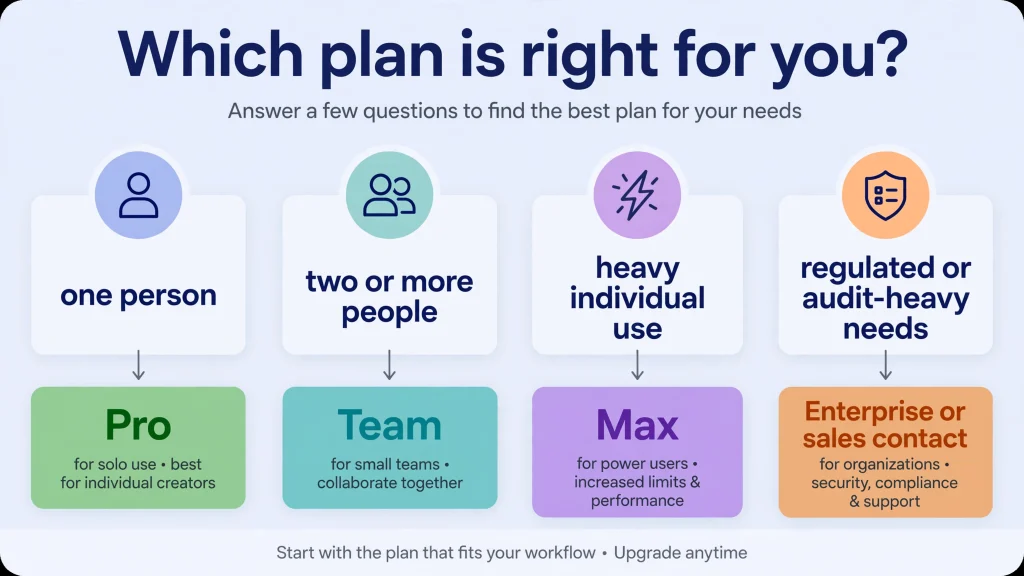
A rough guide to choosing a plan for claude for small business: a one-person business can start on Pro. Two or more people sharing work, wanting central billing, single sign-on and no-training-by-default terms, should look at Team. Do not confuse these with the API, which is billed per token and is a different product.
Claude vs ChatGPT for Small Business
Many owners will test both, and OpenAI is a serious rival. For a deeper model-by-model look, see our fair comparison of Claude and ChatGPT. Here is the small-business slice, limited to what official pages support.
| Factor | Claude | ChatGPT |
|---|---|---|
| Team seat price | Standard $20 annual, $25 monthly | Standard seat $20 annual, $25 monthly |
| Seat minimum | 2 (Team supports 2 to 150) | 2 standard seats |
| Training on workspace data | None by default on Team and Enterprise | Excluded by default on Business |
| Small-business-branded package | Claude for Small Business plugin in Cowork | Not verified in this research |
Claude may be a better fit when your work is document-heavy, you want connected workflows around QuickBooks, HubSpot or Stripe, or you value Anthropic’s approval-first design.
ChatGPT may be a better fit when your staff already live inside OpenAI’s tools, you rely on features specific to that ecosystem, or its connectors match your stack more closely.
Either can work when your needs are drafting, summarizing and brainstorming, which describes much of everyday use. The practical advice is to run the same three real tasks, such as a customer email, a proposal and a spreadsheet summary, through each tool before paying for seats. Many third-party comparisons I found repeat outdated feature claims, so I did not rely on them.
How Safe Is Claude for Small Business Data?
Whether claude for small business is safe for your information depends on which plan you use, not on the word “Claude.” The safeguards differ between individual accounts and business accounts.
Commercial plans. Anthropic’s Privacy Center states that, by default, it does not use inputs or outputs from commercial products, such as Claude for Work and the API, to train its models. The exception: if you submit feedback through the thumbs up or down button, the related conversation may be stored for up to five years and used, de-linked from your user and customer IDs. Team and Enterprise owners can disable that feedback ability through an organization setting called Rate chats.
Individual plans. Anthropic’s pricing page lists model training as opt-out on Free, Pro, Max and Ultra. If you handle client or employee information, an individual account is the wrong place for it unless you have read those terms and your own obligations.
Inside the plugin. For claude for small business specifically, Anthropic says your existing software permissions hold, so a person who cannot see something in QuickBooks or Google Drive cannot see it through Claude. It also says every workflow starts in approval mode by default. Its Cowork safety documentation adds that Claude needs explicit permission before permanently deleting files and reaches your computer only for the folders you connect.
What Team does not include. Anthropic’s comparison lists audit logs, SCIM, role-based access and custom data retention only on Enterprise. If your industry requires them, Team will not be enough.
This is general information, not legal advice. Read Anthropic’s Commercial Terms and Trust Center before uploading customer or employee records, and ask a professional if regulations apply to you.
Limitations of Claude for Small Business
No tool is free of trade-offs, and this one is no exception.
- Mistakes happen. Claude can state wrong facts fluently, misread tables and invent details.
- Review is not optional. Anything customer-facing, financial or legal needs a human decision.
- Usage caps. Heavy days can hit limits, and usage credits cost extra.
- Setup is not zero. Connectors need your accounts, permissions and time. Zapier’s guide notes that the native connector list does not cover every app.
- Specialized software still matters. Claude does not replace a payroll provider, a point-of-sale system or a legal advisor.
- Admin depth varies. Team lacks features Enterprise offers.
- Rules change. Plans, limits and connector lists have shifted several times in 2026.
- Your judgment stays yours. Claude can shape options, but it will not carry your business risk.
Best Ways to Use Claude for Small Business
A sensible rollout of claude for small business takes about a month.
Week 1: pick low-risk jobs. Choose two repetitive tasks such as meeting summaries and first-draft replies. Time them by hand first, so you can measure the change honestly.
Week 2: write reusable instructions. Create a short brand-voice note, a customer-reply checklist and a template for briefing Claude. Save them in a Project so you stop retyping context. Our guide to Claude Max helps if your usage outgrows Pro.
Week 3: add one connection. Connect the single tool that causes the most manual work, usually accounting or CRM, and keep approvals on.
Week 4: review and standardize. Compare time and error rates against week one. Keep what worked, drop what did not, and write down who approves what.
If your team browses a lot, Claude in Chrome is a separate tool worth reading about, but test it on harmless tasks first.
Anthropic also offers a free AI Fluency for Small Business course built with PayPal, and runs free workshops in US cities, which can help owners who prefer guided learning.
Example Claude Prompts for Small Businesses
These prompts work for claude for small business in ordinary chat. Replace the bracketed parts with your own details. Claude cannot see your private systems unless you paste material in or connect a tool.
Marketing: “Act as a marketer for [business type]. Using the three customer reviews below, write five email subject lines and one 120-word promotion for [offer]. Keep the tone [friendly/professional]. Do not invent discounts.”
Customer support: “Here is a complaint and our refund policy. Draft a calm reply under 150 words that acknowledges the problem, applies the policy accurately, and offers one next step.”
Sales: “Turn these discovery notes into a one-page proposal with scope, timeline and three pricing options. Mark anything you assumed with [CHECK].”
Business research: “Summarize the attached supplier contract. List payment terms, renewal dates, penalties and anything unusual. Quote the exact clause for each point.”
SOP creation: “I will describe how we process a return. Convert it into a numbered SOP with roles, tools and a quality check. Then list the questions you still need answered.”
Meeting summaries: “From this transcript, give me decisions made, action items with owners and dates, and open questions.”
Content creation: “Write a 600-word article outline on [topic] for [audience]. Use our voice notes below, and list claims that need a source.”
Data analysis: “I pasted last quarter’s sales by product. Identify the three biggest changes, explain possible causes as hypotheses only, and show the calculation for each figure.”
Business planning: “I am considering [decision]. List the assumptions, risks, costs I may have missed and a cheap test I could run in 30 days.”
Common Mistakes With Claude for Small Business
Most problems come from process, not technology.
- Pasting customer or employee records into an account whose terms you have not read.
- Sending AI output without a human check.
- Trusting statistics, dates and citations without verification.
- Treating Claude as legal, tax or medical advice.
- Building elaborate automations before one simple workflow works.
- Ignoring usage limits and credit costs.
- Using one generic prompt for every task.
- Skipping a clear rule for who approves what.
Who Should and Shouldn’t Use Claude for Small Business?
Claude may suit: writing-heavy teams, agencies, consultants, online sellers, content businesses, technical startups and firms that handle many documents.
Claude may not be the best choice for small business when: you depend on specialized industry software that needs deep native integration, you will use AI only rarely, you need Enterprise-level audit and access controls but cannot justify that tier, or a competing product already matches your existing tools better.
Quick Decision Table: Is Claude for Small Business a Fit?
| Business need | Claude a good fit? | Why |
|---|---|---|
| Content writing | Yes | Strong drafting and editing, with human review |
| Customer support drafts | Yes | Good for replies and FAQs; not an automatic support desk |
| Research | Yes, with checks | Structures material well; verify facts |
| Sales emails | Yes | Fast drafts and follow-ups; confirm lead details |
| Document analysis | Yes | Handles long files; ask for quotes |
| Coding | Yes | Claude Code and API, with separate costs |
| Business automation | Sometimes | The plugin helps; complex automation needs setup |
| Highly sensitive data | Careful | Requires careful policy and security review |
Frequently Asked Questions About Claude for Small Business
Is claude for small business a good idea?
Yes, for writing, research, summarizing and admin preparation, provided a person reviews the output. It is weaker as an unsupervised decision-maker.
How can a small business use Claude?
Start with chat for drafting and summaries. Add the Small Business plugin in Cowork once you want connected routines such as invoice follow-up or weekly briefs.
How much does claude for small business cost?
The plugin has no separate price on the official pages I checked. On November 5, 2026, Pro is $20 monthly or $17 monthly with annual billing, and Team Standard is $20 per seat annually or $25 monthly. Taxes and regional pricing may differ.
Does Claude have a small business plan?
No separate plan. The Claude for Small Business offering is available on paid plans, and Anthropic recommends Team for multi-person businesses.
Is claude for small business better than ChatGPT?
Neither wins universally. Claude is attractive for document work and its small-business plugin; ChatGPT may fit teams in OpenAI’s ecosystem. Test both on your tasks.
Can claude for small business help with marketing?
Yes. It drafts campaigns, emails, captions and briefs. With Canva or HubSpot connected, it can also prepare assets and analyze campaign data for your approval.
Can Claude analyze business documents?
Yes. It can summarize contracts, compare documents and extract key points. Verify important figures and clauses against the originals.
Is claude for small business safe for business data?
Anthropic says commercial products are not used for model training by default, while individual plans use an opt-out model. Review the terms for your plan first.
Can claude for small business automate tasks?
Partly. The plugin can run workflows on a schedule, usually with your approval. It does not replace specialist software.
Sources and References
- Anthropic, “Introducing Claude for Small Business”: https://www.anthropic.com/news/claude-for-small-business
- Claude blog, “Claude for Small Business launches new workflows, integrations, and training programs” (September 15, 2026): https://claude.com/blog/claude-for-small-business-launches-new-workflows-integrations-and-training-programs
- Claude pricing page: https://claude.com/pricing
- Anthropic Privacy Center, “Is my data used for model training?”: https://privacy.claude.com/en/articles/7996868-is-my-data-used-for-training
- Claude Help Center, “Get started with Claude Cowork”: https://support.claude.com/en/articles/13345190-get-started-with-cowork
- Claude Help Center, Cowork safety guidance: https://support.claude.com/en/articles/13364135
- Claude Help Center, Cowork on web, desktop and mobile: https://support.claude.com/en/articles/15520349
- AI Fluency for Small Business (Anthropic and PayPal): https://anthropic.skilljar.com/ai-fluency-for-small-businesses
- OpenAI Help Center, ChatGPT Business seat pricing: https://help.openai.com/en/articles/8792536
- OpenAI Help Center, managing data and privacy in ChatGPT Business: https://help-lb.openai.com/en/articles/8798634
- Zapier, “Claude for small business” walkthrough (independent context): https://zapier.com/blog/claude-for-small-business/
 Daniel Carter