
In this article
Checked on November 5, 2026 against Anthropic’s trademark guidelines, newsroom, press-kit link and Claude Code documentation.
The claude code logo is the visual mark that identifies Claude Code, Anthropic’s agentic coding tool for the terminal, IDEs, the desktop app and the browser.
Here is the verified short answer. Anthropic publishes a general press kit through its newsroom and a trademark policy that covers all of its logos and brand elements.
What I could not confirm, in the pages and files I was able to inspect, is a standalone, publicly labeled download called “Claude Code logo.”
So the safest position today is this. Treat Anthropic’s own pages as the only authority for the claude code logo. Treat every other image as unverified until it is traced back to Anthropic. Ask Anthropic before using the mark in anything commercial.
That answer matters because the search phrase hides several different needs. Some people want to know what the mark looks like. Others want a transparent file for a slide deck.
Others are looking at an icon in a screenshot and wondering whether it is the real thing. This guide handles each need in order.
It starts with the one that carries the most risk: getting a file you are allowed to use.
Table of Contents
What Is the Claude Code Logo?
Claude Code is described in Anthropic’s own documentation as an agentic coding tool that reads a codebase, edits files, runs commands and connects to development tools.
The claude code logo is simply the identifying mark that sits next to that product name. You see it in documentation headers, on app screens, in listings and in marketing.
Two points keep this definition honest.
First, “Claude Code” is a product name. Anthropic’s trademark guidelines state that their trademarks include names, logos, brand elements and anything used to identify goods and services. So the words themselves are protected branding, not only the artwork.
Second, a product mark is not one frozen picture. Companies adjust marks for dark backgrounds, small sizes and different surfaces. That is why one screenshot never settles what the claude code logo “really” looks like.
I also found no Anthropic page explaining the meaning of any shape, color or symbol in Claude Code’s visuals. Articles that tell you what each curve or hue “represents” are guessing, and this guide will not add to that pile.
What Does the Claude Code Logo Look Like Today?
I can describe what is observable without pretending to hold an official specification. Three things show up repeatedly in different places.
The first is the documentation site. It uses its own header logo, and the page markup supplies separate light-mode and dark-mode versions. That tells you the project treats its mark as something that changes with the background, which is normal for a modern product.
The second is the editor extension. A university help-desk guide for setting up Claude Code in VS Code shows a screenshot of the authorization screen with the product’s mark and a welcome message.
The third is the terminal itself, where a small pixel-art character appears on the welcome screen. Community members call that character Clawd.
The Clawd detail deserves caution. The name comes from community discussion, tech-blog coverage and user-filed issues in the public Claude Code repository. It does not come from an Anthropic page that I could retrieve and cite.
Those same issue threads show the character is not constant. One user reported the welcome-screen figure changing from orange to blue around version 2.0.67. Another reported it rendering as a solid black blob after an update in June 2026.
If a terminal mascot can shift color or break between releases, a screenshot of it is a weak basis for calling anything the definitive claude code logo.
So the careful description is this. Claude Code appears with product-specific visuals in its documentation and apps, and a pixel character in its terminal. I could not verify one canonical, Anthropic-published reference image with a published design rationale.
Use Anthropic’s current pages, not memory or a cached thumbnail, as the reference.
Is There an Official Claude Code Logo?
Yes, in the sense that Claude Code has branding that Anthropic itself uses on its own properties.
The harder question is whether Anthropic hands out a dedicated claude code logo file to the public. On that point the evidence I gathered is incomplete rather than negative.
Here is what I verified. Anthropic’s newsroom has a “Download press kit” link under its media assets heading, with a press address listed beside it.
Following the press-kit address returns a ZIP archive hosted on Anthropic’s CDN. I could confirm that the archive exists and that Anthropic presents it as its media-assets resource.
My tools could not open and list its contents. I therefore cannot tell you whether it contains a Claude Code-specific logo, a Claude logo, an Anthropic wordmark, or some mix.
That gap is the honest answer, and you can close it in two minutes. Download the kit from Anthropic’s newsroom yourself and read the file names.
If a Claude Code file is inside, that is your official claude code logo. If it is not, email Anthropic’s press contact and ask rather than borrowing a copy from a stranger’s website.
Claude Code Logo vs Claude Logo vs Anthropic Logo
Three layers of branding get mixed together constantly, and mixing them is the fastest way to publish the wrong image.
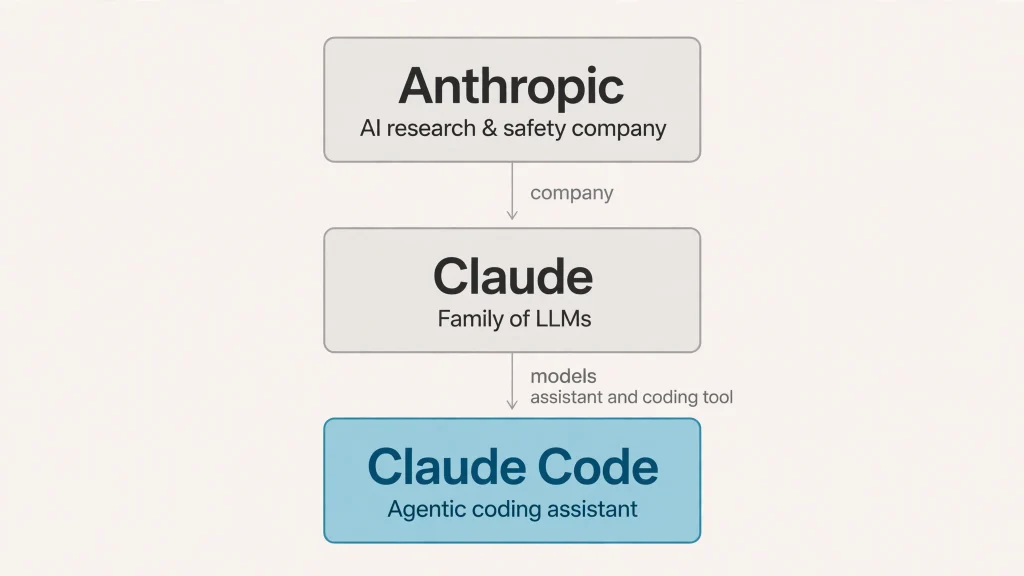
Anthropic is the company. Claude is the family of AI models and the assistant people chat with. Claude Code is one product built on those models, aimed at software work.
A tutorial about Claude Code that opens with the company wordmark is not wrong. But it is not showing the claude code logo either; it is showing a parent brand.
| Branding layer | What it represents | Where to verify it | Typical use |
|---|---|---|---|
| Anthropic | The company that makes Claude | Anthropic’s newsroom and press kit; trademark guidelines page | Corporate news, research, policy, partnership coverage |
| Claude | The model family and the chat assistant | Anthropic’s product and press materials | Articles about the assistant, model releases, general AI comparisons |
| Claude Code | The agentic coding tool | Claude Code documentation and Anthropic’s product pages | Developer tutorials, install guides, tool reviews |
If you are writing about the coding tool, match the image to the subject. A reader scanning a thumbnail should be able to tell which product the article covers.
A trademark owner reading your page should not see a parent-company mark standing in for a product it does not identify.
When no Claude Code-specific asset is available to you, a plain text mention of the name is better than a mislabeled picture.
Where You Will Actually See the Claude Code Logo
Only a few locations can be stated with confidence, so here they are without padding.
- The Claude Code documentation site. Its header carries a logo with light and dark variants, according to the page markup.
- Editor integrations. The VS Code authorization screen is documented with a screenshot in a university IT knowledge-base article. Anthropic’s docs also cover JetBrains and desktop surfaces, which is where you should check current visuals yourself.
- The terminal welcome screen. The pixel-art character appears when a session starts, subject to the variability described above.
- Third-party listings. Monitoring vendors and routing tools display a Claude Code icon beside their integrations. Dynatrace’s hub entry and an agent-CLI router page are two examples. These are third parties showing the product, and each one’s file is that company’s rendering, not an Anthropic download.
Anything beyond this list should be treated as unverified. That includes a particular GitHub avatar, a favicon on some blog, or an emoji.
Appearing on a popular page does not make an image official.
Claude Code Branding Explained: Anthropic, Claude and Claude Code
Understanding the product family prevents most logo confusion.
Anthropic’s newsroom currently lists the Claude model line as Opus 5.5, Sonnet 5.5 and Haiku 5.5. It has also announced separate products such as Claude Design from Anthropic Labs.
Claude Code sits beside those as the tool developers install. Per its documentation, it is available in a terminal, supported IDEs, the desktop app and a browser.
Anthropic also has a feature story, “The Making of Claude Code,” that describes how the tool grew from an internal command-line utility into its coding agent.
Several things are easy to confuse with the real product, and each has a different brand owner:
- Generic AI coding tools. Assistants from other companies are not Claude Code and carry their own marks.
- Community frameworks. AIVibesOfficial’s explainer on Super Claude Code covers a community-built framework that is not an Anthropic product, and the same warning applies to its imagery.
- Plugins and skills. Marketplaces list thousands of community add-ons “for Claude Code.” Extending the tool does not grant a right to use its branding.
- Other Claude products. Not every Claude add-on is Claude Code. For example, AIVibesOfficial’s guide to Claude for Small Business covers a plugin that runs inside Claude Cowork, a different product from the coding tool, so its branding should not be mixed up with the claude code logo.
- Wrappers and look-alikes. Third-party apps that call Claude models may borrow vocabulary without any affiliation.
For deeper product context, the AIVibesOfficial guide to Claude Code skills explains the extension system.
The guide to Claude Code pricing covers plans, so this article can stay focused on branding.
Can You Download the Claude Code Logo?
Be careful with this one, because the top of search results is crowded with sites eager to hand you a file.
One directory I found promises the claude code logo in PNG, JPG, WebP and SVG, and describes the files as brand assets for editorial and educational use. The same page says it does not claim ownership.
That is a useful admission. The site is a middleman, and permission to use the mark still sits with Anthropic.
Here is the practical order of operations.
- Start at the source. Open Anthropic’s newsroom and use its press-kit link. Inspect the archive for a Claude Code file.
- Read the rules attached to it. Anthropic’s trademark guidelines explain that Anthropic supplies the images and the size, pixel and spacing requirements, and that alterations are not permitted.
- Ask when the kit is silent. If no Claude Code asset is inside, contact the press address listed in the newsroom for media questions. The trademark page directs people with an existing business relationship to a marketing address instead.
- Skip substitutes. Do not treat a logo aggregator, an image search result or a repository of unknown ownership as equivalent to an Anthropic download.
If you only need to show readers what the product’s interface looks like, a screenshot of your own installation is often more useful than any downloaded claude code logo anyway. Use it with care.
It also proves the tool is real and current.
Claude Code Logo SVG, PNG and Other Formats
Format questions come up constantly, so let me separate what I verified from general knowledge.
Verified: I did not confirm that Anthropic offers a claude code logo SVG, a claude code logo PNG or any other specific format as a standalone public download. The only files I could point to are inside a press-kit archive I could not open.
Third-party sites advertise SVG, PNG, JPG and WebP versions. But advertising a format is not proof of an official source.
General knowledge, not specific to Anthropic:
- SVG is a vector format. It scales cleanly for print, large banners and high-density screens, and it can be recolored in a design tool (although Anthropic’s guidelines forbid color changes to its marks).
- PNG is a raster format that supports transparency and suits fixed-size web graphics.
- JPG has no transparency and is mostly useful for photos.
- WebP compresses well for modern websites.
If an official file turns up in the press kit, take the vector version for design work and a PNG for ordinary page use. Leave the proportions, colors and spacing exactly as supplied.
If no official file exists, no format is “the right one,” because every available file is unverified.
How to Identify a Real Claude Code Logo
You cannot authenticate a mark by squinting at it. Pixels can be traced, recolored or regenerated by AI in seconds.
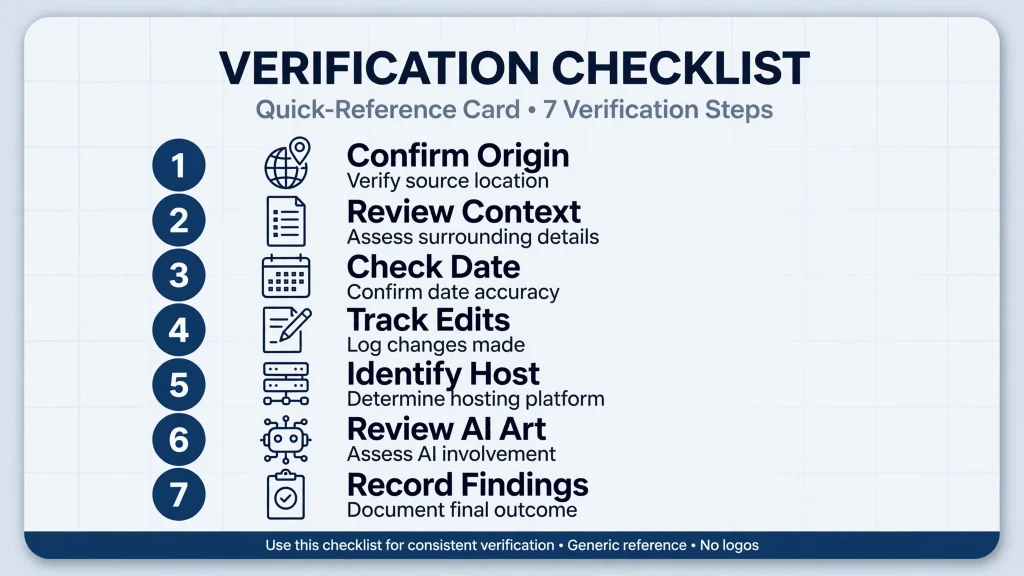
What you can do is authenticate the path an image traveled. Run through this checklist before publishing:
- Trace the origin. Does the file come from an Anthropic domain, such as the newsroom archive or the Claude Code docs?
- Match the context. Does the same mark appear in Anthropic’s current documentation or product screens, shown at the same version of the product?
- Check the date. Product visuals change. A mark from an old screenshot may no longer match today’s materials.
- Look for edits. Cropped corners, stretched proportions, shifted colors, added glows or drop shadows are warning signs, since alterations are not permitted for Anthropic’s marks.
- Inspect the host. Does the site claim a partnership with Anthropic that it cannot document? Pages that call a logo “official” without pointing to Anthropic should be assumed unofficial.
- Question AI-made art. An image produced by a generator is a new picture, not a copy of the trademark.
- Keep a record. Note where and when you obtained the file, so you can show the trail later.
No visual feature, such as a particular curve or shade, reliably proves a file is authentic. The trail does.
Can You Use the Claude Code Logo?
This is a trademark question, and I am not a lawyer. Treat what follows as orientation rather than legal advice.
Anthropic’s trademark guidelines are short and direct. They state that its trademarks may be used only as specifically permitted and in materials Anthropic approves beforehand.
They also say that permission can be withdrawn and that the marks may not be altered. Use may not suggest sponsorship, endorsement or affiliation unless Anthropic expressly authorizes it.
Users are asked to keep the marks on backgrounds that do not interfere with readability, leave reasonable space around them, and avoid adding a trademark symbol.
Applied to common situations, the cautious reading looks like this:
- Personal projects and learning notes. Lower stakes, but the same rules technically apply. Avoid altering anything.
- Blog posts, tutorials and news coverage. Naming Claude Code in text is the safest approach. If you display the mark, source it from Anthropic and keep it unaltered.
- Product comparisons. Show each product’s mark at comparable size and avoid arrangements that suggest Anthropic endorses your ranking.
- Commercial sites, app listings and marketing. Ask Anthropic first. These uses carry the highest risk of implying a partnership.
- Print and merchandise. Treat as requiring explicit permission.
Nothing in the guidelines I read says that anyone may use the claude code logo freely, so do not assume it.
Also, a software license on a public code repository covers the code in that repository. It should not be read as a grant to reuse a company’s logos.
When in doubt, check the current guidelines and ask Anthropic directly.
Claude Code Logo for Websites and Articles
Publishers can cover Claude Code responsibly without much friction.
Lead with words. A page that clearly says “Claude Code, a coding tool from Anthropic” does more for readers and search engines than a decorative icon. It also makes clear that your site does not make the product.
Where you do display the claude code logo, use only an unaltered, Anthropic-sourced file. Give it honest alt text such as “Claude Code logo” when the image serves as the identifier. If the image is purely decorative, leave the alt text empty.
Avoid anything that reads as a seal of approval. That means no “official partner” badges, no layouts where the mark appears to endorse your product, and no cropped or recolored versions to match your theme.
If a screenshot of the product serves the reader, take your own and use it sparingly, because screenshots can contain the mark too.
And date your work. A short note saying when you checked sources helps readers judge whether the visuals still match what Anthropic shows today.
Claude Code Logo for YouTube, Social Media and Design Projects
Creators face the same rules in a more casual setting, which is exactly why mistakes happen there.
For educational videos and tutorials, showing the product on screen is usually enough to teach. Pulling a downloaded claude code logo into the intro animation is optional and adds risk.
Thumbnails deserve extra attention. A recolored, glowing or distorted mark is an alteration. A thumbnail that makes the channel look sponsored by Anthropic is the sort of implied endorsement the guidelines warn against.
For blog graphics and social posts, a plain text title card often performs as well as a borrowed mark.
In software comparisons, keep the treatment of every product equal. In presentation slides, the rule about uniform, unaltered marks is the same inside a deck as on a website.
Monetized channels, sponsored posts and client work are commercial contexts. Check the current guidelines and, where you plan prominent or repeated use, ask Anthropic.
No generic checklist, including this one, is a guarantee.
Official vs Unofficial Claude Code Logos
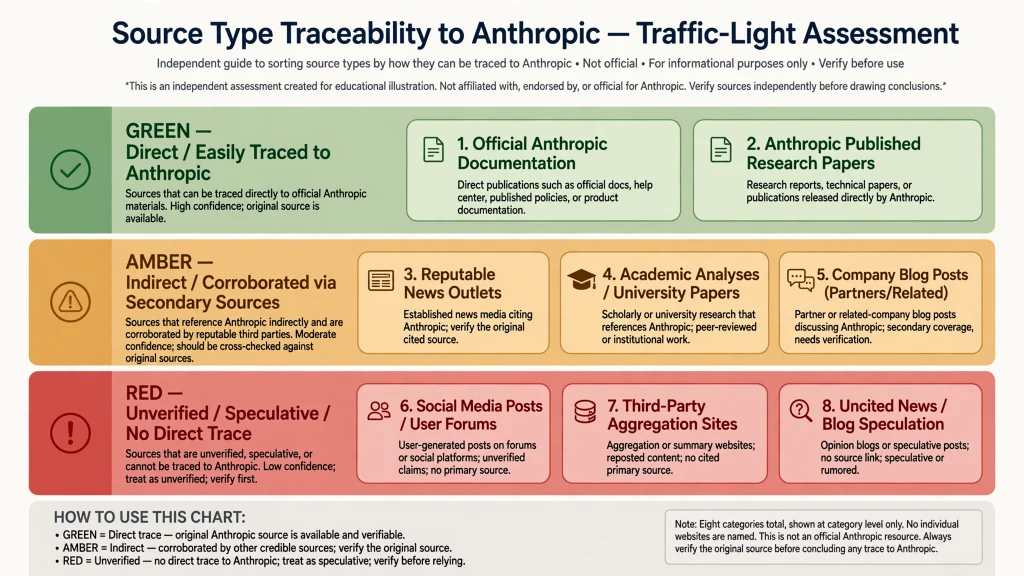
Use this table as a quick triage tool. It labels categories, not specific files, because I have not examined every image online.
| Type | Official? | What to check |
|---|---|---|
| Anthropic-published asset | Yes, if you can verify it came from Anthropic | The exact page or archive it came from |
| Branding shown in Anthropic’s documentation | Treat as official for reference, but verify the current page | Whether it appears on an Anthropic domain, at today’s version |
| GitHub community icon | Not necessarily | Who owns the repository and whether Anthropic maintains it |
| Terminal screenshot posted by a user | Not a licensed asset | The product version and whether the figure is unaltered |
| Third-party logo directory file | Unverified | The directory’s own disclaimers and the original source |
| Random PNG from image search | Usually unverified | Source, date and rights |
| AI-generated logo | No | Never present as official |
| Fan-made logo or mascot art | No | Label it clearly as fan-made |
Common Claude Code Logo Search Mistakes
A handful of errors account for most bad outcomes.
Grabbing the first image result. Search ranking measures popularity and relevance, not provenance. The top thumbnail can be a recolor, a fan redraw or a stale file.
Assuming every Claude icon is the claude code logo. The assistant, the API console and the coding tool are different products. Matching the image to the subject is part of using a mark correctly.
Mixing Claude and Claude Code branding. The wrong layer in an article header can quietly mislead readers about what you are reviewing.
Treating AI-generated art as the real thing. A model can produce something that resembles a mark. Resemblance is not authenticity, and publishing it as “official” is false labeling.
Linking to unofficial download sites. Sending readers to aggregators teaches them to trust files with no chain of custody.
Editing the mark. Recoloring, stretching, adding effects or removing parts conflicts with the no-alterations rule.
Implying endorsement. Phrases like “official partner” or “approved by Anthropic” need evidence. Without it, leave them out.
Frequently Asked Questions About the Claude Code Logo
What is the official Claude Code logo?
It is the mark Anthropic uses to identify Claude Code on its own documentation and product surfaces.
Because the mark can vary by surface and version, confirm what it looks like on Anthropic’s current pages. Do not rely on a screenshot or a downloaded copy.
Does Claude Code have its own logo?
Claude Code has its own product visuals in its documentation and apps, and a pixel-art character on its terminal welcome screen.
I could not verify a single, Anthropic-published reference image with an official design explanation. Treat claims of one “definitive” version cautiously.
Where can I find the official Claude Code logo?
Start with Anthropic’s newsroom, which links to a downloadable press kit, and with the Claude Code documentation.
If the press kit does not include a Claude Code asset, contact Anthropic’s press address and ask.
Can I download the Claude Code logo?
Third-party sites offer downloads, but permission to use the mark rests with Anthropic.
The only official route I could confirm is the press kit, whose contents you should inspect yourself.
Is the Claude Code logo the same as the Claude logo?
No. Claude refers to the models and assistant, while Claude Code is a separate coding tool.
They belong to the same family, but you should not assume their marks are interchangeable.
Is there a Claude Code SVG logo?
Third-party directories advertise one. I could not confirm an official standalone SVG from Anthropic, and the press-kit archive could not be opened with the tools I used.
Check the archive directly.
Is there a Claude Code PNG logo?
The same caveat applies. A PNG labeled “Claude Code logo” on a random website is unverified until you can trace it to Anthropic.
Can I use the Claude Code logo on my website?
Anthropic’s guidelines allow use only as permitted and in materials it approves, with no alterations and no implied endorsement.
For commercial sites, ask Anthropic first. This is not legal advice.
Can I use the Claude Code logo in YouTube videos?
Showing the product on screen is generally lower risk than building a mark into thumbnails or branding.
Avoid edits or layouts that imply sponsorship, and check the guidelines before commercial or sponsored use.
How can I tell whether a Claude Code logo is official?
Trace it to an Anthropic domain or the Anthropic press kit, and compare it with current official pages.
Look for alterations, and distrust any site claiming affiliation without proof. The source matters more than how the image looks.
Sources and References
- Anthropic Trademark Guidelines (effective August 1, 2024): https://www.anthropic.com/legal/trademark-guidelines
- Anthropic Newsroom, including the media-assets link and press contact: https://www.anthropic.com/news
- Anthropic press kit link (resolves to a ZIP archive; contents not inspected): https://www.anthropic.com/press-kit
- Claude Code Docs, Overview: https://code.claude.com/docs/en/overview
- Anthropic, “The Making of Claude Code”: https://www.anthropic.com/features/making-of-claude-code
- Public Claude Code repository issue about the terminal welcome-screen character: https://github.com/anthropics/claude-code/issues/43834
- Community issue mirror on the welcome-screen color change: https://claudeissues.com/issue/13755-question-why-did-the-clawd-mascot-color-change-from-orange-to-blue
- Community issue mirror on the June 2026 rendering problem: https://claudeissues.com/issue/70778-welcome-screen-mascot-renders-as-a-solid-black-silhouette-after-updating-to-v2-1
- Stark Insider, coverage of the terminal mascot (October 2025): https://www.starkinsider.com/2025/10/clawd-ai-retro-mascot-command-line.html
- University of Texas at Dallas, Claude Code Setup for VS Code: https://atlas.utdallas.edu/TDClient/30/Portal/KB/Article/1602/Claude-Code-Setup-for-VS-Code
- Example third-party logo directory (not an Anthropic source): https://toolradar.com/logo/claude-code
- Dynatrace Hub, Claude Code CLI listing (third-party use example): https://www.dynatrace.com/hub/detail/claude
 Daniel Carter