


In this article
Checked against Anthropic and Microsoft documentation on November 9, 2026. Plans, menus and supported Excel builds change often, so confirm anything that affects a purchase or a workflow inside your own account.
Short answer: Claude for Excel is an official Excel add-in from Anthropic. It opens a Claude panel inside Microsoft Excel so you can ask questions about the workbook in front of you, change assumptions, trace broken formulas and build models without leaving the grid. It runs on Excel for the web, Microsoft 365 on Windows and Excel for Mac, and Anthropic’s help center lists Pro, Max, Team and Enterprise as the plans that include it.
That add-in is only one of the things people mean when they search for claude for excel. The phrase also gets used for uploading a spreadsheet to regular Claude chat, asking Claude to write a formula, picking a Claude model inside Microsoft’s own Copilot, and scripting workbooks with Claude Code or the API. This guide keeps those routes apart, labels each one as official Anthropic, official Microsoft or third-party, and says plainly where each one runs out of road.
Table of Contents
What Is Claude for Excel?
Claude for Excel is the name Anthropic’s help center uses for its spreadsheet add-in. On Microsoft AppSource the listing is called “Claude for Microsoft 365,” because one listing covers Excel, PowerPoint, Word and Outlook, and many articles say “Claude in Excel.” All three labels describe the same add-in, and you only need to install it once.
Picture a chat sidebar that can read the workbook you have open. According to Anthropic’s documentation, claude for excel lets you:
- ask about a workbook and receive answers with clickable cell-level citations;
- change assumptions while the formula relationships stay intact;
- find the root cause of errors such as #REF! or #DIV/0!;
- generate a new model or fill an existing template from a plain-language description;
- work across several tabs at once;
- pull outside context through connectors such as S&P Global, LSEG and Daloopa;
- apply enabled Skills automatically while you work.
Anthropic also describes native spreadsheet operations: sorting, filtering, editing pivot tables, conditional formatting and data-validation dropdowns, which you request directly in the chat.
Here is a fast reference before the detail:
| Question | Verified answer |
|---|---|
| Does an official Claude Excel add-in exist? | Yes, published by Anthropic through Microsoft AppSource |
| Which plans include it? | Pro, Max, Team and Enterprise per Anthropic’s help center; the Free plan is not listed |
| Is there a separate add-in price? | Anthropic says use is tied to your existing Claude account and its usage limits |
| Can regular Claude chat open .xlsx files? | Yes, but code execution and file creation must be enabled |
| Can Claude create .xlsx files? | Yes, in chat with code execution and file creation on |
| Does the add-in handle macros or VBA? | No; Anthropic lists macros, VBA operations and data tables as unsupported |
| Does it run on Excel for iPad or Android? | No |
Can Claude Work With Microsoft Excel?
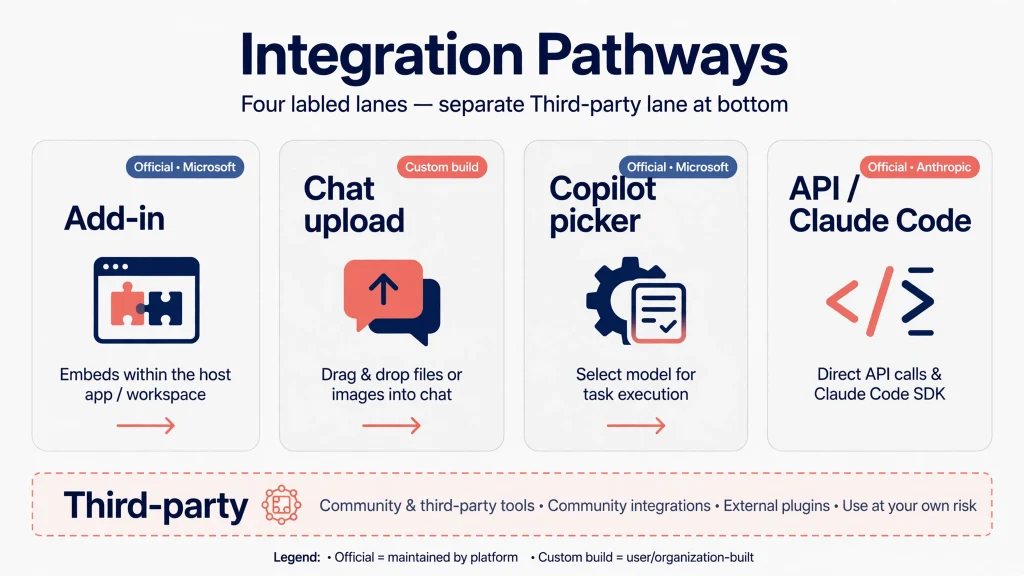
Yes, through four separate doors, and mixing them up is the most common source of confusion around claude for excel.
- The official add-in (Anthropic). Claude lives inside Excel and works on the open workbook.
- Claude chat with file upload and file creation (Anthropic). You upload a spreadsheet to claude.ai or the desktop and mobile apps, and Claude analyzes it or builds a new .xlsx you download.
- Claude models inside Microsoft Copilot in Excel (Microsoft). Microsoft’s own AI pane lets eligible users choose an Anthropic model.
- Code and API workflows (Anthropic tooling, your own build). Claude Code, the API and Anthropic’s pre-built xlsx Agent Skill can generate or manipulate workbook files through scripts.
Each door suits a different job. Claude for Excel, the add-in, is for live work on a model you are already building. Chat upload is for a one-off analysis of a file. Copilot is for people whose company standardizes on Microsoft’s assistant. Code and API routes are for repeatable pipelines. Anything outside these four routes to claude for excel, such as a community plugin or a no-code connector, belongs in the third-party bucket and carries no Anthropic or Microsoft guarantee.
Does Claude Have an Official Excel Integration?
It does. The history is short: reports from late 2025 describe a beta of the add-in aimed at select business and financial-services customers, a January 2026 expansion to every Pro subscriber, and a March 2026 update that let Claude carry shared context between Excel and PowerPoint. Anthropic’s current help page now calls claude for excel generally available to Pro, Max, Team and Enterprise plans.
Do not confuse Claude for Excel with Microsoft’s Copilot. Copilot is Microsoft’s assistant, and it can run Anthropic models in some configurations (covered below). The add-in is Anthropic’s product, signed in with a Claude account, with its own sidebar, so claude for excel and Copilot can sit side by side in the same ribbon.
Supported Excel versions
Anthropic lists these builds as supported:
- Excel on the web;
- Excel on Windows with a Microsoft 365 subscription, build 16.0.13127.20296 or later;
- Excel on Mac, version 16.46 or later, build 21011600 or later.
These are listed as unsupported: Excel 2016 and 2019 perpetual or volume licenses, Excel on iPad, Excel on Android, and Microsoft 365 builds older than the required runtime threshold. Anthropic’s list does not mention Excel 2021 or 2024 perpetual licenses either way, so treat them as unconfirmed.
How to install Claude for Excel
- Open the Claude for Microsoft 365 listing on Microsoft AppSource, linked from Anthropic’s help article.
- Select “Get it now.”
- Open Excel and activate the add-in: on Windows it appears under Home, then Add-ins; on Mac under Tools, then Add-ins.
- Sign in with your Claude account.
Administrators can deploy it for a whole organization through the Microsoft 365 Admin Center (Integrated apps, then Add-ins) after allowing Office Store access. If Office Store access is switched off, Anthropic documents a custom-manifest route. Companies that route AI traffic through Amazon Bedrock, Google Cloud Vertex AI, Azure AI Foundry or an LLM gateway can deploy the add-in without individual Claude accounts, though Anthropic notes that connectors and Skills may not be available in those modes.
How to Use Claude With Excel: Six Methods Compared
Every method below carries an honesty label. Keep the labels attached when you share this advice with colleagues.
| Method | Label | Best for | Main catch |
|---|---|---|---|
| Add-in sidebar | Official Anthropic | Editing and auditing a live workbook | Paid plan; supported builds only; no macros |
| Upload to Claude chat | Official Anthropic | One-off analysis of a file | Works on a copy, not inside Excel |
| File creation in chat | Official Anthropic | Generating a new .xlsx | Review formulas and formatting yourself |
| Claude in Copilot’s model picker | Official Microsoft | Microsoft 365 Copilot users | Needs the right Copilot license and admin approval |
| API, Skills and Claude Code | Official tooling, custom workflow | Repeatable pipelines | Requires technical setup |
| Community plugins and connectors | Third-party | Niche needs | Not endorsed; vet carefully |
Method 1: Claude for Excel, the add-in sidebar (official Anthropic)
With claude for excel, start with a trusted copy of the workbook. Open the sidebar and make requests that name cells or ranges: “Explain how the margin in D18 is calculated,” or “Change the discount rate to 8% and update everything that depends on it.” Anthropic’s guidance is to be specific about what should change and to review every edit. Claude warns before overwriting existing data, but a warning is not a backup.
Method 2: upload to Claude chat (official Anthropic)
Click the “+” button in the chat box, choose “Add files or photos,” and pick the spreadsheet. Then describe the job. You can attach to a single chat, or place the file in a Project’s Files area for reuse. The upload section below covers file limits.
Method 3: file creation in chat (official Anthropic)
With code execution and file creation on, Anthropic says Claude can produce Excel files, PowerPoint decks, Word documents and PDFs that you download or save to Google Drive. A prompt such as “Build a monthly expense tracker with a summary tab and working totals” produces a file you then open in Excel and inspect.
Method 4: Claude through Microsoft Copilot (official Microsoft)
Microsoft’s support pages state that Copilot in Excel supports Anthropic and OpenAI models, selectable from a model picker that defaults to Auto. Microsoft notes that the picker needs a commercial Microsoft Copilot subscription or Microsoft 365 Premium, and that company admins must allow Anthropic models in the Microsoft 365 Admin Center. The model choice lasts for the active session only. This is not the same product as claude for excel, so billing, privacy and features follow Microsoft’s rules.
Method 5: API, Skills and Claude Code (official tooling)
Anthropic’s API documentation lists pre-built Agent Skills for xlsx, pptx, docx and pdf, used with the code execution tool to create and analyze files. Claude Code works with files and scripts on your machine. None of this drives the Excel desktop interface; it produces or edits workbook files programmatically. More on this in the automation section.
Method 6: community plugins and no-code connectors (third-party)
Community Excel tools built on Claude exist, as do MCP servers and automation-platform connectors. I did not verify any specific one for this guide, so none is recommended here. If you test one, check who publishes it, what permissions it requests and where your data goes before opening a real workbook.
Uploading Excel Files to Claude
Anthropic’s upload article lists XLSX among supported document types, with a note: you must enable code execution and file creation in your account to upload XLSX files. CSV, JSON and plain text are also supported. The article does not list the older .xls format, so convert such files to .xlsx first if the upload fails.
For file-based claude for excel work in chat, the numbers Anthropic publishes for uploads are 500 MB per file and up to 20 files per chat. Files stored in a Project are capped at 30 MB each. A separate Anthropic article on file creation states a 30 MB maximum for uploads and downloads, which conflicts with the 500 MB figure, so treat 30 MB as the safer working limit until Anthropic reconciles the two.
What the documentation does not spell out, and what I will not guess at, is how chat upload treats pivot tables, charts, hidden sheets, named ranges, external links and macros. Anthropic notes that for non-PDF documents Claude extracts text, so embedded images are not read. Assume that a spreadsheet’s visual layout and richer Excel objects may not survive intact, and ask Claude to list what it could and could not read before you rely on the analysis.
| Capability | Status in current official documentation |
|---|---|
| .xlsx upload | Supported, with code execution and file creation enabled |
| .csv, .json, .txt upload | Supported |
| .xls upload | Not listed |
| Chat upload size | 500 MB per file, 20 files per chat (30 MB elsewhere in Anthropic’s docs) |
| Creating .xlsx in chat | Supported |
| Macros/VBA in the add-in | Unsupported |
| Data tables in the add-in | Unsupported |
| Pivot tables in the add-in | Editing supported per Anthropic |
| Charts, hidden sheets, named ranges, external links | Not documented; test on a copy |
Analyzing Spreadsheet Data With Claude for Excel
Chat upload works well when the question is about a dataset rather than a model, and it is the simplest form of claude for excel analysis. Typical requests: summarize what the data contains, spot rows that look inconsistent, group free-text categories, compare periods and explain a pattern in plain English. Because Claude can run Python in its sandbox when code execution is enabled, it can calculate statistics rather than estimate them by eye, and you can ask to see the code it used.
A useful habit is to separate observation from conclusion. Ask first: “List every column, its apparent data type, and the number of blank cells.” Only then ask for interpretation. When Claude says revenue fell in a quarter, check that figure against the sheet. AI-generated analysis is a draft, and a statement about money, risk or compliance needs independent verification before it goes into a report.
Creating Excel Formulas With Claude for Excel
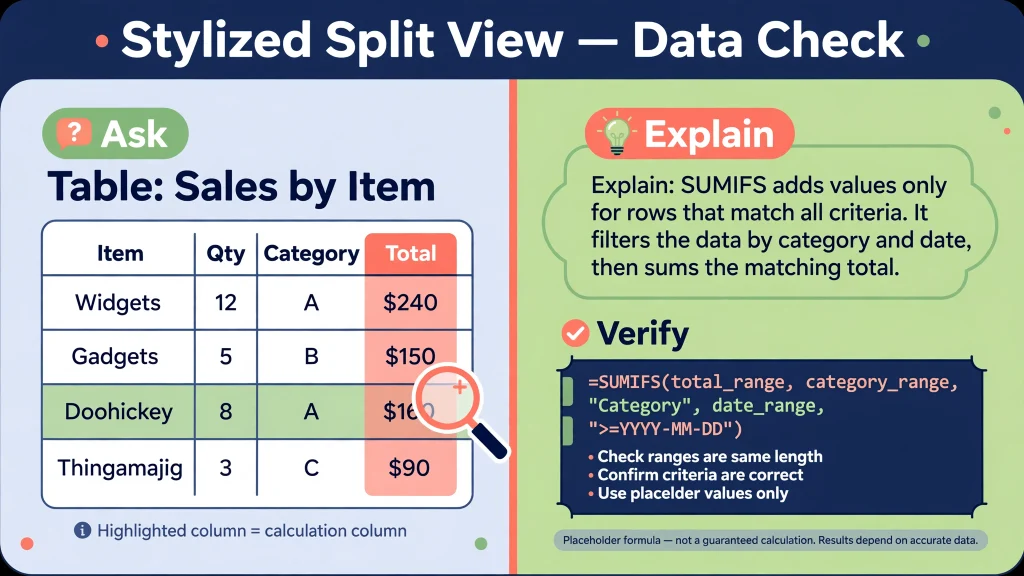
Formulas are the quickest win. Whether you use the add-in or paste your layout into chat, claude for excel formula work usually starts with a request like these:
- Write: “Column B holds order dates, column D holds regions, column F holds revenue. Write a formula that totals revenue for the West region in March 2026, and explain each argument.”
- Explain: “Break this formula into plain steps and tell me what each nested function returns: =IFERROR(INDEX(…))” (paste the real one).
- Debug: “This formula returns #N/A for some rows. Here are three failing rows and three working rows. Find the pattern.”
- Convert: “Rewrite this VLOOKUP chain with XLOOKUP, and tell me if my Excel version supports it.”
- Simplify: “Can this formula be shortened with LET without changing the result?”
SUMIFS, COUNTIFS and INDEX/MATCH are available in almost any Excel version. XLOOKUP, FILTER, UNIQUE and LET depend on your build, and Microsoft documents version availability on each function’s page, so tell Claude which version you run. Otherwise it may hand you a modern function your workbook cannot calculate.
Three rules keep formula help honest. First, Claude does not calculate the way Excel’s engine does, so test generated formulas on a few rows where you know the answer. Second, give real column letters and sample values, because guessed layouts produce guessed formulas. Third, check regional settings: some locales use semicolons as argument separators, and pasted formulas can break because of that alone.
Cleaning and Transforming Excel Data
Messy data is where claude for excel earns its subscription. Claude can propose how to standardize date formats, split full names, trim stray spaces, flag likely duplicates, harmonize spelling variants such as “NY,” “N.Y.” and “New York,” and reshape columns for a pivot table. In the add-in, it can apply sorting, filtering and validation dropdowns directly. In chat, it can return a cleaned copy as a new file.
Be careful with irreversible steps. Ask Claude to add a “cleaned” column beside the original instead of overwriting it, and have it explain each rule before applying it. For records where wrong merges are costly, such as customers or patients, review a sample manually. Fuzzy matching makes plausible-looking mistakes.
Creating Spreadsheet Reports With Claude for Excel
For reporting, Claude can draft a summary tab, propose which metrics belong on a dashboard sheet, write the narrative paragraph that explains a table and generate a new workbook structured for monthly updates. Anthropic’s file-creation material says Claude can build Excel models with working formulas and charts, and that outputs may need refinement. Treat the result as a first draft: open it in Excel, trace the formulas, check number formats and confirm the totals reconcile with the source data.
Anthropic’s add-in documentation is blunt on this point. It says the add-in is not recommended for final client deliverables without human review, for audit-critical calculations without verification, or for models with highly sensitive or regulated data without proper controls.
Claude for Excel Automation
Be precise about what “automation” means, because only some forms are verified.
- Add-in Skills and Instructions. In claude for excel you can set persistent Instructions, such as number formats or header styling, and use Skills that apply repeatable task recipes. Anthropic states these apply inside Excel.
- Connectors. The add-in supports connectors that bring external data into a workbook; named examples are financial-data providers. Custom connectors can carry security risk, and Anthropic recommends reviewing its guidance first.
- API and Agent Skills. Developers can use the Messages API with the code execution tool and the pre-built xlsx Skill to create and analyze spreadsheets in code.
- Claude Code. It can write and run scripts, for example Python that reads and writes workbook files in a folder. I found no Anthropic documentation describing Claude Code operating the desktop Excel interface, so do not expect it to click through Excel for you. If you let it run scripts unattended, read our guide to the Claude Code permission-bypass flag first, because skipping approval prompts removes a safety checkpoint, and keep any workbook work in a copy.
- VBA, Power Query and Power Automate. Claude can draft VBA or Power Query steps as text, and you run them yourself. The add-in does not execute VBA. Wiring Claude into Power Automate flows would be a third-party or custom build, not a documented native feature.
The pattern that works for claude for excel automation: let Claude write the logic, keep a human in the loop for execution and review, and store the output in a copy.
Claude vs Microsoft Copilot for Excel
Claude for Excel and Copilot overlap but are not interchangeable. This comparison uses only what current documentation supports.
| Factor | Claude for Excel (add-in) | Copilot in Excel |
|---|---|---|
| Maker | Anthropic | Microsoft |
| Where it runs | Sidebar add-in from AppSource | Built into Excel |
| Models | Curated Claude models for Office tasks | Anthropic and OpenAI models, Auto by default |
| Access | Claude Pro, Max, Team or Enterprise | Copilot license; model picker needs a commercial Copilot subscription or Microsoft 365 Premium |
| Admin step | Deploy via Integrated apps or manifest | Admin must allow Anthropic models |
| Unsupported | Macros, VBA, data tables | Check Microsoft’s current documentation |
| Data path | Content goes to Anthropic | Anthropic models are hosted outside Microsoft’s own environment, per Microsoft’s notes |
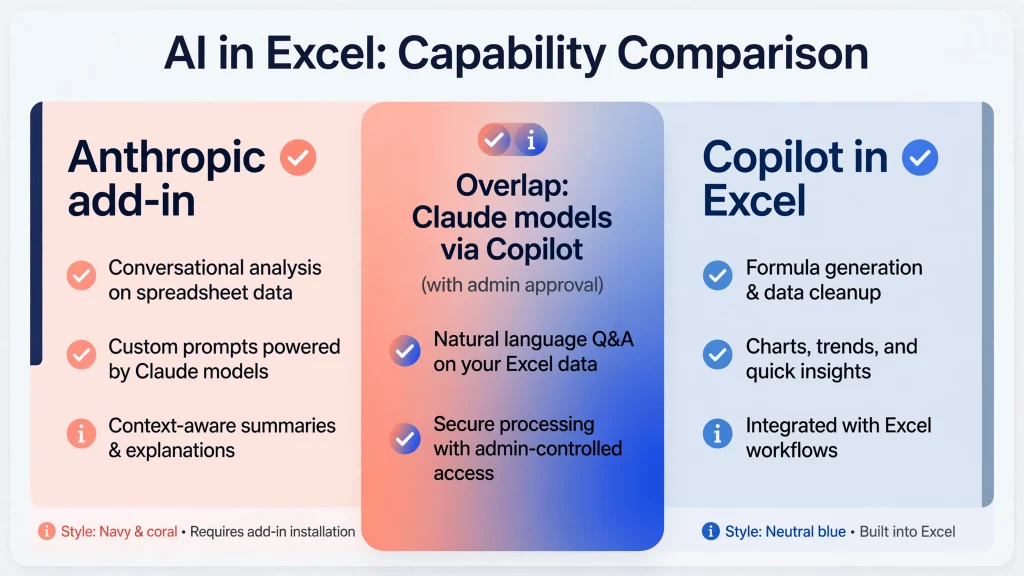
Which is better? That depends on where you already pay and what your IT team approves. If your organization lives inside Microsoft 365 Copilot, using a Claude model there keeps governance in one place. If you already have a Claude plan and want claude for excel with its sidebar, shared context with PowerPoint, Word and Outlook, and Claude-side Skills, the add-in fits. Because both can call Claude models, run the same task in each on a sample workbook before deciding; the model is only one variable, and product features matter as much.
Claude for Excel Use Cases
These claude for excel examples describe realistic help, not replacement of professional judgment.
- Students: explain a stats-class formula, find why a lab dataset yields #VALUE!, structure a budget project.
- Office workers: consolidate monthly sheets, standardize inconsistent entries, draft the summary line for a weekly report.
- Analysts: trace how an output depends on assumptions, run sensitivity changes, document a model’s logic in plain language.
- Researchers: tidy survey exports, suggest summary statistics, flag outliers worth checking by hand.
- Accountants: reconcile columns, trace formula chains, draft a model from a trial balance. Verification stays with the accountant.
- Marketers: group campaign names, compare channel performance across periods, turn a table into talking points.
- Business owners: build an inventory or cash-flow tracker without learning every function.
- Developers: generate test data sets, convert spreadsheets to structured formats, script batch edits through the API.
- Data teams: profile an incoming file’s quality before loading it, or document the transformations inside a legacy workbook.
Claude for Excel Limitations
Documented limits of claude for excel first:
- no support for macros, VBA operations or data tables in the add-in;
- no Excel 2016/2019 perpetual or volume licenses, iPad, Android or outdated Microsoft 365 builds;
- usage counts against the same limits as your Claude account, so long modeling sessions draw down your allowance;
- the add-in does not inherit custom data-retention settings your organization set, and its activity is not included in Enterprise audit logs, although the Compliance API covers sessions when enabled;
- long conversations are automatically compacted into new ones, so earlier detail may be summarized rather than kept verbatim.
Limits that follow from how language models work, and that I mark as general caution rather than documented fact: wrong formulas that look right, confident explanations of a layout Claude only partly read, and incomplete handling of very large or heavily formatted workbooks. Real-time co-editing behavior, with several people changing the same workbook while Claude edits, is not documented, so avoid relying on it.
Claude for Excel Security and Privacy
Before using claude for excel with confidential files, read Anthropic’s current privacy and retention pages first. Anthropic’s add-in documentation states that, when you sign in with a Claude account, the add-in sends your conversations to Anthropic, including workbook content Claude reads and attached files. It also says inputs and outputs are deleted from Anthropic’s backend within 30 days of receipt or generation, with exceptions described in its retention article. Chat history and uploaded Skills are stored locally in your browser storage, not synced across devices, and clearing them removes only your local copy.
The sharpest warning is prompt injection. Anthropic advises using the add-in only with trusted spreadsheets, since a downloaded template or vendor file can hide instructions that try to make Claude extract data or perform destructive edits. The add-in asks for confirmation before risky operations; read those prompts instead of clicking through.
Practical guardrails:
- keep credentials, API keys and passwords out of any sheet you share with an AI tool;
- strip or mask personal identifiers and customer data unless your policy permits sharing;
- work on a copy, and keep version history on;
- follow your employer’s rules, since many organizations restrict which vendors may see financial records;
- for broader habits that apply to any AI tool, see our guide on whether ChatGPT is safe, because the same data-handling questions apply.
Nothing about claude for excel promises that your data stays private forever. Verify the exact retention and training terms for your plan on Anthropic’s own pages. If you are weighing plan costs, our Claude Code pricing guide shows how the plans and API billing compare.
Troubleshooting Claude for Excel
Claude for Excel does not appear. Confirm your Excel build is on the supported list, since iPad, Android and older perpetual versions cannot run it. On Windows look under Home, then Add-ins; on Mac under Tools, then Add-ins. In a company, ask your admin whether the add-in was assigned to you and whether Office Store access is enabled.
Sign-in fails. Check that your Claude plan is Pro, Max, Team or Enterprise. If your organization uses a third-party platform such as Bedrock or Vertex AI, sign-in works differently and your admin controls it.
Chat history or Skills went missing on Windows. Anthropic’s help page warns that after the September and October 2026 Microsoft 365 updates, some Windows users lost chat history and uploaded Skills, and it points to a data-storage page with steps for you and your IT team. Also check that you are signed in to the original Office account, because storage is keyed to it.
An .xlsx upload fails. Make sure code execution and file creation are switched on, check the file size against the limits above, and try saving as .xlsx if the file is an older format.
Claude misreads the workbook. Tell it the sheet names, header rows and ranges. Ask it to restate the structure back to you before analysis.
Formulas come out wrong. Give your Excel version, regional separators and sample inputs with expected results. Test on a few rows.
Formatting or objects vanished after a chat-edited file came back. Rich Excel features are not documented as fully preserved, so keep the original and compare.
A third-party connector misbehaves. Contact that vendor, since Anthropic and Microsoft do not support it. Revoke its permissions if anything looks off.
Admin deployment fails. Anthropic’s help page describes a known Microsoft issue with Privileged Identity Management roles in the Integrated apps page and suggests deploying from an account with the role assigned permanently.
Frequently Asked Questions About Claude for Excel
Can Claude work with Excel, and what is Claude for Excel?
Yes. Claude can work with Excel through Anthropic’s add-in, through file upload and creation in Claude chat, through Microsoft Copilot’s model picker, and through API or Claude Code workflows. Each route has different requirements and limits.
Is there an official Claude Excel add-in?
Yes. Anthropic publishes claude for excel, available through Microsoft AppSource, and its help center lists Pro, Max, Team and Enterprise plans as eligible.
Can Claude analyze Excel files?
Yes. Upload an .xlsx file to Claude chat with code execution and file creation enabled, or use the add-in on an open workbook. Verify any figures Claude reports.
Can Claude create Excel formulas?
Yes, including writing, explaining, debugging and converting them. Tell Claude your Excel version and test the result on rows with known answers.
Can Claude edit an Excel spreadsheet?
In the add-in, yes: it updates values, edits pivot tables and applies formatting inside the open workbook. In chat, Claude can create and edit files in its sandbox, but how every Excel feature survives is not fully documented.
Can Claude create an Excel file?
Yes. With code execution and file creation enabled, Claude can generate .xlsx files for download or saving to Google Drive.
Is Claude better than Copilot for Excel?
Neither wins everywhere. Copilot is built into Microsoft 365 and can use Claude models when licensing and admin settings allow; the Claude add-in brings Anthropic’s own sidebar, Skills and cross-app context. Test both on your own workbook.
Is Claude for Excel free?
Not on the Free plan, according to Anthropic’s help page, which lists Pro, Max, Team and Enterprise as the plans that include claude for excel. There is no separate add-in fee; usage counts against your account’s limits. Check Anthropic’s pricing page for current plan prices.
Can Claude automate Excel?
Partly. The add-in supports Instructions, Skills and connectors, and developers can automate file workflows through the API or Claude Code. Anthropic’s documentation does not describe Claude controlling desktop Excel by itself or running macros.
Is it safe to upload Excel files to Claude?
It depends on the data and your policy. Anthropic says workbook content is sent to Anthropic, deleted from its backend within 30 days barring exceptions, and warns about prompt injection from untrusted files. Review the privacy terms, avoid credentials, and follow your organization’s rules.
Conclusion
Claude for Excel exists, it is official, and it is more capable than a chat window with a pasted formula: it reads the open workbook, cites cells, edits with formula relationships intact and handles several tabs. It also has firm edges: paid plans only, supported builds only, no macros or data tables, and a real prompt-injection risk with untrusted files. Around it sit other routes, from chat uploads to Copilot’s model picker to API scripts, each with its own label and limits.
A sensible first step with claude for excel is small. Install the add-in or upload a harmless copy of a workbook, ask Claude to explain one formula, check its answer against Excel, and expand only as the results earn your trust. If you also use Claude elsewhere, our overview of Claude in Chrome and our directory of official Claude documentation show how the wider product family fits together. Developers who want repeatable workflows can read about Claude Code Skills.
Sources and References
All consulted on November 9, 2026.
- Anthropic, Use Claude for Excel, Claude Help Center.
- Anthropic, Connectors and Skills for Claude for Microsoft 365.
- Anthropic, Data storage and retention for Claude for M365.
- Anthropic, Upload files to Claude, Claude Help Center.
- Anthropic, Create and edit files with Claude, Claude Help Center.
- Anthropic, Get started with Agent Skills in the API, Claude Platform Docs.
- Anthropic, Claude pricing.
- Microsoft, Use Claude with Agent Mode in Excel, Microsoft Support.
- Microsoft, Copilot in Excel tips, Microsoft Support.
- Microsoft, Claude by Anthropic for Office on Microsoft Marketplace.
- The Decoder, Anthropic opens Claude’s improved Excel integration to all Pro subscribers, January 2026 (secondary reporting).
- VentureBeat, Anthropic gives Claude shared context across Microsoft Excel and PowerPoint, March 2026 (secondary reporting).
 Daniel Carter