
An AI writing tool is software that uses a large language model to draft, rewrite, summarize, or correct text from instructions you type in plain language. You describe the job, such as a product description, a polite refusal email, or a study outline, and the AI writing tool returns a first version that you then shape into your own. Some products are general-purpose assistants like ChatGPT, Claude, and Gemini. Others are built for one narrow purpose, such as marketing copy, grammar correction, or paraphrasing.
This guide explains how each kind of AI writing tool works, compares nine real products as of November 2026, and walks through a practical method for getting usable drafts without publishing mistakes. It was researched on 2 November 2026. Plans, prices, and free-tier limits in this category change quickly, so treat every figure below as a dated snapshot and confirm it on the vendor’s own page before you pay.
Table of Contents
What Is an AI Writing Tool?
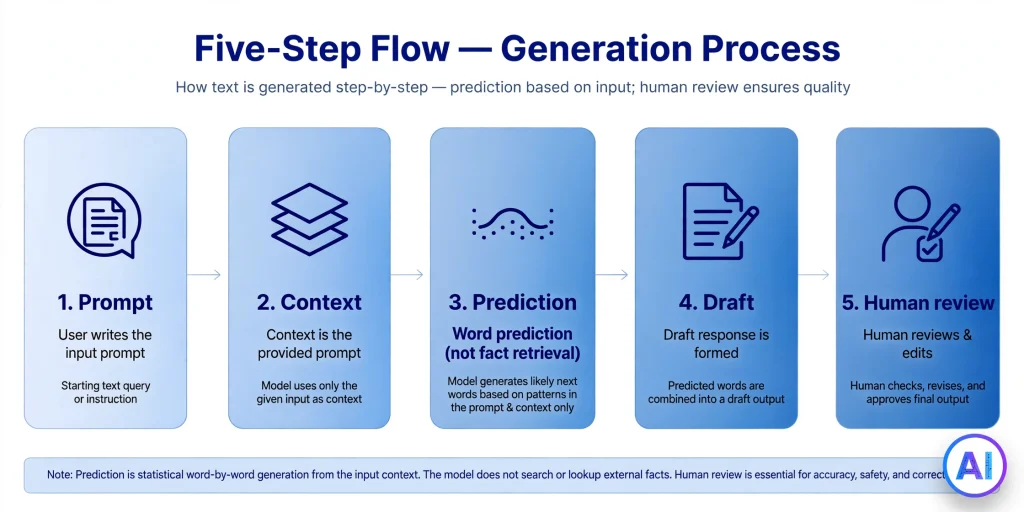
An AI writing tool is an application that produces or improves language using a trained statistical model rather than fixed templates. You supply instructions and context. The AI writing tool predicts a sequence of words that fits them. Everything else, from tone sliders to brand-voice memory, is packaging built around that prediction step.
Three families sit under the label:
- General-purpose AI assistants. Chat products that write as one of many jobs, alongside research, coding, and analysis.
- Specialized writing platforms. Products organized around content workflows: templates, brand voice, campaign assets, SEO scoring.
- Editing and rewriting utilities. Tools that start from your text and refine it: grammar, clarity, tone, paraphrasing, summaries.
A quick way to place any product is to ask what it does when you give it no writing task at all. A general assistant still has plenty to offer. A rewriting utility has nothing to work on until you paste something in. A specialized platform sits in between, waiting for a campaign brief.
How Does an AI Writing Tool Work?
Under the hood, a modern AI writing tool breaks your prompt into small text units called tokens, feeds them through a neural network, and generates the reply one token at a time, each chosen because it is statistically likely to follow the previous ones. Google’s own documentation for site owners puts the consequence plainly: generative models do not look facts up, they predict likely word sequences, which is why their output can contain errors.
Several layers sit around that core:
- The prompt. Your instruction, plus any pasted source text, audience notes, and examples.
- Hidden instructions. Many products silently prepend their own guidance, such as “write in a persuasive but honest tone,” or load a template.
- Stored context. Specialized platforms can keep brand voice samples, product facts, or audience profiles and attach them to every request. Jasper, for instance, lists Brand Voices, knowledge assets, and audiences as plan features.
- Optional retrieval. Some tools search the web or your documents before answering, which can ground the draft in sources, though it does not make errors impossible.
- Post-processing. Grammar checks, length limits, formatting, and plagiarism or AI-detection scans.
Understanding this chain explains the most common frustration: vague prompts give generic results because the model has nothing specific to predict from. The more concrete your inputs, the narrower and more useful the output. For a closer look at one popular example, see how ChatGPT works.
Why Are AI Writing Tools Becoming Popular?
Four practical forces explain the adoption curve, and none of them requires hype.
The blank page problem. Most people do not struggle to edit a mediocre paragraph; they struggle to produce the first one. An AI writing tool removes that start-up cost by handing over something to react to.
Free entry points. ChatGPT, Claude, Gemini, Grammarly, QuillBot, and Rytr all offer some form of no-cost access, so trying one costs time rather than money.
Presence inside everyday apps. Writing help now lives in the places where people already type: browser extensions, email clients, word processors, and workspace suites. Google’s Workspace plans, for example, bundle Gemini into Gmail and other apps.
Multilingual reach. Rytr’s listing mentions support for more than 30 languages, and the big assistants handle many more. For a small business writing to customers in a second language, that matters.
Popularity is not proof of quality, though. The next sections separate what these products genuinely do well from where they still need a human editor.
Main Features of Modern AI Writing Tools
Not every product offers every capability, so compare on the features you will actually use:
- Draft generation from a short brief, from a template, or from an outline.
- Rewriting and paraphrasing with controls for tone, formality, and length.
- Grammar, spelling, and clarity correction, often live inside the browser.
- Summarization of long documents or articles.
- Brand voice and knowledge storage, so drafts reflect your terminology and facts.
- SEO assistance such as keyword suggestions, outlines, and content scoring.
- Plagiarism and AI-content detection. QuillBot’s Premium page lists a plagiarism checker and AI detector alongside its paraphraser and grammar checker.
- Integrations: browser extensions, plugins, API access, team workspaces.
- Collaboration and governance for businesses: shared assets, seat management, security controls.
A feature checklist helps, but the deciding question is usually narrower: which two or three of these will I use every week?
Different Types of AI Writing Tools
The most useful distinction for a buyer is between general-purpose assistants and specialized writing software, because the two behave differently and are priced differently.
General-purpose assistants are conversational. You can ask for a blog outline, then ask why section three feels weak, then request a spreadsheet formula, all in one thread. They tend to be strong at reasoning about text and flexible across tasks, and their subscriptions are priced around usage limits and model access. ChatGPT, Claude, and Gemini belong here. They are excellent writing partners, but they are not dedicated writing platforms.
Specialized writing platforms put structure around repeatable content work: templates for ads and landing pages, stored brand voice, approval flows, and campaign-sized outputs. Jasper, Copy.ai, Writesonic, and Rytr lean this way, with different emphases. Their value is consistency across a team, not raw flexibility.
Editing-first tools such as Grammarly and QuillBot begin with your words. They suit people who already write and want a second pair of eyes on grammar, clarity, tone, or phrasing.
Many products blur these lines. Grammarly now generates drafts, and ChatGPT can hold a style guide in a project. Judge by the core workflow, not the marketing label.
Best AI Writing Tools Available Today
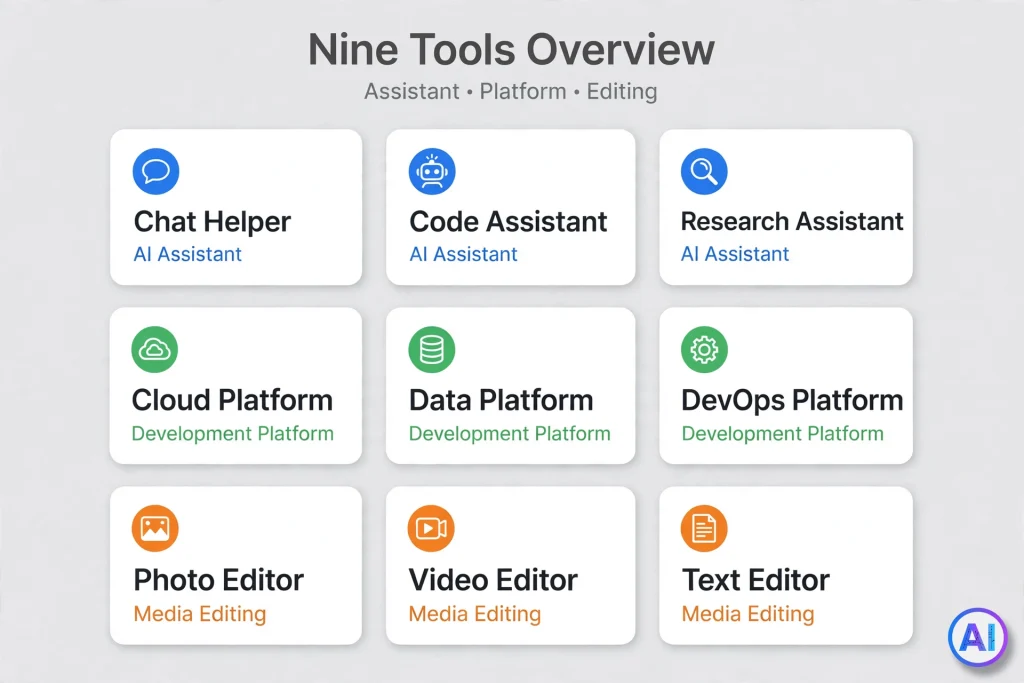
The nine products below are listed alphabetically, not ranked, because the right choice depends on the job. Details were checked on 2 November 2026 against vendor pages where reachable and against independent pricing trackers where not. Prices change often, so confirm before buying.
ChatGPT
OpenAI’s ChatGPT is a general-purpose assistant that drafts, rewrites, brainstorms, summarizes, and explains. Its strength is breadth: one conversation can move from outline to rewrite to fact-check questions. A free plan exists with limited usage and a lighter default model. Trackers list paid individual tiers named Go, Plus, and two Pro levels, with Plus most often reported at $20 per month and Go at $8, though higher tiers and model access shift frequently. Consider it if you want one flexible assistant for varied tasks. Limitations: it is not a templated content platform, and output needs verification like any language model.
Claude
Anthropic’s Claude is also a general-purpose assistant, commonly used for long-form drafting, careful editing, and working with large pasted documents. It has a free plan with daily limits, a Pro plan widely reported at $20 per month ($17 per month billed annually), and higher Max tiers at $100 and $200. Consider it if your work involves long documents or nuanced rewrites. Limitations: usage caps apply on every plan, and it has no built-in marketing templates or SEO scoring.
Copy.ai
Copy.ai has moved toward sales and marketing workflows rather than a simple one-box writer. Independent pricing trackers recorded a plan consolidation during 2026, with an entry paid plan reported around $29 per month and custom enterprise pricing, but sources disagree on whether a free plan still exists. Consider it if you run repeatable go-to-market tasks and are comfortable with workflow tooling. Limitations: the structure is heavier than most solo writers need, and pricing should be checked directly because it has changed recently.
Google Gemini
Gemini is Google’s assistant. A free tier is available, and paid Google AI plans add higher limits and more capable models, with the Pro tier widely reported at $19.99 per month. Entry-level plan pricing differs by country. Google also began notifying subscribers of the cheaper AI Plus plan that manual access to its Pro models would move to the AI Pro tier from 13 November 2026, a reminder that plan contents shift. Consider it if you live in Gmail, Docs, and other Google apps. Limitations: features vary by plan, region, and account type, so check what your own account includes. If you are weighing it against ChatGPT, read is Gemini better than ChatGPT.
Grammarly
Grammarly is an editing-first product that checks grammar, spelling, punctuation, clarity, and tone across browsers and apps, and now includes AI drafting and rewriting. A free plan covers core corrections. Trackers report the paid plan at about $12 per month billed yearly and $30 billed monthly, and note that the company behind it has been reshuffling plans after a corporate rebrand. Consider it if you already write your own text and want consistent polish. Limitations: it is not designed for long-form article generation from a blank brief, and plan details deserve a fresh look before purchase.
Jasper
Jasper positions itself as an AI platform for marketing teams. Its Pro plan lists a canvas workspace, marketing workflow agents, and stored Brand Voices, knowledge assets, and audiences, while a custom-priced Business plan adds team governance. Independent reviewers report Pro at $69 per month, or about $59 per month billed annually, and a seven-day Pro trial rather than a permanent free plan. Consider it if several people must produce on-brand copy consistently. Limitations: it is among the pricier options, and a solo writer may not use enough of the platform to justify it.
QuillBot
QuillBot began as a paraphraser and now bundles a grammar checker, summarizer, plagiarism checker, and AI detector under Premium. The free plan is real but capped; reviews describe paraphrasing limited to 125 words per pass in two modes. Premium is widely reported at $19.95 monthly or $8.33 per month on an annual plan ($99.95 per year), with a three-day refund window. Consider it if your main need is rewriting and tightening existing text. Limitations: it is not a full drafting assistant, and plagiarism and detector quotas can be limited even on paid plans.
Rytr
Rytr is a lightweight writing assistant with preset use cases, tone options, a browser extension, and support for many languages. Several 2026 reviews describe a permanent free plan of 10,000 characters per month, with paid tiers well under the price of marketing platforms. A tracker reports that its pricing page was restructured in October 2026, and its older plan names no longer match. Consider it if you want short-form copy cheaply. Limitations: the free allowance is measured in characters and runs out quickly, and quality on complex briefs trails the large assistants.
Writesonic
Writesonic started as an AI article and ad-copy writer and has increasingly emphasized SEO and visibility inside AI-powered search. Its pricing is the least stable in this list: trackers report figures ranging from the high teens to $99 or more per month for entry plans, depending on the date and the plan generation. Consider it if SEO and tracking how your brand appears in AI answers are central to your work. Limitations: the positioning has shifted, so confirm that the current product still matches what an older review described.
Free vs. Paid AI Writing Tools
A free AI writing tool is perfectly adequate for occasional use, and a paid plan is justified when limits start costing you time.
| What you are weighing | Typically free | Typically paid |
|---|---|---|
| Usage | Daily or monthly caps | Higher or less restrictive limits |
| Model quality | Lighter default model | Access to stronger models |
| Length of single output | Short passages | Longer documents |
| Brand voice and team features | Rare | Common on business plans |
| Plagiarism and detection checks | Usually absent | Often included, sometimes capped |
| Support | Community or help pages | Email or priority support |
Examples from the research: Rytr’s free plan was reported at 10,000 characters a month, QuillBot’s free paraphraser at 125 words per pass, Grammarly’s free plan covers core corrections, and the big assistants all have free access with usage caps. Jasper is the notable exception, with a trial but no permanent free plan.
A sensible approach is to spend two weeks on free tiers using your real work, note exactly which limit annoyed you, and pay only to remove that limit.
AI Writing Tool for Blog Posts and SEO Articles
For blog work, an AI writing tool is most valuable before and after the drafting stage. Use it to cluster questions readers ask, propose outlines, tighten introductions, and produce meta-description options. Use your own expertise for the claims, examples, and opinions that make a page worth reading.
Search engines are not hostile to AI-assisted writing as such. Google’s guidance says generative tools can help with research and structure, but producing many pages without adding value for users may violate its spam policy on scaled content abuse. The question is never how a page was made, but whether it helps the reader.
If search performance matters, an SEO-oriented AI writing tool such as Writesonic can suggest keyword coverage. Treat those suggestions as hints, not as a rank guarantee. No product can promise placement.
AI Writing Tool for Students and Academic Writing
Students can use an AI writing tool legitimately as a tutor: to explain a concept differently, test an argument for gaps, outline an essay, or point out unclear sentences. The line is institutional policy. Many schools and journals restrict or require disclosure of AI assistance, and submitting generated text as your own can count as misconduct.
Practical habits that hold up under scrutiny:
- Check your course or institution’s AI policy before using any tool.
- Write the argument yourself, then ask for critique rather than a replacement draft.
- Verify every citation. A language model can invent references that look real.
- Keep your drafts and notes so you can show how the work developed.
For rewriting your own sentences more clearly, an editing-first AI writing tool like QuillBot or Grammarly is usually a better fit than asking an assistant to write whole paragraphs.
AI Writing Tool for Businesses and Professionals
In a company, the question changes from “which tool writes well?” to “which tool can we govern?” An AI writing tool for professionals should answer a few operational questions: where does our data go, who can access shared brand assets, can we control seats, and what happens to confidential text we paste in?
Smaller teams often start with a general assistant plan, such as ChatGPT Business, and a shared prompt document. Larger marketing groups tend to move toward platforms like Jasper, where brand voice and knowledge assets are stored once and reused. Keep in mind that Jasper’s published self-serve plan is per-seat and its team tier is custom quoted, so budgeting requires a sales conversation.
Regardless of size, write a short internal policy: which tasks may use AI, which data may never be pasted, and who signs off on published text.
AI Writing Tool for Marketing and Social Media
Marketing copy rewards variety and speed, which suits an AI writing tool. It can generate ten caption angles, restate one offer for different audiences, or adapt a webinar into a thread. Specialized platforms add campaign structure: Jasper lists marketing workflow agents, and Copy.ai focuses on go-to-market tasks.
The risk is sameness. If every competitor feeds similar prompts to similar models, the output converges on the same phrases. Counter this by supplying what only you have: customer quotes, real numbers, product details, a distinctive point of view. Then edit hard for voice, and never publish claims, discounts, or testimonials that the model supplied on its own.
AI Writing Tool for Emails, Reports, and Product Descriptions
These three formats share one trait: structure matters more than flair.
Emails. An AI writing tool is useful for tone control, such as turning a blunt note into a courteous one, and for shortening long threads. Always check names, dates, and commitments before sending.
Reports. Feed it your findings and ask for an executive summary, then compare the summary against your data line by line. Models can smooth over awkward numbers.
Product descriptions. Provide specifications, materials, sizes, and intended buyer. Prohibit unsupported claims such as “best” or “medical-grade.” For catalogs, Google notes that AI-generated product titles and descriptions have their own labelling expectations in Merchant Center, so check the rules for your shopping channels.
AI Writing Tool for Grammar, Editing, and Rewriting
Editing-first products shine here. Grammarly offers corrections for grammar, spelling, punctuation, clarity, and tone across many apps. QuillBot concentrates on paraphrasing, with modes that change how formal or concise a passage reads, plus summarization.
A good editing workflow keeps you in control:
- Write your draft without interruption.
- Run a correction pass and accept only suggestions you agree with.
- Use a rewriting mode on sentences that still feel clumsy.
- Read the final version aloud, because tools can flatten your voice.
A cautionary note for non-native writers: heavy rewriting can introduce subtle meaning shifts. Reread the result against your intent.
How to Choose the Right AI Writing Tool
Choosing the right AI writing tool is less about finding a winner and more about matching a workflow. Ask these questions in order:
- What is the main job? Drafting, editing, paraphrasing, team campaigns, or SEO research each point to a different category.
- Who will use it? One person or a team that needs shared brand voice?
- What output length do you need? Short captions suit lightweight tools; long reports suit stronger assistants.
- What is your budget ceiling? Compare a full year of cost, including seats and add-ons, not just the headline monthly price.
- What data will you paste in? Review privacy terms if the text is confidential.
- Where do you already work? A tool inside your email or document app gets used more than a separate website.
- Can you test it on real work? Free tiers and trials exist so you can run your own sample task.
If two options tie, pick the one whose limit is least likely to interrupt you.
How to Use an AI Writing Tool Step by Step
This beginner routine works with almost any AI writing tool.
- Choose the tool. Use the questions above to shortlist one product.
- Create an account. Most require an email address or a Google login. Read what the free tier allows.
- Pick a task or template. Chat assistants start with a blank prompt box; platforms offer templates such as blog outline or product description.
- Write a specific prompt. State the goal, the reader, the facts to include, and the format.
- Add audience, tone, topic, and length. “Friendly, for first-time homeowners, 150 words” beats “write something nice.”
- Review the first draft. Look for generic phrases, repeated ideas, and claims you did not provide.
- Fact-check and edit. Verify every number, name, quote, and link, then rewrite in your own voice.
- Optimize for readers and search. Add a clear headline, short paragraphs, honest sources, and original examples.
Five Original Prompts You Can Use Today
For more ready-made ideas, browse these ChatGPT prompts.
Blog post writing
Act as an editor for a gardening blog. Draft a 900-word post titled “Seven Mistakes First-Time Balcony Gardeners Make.” Reader: apartment dwellers with no outdoor experience. Tone: encouraging, specific, no clichés. Use these facts only: [paste your facts]. End with a three-item checklist. Mark any statement you are unsure about with [VERIFY].
SEO content planning
I run a site about home espresso. Suggest a content cluster around “how to descale an espresso machine.” List one pillar page and six supporting articles. For each, give the reader’s question, a working headline, and the single most useful section to include. Do not invent search volume numbers.
Social media captions
Write five Instagram captions for a small bakery announcing a new rye loaf. Each under 30 words. Vary the angle: ingredient story, morning routine, limited batch, customer shout-out, behind-the-scenes. Avoid hashtags and exclamation marks.
Professional email writing
Draft a firm but polite email to a client whose invoice is 30 days overdue. Include the invoice number [XXXX], the amount [XXXX], and a request for payment within seven days. Keep it under 120 words and offer a call if there is a problem. Do not threaten legal action.
Product descriptions
Write a 70-word product description for a stainless steel insulated bottle. Specs: 750 ml, keeps cold 24 hours, hot 12 hours, dishwasher-safe lid. Buyer: commuters. Use only these specs, no superlatives, and finish with one practical care tip.
AI Writing Tool Comparison: Features, Pricing, and Use Cases
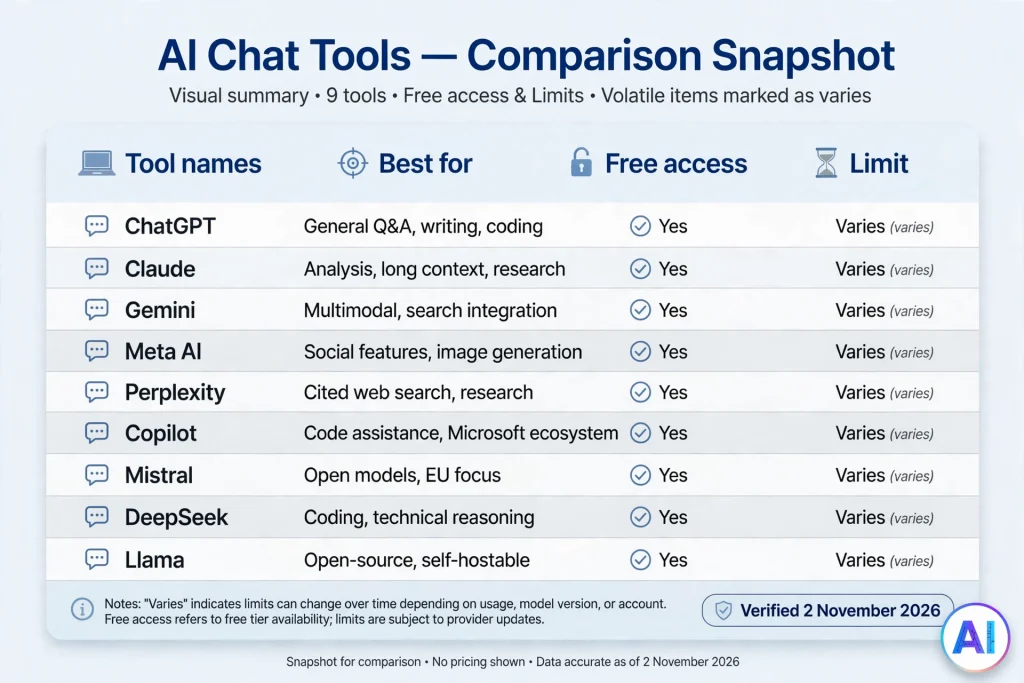
The table summarizes verified findings as of 2 November 2026. Free access and pricing vary by region, subscription, and usage, and several vendors changed plans during 2026, so confirm details on each official page.
| AI Writing Tool | Best For | Main Features | Free Access | Important Limitations |
|---|---|---|---|---|
| ChatGPT | Flexible everyday drafting and brainstorming | Conversational drafting, rewriting, summaries, file and image support on some plans | Yes, with usage limits | Not a templated platform; paid tiers and model access change often |
| Claude | Long-form drafting and careful editing | Large-document handling, nuanced rewriting, conversational editing | Yes, with usage limits | Usage caps on all plans; no built-in SEO scoring |
| Copy.ai | Sales and marketing workflows | Workflow automation, marketing copy generation | Reports conflict; check current plans | Plans restructured in 2026; heavier than solo writers need |
| Google Gemini | Writing inside Google apps | Drafting and summarizing, Workspace integration | Yes, with limits | Features vary by plan, region, and account type |
| Grammarly | Polishing your own writing | Grammar, clarity, tone, AI rewriting and drafting | Yes, core corrections | Not built for long article generation; plans being reshuffled |
| Jasper | Brand-consistent marketing teams | Brand Voices, knowledge assets, marketing agents, canvas | No permanent plan; seven-day Pro trial reported | Higher price; business pricing by quote |
| QuillBot | Paraphrasing and rewriting | Paraphraser, grammar check, summarizer; plagiarism and AI detection in Premium | Yes, with word limits | Not a full drafting assistant; capped checks |
| Rytr | Budget short-form copy | Use-case presets, tones, browser extension, many languages | Free plan reported, character-based | Small allowance; pricing page restructured in October 2026 |
| Writesonic | SEO and AI-search visibility work | SEO content and AI-visibility tracking features | Trial or limited access reported; varies | Positioning and pricing have shifted; verify current product |
No row is a winner. A student polishing essays, a solo blogger, and a marketing director with six writers should reach different conclusions from the same table.
Advantages and Benefits of AI Writing Tools
- Speed on first drafts. A usable starting point in seconds shortens the slowest part of writing.
- Consistent structure. Templates and outlines reduce missed sections.
- Lower cost for routine copy. Short, repetitive text can cost far less than commissioning each piece.
- Language support. Drafting and translation help across many languages.
- Accessibility. Tools can assist people who find writing physically or cognitively tiring.
- Learning aid. Seeing alternative phrasings teaches style.
Limitations and Disadvantages of AI Writing Tools
The same predictive design that makes an AI writing tool fluent also creates its weaknesses.
- Hallucinations. Confident, wrong statements, including invented citations.
- Generic voice. Output drifts toward the average of its training text.
- No lived experience. It cannot report what it saw, tested, or felt.
- Stale knowledge. Unless a tool searches the web, its information stops at a cutoff date.
- Privacy exposure. Pasted text may be processed under the vendor’s data terms.
- Plan instability. Prices and limits move, as this guide shows repeatedly.
- Over-reliance. Writers can lose the habit of thinking through an argument.
AI Writing Tools vs. Human Writers
The comparison is less about replacement than division of labor. An AI writing tool is faster, cheaper per draft, and tireless on repetitive formats. A human writer brings accountability, original reporting, taste, interviews, and the judgment to know what a particular reader needs.
For high-stakes work such as medical, legal, financial, or investigative content, a qualified human must be responsible for accuracy. For low-stakes, high-volume text such as alt-text variants or short product blurbs, AI-assisted drafting with a light human check is often sensible. Most good workflows land in the middle: the tool drafts or polishes, and a person decides what is true and worth saying.
AI Content Quality, Originality, and Fact-Checking
Quality is something you add after generation. Google’s guidance for site owners was updated on 1 October 2026 to say it is critical to manually fact-check and review AI-generated content for accuracy and trustworthiness before publishing, according to reports in Search Engine Land and Search Engine Roundtable.
A practical review process:
- Verify facts at the source. Open the official page, paper, or document, not another summary.
- Check every number and date. Recalculate anything that matters.
- Confirm every link and citation exists and says what the draft claims.
- Add something original. An example, measurement, screenshot, or opinion the model could not have produced.
- Run a plagiarism check if originality is critical. Detection tools estimate similarity; they do not prove authorship or accuracy, and AI detectors in particular can be wrong.
SEO Best Practices When Using an AI Writing Tool
Using an AI writing tool does not change what search systems reward. Google’s May 2026 guide to generative AI features says unique, valuable content matters more than any special tactic, and that standard SEO fundamentals remain relevant.
Habits that follow from that:
- Write for a real question. Start from what readers actually ask.
- Add original value. Publishing pages that merely restate what exists risks falling under scaled content abuse.
- Disclose how content was made where it helps readers. Google suggests considering context about how content was created.
- Keep technical basics sound. Clear headings, fast pages, descriptive titles and alt text.
- Avoid keyword stuffing. Natural repetition reads better and performs no worse.
- Update and maintain. Revisit pages when facts change.
Nothing here guarantees rankings, featured snippets, or AI Overview inclusion, and anyone who promises them is overselling.
Responsible Use, Copyright, and Privacy Considerations
Privacy. Before pasting client data, personal information, or unpublished work into an AI writing tool, read the vendor’s data and training terms. Business and team plans often offer stricter controls than free accounts, but confirm rather than assume.
Copyright. The legal status of AI-generated text, and of the material models were trained on, differs by country and is still evolving. Do not present AI output as automatically original or free of third-party rights. If you need certainty for commercial use, seek legal advice and review the vendor’s terms.
Attribution and honesty. Do not invent testimonials, reviews, or expert quotes. Do not pass off AI text where a rule requires disclosure, such as in some academic and publishing settings.
Bias and sensitivity. Models can reproduce stereotypes and gaps from their training text, so review content about people and communities with extra care.
The Future of AI Writing Tools
Several trends are visible in 2026. First, the line between general assistants and specialist platforms keeps blurring, with editing tools adding drafting and chat tools adding style memory. Second, vendors are moving from single-document help toward multi-step workflows. Copy.ai’s shift toward go-to-market automation illustrates that. Third, search itself is changing: Writesonic’s emphasis on tracking brand mentions in AI answers shows that visibility is no longer only about blue links. Fourth, institutions are tightening review expectations, as Google’s October 2026 accuracy language suggests.
Predictions about specific features age badly, so the safer long-term assumption is simple: the tools will get more capable, and the value of a human who verifies and contributes original substance will rise with them.
Conclusion
An AI writing tool is best understood as a fast, fallible collaborator. It can break the blank page, tidy grammar, adapt tone, and produce serviceable short copy, but it cannot take responsibility for truth. Pick a category first, whether general assistant, specialized platform, or editing utility. Test one or two options on your own tasks using free access, pay only to remove a limit you actually hit, and keep a human review step for every piece that carries your name. Before you buy, check the vendor’s current pricing page, because plans in this category moved repeatedly during 2026.
Frequently Asked Questions About AI Writing Tools
What is an AI writing tool?
An AI writing tool is software that uses a language model to generate, rewrite, summarize, or correct text from your instructions. It ranges from chat assistants to marketing platforms and grammar checkers.
Which AI writing tool is best?
There is no universal best. A general assistant like ChatGPT, Claude, or Gemini suits flexible drafting, Grammarly or QuillBot suit editing, and Jasper suits brand-focused marketing teams. Choose by task, budget, and workflow.
Are there free AI writing tools?
Yes. ChatGPT, Claude, Gemini, Grammarly, QuillBot, and Rytr have been reported to offer free access with limits. Jasper offers a trial rather than a permanent free plan. Check each vendor’s current terms.
Can an AI writing tool write a complete blog post?
It can produce a full draft, but you should supply facts, edit for voice, and verify every claim. Publishing unreviewed output risks errors and thin content.
Can AI writing tools help with SEO?
They can help with outlines, keyword ideas, titles, and meta descriptions. They cannot guarantee rankings. Helpful, accurate, original content still matters most.
Are AI-generated articles good for Google?
Google has said AI-generated content is not banned in itself, but using automation mainly to manipulate rankings or mass-producing low-value pages can violate spam policies. It also advises manual fact-checking before publishing.
Can AI writing tools detect plagiarism?
Some products bundle plagiarism checkers, such as QuillBot Premium, and some assistants add similar features, but quality and limits vary. A checker estimates overlap with known sources; it does not guarantee originality. For the AI-detection side, see this guide to the ChatGPT detector.
Are AI writing tools better than human writers?
They are faster at routine drafts, while humans are better at original reporting, judgment, and accountability. Combining both usually works best.
Is it safe to use AI writing tools?
It is generally safe for non-sensitive text (see is ChatGPT safe for one popular assistant), but avoid pasting confidential or personal data without reading the vendor’s privacy and training terms. Always review outputs for errors and bias.
How do I choose the right AI writing tool?
Start with your main task, your budget, and the apps you use. Test free tiers on real work, check privacy terms, and pick the tool whose limits will bother you least.
Sources and References
Product and pricing details were checked on 2 November 2026. Direct access to several official pricing pages was not possible during research, so those figures were cross-checked against independent trackers and reviews and are marked as reported. Verify on the vendor pages listed at the end.
- Google Search’s guidance on using generative AI content on your website — Google Search Central
- Google Search’s guidance about AI-generated content — Google Search Central Blog, 8 February 2023
- A new resource for optimizing for generative AI in Google Search — Google Search Central Blog, 15 May 2026
- Google: Manually Factcheck & Review AI-Generated Content For Accuracy — Search Engine Roundtable
- Google Search now says it’s critical to manually factcheck and review all AI-generated content — Search Engine Land
- QuillBot Premium — QuillBot official page
- Jasper pricing — Jasper official page (excerpt)
- Jasper AI Pricing (2026) — Layer3 Labs, updated 7 July 2026
- Jasper AI Free Trial: What You Get & What’s Off-Limits — Marc Andrews, July 2026
- Grammarly Pricing — SaaSGenius
- Grammarly pricing guide — Carly
- QuillBot Pricing — Hackceleration, June 2026
- QuillBot Plans and Pricing — CostBench
- Rytr Pricing in 2026 — HyperWrite
- Rytr pricing, October 2026 change — UsagePricing
- Writesonic Pricing 2026 — AI Productivity
- Copy.ai Pricing 2026 — CostBench
- Copy.ai pricing change, May 2026 — CostBench
- ChatGPT Plans — Gradually
- ChatGPT Pricing and Plans (2026) — PricePerToken
- Claude Pricing and Plans (2026) — PricePerToken
- Gemini Pricing and Plans (2026) — PricePerToken
- Google’s $5 AI plan is getting a major downgrade starting November 13 — Android Central
Check current plans directly on the vendors’ sites: ChatGPT, Claude, Google Gemini, Grammarly, Jasper, Copy.ai, Writesonic, Rytr, and QuillBot.