

In this article
Checked against the project’s official repository and documentation on November 9, 2026. Claude-Mem changes quickly, so treat the version checks below as part of the procedure, not an optional extra.
Anyone asking how to install claude mem needs one command and two prerequisites. The command is npx claude-mem install, run in an ordinary terminal. The prerequisites are Node.js 20 or newer and a recent Claude Code. The installer fetches Bun and uv by itself when they are missing. Claude-Mem is an independent open-source project, not an Anthropic feature, and this guide on how to install claude mem covers the install, the checks that prove it works, and the fixes for failures that real users have reported.
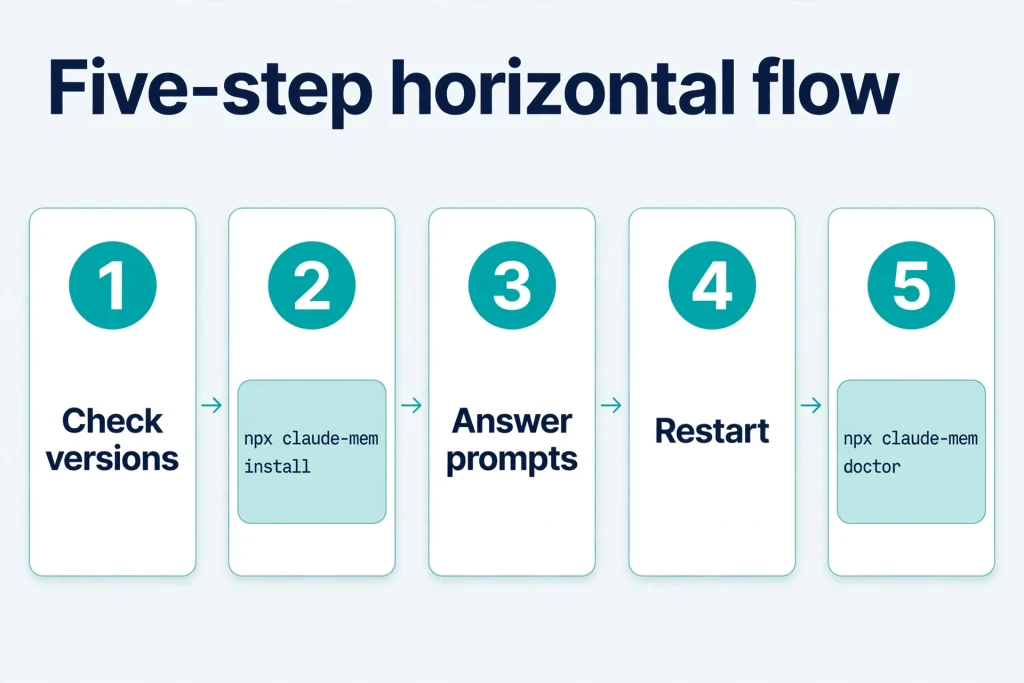
Quick answer: how to install claude mem in five moves
- Run
node --version(it must print 20.0.0 or higher) andclaude --version(the documentation requires 2.1.139 or higher). - Run
npx claude-mem installand answer the prompts. - Close the terminal and open a new one, so the updated PATH is loaded.
- Restart Claude Code.
- Run
npx claude-mem doctorand look at the “Hook launcher” row.
Do not run npm install -g claude-mem. The README states that this command installs only the SDK and library, without registering any hooks or starting the background worker.
Table of Contents
What Is Claude-Mem?
Claude Code begins every session with no knowledge of yesterday’s work. You can paper over that with a CLAUDE.md file, but nobody keeps such a file current by hand for long. Claude-Mem attacks the gap from the other side: it watches what the agent does, condenses each event into a short written note called an observation, stores those notes in a local SQLite database, and injects the relevant ones when you open a new session in the same project.
The repository describes the project as a persistent memory compression system built for Claude Code. Its README also lists other hosts it can attach to, including Codex, OpenCode and Gemini-based tools, but this guide stays with Claude Code because that is what almost everyone who searches how to install claude mem actually runs.
Is Claude-Mem an Official Anthropic Product?
No, and nothing I read suggests otherwise. The code lives at github.com/thedotmack/claude-mem, the README credits Alex Newman (@thedotmack) as author, and the license is Apache-2.0. Neither the README nor the documentation pages claim that Anthropic built, sponsors or endorses it. The line “Built with Claude Agent SDK” describes what the project uses, which is a statement about compatibility rather than affiliation.
Anthropic’s own memory features for Claude Code are a separate matter. Its documentation describes CLAUDE.md files you write yourself and an auto memory feature in which Claude saves notes under ~/.claude/projects/<project>/memory/. Where Anthropic’s official material lives is mapped in our Claude Docs guide.
Why the distinction matters in practice:
- Support comes from the project’s GitHub issue tracker, not from Anthropic.
- You are trusting third-party code with access to your coding sessions, so confirm the repository owner before you run anything.
- Look-alikes exist. The repository at
github.com/claude-mem/claude-memis only a signpost that points back to the thedotmack repository, and many forks are public. Whenever you follow a tutorial on how to install claude mem, check that the owner in the URL isthedotmack.
What Claude-Mem Does Inside Claude Code
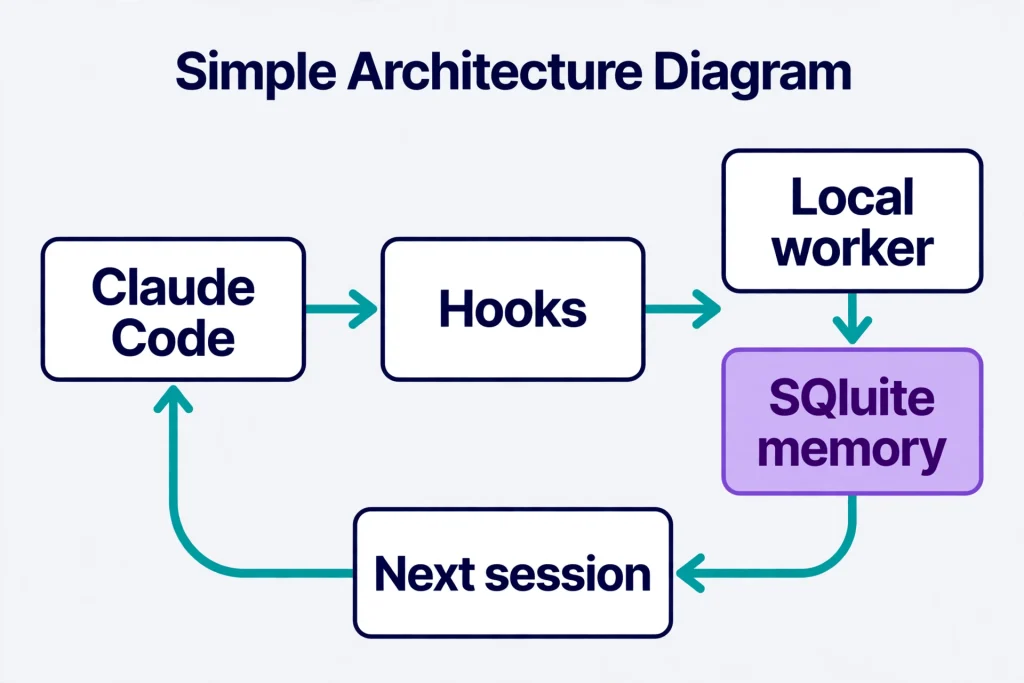
Claude-Mem attaches to Claude Code through lifecycle hooks, which are small commands that Claude Code runs at fixed moments. The documentation lists six: session start, prompt submission, before a file read, after every tool call, when Claude finishes responding, and session end. A background worker, an HTTP service on your own machine managed by Bun, receives what the hooks capture and hands it to an “observer” model that writes the observations.
At the start of your next session, the SessionStart hook pulls recent observations for the current project and adds them to Claude’s context. By default that means up to 50 observations from the last 10 sessions. Later, you can ask in plain language what happened before, and Claude uses MCP search tools (search, timeline and get_observations) to look it up in layers, which keeps token use down.
The README describes the search side as a “mem-search” skill. If skills are new to you, our guide to Claude Code Skills explains the mechanism.
What You Need Before You Install
Before you follow any instructions on how to install claude mem, check these items against the current documentation:
| Requirement | What the project documents | How to check |
|---|---|---|
| Node.js | 20.0.0 or higher | node --version |
| Claude Code | 2.1.139 or later for the current hook format | claude --version |
| Bun | 1.0 or higher, installed automatically if missing | bun --version (optional) |
| uv | Installed automatically if missing; supplies Python for the vector search | Nothing to check |
| SQLite | Bundled, nothing to install | Nothing to check |
Two corrections to older advice. Several tutorials still say Node.js 18 is enough, but the current README and installation page both say 20. And the Claude Code version matters more than it looks: the installer registers hooks in a format that older Claude Code builds ignore, and in that case nothing is captured and no error appears. If claude --version is too old, run claude update first.
You will also make one decision during setup: which model does the memory work. The options are explained in Step 3.
Choosing the Right Method for How to Install Claude Mem
The documentation offers two main routes for Claude Code, plus a source build for contributors. The comparison below reflects what the installation page says.
| Method | Command | Best for | Trade-off |
|---|---|---|---|
| Installer (npx) | npx claude-mem install | Most people | Interactive prompts; sets up everything in one pass |
| Plugin marketplace | /plugin marketplace add thedotmack/claude-mem then /plugin install claude-mem | People who prefer staying inside Claude Code | The first session may run without memory while the launcher compiles |
| Build from source | git clone, npm install, npm run build | Contributors and testers | More steps; not meant for everyday use |
My recommendation is the installer. The documentation says a marketplace-only install has no installer step, so the plugin places its launcher on the first session start, and that session can run without memory. Running npx claude-mem install once avoids the gap. The rest of this guide on how to install claude mem uses the installer and then covers the alternatives.
How to Install Claude Mem Step by Step
Step 1: Check Node.js and Claude Code
Open a terminal. On macOS or Linux that is Terminal or your shell of choice; on Windows use PowerShell or Windows Terminal. Run these two commands, which only print version numbers:
bash
node --version
claude --version
You need 20.0.0 or higher from the first and 2.1.139 or higher from the second. If node is not recognized, install Node.js from nodejs.org and open a fresh terminal. Windows users who see “npm is not recognized” have the same problem: Node.js is missing or not on PATH.
Step 2: Run the installer
In the same terminal, run the one command that the README and the documentation give as the main route for how to install claude mem:
bash
npx claude-mem installThe npx tool downloads and runs the installer without a global install. According to the documentation, the installer works in three stages. First it asks which agents to set up, then checks for Bun and uv, copies the plugin into Claude Code’s marketplace folder, registers it, installs dependencies and places a small claude-mem launcher on your PATH. Second, it may ask you to sign in. Third, it asks you to choose a memory provider.
To skip the agent question you can pass a flag, for example npx claude-mem install --ide claude-code.
Step 3: Answer the prompts deliberately
This is where a careful installation differs from a rushed one, and where many tutorials say little. Expect these prompts:
- An optional email and note. An interactive install asks once, and you can press Enter to skip. If you answer, the email, your note, the claude-mem version and your operating system go to
cmem.ai. - Whether to disable Claude Code’s native auto memory. This appears when Claude Code is one of the selected agents. The
--disable-auto-memoryflag answers “disable”; there is no flag for “leave enabled”. Decide whether you want two memory systems running at once. - Which provider runs the observer. This choice decides where your session content goes, so read the table below.
- A usage-analytics question at the end. The installer may ask whether to share anonymized usage data. It is skipped when the
CIorDO_NOT_TRACKenvironment variable is set.
| Provider | Where observation work runs | Notes from the documentation |
|---|---|---|
| CMEM Pro (pre-selected) | The cmem.ai gateway, off your plan | 30-day free trial; afterwards memory falls back to your Anthropic plan unless you subscribe. Sign-in needs no card. |
Anthropic plan (--provider claude) | Your own Claude plan | Skips sign-in; memory shares your plan’s usage. You also pick Haiku, Sonnet or Opus for compression. |
| OpenRouter key | Your OpenRouter credit | Personal keys must never be sent to the cmem.ai gateway. |
| Gemini key | Your Gemini API key | Off-plan. |
Host observer (--provider host) | Local loopback with an already-logged-in agent | Opt-in. |
If you choose the Anthropic plan, remember that observer calls draw from the same allowance as your coding. Our Claude Code pricing guide explains how those limits behave. Anyone who wants no account interaction at all can pass an explicit --provider flag, set CLAUDE_MEM_ONLINE_OPTIN=false, or run in a CI or non-interactive shell.
Step 4: Restart the terminal and Claude Code
The installer adds a launcher directory to PATH: ~/.local/bin on macOS and Linux (appended to your shell rc file if needed) and %LOCALAPPDATA%\claude-mem\bin on Windows (appended to your user Path). A running Claude Code keeps the PATH it started with, so close the terminal, open a new one, and start Claude Code again. If you launch Claude Code from an editor, restart the editor too. Skipping this restart is a likely reason a correct run of how to install claude mem appears to do nothing.
Step 5: Run the health check
bash
npx claude-mem doctorThe doctor command prints a table of checks, including a “Hook launcher” row and a “Claude Code version” row. The documentation says it warns when your Claude Code is older than 2.1.139. A healthy install is the goal of every how to install claude mem tutorial, but this command, not the absence of errors, is what proves it.
The marketplace route
If you would rather not use the installer, open Claude Code and run these two commands, one after the other:
/plugin marketplace add thedotmack/claude-mem
/plugin install claude-mem
The first adds the project’s marketplace, and the second installs the plugin. Restart Claude Code afterwards. Per the documentation, both routes configure the hooks and start the worker, but only the installer avoids the first-session gap. If dependencies are missing after a marketplace install, the documentation tells you to run npx claude-mem install or claude --init-only.
Building from source
Contributors can clone the repository, install dependencies and build it:
bash
git clone https://github.com/thedotmack/claude-mem.git
cd claude-mem
npm install
npm run build
The documentation says the worker then starts automatically with your first Claude Code session, or manually with npm run worker:start. Ordinary users do not need this.
Platform Notes: How to Install Claude Mem on Windows, macOS, Linux, WSL and Docker
The project documentation says installation works across Windows, macOS and Linux. Here is how far I could verify each environment:
| Environment | Status | What to know |
|---|---|---|
| macOS | Documented as supported | Launcher goes to ~/.local/bin/claude-mem |
| Linux | Documented as supported | Same launcher location as macOS |
| Windows | Documented as supported | Runtime hooks do not need Git Bash. Launcher is %LOCALAPPDATA%\claude-mem\bin\claude-mem.exe. More open bug reports than on other systems. |
| WSL | Could not confirm | The pages I read do not address it, so no claim is made |
| Docker | Could not confirm for Claude Code | The repository contains Docker files, but I did not verify a supported procedure |
On Windows, if the installer complains that npm is not recognized, the README says to install Node.js and restart the terminal. For everything else, how to install claude mem on Windows is the same command shown above.
How to Verify Claude-Mem Is Working
A finished installer run does not prove memory is flowing, so any honest answer on how to install claude mem has to include a verification pass. Verify in layers.
1. The launcher resolves. On macOS or Linux:
bash
command -v claude-mem && claude-mem --versionThis prints the launcher’s path and a protocol number such as 1. On Windows use where.exe claude-mem instead.
2. The doctor is satisfied. npx claude-mem doctor should show a healthy hook launcher and no Claude Code version warning.
3. The worker is healthy. The worker listens on 127.0.0.1. Its default port is 37700 + (uid % 100), so two users on one machine get different ports, and the configured value lives in ~/.claude-mem/settings.json. With the port known, run:
bash
curl http://127.0.0.1:$PORT/health4. Data is accumulating. After a working session, the database should grow. If you have the sqlite3 tool installed:
bash
sqlite3 ~/.claude-mem/claude-mem.db "SELECT COUNT(*) FROM observations;"Everything Claude-Mem keeps sits in ~/.claude-mem/, including the database, logs and settings.json.
How Claude-Mem Connects to Claude Code
Understanding the plumbing turns troubleshooting from guesswork into a checklist. Here is the chain that every correct run of how to install claude mem produces:
- The plugin is registered with Claude Code under the marketplace folder
~/.claude/plugins/marketplaces/thedotmack. - Its
hooks.jsondeclares one entry per event. Each entry is a plain command,claude-mem hook claude-code <event>, with no shell involved. - Claude Code looks up
claude-memon the PATH it inherited, so the launcher must be there. The launcher is a small compiled program, not the npm package; it finds the plugin, runs the hook under Bun, and always exits with code 0 so a failure never blocks your session. - The hooks pass events to the worker, which queues them for the observer model.
- An MCP server exposes the search tools to Claude.
One behavior surprises people: by default Claude-Mem can block a whole-file Read of a code file that is 32 KB or larger when that file already has observation history. It redirects Claude to targeted tools instead. Reads with an offset and limit still work. The behavior is controlled by CLAUDE_MEM_FILE_READ_GATE_ENABLED, and setting it to false lets every read through.
Basic Configuration After You Know How to Install Claude Mem
You rarely need to change anything. Settings live in ~/.claude-mem/settings.json, which is created with defaults on first run, and a few can also be set as environment variables. The settings most likely to matter:
| Setting | Default | What it controls |
|---|---|---|
CLAUDE_MEM_PROVIDER | claude | Observer provider: claude, codex, gemini, openrouter or openai-compatible |
CLAUDE_MEM_MODEL | claude-haiku-4-5-20251001 | Claude model used for compression when the Claude provider is active |
CLAUDE_MEM_CONTEXT_OBSERVATIONS | 50 | How many observations are injected at session start |
CLAUDE_MEM_WORKER_PORT | 37700 + (uid % 100) | Worker port; set a fixed one if it collides |
CLAUDE_MEM_REDACT_ENABLED | false | Opt-in removal of recognized secrets before storage |
CLAUDE_MEM_FILE_READ_GATE_ENABLED | true | The large-file read gate described above |
After editing the file, restart the worker. A quick example that raises the injected context:
json
{
  "CLAUDE_MEM_CONTEXT_OBSERVATIONS": "100"
}
If the per-tool hooks feel heavy on your machine, the documentation describes an opt-out: add "CLAUDE_MEM_DISABLE_TOOL_HOOKS": "1" under an env block in ~/.claude/settings.json. Session-start context, prompt summaries and stop summaries keep working. Do not rename hook keys in hooks.json instead, because the documentation warns that Claude Code then rejects the entire plugin hook set.
How to Test Claude-Mem
A good test takes two short sessions. Knowing how to install claude mem is only half the job if you never see it recall anything.
- In a real project, start Claude Code and give it a small task, such as explaining a module or fixing a minor bug. Let Claude finish its response, because the Stop hook is what triggers the summary.
- Exit, then start a fresh Claude Code session in the same project folder.
- Look for injected context from the previous session at the start.
- Ask, “What did we work on last session?” The documentation gives similar examples, such as asking which bugs were fixed. Claude should reach for the memory search tools.
If nothing appears, give the observer a moment. Processing happens in the background, and a provider that is rate-limited or out of quota can delay it. The troubleshooting section below covers the usual causes.
Troubleshooting When How to Install Claude Mem Steps Go Wrong
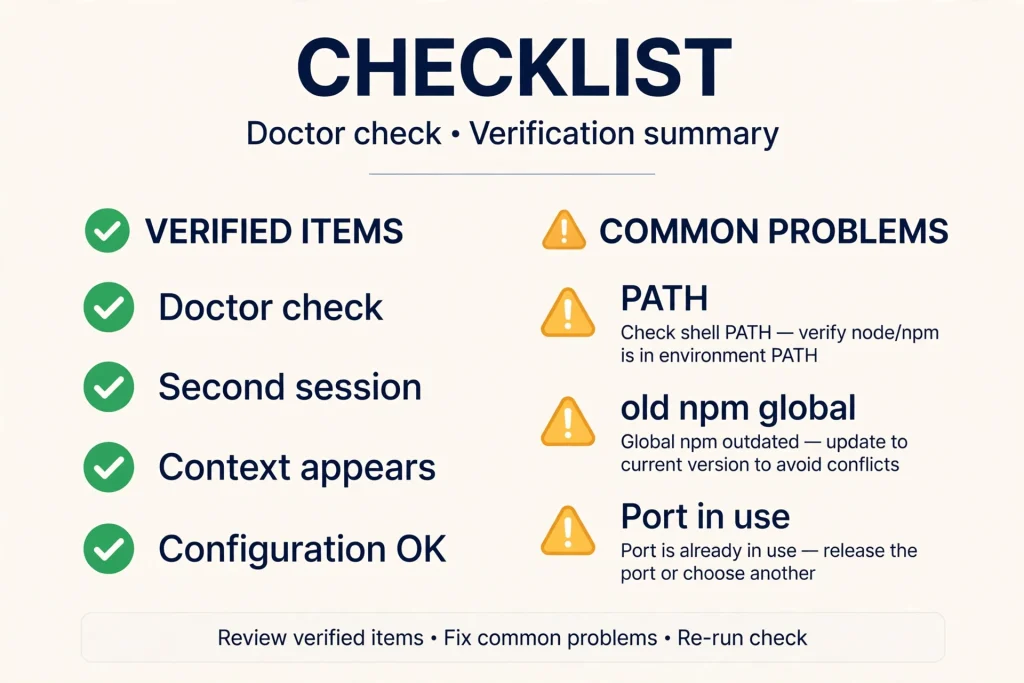
Every fix here comes from the project’s troubleshooting guide or its issue tracker. When a failure appears even though your run of how to install claude mem looked successful, start with npx claude-mem doctor, because it names the likeliest cause.
“Executable not found in $PATH: claude-mem”
The documented error message is Error occurred while executing hook command: Executable not found in $PATH: "claude-mem". Claude Code runs hooks without a shell, so it needs the launcher on the PATH it started with. Run npx claude-mem install to place the launcher, restart the terminal and then Claude Code, and read the “Hook launcher” row from npx claude-mem doctor. If that row says another claude-mem comes first, see the next fix.
A global npm package shadows the launcher
Anyone who first tried npm install -g claude-mem may have the wrong program ahead of the launcher on PATH. Find every copy with which -a claude-mem (macOS and Linux) or where.exe claude-mem (Windows). Remove the npm one with npm uninstall -g claude-mem, or move the launcher directory earlier on PATH. The installer never overwrites a claude-mem it did not place.
Hooks seem to run but nothing is captured
Check claude --version. Older Claude Code versions ignore the hook arguments and run a bare claude-mem, which only prints usage, with no error displayed. Update with claude update, then rerun the doctor.
“Executable not found in $PATH: node”
This variant means Node.js is not on the inherited PATH, so the startup self-heal step cannot run. Install Node.js 20 or newer and restart your terminal.
The worker will not start or the port is taken
From the plugin folder (~/.claude/plugins/marketplaces/thedotmack), the documentation lists npm run worker:status, npm run worker:logs and npm run worker:restart. If the log says the port is in use, pin another one:
bash
export CLAUDE_MEM_WORKER_PORT=38000
npm run worker:restart
Windows: “bun is not recognized” or flashing windows
The documentation traces the first symptom to a very long PATH, because cmd.exe drops environment variables beyond about 8,191 characters. Update with npx claude-mem install, since current hooks call the launcher directly, and check $env:Path.Length in PowerShell. One open report from September 2026 describes a spawn error when the Windows profile path contains non-ASCII characters, and another describes console windows flashing on version 13.24.0, so Windows users with unusual setups should search the issue tracker before assuming their setup is at fault.
Vector search errors
Chroma needs Python, which uv provides. If installation fails with Chroma-related errors, the guide says hybrid search degrades gracefully to SQLite full-text search, so memory still works.
Context does not appear
Confirm summaries exist with sqlite3 ~/.claude-mem/claude-mem.db "SELECT COUNT(*) FROM session_summaries;". Then confirm the worker is running. If observations are stuck in the queue, the documentation provides a recovery script, bun scripts/check-pending-queue.ts, run from the plugin folder.
How to Update Claude-Mem
Keeping the install current is part of any complete guide on how to install claude mem, because the launcher and the Claude Code version requirement both move over time. Plugin marketplace updates apply automatically. For a clean refresh of the plugin, its dependencies and the launcher in one step, the documentation recommends:
bash
npx claude-mem updateIf an update leaves dependencies missing, run npx claude-mem@latest install. After an update through Claude Code’s own plugin commands, the first session may miss memory context while the launcher compiles. Rerun the doctor afterward, and read the project changelog when you want to know what changed.
How to Uninstall Claude-Mem
Anyone who followed how to install claude mem and then changes their mind needs the reverse path. The documented command is:
bash
npx claude-mem uninstallIt removes the launcher binary but leaves your shell rc file and user Path alone, and it prints the line you should remove yourself. The pages I read do not say whether your stored memories in ~/.claude-mem/ are deleted. Check that folder afterward, and copy claude-mem.db somewhere safe first if you might want the history again.
Security and Privacy Considerations
Nobody should treat a guide on how to install claude mem as a guarantee of safety. This tool sits in the middle of everything Claude Code does, so it deserves a careful look.
What it stores. Observations derived from tool calls, your prompts and summaries, in a local SQLite database at ~/.claude-mem/claude-mem.db. Claude Code tool calls include file reads and shell commands, so file contents and command output can end up in notes.
Where content goes. That depends on your provider choice. With the Anthropic plan, the observer runs through your own Claude plan. With CMEM Pro, OpenRouter or Gemini, the content used to write observations is sent to that service. The documentation says a local install sends cmem.ai only a numbers-only usage summary, plus your email and note if you shared them, unless you choose to upload prompts during browser setup. Cloud Sync is a separate opt-in feature, and the documentation states plainly that it uploads observation narratives and full prompt text to your cmem.ai account.
Secrets. Automatic redaction is off by default. Enable it with "CLAUDE_MEM_REDACT_ENABLED": "true" in settings.json to replace patterns such as API keys with placeholders before storage. The documentation calls this destructive replacement, and it admits coverage gaps, such as Azure and IBM Cloud tokens. Separately, wrapping text in <private> tags keeps it out of storage.
The local worker. It binds to 127.0.0.1 by default and, per the project’s own documentation, has no request authentication, so the loopback address is its main defense. A security issue filed in September 2026 described unauthenticated settings access and unchecked file paths in the search tools; the maintainer’s closing comment says fixes landed on main in pull request #3985. I could not confirm which numbered release contains them, so update and read the changelog. Setting the worker host to 0.0.0.0 without a token exposes the rest of the worker API on your network, so leave it at the default.
Third-party code. Read the README and the install flow, confirm the thedotmack owner, and pin versions in sensitive environments. The README also mentions a cryptocurrency token named CMEM that it says a third party created and the author embraced; nothing in the installation steps involves it, so be suspicious of any site that ties wallets to how to install claude mem. If you also give AI agents control of your browser, the same prompt-injection logic applies, as our Claude in Chrome guide explains.
Limitations to Know About
- It uses model capacity. Every observation is an observer request, charged to your provider’s allowance or your plan.
- Queued work can be lost. The documentation says observations waiting in worker memory can be discarded if the worker restarts before they are processed.
- Churn is real. The repository’s issue list showed dozens of open issues when I read it, several about Windows hooks and version mismatches.
- First-session gaps. Marketplace-only installs and some updates can skip memory for one session.
- Install guides age quickly. A tutorial on how to install claude mem written months ago may name commands that no longer exist, which is why this one lists its check date.
- Not a substitute for CLAUDE.md. Memory notes are generated; your team’s rules still belong in files you control.
Frequently Asked Questions
What is Claude-Mem?
Claude-Mem is an open-source persistent memory system for Claude Code and several other coding agents. It captures tool activity through hooks, condenses it into observations with a model, stores them locally in SQLite, and injects relevant context into later sessions.
How to install Claude Mem on Windows, macOS or Linux?
The shortest answer to how to install claude mem on any of the three systems is to run npx claude-mem install after confirming Node.js 20 or newer and Claude Code 2.1.139 or newer. Restart your terminal and Claude Code, then verify with npx claude-mem doctor. An alternative is the pair of commands /plugin marketplace add thedotmack/claude-mem and /plugin install claude-mem.
Is Claude-Mem free?
The software is open source under Apache-2.0. Memory still needs a model to write observations: the hosted observer offers a 30-day free trial, after which memory falls back to your Anthropic plan unless you subscribe, and other providers bill you through your own keys. I could not verify CMEM Pro pricing. Cost does not change how to install claude mem; it changes which provider you pick at the prompt.
Is Claude-Mem official Anthropic software?
No evidence supports that. The project is maintained independently by Alex Newman at thedotmack/claude-mem. It integrates with Claude Code, but Anthropic’s official memory features are CLAUDE.md files and auto memory.
Does Claude-Mem work with Claude Code?
Yes. Claude Code is the main supported host, and the documentation requires version 2.1.139 or later. It attaches through hooks and an MCP search server, and the steps for how to install claude mem for Claude Code are the ones in this guide.
What operating systems support Claude-Mem?
The documentation says Windows, macOS and Linux, and the command for how to install claude mem is the same on all three. WSL and Docker support for Claude Code could not be confirmed from the pages I read.
What do I need before I learn how to install Claude Mem?
For how to install claude mem, you need Node.js 20.0.0 or higher and Claude Code 2.1.139 or higher. Bun and uv are installed automatically if missing, and SQLite is bundled.
How do I know Claude-Mem is installed correctly?
Run npx claude-mem doctor and check the Hook launcher row, then run a second Claude Code session in the same project and look for injected context. This is the surest final step in how to install claude mem.
How do I update Claude-Mem?
Run npx claude-mem update. Marketplace updates also apply automatically. If dependencies go missing, run npx claude-mem@latest install.
How do I uninstall Claude-Mem?
Run npx claude-mem uninstall. It removes the launcher but leaves PATH edits, which you remove yourself, and the documentation does not say whether ~/.claude-mem/ data is deleted.
Conclusion
The reliable answer to how to install claude mem is short: confirm Node.js 20 and Claude Code 2.1.139, run npx claude-mem install, make the privacy choices at the provider prompt, restart everything, and prove it with npx claude-mem doctor plus a two-session test. The rest of this guide exists for the moments when a tutorial written months ago stops matching reality.
Before you commit your projects to it, decide where your session content may go, turn on redaction if you handle secrets, and keep the install source pinned to the official repository. Used that way, Claude-Mem is a capable, independent addition to Claude Code, and a practical next step for anyone who wants their coding assistant to remember. If a teammate asks how to install claude mem, send them the five moves at the top and the doctor command at the end.
Sources and References
All consulted on November 9, 2026.
- Claude-Mem, official GitHub repository and README: github.com/thedotmack/claude-mem
- Claude-Mem documentation, Installation: docs.claude-mem.ai/installation
- Claude-Mem documentation, Configuration: docs.claude-mem.ai/configuration
- Claude-Mem documentation, Troubleshooting: docs.claude-mem.ai/troubleshooting
- Claude-Mem documentation, Getting Started: docs.claude-mem.ai/usage/getting-started
- Claude-Mem documentation, Auto-Redaction: docs.claude-mem.ai/usage/auto-redaction.md
- Claude-Mem GitHub issue tracker: github.com/thedotmack/claude-mem/issues
- Claude-Mem GitHub issue #3861 (security report and maintainer reply): github.com/thedotmack/claude-mem/issues/3861
- Claude-Mem signpost repository: github.com/claude-mem/claude-mem
- Anthropic, “How Claude remembers your project,” Claude Code documentation: code.claude.com/docs/en/memory
 Daniel Carter