
In this article
Checked against Anthropic’s official Claude Code documentation on November 8, 2026. This feature is experimental and the documentation changes often, so confirm anything version-specific on the official page before relying on it.
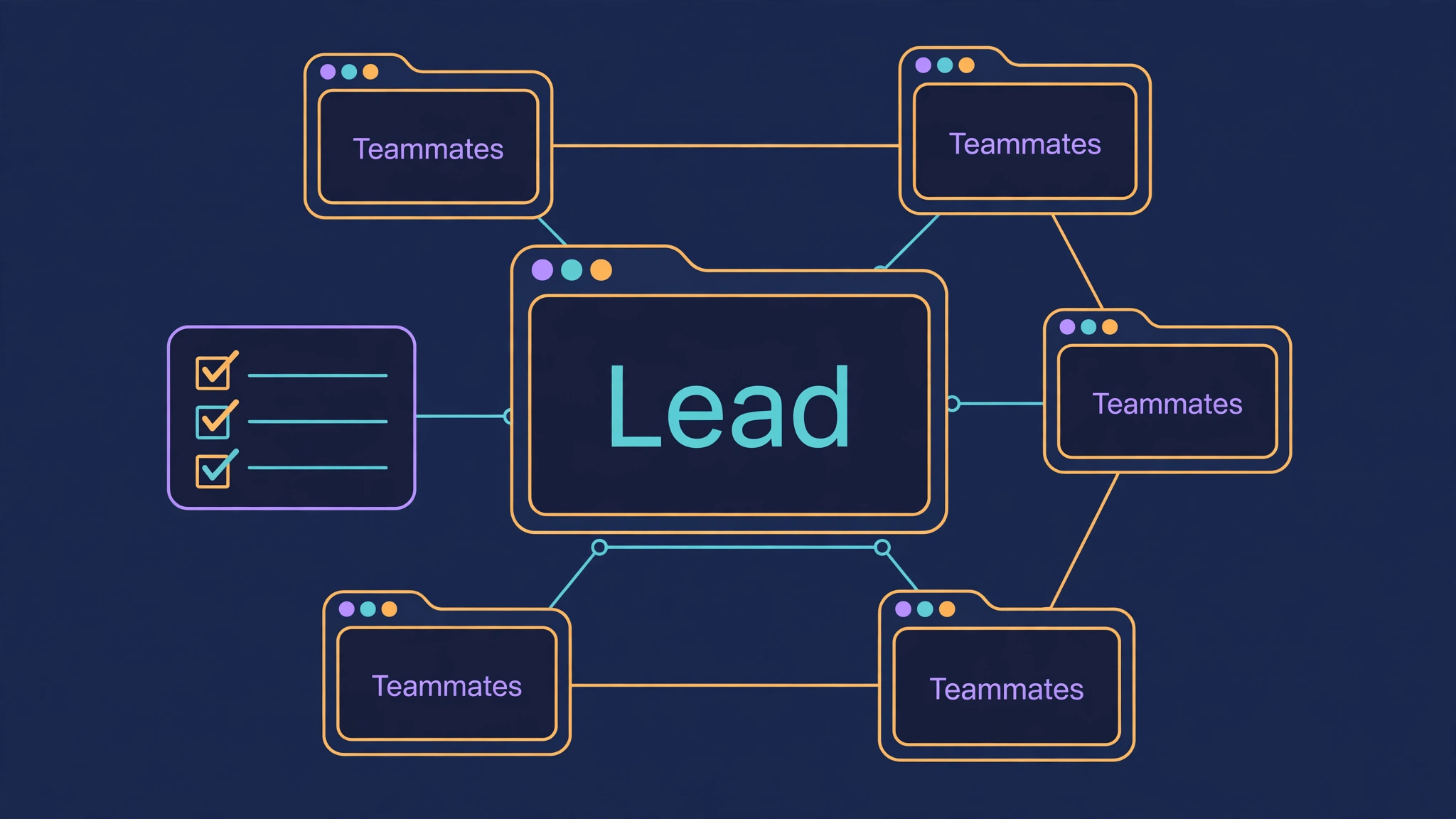
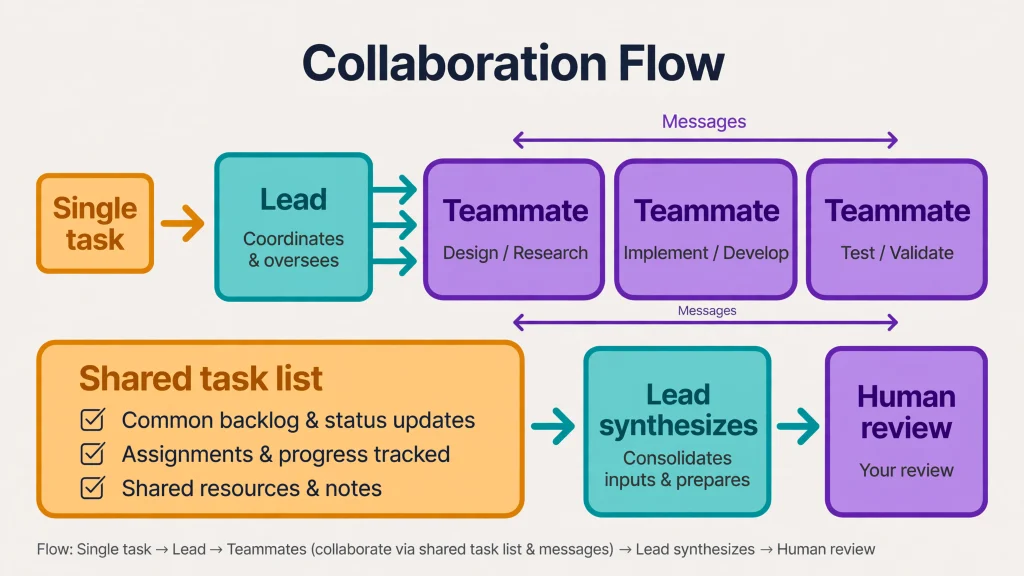
Claude Code agent teams let one Claude Code session recruit several other Claude Code sessions and run them as a coordinated group. The main session becomes the team lead. The others are teammates: separate instances, each with its own context window, that share a task list and can message each other directly instead of routing everything through the lead.
Anthropic currently labels the feature experimental and disabled by default. Claude Code agent teams stay switched off until you set the CLAUDE_CODE_EXPERIMENTAL_AGENT_TEAMS environment variable to 1. Without it, the documentation says no team is created at session start, and Claude will not spawn or suggest teammates.
This guide explains the mechanics in Anthropic’s own terminology, walks through setup, compares claude code agent teams with subagents, and is direct about cost and limitations. Where I interpret rather than report documented behavior, I say so.
Table of Contents
What Are Claude Code Agent Teams?
Short answer: Claude Code agent teams are several full Claude Code sessions working together under one lead, with a shared task list and direct messaging between members. Anthropic documents them as an experimental feature for work where parallel exploration adds real value.
A team has four documented parts:
| Component | Role |
|---|---|
| Team lead | Your main session. It spawns teammates, coordinates the work, and synthesizes results. |
| Teammates | Separate Claude Code instances, each assigned tasks and each with its own context window. |
| Task list | A shared list of work items that teammates claim and complete. |
| Mailbox | The messaging layer that lets agents talk to one another. |
Why Agent Teams Exist
A single Claude Code session works through problems one thread at a time, and everything it reads piles into one context window. Claude Code agent teams exist for cases where several threads of investigation should run side by side and where the people doing the investigating benefit from comparing notes.
Anthropic names four strong fits: research and review, new modules or features that can be owned separately, debugging with competing hypotheses, and cross-layer changes spanning frontend, backend, and tests. My reading is that the shared theme is independence. Teammates earn their cost when each can make progress without waiting for the others.
How Teammates Communicate
Documented behavior is fairly specific. Messages between teammates are delivered automatically, so the lead does not have to poll. When a teammate finishes, it sends the lead an idle notification that includes its final answer. Agents that have the Task tools can also see the shared list and claim available work. Any teammate can message any other by name, and you can message a teammate yourself without going through the lead.
One detail catches people out: a teammate receives the lead’s spawn prompt, but not the lead’s conversation history. It does load the same project context as an ordinary session, meaning CLAUDE.md files, MCP servers, and skills.
How Results Get Combined
The documentation says the lead synthesizes findings when teammates finish. It does not describe an automatic code-merging step. Because teammates are not isolated in separate git worktrees, they edit the same working directory. In practice, that means “combining” code is something you manage through task boundaries and review, which is an interpretation on my part, not a documented merge feature.
How Claude Code Agent Teams Work
Here is the lifecycle of claude code agent teams as the documentation describes it, with the order arranged by me for readability.
- Enable the feature. Set the environment variable, either in your shell or in
settings.json. - Describe the task and the roles. You write in natural language. Claude decides how many teammates to spawn unless you specify a number.
- The lead spawns teammates. Per the docs, Claude launches a teammate when it calls its Agent tool with a name while teams are enabled. It does not ask you to confirm.
- A task list takes shape. Tasks are pending, in progress, or completed, and a task can depend on others and show as blocked until they finish.
- Teammates claim work. The lead can assign tasks directly, or a teammate can pick up the next unassigned, unblocked task itself. Claiming uses file locking so two teammates cannot grab the same task.
- Teammates exchange findings. They message each other and the lead as they go.
- You monitor and steer. You can open any teammate’s transcript, redirect it, or stop it.
- The lead synthesizes. Findings come together in the lead session.
- You shut the team down. Teammates exit on request, and the shared directories are cleaned up when the session ends.
A Simple Illustration
This example is mine, not Anthropic’s. Imagine adding a notifications feature to a small web app. A lead might spin up one teammate to own the API layer, another to own the user interface, and a third to write tests, with a fourth reading existing code for conventions. Claude code agent teams do not require this split. It simply shows how independent slices of one project map onto separate teammates.
How to Use Claude Code Agent Teams: Step-by-Step Setup
Prerequisites
Claude Code needs a Pro, Max, Team, Enterprise, or Console account, and the official install page states the free Claude.ai plan does not include Claude Code access. The agent teams page I reviewed does not list any additional plan requirement. Teammates also need an interactive session: in non-interactive mode with the -p flag, including Agent SDK sessions, Claude does not spawn teammates.
Install Claude Code on macOS, Linux, or WSL with Anthropic’s native installer:
bash
curl -fsSL https://claude.ai/install.sh | bashHomebrew and WinGet users can run brew install --cask claude-code or winget install Anthropic.ClaudeCode. Afterwards, claude --version shows your build and claude doctor runs installation diagnostics. If your install is old, our guide on how to update Claude Code covers each install method.
Step 1: Enable Claude Code Agent Teams
Add the variable to your user settings file:
json
{
  "env": {
    "CLAUDE_CODE_EXPERIMENTAL_AGENT_TEAMS": "1"
  }
}
Or set it in your shell before launching:
bash
export CLAUDE_CODE_EXPERIMENTAL_AGENT_TEAMS=1
claude
Enabling teams has a side effect worth knowing. While the variable is on, a subagent that Claude names launches as a teammate, so a team can form even when you never asked for one.
Step 2: Pick a Display Mode
Claude code agent teams offer two display modes. In-process is the default and runs every teammate inside your main terminal, working in any terminal. Split panes gives each teammate its own pane and needs tmux or iTerm2 with the it2 CLI. Anthropic notes that split panes are not supported in the VS Code integrated terminal, Windows Terminal, or Ghostty.
To change the default, set teammateMode in ~/.claude/settings.json to "auto", "tmux", "iterm2", or keep "in-process". For one session only, use the flag below. Anthropic says this flag is experimental and does not appear in claude --help:
bash
claude --teammate-mode autoStep 3: Start a Team
To start one of your claude code agent teams, ask for teammates in plain language and give each a distinct job. A prompt of my own devising:
text
I need a second opinion on our checkout flow. Spawn three teammates:
one auditing error handling, one reviewing accessibility, and one
checking how well the existing tests cover edge cases. Have each one
report findings back to me.
The lead’s terminal lists teammates in an agent panel below the prompt. Claude sometimes uses ordinary subagents instead of a team, and both appear in the same panel, so the panel alone does not prove a team formed. If you only got subagents, ask again and explicitly request an agent team.
Step 4: Monitor and Steer
In the panel, the up and down arrows select a teammate, Enter opens its transcript so you can message it, and Escape clears the selection. In in-process mode, x stops a selected teammate and Ctrl+T toggles the task list. In split-pane mode, you click into a pane instead.
Step 5: Assign Work and Control Models
You can tell the lead who gets which task, or let teammates self-claim. You can also state a model in your prompt, for example asking for Sonnet on each teammate. Claude Code picks a teammate’s model from the first rule that applies: the model named in your spawn prompt, then a subagent definition’s model, then the CLAUDE_CODE_SUBAGENT_MODEL variable, then the lead’s current model. The page lists no specific required model for claude code agent teams.
Step 6: Add Planning and Quality Gates
For risky work in claude code agent teams, switch the lead into plan mode before asking for a teammate. That teammate then works read-only until its plan is ready and sends a plan approval request to the lead. Be careful here: per the docs, you are not asked to approve it, and unless you changed that teammate’s permission mode, Claude Code approves the plan automatically, so do not treat it as a human review gate. For hard guardrails, Claude Code offers three hook events: TeammateIdle, TaskCreated, and TaskCompleted. Exiting a hook with code 2 sends feedback and either blocks the action or keeps the teammate working, depending on the event.
Step 7: Finish and Close the Team
Ask the lead to shut down a named teammate. It sends a shutdown request, which the teammate can approve or decline with an explanation. There is no separate cleanup command, because the team’s shared directories are removed automatically when the session ends.
Anthropic also lets you reuse subagent definitions as teammate roles. Name the definition when you request the teammate, and Claude Code applies parts of it, such as the tool list, model, and body text. Not every field carries over, and the behavior differs between display modes, so read the official section before depending on it.
Claude Code Agent Teams vs Subagents
Short answer: Subagents are helpers inside one session that do a side task and report back. Claude code agent teams are independent sessions that share a task list and talk to each other. Anthropic’s rule of thumb is to use subagents for quick, focused workers that report back, and teams when teammates need to share findings, challenge each other, and coordinate themselves.
| Feature | Agent Teams | Subagents |
|---|---|---|
| Main purpose | Complex work that benefits from discussion and collaboration | Focused tasks where only the result matters |
| Parallel work | Multiple separate sessions working at once | Delegated side tasks, often run in the background |
| Communication | Teammates message each other directly | Return a result to the caller; subagents that Claude named can also message each other |
| Coordination | Self-coordination through messages, plus a shared task list for agents with Task tools | The main agent manages all work |
| Context | Own context window, fully independent | Own context window; results return to the caller |
| Best for | Research and review, separate modules, competing-hypothesis debugging | Isolating verbose output such as test logs or file searches |
| Complexity | Higher: lead, teammates, task list, mailbox, display modes | Lower: one session delegates and collects |
| Resource considerations | Higher token cost; each teammate is a separate Claude instance | Lower; results are summarized back to the main context |
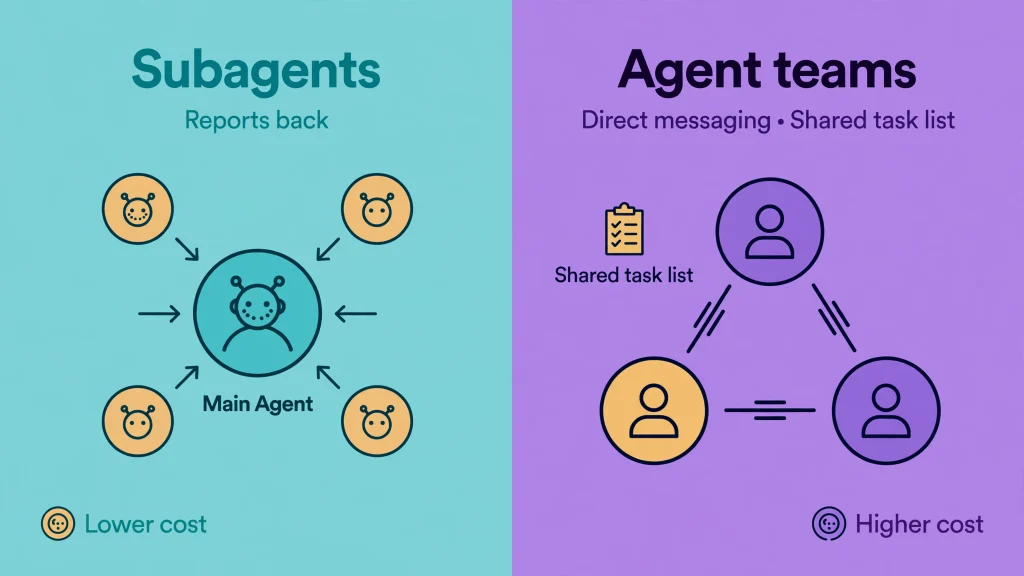
Two additions from the subagent documentation matter in practice. First, subagents have their own documented limits: by default, spawning fails once 20 are running in a session, and nesting stops at three layers below the main conversation. The teammates of claude code agent teams follow their own limits instead, and the page I reviewed gives no numeric ceiling for them. Second, a subagent still spends tokens of its own, so “lighter” does not mean free.
The relationship between claude code agent teams and subagents is also not either-or. Because you can reuse subagent definitions as teammate roles, a security-reviewer you wrote once can serve in both patterns.
Agent Teams vs Parallel Agents: Are the Terms Interchangeable?
Short answer: No. “Parallel agents” is a general description, while claude code agent teams is one specific, documented mechanism for achieving it.
Anthropic’s “Run agents in parallel” page lists five ways Claude Code can handle several tasks at once: subagents, agent view, agent teams, dynamic workflows, and projects. The distinguishing question is who coordinates. Subagents have Claude delegate inside one conversation, agent view has you dispatch independent sessions, agent teams have Claude plan and supervise a group, and dynamic workflows hand the plan to a script.
Third-party guides use the vocabulary loosely. Some describe dynamic workflows as a single agent improvising, which conflicts with Anthropic’s description of a script that runs many subagents. Others say teams cut token costs, while Anthropic says teams use significantly more tokens. When a blog and the documentation disagree, treat the documentation as authoritative.
Worktree handling also differs. Claude Code agent teams do not put teammates in separate git worktrees, whereas sessions you run yourself, agent view sessions, and subagents can each use one.
Real-World Use Cases for Claude Code Agent Teams
I have labeled each case so you can tell documented guidance from my own suggestions.
Large feature development (documented fit: new modules, cross-layer changes). Teammates can each own a separate piece, such as an API, a UI, and tests.
Codebase research (documented fit: research and review). Different teammates can investigate different parts of a large repository, then share and challenge each other’s findings.
Bug investigation (documented fit). Anthropic’s example spawns several teammates to test competing theories and has them try to disprove each other. The stated reasoning is that sequential investigation anchors on the first plausible explanation.
Code review (documented fit). Anthropic shows a pull request reviewed by three teammates with different lenses: security, performance, and test coverage.
Refactoring (documented example, with caveats). Anthropic’s model-selection example has teammates refactoring modules in parallel. It works only if each module’s files belong to one teammate.
Testing (my suggestion). One teammate could examine edge-case coverage while another writes integration tests. Keep their files separate.
Documentation (my suggestion, hypothetical). One teammate could draft documentation from a read-only look at the code while another implements changes. Nothing in the official page recommends this specific workflow.
When Claude Code Agent Teams Beat a Single Agent
Claude code agent teams make sense when the work splits cleanly and the pieces can move without waiting on each other. Anthropic’s list favors research, review, separately owned modules, cross-layer coordination, and debugging with competing theories. Claude code agent teams are also useful when the value comes from teammates disagreeing, because a lone agent tends to settle on one explanation.
My practical filter: if you can write each teammate’s assignment in two sentences and none of them depends on another’s output, a team is a candidate. Anthropic suggests beginners start with research and review tasks, since those show the benefit of parallel exploration without the headaches of parallel code changes.
When Not to Use Claude Code Agent Teams
Skip claude code agent teams for sequential tasks, same-file edits, and work with many dependencies. Anthropic says a single session or subagents are more effective there. The documentation also warns that tasks can be too small, in which case coordination overhead exceeds the benefit.
These next items are practical considerations of mine, not documented rules. Add them to the “skip” list: quick bug fixes, small edits you could finish faster by hand, and work where every step depends on shared, evolving context. If two teammates would need to edit the same file, redesign the split or use one session.
Costs and Resource Usage
Short answer: Yes, agent teams use significantly more tokens than a single session. Anthropic says each teammate has its own context window and that usage scales with the number of active teammates.
The cost question for claude code agent teams mixes several things, so it helps to separate them:
| Layer | What the official sources say |
|---|---|
| Subscription pricing | Plan prices live on Anthropic’s pricing page. See our Claude Code pricing guide for a plain-language walk-through. |
| Claude Code access | Requires a Pro, Max, Team, Enterprise, or Console account; the free plan is excluded. |
| API usage | Claude Code charges by API token consumption; Console and cloud-provider setups are billed per token. |
| Model usage | The model for each teammate follows the selection order described above. |
| Teams-specific impact | More active teammates, more concurrent context windows, more tokens. |
Anthropic’s costs page gives one quantified figure: roughly seven times the tokens of a standard session when teammates run in plan mode. Treat it as an approximation for that scenario, not a universal multiplier. A teammate’s cache also behaves differently: an in-process teammate’s cache holds for five minutes by default, and a subagentPromptCacheTtl setting of 1h extends it, though the API bills one-hour cache writes at a higher rate.
Anthropic’s advice for keeping claude code agent teams affordable is this: use Sonnet for teammates, keep teams small, keep spawn prompts focused, and shut teammates down when their work is done, since each active teammate keeps consuming tokens until it exits. Inside Claude Code, /usage shows token statistics, and on subscription plans it also shows a breakdown of what counts against your plan limits. If you are on Max, our Claude Max plan breakdown explains how limits work.
Limitations of Claude Code Agent Teams
Anthropic’s page lists these current limitations of claude code agent teams:
- No session resumption with in-process teammates.
/resumeand/rewinddo not restore them, and the lead may try to message teammates that no longer exist. - Task status can lag. Teammates sometimes fail to mark tasks completed, blocking dependent tasks.
- Shutdown can be slow, because teammates finish their current request first.
- One team per session. You cannot create additional named teams or share one across sessions.
- No nested teams. Teammates cannot spawn their own teammates.
- No background subagents from in-process teammates. Their subagents run in the foreground.
- The lead is fixed. You cannot promote a teammate or transfer leadership.
- Permissions are set at spawn. Teammates inherit the lead’s mode, and you cannot set per-teammate modes at spawn time.
- Split panes require tmux or iTerm2.
Also documented: no hard limit exists on the number of teammates, though the practical constraints are token cost, coordination overhead, and diminishing returns. Anthropic’s guidance of 3 to 5 teammates for most workflows is a starting recommendation, not a cap. File conflicts are a risk because teammates share a working directory. I found no official statement about reliability percentages or model-specific restrictions, so I make none.
Troubleshooting Claude Code Agent Teams
Each row follows the pattern: possible cause, what to check, safe next step.
| Problem | Possible cause | What to check | Safe next step |
|---|---|---|---|
| Nothing team-like happens | Feature not enabled | Is CLAUDE_CODE_EXPERIMENTAL_AGENT_TEAMS set to 1 in settings or shell? | Set it, restart, and explicitly ask for an agent team |
| Only subagents appear | Claude chose subagents, or the task seemed simple | The panel shows both, so it proves nothing | Ask again, requesting an agent team by name |
| Teammates missing from the panel | Idle rows hide after 30 seconds, or collapse past three idle | Select the panel or message the teammate by name | Send it a message to bring the row back |
| Split panes do not appear | tmux or iTerm2 setup missing | Run which tmux; for iTerm2 confirm it2 and the Python API setting | Install the prerequisite or use in-process mode |
| Teammates not spawning at all | Non-interactive session | Are you using -p or the Agent SDK? | Switch to an interactive session |
| Teams forming unexpectedly | Named subagents launch as teammates when enabled | Look at the variable in every settings source | Set it to 0; project, local, and managed settings can override user settings |
| Too many permission prompts | Teammate requests bubble up to the lead | Review your permission settings | Pre-approve common safe operations before spawning |
| Teammate stopped early | An error halted it | Open its transcript from the panel | Give it instructions, or spawn a replacement |
| Lead acts like it is done | Lead concluded early | Compare tasks against actual progress | Tell it to wait for teammates or keep going |
| Orphaned tmux session | Cleanup did not finish | Run tmux ls | End the one the team created with tmux kill-session -t <session-name> |
| Behavior differs from a tutorial | Possibly an outdated build (no minimum version is stated on the page I reviewed) | Run claude --version | Update, then re-read the current docs; see our update guide |
For installation problems, run claude doctor. For access problems, confirm your account is one of the supported types listed earlier and that your terminal is not one of the unsupported split-pane environments.
Best Practices: 7 Rules for Effective Use
Rules 1 to 5 and rule 7 follow Anthropic’s documented advice for claude code agent teams; rule 6 is my editorial addition.
- Start with research and review. Anthropic recommends beginners try tasks with clear boundaries and no code writing, such as reviewing a pull request.
- Give every teammate its own files. Two teammates editing one file leads to overwrites, per the documentation.
- Put the context in the spawn prompt. Teammates do not inherit the lead’s conversation, so state file paths, constraints, and the expected deliverable.
- Keep teams small and tasks substantial. Aim for self-contained units like a test file or a review, and watch cost.
- Check in regularly. Letting a team run unattended raises the risk of wasted effort.
- Review everything before merging. Treat teammate output as a draft, run tests, and read the diff.
- Close teammates promptly. Per Anthropic, each active teammate keeps consuming tokens until it exits or the session ends.
For reusable standing roles, consider defining subagents and pairing them with Claude Code skills so each teammate starts with the right conventions.
Example Workflow: Adding a Feature With a Team
This is an illustrative workflow of my own design, not an Anthropic-recommended recipe.
Project: add a saved-searches feature to an existing web application.
Step 1 — Research first. Ask the team for two read-only teammates: one summarizing the existing architecture and conventions, and one listing what the backend API needs. Review both reports before any code is written.
Step 2 — Plan the split. Based on those findings, decide which directories each teammate owns. Write the boundaries into the next prompt.
Step 3 — Parallel build. Spawn one teammate for the API and one for the interface, with a third drafting tests against the agreed contract. Ask for two or three tasks each.
Step 4 — Steer. Watch the panel, open transcripts when something looks off, and redirect early.
Step 5 — Integrate and verify. Have the lead summarize what changed. Then review the diff yourself, run the full test suite, and fix mismatches in a single session where context is shared.
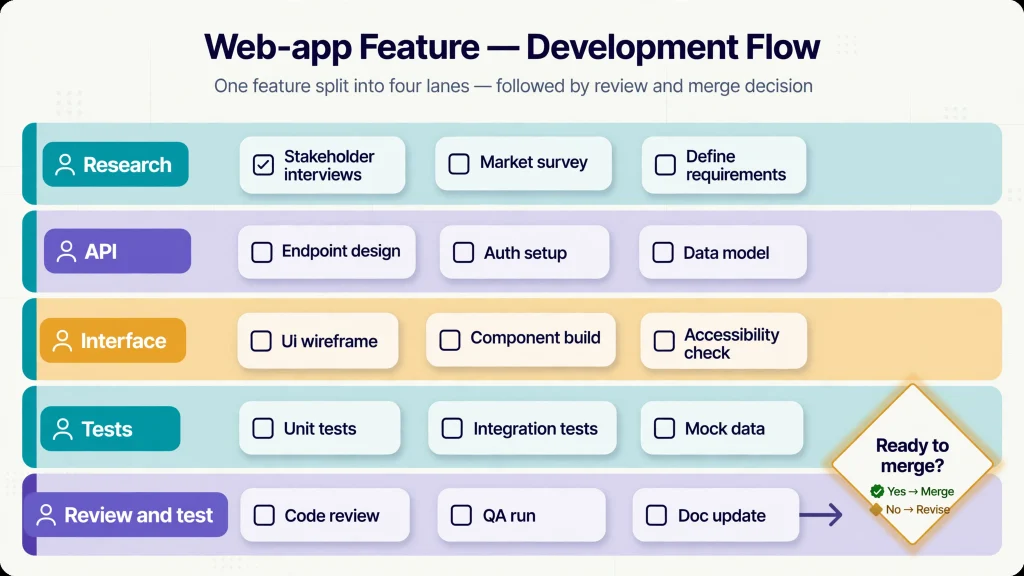
Notice what the workflow does: it uses claude code agent teams for the genuinely separable parts and returns to a single session for integration, which is the most context-heavy step.
Security and Code Review
Running claude code agent teams means more agents and more actions to supervise, so lean on the permission system instead of trusting autopilot. Teammates start with the lead’s permission mode. If the lead runs with --dangerously-skip-permissions, every teammate does too, which is a good reason not to use that flag on shared or sensitive repositories.
Anthropic’s documentation states that a message from one agent to another is not your approval. A teammate cannot approve a permission prompt for you, and a denied action cannot be relayed through another teammate to bypass the check.
My checklist for any team session: read every file change before committing; review destructive commands rather than approving by reflex; keep secrets and API keys out of spawn prompts and out of files teammates can read; verify any new dependency a teammate adds; run the test suite; and treat instructions found inside repository files or web pages as untrusted data. Use the minimum repository access needed. None of this makes the process safe on its own, and the documentation does not claim that it does.
Conclusion
Claude code agent teams are a real, documented, but experimental way to run several Claude Code sessions as a coordinated group. They shine for research, review, competing-hypothesis debugging, and work divided across separate files, and they are a poor fit for small, sequential, or tightly coupled changes. The cost trade-off is real: more teammates mean more context windows and more tokens.
Start small. Enable the variable, try a three-teammate code review, watch what each teammate does, and measure usage with /usage. Because Anthropic can change or rename any of this, re-read the official page before building habits around it. Our guide to finding official Claude documentation shows where to look.
Frequently Asked Questions About Claude Code Agent Teams
What are Claude Code agent teams?
They are multiple Claude Code sessions coordinated by one lead session, with a shared task list and direct messaging between teammates. Anthropic classifies the feature as experimental.
How do Claude Code agent teams work?
You describe the task and roles. The lead spawns teammates, tasks are created and claimed, teammates message one another, and the lead synthesizes findings when they finish.
How do I enable Claude Code agent teams?
Set CLAUDE_CODE_EXPERIMENTAL_AGENT_TEAMS to 1 in your settings.json env block or your shell, then start an interactive Claude Code session and explicitly request a team.
Are Claude Code agent teams available to everyone?
They are disabled by default and require you to opt in. Claude Code itself needs a Pro, Max, Team, Enterprise, or Console account. The agent teams page lists no further plan requirement, but check your organization’s managed settings, which can override yours.
What is the difference between agent teams and subagents?
Subagents report results back to the main agent and are managed by it. Teammates in a team share a task list, claim work, and message each other directly. Teams cost more tokens.
Do Claude Code agent teams use more tokens?
Yes. Anthropic says they use significantly more tokens than a single session because each teammate has its own context window.
Are Claude Code agent teams free?
No special pricing exists on the pages I reviewed. Usage counts against your subscription limits or is billed per token on API and cloud setups, and a team multiplies that usage.
What are the limitations of Claude Code agent teams?
Documented limits include no resumption of in-process teammates, lagging task status, one team per session, no nested teams, a fixed lead, and tmux or iTerm2 for split panes.
Can Claude Code agent teams work on the same project?
Yes, but not on the same files at once. Teammates share a working directory without worktree isolation, so assign each teammate a different set of files.
When should I use agent teams instead of a single Claude Code agent?
Use a team when the work splits into independent pieces, or when comparing competing explanations adds value. For sequential, same-file, or small tasks, use a single session or subagents.
Sources and References
Official Anthropic documentation (consulted November 8, 2026):
- Anthropic, “Orchestrate teams of Claude Code sessions”: https://code.claude.com/docs/en/agent-teams
- Anthropic, “Run agents in parallel”: https://code.claude.com/docs/en/agents
- Anthropic, “Create custom subagents”: https://code.claude.com/docs/en/sub-agents
- Anthropic, “Manage costs effectively”: https://code.claude.com/docs/en/costs
- Anthropic, Claude Code installation and system requirements: https://code.claude.com/docs/en/install
- Anthropic, Claude Code setup documentation: https://code.claude.com/docs/en/setup
Third-party sources consulted for terminology comparison only (not used for factual claims about current behavior):
- MindStudio, “Claude Code Agent Teams vs Sub-Agents: Which Pattern Should You Use?”: https://www.mindstudio.ai/blog/claude-code-agent-teams-vs-sub-agents?src=aicpb
- MindStudio, “Claude Code Dynamic Workflows vs Agent Teams vs Sub-Agents: Which Should You Use?”: https://www.mindstudio.ai/blog/claude-code-dynamic-workflows-vs-agent-teams-vs-sub-agents
 Daniel Carter