
Last checked against OpenAI’s public documentation on October 31, 2026. Settings, plans and policies change often, so confirm anything important inside your own account.
Is ChatGPT Safe? For everyday jobs such as polishing an email, explaining a tricky concept or outlining a study plan, it is reasonably safe, as long as you control what you type, protect your login and double-check what it tells you. It is not safe to treat as a private vault, a licensed professional or a source that cannot be wrong. That conditional answer beats a flat yes or no, because Is ChatGPT Safe is really several questions about privacy, hacking, scams, accuracy, children and workplace data, and each one has its own answer.
Table of Contents
Is ChatGPT Safe? The Short Answer
Think of the verdict as a balance sheet. On the positive side, ChatGPT is a mainstream product from a company that publishes privacy documentation, offers account protections such as multi-factor authentication, and says it encrypts business data at rest and in transit. On the cautionary side, conversations on individual plans may be used to improve models unless you opt out, saved chats stay in your account until you delete them, and the model can state falsehoods fluently. Fraudsters also borrow its name.
So Is ChatGPT Safe for you personally? It depends on three habits more than on the technology: what you share, how you secure your account, and whether you verify the output. The table shows how those habits play out.
| Situation | Reasonable to do? | Main caveat |
|---|---|---|
| Asking for a recipe, a grammar fix or a workout outline | Generally yes | Still check anything that affects health |
| Pasting a client contract or customer list | Not without approval | Confidentiality and company policy |
| Using it to choose a medical treatment | Only as background reading | A clinician must confirm |
| Letting a young child chat unsupervised | Not advisable | Age rules, content and privacy |
| Typing a password or card number | No | It is never needed for the task |
Is ChatGPT Safe? Seven Questions Hiding Inside One
“Safe” is a bundle of separate ideas, and mixing them together produces bad advice. A service can lock down its servers and still hand you a wrong answer, or collect data you would rather keep to yourself. Pulling the layers apart makes the rest of this guide easier to follow.
| Dimension | What it asks | Typical risk |
|---|---|---|
| Data privacy | What is collected, stored and used? | Chats retained or used for training |
| Data security | Can an outsider break in? | Stolen passwords, vendor incidents |
| AI accuracy | Is the answer true? | Confident mistakes and invented sources |
| Online safety | Who might exploit the brand? | Fake apps, phishing, malicious extensions |
| Personal safety | Could a decision hurt me? | Leaning on it for health, money or legal choices |
| Children’s safety | Is it suitable for a young user? | Unsuitable content, oversharing, dependence |
| Business safety | Could work data leak? | Confidential files in personal accounts |
A privacy setting does nothing for accuracy, and a strong password does nothing for an invented citation. Whenever someone asks Is ChatGPT Safe, the most useful reply is “safe in which sense?” The sections below take each dimension in turn.
Is ChatGPT Safe for Your Privacy and Personal Data?
Privacy is where your plan type matters most, so read this section with your own account in mind.
What Information Does ChatGPT Handle?
OpenAI’s privacy policy describes three broad buckets. Account information includes your name, contact details, credentials and payment card details. User content covers what you type, the files you upload and any feedback you send. Technical information covers log data such as IP address and browser type, usage data, device details and cookies. The listed purposes include running and improving the services, conducting research, preventing fraud and abuse, and meeting legal obligations, and the policy says information may be shared with vendors, affiliates, parties to a business transfer, or authorities when the law requires.
The policy also states that it does not cover content processed on behalf of business customers, such as API customers, whose data follows their customer agreements. So the honest answer to Is ChatGPT Safe for privacy begins with another question: which product are you using?
Do Individual-Plan Chats Train the Model?
For individual services, OpenAI’s help center says content from Free, Plus and Pro may be used to train its models, and it provides a switch. In ChatGPT, open Settings, then Data controls, and turn off “Improve the model for everyone.” You can also use the “Do not train on my content” option in OpenAI’s privacy portal. After you opt out, new conversations are not used for training.
Three details are easy to miss:
- Feedback is an exception. If you press thumbs up or thumbs down, the whole conversation attached to that feedback may be used, even after an opt-out.
- Support chats count. Conversations with OpenAI Support may be used to improve services when the training setting is on.
- Codex has its own switch. The coding agent keeps a separate environment setting that the ChatGPT toggle does not change.
OpenAI adds that it takes steps to reduce personal information in training datasets. That is a mitigation, not a promise that nothing personal survives, so Is ChatGPT Safe for deeply private details? Not on the strength of a toggle alone.
What Temporary Chat Does and Does Not Do
Temporary Chat opens a conversation with a blank slate. According to OpenAI, temporary chats do not appear in your history, do not create or update memories, and are not used to improve models while they remain temporary. If you save one, it becomes a regular chat and follows your normal settings.
The limits matter just as much. OpenAI’s FAQ says it may still keep a copy for up to 30 days for safety purposes, reviewing it only when needed to monitor abuse. Temporary Chat shrinks your footprint, but it is not an invisibility cloak, and Is ChatGPT Safe for secrets inside a Temporary Chat? Still no.
Deleting Chats: What “Within 30 Days” Means
When you delete a chat, it disappears from your view immediately and is scheduled for permanent deletion from OpenAI’s systems within 30 days, unless it was already de-identified or OpenAI must keep it for security or legal reasons. Archiving deletes nothing. A deleted chat cannot be restored, and files saved separately in your Library stay there until you remove them.
The legal clause is real. In 2025, a court order in a copyright case brought by The New York Times required OpenAI to preserve output logs that would normally have been deleted, including chats users had asked to remove. Reporting indicates the broad obligation ended in late September 2025, although logs already preserved and data linked to accounts flagged by the plaintiffs remained subject to exceptions. The lesson is not alarm. It is that deletion on any online service operates inside legal limits.
Connected Apps and Third Parties
Connecting an app lets ChatGPT draw on that service’s data inside your conversations. Deleting a conversation removes connected-app data retained within it, but it does not delete the original in the other service. Disconnecting an app blocks future access without erasing past conversations that already used the data. Third-party sites and tools follow their own policies, not OpenAI’s, so ask whether the convenience justifies the wider access before you connect anything.
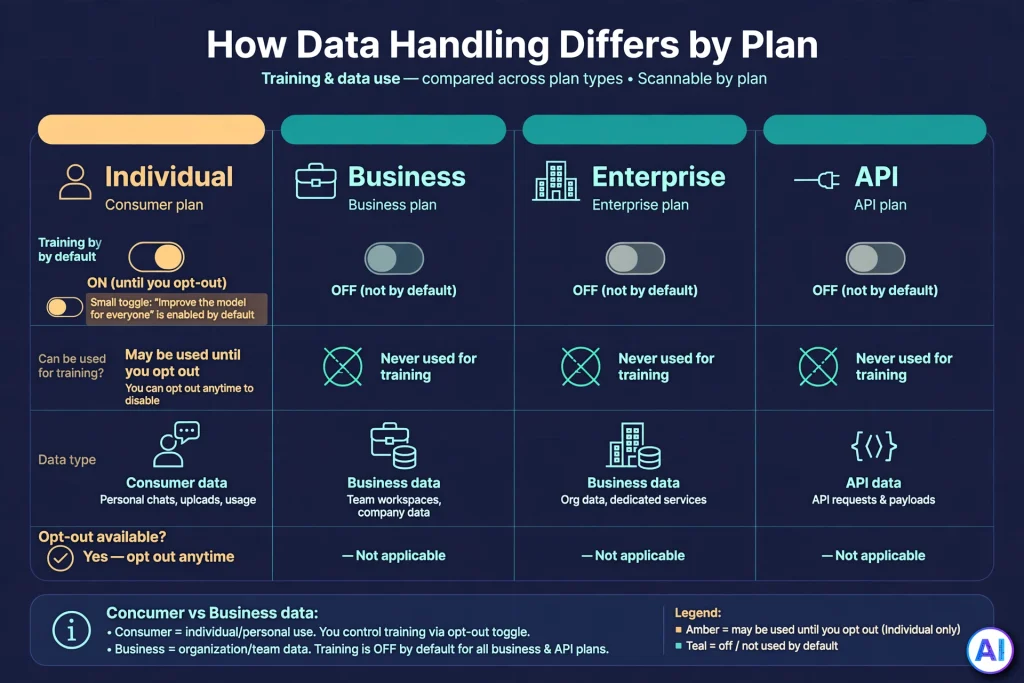
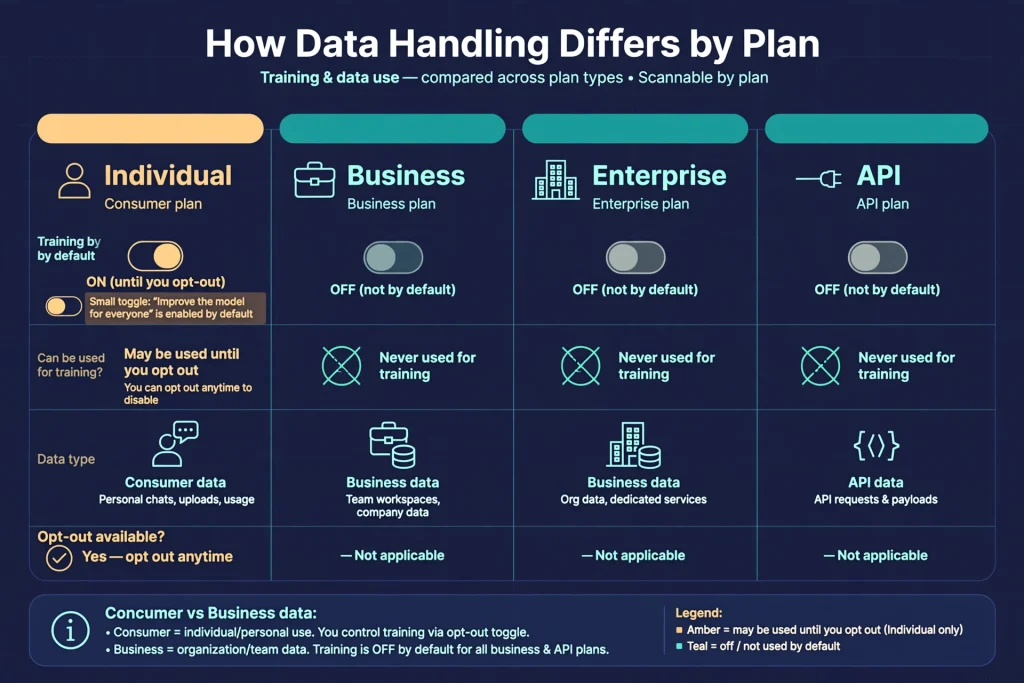
Individual, Business, Enterprise and API Compared
| Product | Used for training by default? | Control highlights |
|---|---|---|
| Free, Plus, Pro | May be, until you opt out | Data controls, Temporary Chat, deletion |
| ChatGPT Business | No, per OpenAI | Workspace admin tools, single sign-on |
| ChatGPT Enterprise | No, per OpenAI | Admin-set retention, added governance |
| OpenAI API | No, unless the organization opts in to data sharing | Governed by customer agreements |
OpenAI’s enterprise privacy page says business data is not used for training by default, that customers own their inputs and outputs where the law allows, and that data is encrypted with AES-256 at rest and TLS 1.2 or higher in transit. It also reports a completed SOC 2 audit. Our guides to ChatGPT Business and ChatGPT Enterprise show how those commitments translate into plans and prices. They describe how OpenAI handles data, not a clean bill of health for every use, a point we revisit in the workplace section.
Is ChatGPT Safe for Sensitive Information?
Keep your most sensitive material out. Even with training switched off and Temporary Chat on, a prompt still travels to a third-party service, may sit in logs for a period, and could be touched by a future incident or legal demand. Every setting is risk reduction, and no toggle turns Is ChatGPT Safe for highly sensitive uploads into a yes.
Avoid submitting:
- Passwords, one-time codes and recovery keys.
- Bank account and credit card details.
- Government identification numbers.
- Private medical records and lab results.
- Confidential business documents and trade secrets.
- Home addresses, phone numbers and other contact details.
- Private information about other people, who never agreed to be included.
Safer Ways to Get the Same Help
You rarely need the raw data to get useful help. Try these substitutes:
- Swap names for placeholders, such as “Client A” instead of a real company.
- Redact account numbers, keeping at most the last few digits.
- Paste only the relevant excerpt instead of the whole file.
- Describe the situation in words rather than uploading the record.
- For confidential work, use tools and rules your organization has approved.
Suppose you want help understanding a lease. Rather than uploading the signed document, quote the clause you find confusing, remove names and addresses, and ask what questions to bring to a tenant advocate. You get most of the value with a fraction of the exposure.
Is ChatGPT Safe From Hackers and Scams?
The Service Versus the User
Two different risks get blended together. One is a compromise of the service. The other is a compromise of you. No online service is immune, and OpenAI’s own privacy policy admits that no internet transmission is ever fully secure.
A concrete example: in November 2025, OpenAI disclosed that Mixpanel, an analytics vendor used on the front end of its API platform, suffered a security incident. OpenAI said chat content, passwords, API keys and payment details were not exposed, that the affected data was limited analytics information mostly tied to API users, and that it stopped using the vendor. The takeaway is that vendor chains belong to the attack surface, and that leaked names and email addresses can fuel convincing phishing.
The second risk is far more common, because criminals find it easier to fool a person than to breach a company.
Scams and Misuse to Recognize
- Lookalike websites with slightly altered addresses that capture your login.
- Fake apps that imitate ChatGPT, collect data or push paid “upgrades.”
- Phishing emails and texts claiming a billing problem or a suspended account.
- Fraudulent subscriptions from resellers selling “cheap premium access.”
- Suspicious browser extensions that can read what you type or see on a page.
- Malicious downloads, such as a “free desktop installer” from an unknown site.
- Fake AI tools that ask you to sign in with your ChatGPT or email password.
- Social engineering, where a scammer uses leaked details to sound legitimate.
OpenAI has said it never asks for passwords, API keys or verification codes by email, text or chat. If a message demands one, treat it as hostile.
Protect Your Account: Eight Steps
- Use a long, random, unique password. The US Cybersecurity and Infrastructure Security Agency advises long, random and unique passwords, ideally stored in a password manager. Reuse is how one breach becomes many.
- Turn on multi-factor authentication. In ChatGPT, go to Settings, then Security. OpenAI lists options such as an authenticator app, push approval, text or WhatsApp code, and passkeys, though availability varies by device, country and account type.
- Secure your recovery email. If someone controls your inbox, password resets hand them your account.
- Verify the address before signing in. Type the site yourself or use a bookmark rather than a link in a message.
- Never share one-time codes. Anyone who asks for one is trying to get in.
- Avoid sketchy extensions and downloads. Install apps only from official stores and the official site.
- Review settings and connected apps now and then. Remove integrations you no longer use.
- Sign out of untrusted devices. Settings, then Security, offers “Log out of all devices,” which OpenAI says can take up to 30 minutes. Turning on MFA does not by itself sign out other sessions.
Is ChatGPT Safe from every attacker? No service can honestly promise that, but these steps close the doors criminals use most often.
Can ChatGPT Give Wrong or Dangerous Answers?
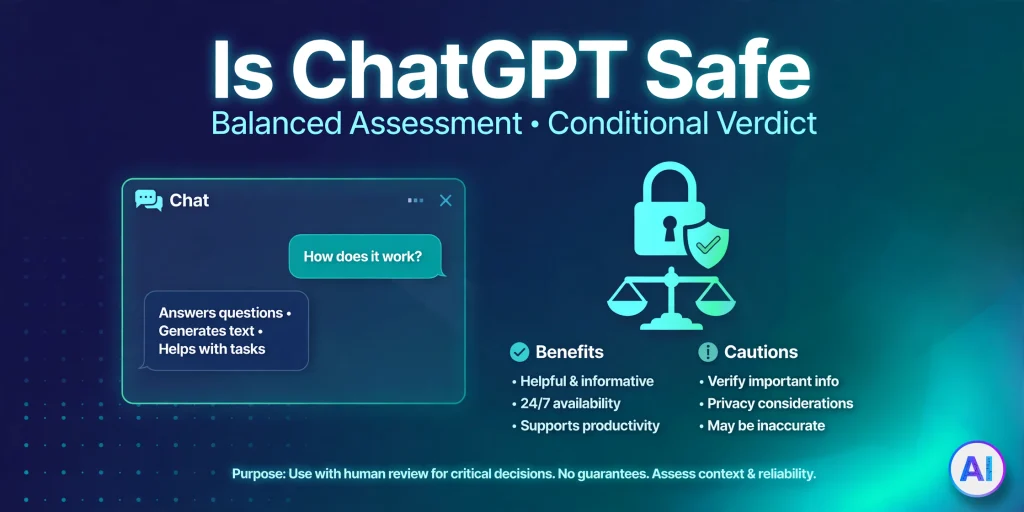
Is ChatGPT Safe as an information source? Only when you treat its output as a draft to be checked. A fluent paragraph is not a verified one.
Why Errors Happen
OpenAI describes hallucinations as plausible but false statements and says they remain a challenge for all large language models, even as newer ones reduce them. Its research argues that common training and testing setups reward guessing over admitting uncertainty, which helps explain confident wrong answers. For the mechanics behind this, see our plain-English explainer on how ChatGPT works.
In practice, ChatGPT can:
- Produce inaccurate information.
- Invent sources, quotes or references.
- Misinterpret a vague question.
- Offer outdated information.
- Get calculations wrong.
- Write code that looks right but fails.
- Give misleading explanations.
- Sound certain even when it is mistaken.
Higher-Risk Areas
Mistakes cost more in some domains than others:
- Medical: symptoms, dosages and drug interactions need a pharmacist or clinician.
- Legal: rules vary by place and change, and small details decide outcomes.
- Financial: tax, investing and debt decisions deserve a qualified adviser and official figures.
- Cybersecurity: instructions that alter settings or run commands can open new holes.
- Emergencies: call local emergency services, not a chatbot.
- Academic and professional decisions: fabricated references can sink a paper or a report.
Is ChatGPT Safe to replace a doctor, lawyer or adviser? No. It can help you prepare better questions for one.
Five Ways to Verify an Answer
- Check important claims against authoritative sources such as official agencies, primary documents or professional bodies.
- Verify dates, names and figures yourself, since they are common failure points.
- Open every cited reference and confirm it exists and says what is claimed.
- Do not rely on citations you cannot trace; treat them as unverified.
- Seek qualified professional advice when the stakes are serious.
Is ChatGPT Safe for Students and Children?
What Age Rules Say
OpenAI’s help center states that ChatGPT is not meant for children under 13, and that children aged 13 to 18 must have parental consent. It also advises caution about exposing kids, even those who meet the age requirement, and says that in education settings with children under 13, an adult must carry out the actual interaction. It warns that outputs may not suit every audience or age.
Being old enough to sign up is not the same as being ready. Is ChatGPT Safe for a 14-year-old who verifies facts, protects personal details and asks for help rather than answers? Probably far more than for one who copies every reply.
Teen Protections and Parental Controls
OpenAI describes ChatGPT for Teens as age-appropriate protections that switch on automatically for eligible accounts identified as belonging to someone under 18, using account information, age verification or age prediction. An adult wrongly placed there can verify their age through a third-party service. Parental controls are optional: a parent and teen link accounts by invitation, and the other person must accept. According to OpenAI, parental controls do not let a parent read or monitor a teen’s conversations, and in limited safety situations OpenAI shares only the information needed to support the teen’s safety. Linking can end when an account is identified as 18 or older.
There are practical gaps. ChatGPT can be used without signing in, so a parental link only covers a signed-in, linked account. Controls reduce risk; they cannot guarantee protection, and Is ChatGPT Safe for children without conversation and supervision? Not reliably.
Risks Parents and Students Should Weigh
Is ChatGPT Safe for homework help? It can be, if these risks are managed:
- Inaccurate or unsuitable content. Answers may be wrong or inappropriate for an age group.
- Overdependence. Handing every problem to a chatbot weakens the practice that builds skills.
- Academic integrity. Schools set their own rules, and submitting AI work as your own may break them.
- Oversharing. Children may reveal names, schools, locations or family details.
Simple Guidance for Families
- Keep personal information out of prompts.
- Verify educational answers against textbooks or teachers.
- Encourage the child to attempt a problem before asking.
- Talk openly about what AI can and cannot do.
- Follow school and family rules, and supervise younger users.
Is ChatGPT Safe for Work and Business?
Workplace use raises stakes because the data often belongs to someone else. Confidential business information, employee records, customer details, proprietary documents and internal communications all deserve more care than a personal question. Intellectual property adds another layer, since the ownership of outputs and the handling of inputs depend on your plan and contract.
A personal subscription and an organizational plan are different products. On an individual plan, you manage settings yourself and your content may be used for training unless you opt out. Business and Enterprise add workspace administration, access management and the no-training-by-default commitment described above. Our ChatGPT subscriptions comparison lays out how the tiers differ.
Even so, Is ChatGPT Safe for work under any plan without rules? No. Consider these safeguards:
- Read your employer’s AI policy before pasting anything.
- Use organization-approved accounts, not personal ones, for company data.
- Limit access so only people who need the tool have it.
- Keep humans in the loop by reviewing AI-generated work before it reaches a client or regulator.
- Check contracts and compliance duties. Business or Enterprise status does not make every use automatically compliant with every law or industry rule.
Regulated sectors, such as healthcare or finance, should involve legal and compliance teams and read OpenAI’s current terms before deployment. Is ChatGPT Safe for confidential company work? It can be, under the right plan, settings and policy, but not by default.
Benefits of Using ChatGPT Safely
Caution should not become avoidance. Is ChatGPT Safe enough to be worth using? For the right tasks, yes. Used sensibly, ChatGPT can support:
- Learning and education: explanations at your level and practice questions.
- Writing and editing: tightening drafts and adjusting tone.
- Brainstorming: names, outlines and angles you had not considered.
- Productivity: summarizing notes and organizing tasks.
- Coding support: explaining errors and drafting snippets for review.
- Research assistance: mapping a topic before you consult primary sources.
- Language learning: conversation practice and grammar clarification.
- Everyday explanations: plain-language versions of forms and instructions.
- Creative work: story ideas, titles and early drafts.
Is ChatGPT Safe for creative work and brainstorming? Usually, because little sensitive data is at stake. The benefit is real, but results vary, and nothing guarantees a productivity gain. The safer approach is to match the task to the risk: use ChatGPT freely for low-stakes, non-sensitive work, and add checks as stakes rise. That is how you keep the value and trim the exposure.
Practical Checklist: How to Use ChatGPT Safely
Is ChatGPT Safe when you follow a routine? Far safer. Here is a twelve-point checklist.
- Use the official ChatGPT website or app. Lookalikes exist to steal logins and money.
- Protect your account with a strong, unique password. It blocks the simplest break-ins.
- Enable multi-factor authentication where available. A stolen password alone then fails.
- Never share passwords or financial credentials. No task requires them.
- Review Data controls and privacy settings. Confirm whether “Improve the model for everyone” matches your wishes.
- Use Temporary Chat when appropriate, and know its limits. It avoids history and memory, but a safety copy may remain for up to 30 days.
- Verify important answers. Fluent text can still be false.
- Avoid suspicious links. A message with urgency is a classic phishing sign.
- Check integrations before connecting them. Each connected app widens what ChatGPT can see.
- Do not rely on AI for emergencies or high-stakes decisions. Use professionals and official channels.
- Follow workplace privacy policies. Company data carries obligations you did not choose.
- Supervise children’s use appropriately. Age rules and parental controls help, but guidance matters more.
Conclusion
Is ChatGPT Safe? Neither completely safe nor completely unsafe. It offers genuine safeguards, including documented privacy controls, account protections and business-grade terms, alongside real limits: individual-plan chats may train models by default, deletion has legal exceptions, scammers imitate the brand, and answers can be wrong. That is why Is ChatGPT Safe has no one-size answer. The decisive factors are the ones you control. Share less, secure your account, verify what matters and match the plan to the sensitivity of the work.
If you remember one rule, make it this: the more serious the consequence, the less you should depend on a single unverified AI answer. Ask Is ChatGPT Safe before every sensitive task, answer honestly, and the tool becomes a dependable helper rather than a hidden liability. Because policies and features evolve, recheck OpenAI’s documentation periodically.
Is ChatGPT Safe? Frequently Asked Questions
Is ChatGPT Safe to Use?
Generally yes for everyday, low-sensitivity tasks when you secure your account and verify important answers. It is not a safe place for passwords, financial credentials or highly confidential material.
Is ChatGPT Safe for Personal Information?
Only with care. Personal details you submit are collected under OpenAI’s privacy policy, and on individual plans may be used for training unless you opt out. Sharing less is the strongest protection.
Does ChatGPT store private conversations?
Regular chats are saved in your account until you delete them. Temporary Chats skip your history, though OpenAI may keep a copy for up to 30 days for safety. Deleted chats are scheduled for permanent removal within 30 days, subject to legal and de-identification exceptions.
Does OpenAI use ChatGPT conversations to train its models?
On individual plans such as Free, Plus and Pro, content may be used unless you turn off “Improve the model for everyone.” For Business, Enterprise and the API, OpenAI says it does not train on inputs or outputs by default. Feedback on a response can be an exception for individual plans.
Is ChatGPT Safe for Students?
It can be a useful study aid if students verify answers, avoid sharing personal details and follow school rules on AI. Overreliance and fabricated references are the main academic risks.
Is ChatGPT Safe for Children?
OpenAI says ChatGPT is not meant for children under 13 and that ages 13 to 18 need parental consent. Parental controls and teen protections exist, but they are not a guarantee, so supervision still matters.
Can hackers access a ChatGPT account?
Is ChatGPT Safe from hackers? No service can promise that. Any online account can be targeted, but strong unique passwords, multi-factor authentication, careful link checking and a secure recovery email greatly reduce the odds. Nothing eliminates risk.
Is ChatGPT Safe for Business Use?
It can be, particularly on Business or Enterprise plans that do not train on workspace data by default. Companies should still review contracts, compliance duties and internal policies before sharing confidential information.
Can ChatGPT give dangerous or incorrect answers?
Is ChatGPT Safe from errors? No. It can hallucinate, cite sources that do not exist and sound confident while wrong. Verify health, legal, financial and safety information with qualified professionals.
How can I use ChatGPT more safely?
Is ChatGPT Safe when you follow good habits? Much safer. Use the official site, enable MFA, limit sensitive input, review Data controls, verify key answers and follow workplace or school rules. The checklist above turns these into twelve concrete steps.
Sources and References
OpenAI documentation
- OpenAI Privacy Policy: https://openai.com/policies/privacy-policy/
- Enterprise privacy at OpenAI: https://openai.com/enterprise-privacy/
- Data Controls FAQ: https://help.openai.com/en/articles/7730893-data-controls-faq
- Temporary Chat FAQ: https://help.openai.com/en/articles/8914046-temporary-chat-faq
- How your data is used to improve model performance: https://help.openai.com/en/articles/5722486-how-your-data-is-used-to-improve-model-performance
- Deleting and archiving chats in ChatGPT: https://help.openai.com/en/articles/8809935-deleting-and-archiving-chats-in-chatgpt
- Managing multi-factor authentication (MFA): https://help.openai.com/en/articles/7967234-enabling-or-removing-multi-factor-authentication-mfa
- Is ChatGPT safe for all ages?: https://help.openai.com/en/articles/8313401-is-chatgpt-safe-for-all-ages
- ChatGPT for Teens: https://help.openai.com/en/articles/20001421
- What changes when a ChatGPT user turns 18: https://help.openai.com/articles/20001262
- Why language models hallucinate: https://openai.com/index/why-language-models-hallucinate/
- What to know about a recent Mixpanel security incident: https://openai.com/index/mixpanel-incident/
Independent sources
- CISA, Secure Yourself & Your Family: https://www.cisa.gov/secure-yourself-your-family
- Engadget, OpenAI no longer has to preserve all of its ChatGPT data, with some exceptions: https://engadget.com/ai/openai-no-longer-has-to-preserve-all-of-its-chatgpt-data-with-some-exceptions-192422093.html
- Simon Willison, OpenAI slams court order to save all ChatGPT logs: https://simonwillison.net/2025/Jun/5/openai-court-order