
Last checked against OpenAI’s published prompting guidance on October 30, 2026. ChatGPT changes often, so features mentioned here may differ on your account.
ChatGPT prompts are the messages you give ChatGPT to tell it what you need. A strong one names the task, supplies background the model cannot guess, and describes the shape of the answer you want. OpenAI’s own prompting lesson boils the craft down to those same three moves, and everything below builds on them.
You will get a simple way to structure any request, ten copy-ready templates for writing, study, planning, work, research, coding and everyday decisions, and a method for rescuing a weak answer. The templates are our own editorial examples, not official OpenAI wording. We did not run them for this guide, and results vary from one attempt to the next.
Table of Contents
What Are ChatGPT Prompts, and Why Does Wording Matter?
A prompt is the input that starts a response. OpenAI’s Help Center describes it as a text input to a language model, though it can also be an image or audio. In ChatGPT you might type a question, paste a draft, attach a file, or combine all three.
Wording matters because the model works from the text and context in front of it. Compare “Help with my presentation” to “Suggest a five-slide outline for a ten-minute talk to new hires about our expense policy.” The second gives the model a job, an audience and a size. If you want the mechanics behind this, our explainer on how ChatGPT works covers tokens and context in plain English.
OpenAI also stresses that there is no single perfect way to write a request. Think of it as briefing a capable colleague: if the first result misses, you adjust the brief. That is why the best ChatGPT Prompts read like clear instructions rather than magic phrases.
How to Write Effective ChatGPT Prompts: The Four-Line Brief
OpenAI’s Academy lesson lists three steps. We add a fourth, which is our recommendation rather than official guidance.
- Task. Say what you want done, who it is for, and why it matters. Start with an action verb such as plan, draft, compare or research.
- Context. Add the background a stranger would need: your situation, the text to work on, attached files, or what you already tried.
- Output shape. Name the tone, format, length, audience and any constraints. A table, a three-paragraph email and a bulleted checklist are different requests.
- Checks (our addition). Ask ChatGPT to flag assumptions, missing information or claims you should verify.
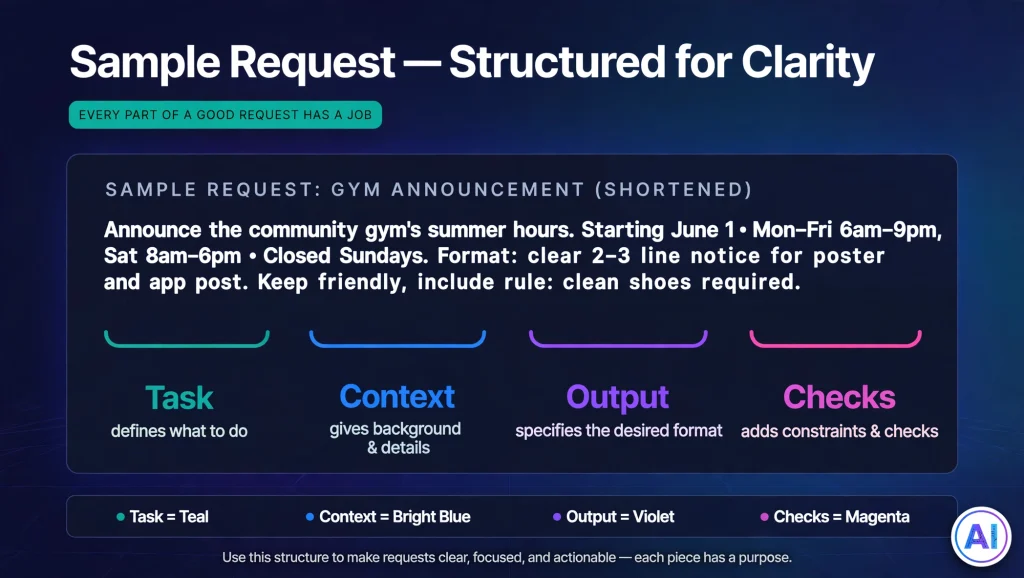
Here is the brief in action, using an example we wrote ourselves.
Weak: “Write something about our new gym.”
Stronger: “Draft a 120-word announcement for our neighborhood newsletter about a new gym opening on Main Street in March. The audience is busy parents. Keep the tone friendly, mention the free first week, and end with a sign-up link placeholder. List any details you assumed so I can correct them.”
Nothing in the stronger version is exotic. Most effective ChatGPT Prompts simply answer the questions the model would otherwise guess at.
Techniques OpenAI Documents
OpenAI’s Help Center describes several techniques worth knowing:
- Persona. Ask for a role or viewpoint, such as “act as an experienced editor,” to tailor the response to an audience.
- Delimiters. Mark off text to be worked on with triple quotes so the instruction and the material stay separate.
- Step-by-step instructions. For multi-part work, number the steps you want followed.
- Examples. Show one or a few samples of the pattern you want, and the model can infer the style.
OpenAI’s tips also include splitting big tasks into smaller steps, asking for options, and telling ChatGPT what matters most, such as accuracy or speed. Its lesson warns that piling on extra detail can sometimes make an answer less helpful, so include what matters and trim the rest.
10 ChatGPT Prompts to Copy for Common Tasks
Replace every bracket with your own details. Where a template says to paste text, keep it between triple quotes so ChatGPT can tell your material from your instructions. Treat each of these ChatGPT Prompts as a starting point and edit it freely.
ChatGPT Prompts for Writing and Editing
1. Edit a draft without losing your voice
Edit the text between triple quotes for clarity and concision. Keep my voice and every factual claim unchanged. Return the edited version, then list the three biggest changes you made and why.

"""
[paste draft]
“””
What it does: limits the job to editing, so the model is less likely to rewrite your argument. Customize it: name words or phrases that must stay.
2. Brainstorm fresh angles
I write for [audience] about [topic]. Suggest eight article angles that go beyond the obvious ones. Give each a working headline and one sentence on who it helps. Mark the two you think are most original and explain why.What it does: asks for volume plus a ranking, which gives you something to push against. Customize it: add angles you have already used.
ChatGPT Prompts for Studying and Learning
3. Learn a concept, then get checked
Explain [concept] to someone with [background or grade level] using one everyday analogy, in under 150 words. Then ask me three questions, one at a time, to check my understanding, and wait for my answer before the next question.What it does: turns passive reading into a short quiz. Customize it: ask for harder questions once the basics land.
4. Build a study plan
I have [number] weeks to prepare for [exam or skill]. I can study [hours] per week and find [topic] hardest. Build a week-by-week plan in a table with a goal, tasks and a short self-test for each week.What it does: gives the plan real constraints. Customize it: include your exam date and past scores.
ChatGPT Prompts for Productivity and Planning
5. Turn messy notes into actions
Turn the notes between triple quotes into a task list. Group tasks by owner, mark any task missing a deadline, and list questions I still need answered. Do not invent owners or dates.

"""
[paste notes]
“””
What it does: the last instruction discourages made-up details. Customize it: ask for a format your task app can import.
6. Plan a week around priorities
Help me plan next week. Fixed commitments: [list]. Priorities in order: [list]. I focus best in the [morning/afternoon]. Propose a day-by-day schedule with buffer time and tell me which priority is most at risk.What it does: asking what is at risk surfaces trade-offs early. Customize it: add commute or energy limits.
ChatGPT Prompts for Work, Research and Technical Tasks
7. Reply to a tense customer message
Draft a reply to the customer message below. Tone: calm, warm and direct. Acknowledge the problem, state what we can offer ([options]), and end with one clear next step. Keep it under 150 words and give me two subject lines.

"""
[customer message]
“””
What it does: gives tone, structure and length in one pass. Customize it: paste your brand’s voice notes. Review before sending, because ChatGPT may promise things your company cannot deliver.
8. Summarize a document and flag what to check
Summarize the document below for a busy [role]. Give a three-sentence overview, five key points, and any figures or claims I should verify before sharing. Use only the text provided, and say so when something is unclear.

"""
[paste text]
“””
What it does: restricts the model to your source and builds in the fourth line of the brief. Customize it: change the audience or the number of points.
9. Understand unfamiliar code
Explain what the code below does, step by step, for someone who knows the basics of [language]. Point out bugs or risky patterns and suggest one improvement. Do not rewrite it unless I ask.

"""
[paste code]
“””
What it does: separates understanding from rewriting. Customize it: name your framework or runtime version. Always test any suggested change yourself.
An Everyday Decision Prompt
10. Compare two options
I'm choosing between [option A] and [option B] for [purpose]. My budget is [amount] and my priorities, in order, are [list]. Compare them in a table, then tell me which questions I should answer before deciding.What it does: ranks your priorities so the comparison reflects what you care about. Customize it: add a deadline or a dealbreaker.
For picture-making requests, our ChatGPT caricature guide shows how to structure image prompts.
How to Improve a ChatGPT Response You Don’t Like
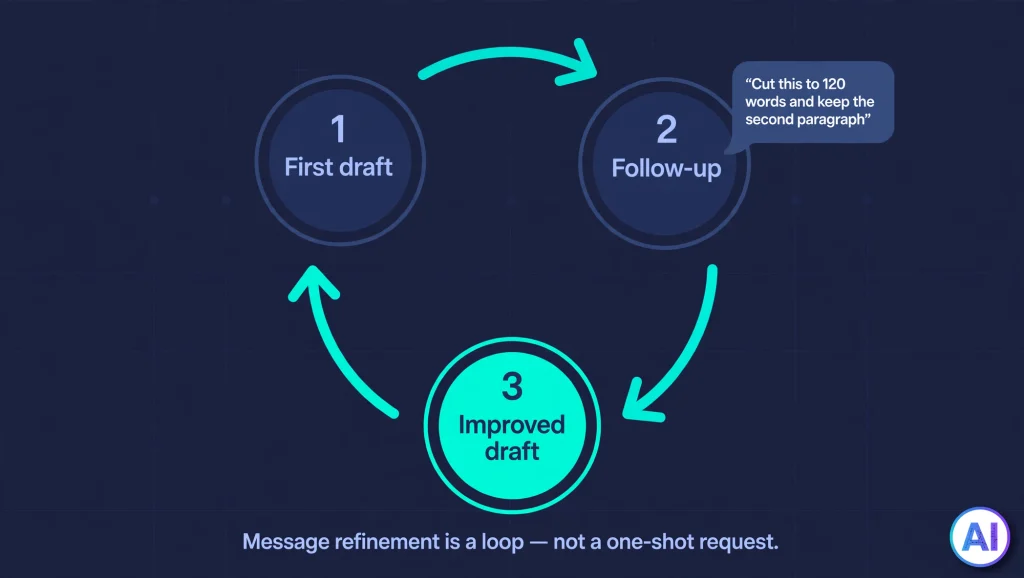
Treat the first answer as a draft. OpenAI’s guidance recommends iterating: review the response, then adjust the wording, add context, or simplify the request. Change one thing at a time so you can see what worked.
| If the answer is… | Try this follow-up |
|---|---|
| Too long or padded | “Cut this to 120 words and keep the second paragraph.” |
| Generic | “Make it specific to [situation]. Use my details: [details].” |
| The wrong tone | “Rewrite in a warmer, more direct tone.” |
| Built on guesses | “What assumptions did you make? Ask me up to five questions first.” |
| One-note | “Give me three alternatives with different structures.” |
These ChatGPT Prompts for refinement are editorial suggestions, not official rules. If a conversation drifts, start a fresh chat and paste in a corrected brief.
Common Mistakes With ChatGPT Prompts
- Being vague about the goal. “Make it better” leaves the model guessing what “better” means.
- Leaving out the source material. Asking for a summary without pasting the text invites invention.
- Stacking too many tasks. Split a big request into steps, as OpenAI suggests.
- Skipping the audience. A tone and reading level only make sense relative to a reader.
- Accepting the first draft. One round of follow-ups usually beats the opening reply.
- Sharing sensitive details. Leave out private or confidential information you would not want in a chat.
Using ChatGPT Prompts Responsibly: Check What It Tells You
Even well-built ChatGPT Prompts improve your odds without guaranteeing a correct answer. OpenAI’s Help Center says ChatGPT can produce responses that are not factually accurate, including wrong definitions, dates or facts, and fabricated quotes, studies or citations. It also notes that the model may sound confident while being wrong.
OpenAI’s practical advice is to use ChatGPT as a first draft, not a final source, and to verify quotes, data, technical information and references to outside documents. Its tools, such as search or deep research, can help when accuracy matters, but you should still open the cited links. Tool availability depends on your plan; our look at whether ChatGPT Plus is worth it explains how plans differ. And if you publish AI-assisted writing, our guide to ChatGPT detector accuracy explains why those checks are imperfect.
FAQs About ChatGPT Prompts
What are ChatGPT prompts?
They are the instructions, questions or materials you give ChatGPT to start a response. A prompt can be a single sentence or a long brief with pasted text, and it can include files or images where your plan supports them.
How do I write an effective prompt?
Outline the task, give helpful context, and describe the output you want, as OpenAI’s lesson advises. Our four-line brief adds a checks line. Then refine the result with follow-up messages.
What should a good prompt include?
A clear task, relevant background, and a description of tone, format, length and audience. Include source text when you want ChatGPT to work from it, and say what matters most to you.
Can I reuse ChatGPT prompt templates?
Yes. Save the ones that work, and replace the bracketed details each time. Edit them for your situation, because a template that suits a newsletter may need changes for a legal summary or a lesson plan.
How can I improve an unhelpful response?
Say what missed and what you want instead. Add context, narrow the scope, ask it to list its assumptions, or request alternatives. Changing one variable at a time shows what helps.
Are ChatGPT prompts guaranteed to produce accurate answers?
No. Better wording can make answers more relevant, but OpenAI says ChatGPT can make mistakes, including invented citations. Check anything important against reliable sources.
Can ChatGPT prompts help with studying and writing?
They can help with explanations, practice questions, outlines and editing. Follow your school’s or employer’s rules on AI use, and keep your own judgment in charge of facts and final wording.
Conclusion
Good ChatGPT Prompts are less about clever tricks than clear briefing. Name the task, supply the context, describe the output, and ask for checks. Then treat the first reply as a draft and refine it.
Start with one of the ChatGPT Prompts above, adapt it to a real task today, and save the version that works. Whatever you ask, verify the facts before you rely on them.
Sources and References
- Prompting fundamentals, OpenAI Academy. https://openai.com/academy/prompting/. Supports the three-step approach (task, context, output), the action-verb tip, the advice to break tasks into steps, ask for options and set priorities, the caution about excess detail, and the point that iteration matters.
- Prompt engineering best practices for ChatGPT, OpenAI Help Center. https://help.openai.com/en/articles/10032626-prompt-engineering-best-practices-for-chatgpt. Supports the definition of a prompt, and the persona, delimiter, step-by-step, examples and iterative-refinement techniques.
- Does ChatGPT tell the truth?, OpenAI Help Center. https://help.openai.com/en/articles/8313428-does-chatgpt-tell-the-truth. Supports the statements on inaccurate or fabricated output, confident-sounding errors, using ChatGPT as a first draft, verifying quotes and data, and checking sources from search and deep research.