
Pricing verified against Anthropic’s official pages on November 3, 2026. Every amount below is in US dollars before tax. Anthropic can change plans at its discretion, so confirm the live figures at claude.com/pricing before you pay for anything.
Claude Code Pricing is not one number, and that is the first thing worth getting straight. Anthropic lets you reach its coding agent through two quite different doors. The first is a flat-fee Claude subscription, where the price of heavy use is hitting a usage limit rather than receiving a bigger invoice. The second is a Claude Console account, where every token is metered at published API rates and the invoice grows with your activity. The door you choose shapes your bill more than the sticker price of any single plan, and that quiet complexity sits at the heart of Claude Code Pricing.
This guide covers every route that was live on November 3, 2026: Pro, Max, Ultra, Team, Enterprise, and pay-as-you-go API billing. It explains what each one costs, what the allowance means in practice, and clears up the most common mix-up, which is the set of monthly API credits bundled with some plans. Anthropic states that those credits cannot pay for interactive Claude Code sessions. If you are comparing Claude Code Pricing with a rival’s structure, our breakdown of ChatGPT subscriptions in 2026 shows how OpenAI tiers its own plans.
Table of Contents
What Is Claude Code?
Claude Code is Anthropic’s agentic coding tool. Instead of waiting for you to paste snippets into a chat box, it works inside your project. It searches the repository to learn how the pieces fit together, edits files, runs shell commands, executes your test suite, and keeps going when something fails. Anthropic’s product page describes jobs that range from a small bug fix to a multi-day migration, and says Claude Code can read an issue, write the change, run the tests, and open a pull request through GitHub, GitLab, and command-line tools.
You can use it in a terminal, in VS Code and JetBrains extensions, in the Claude desktop app, on the web, on mobile, through Slack, and inside GitHub workflows. It connects to MCP servers and everyday tools such as Git, and it asks permission before it changes files or runs commands. Anthropic says Claude Code now runs in auto mode by default on Pro, Max, and Team plans, which lets sessions run longer while still screening risky commands. For Team and Enterprise customers, Code Review became generally available on October 15, 2026.
Why does any of this matter for your wallet? Because each of those abilities consumes tokens. Reading a file, receiving a test log, planning an approach, and writing a patch all count toward your allowance or your bill. The more autonomous the task, the more tokens it burns, which is why Claude Code Pricing depends so heavily on how you work. If you want a map of where Anthropic keeps its official material, our guide to Claude Docs and every official Claude resource is a handy companion.
How Much Does Claude Code Cost?
The shortest accurate answer is this: from $17 a month on an annual Pro subscription, up to $200 a month for a single person on Ultra, or a metered API bill that has no built-in ceiling unless you set one. The Free plan does not include Claude Code at all.
Here is the overview in plain terms:
- Individuals: Pro costs $17 per month on annual billing ($200 charged up front) or $20 when paid monthly. Max costs $100 per month. Ultra costs $200 per month.
- Teams: Standard seats cost $20 per seat per month on annual billing ($25 monthly). Premium seats cost $100 ($125 monthly).
- Enterprise: $20 per seat per month billed annually with a 20-seat minimum, plus usage billed at API rates.
- API: no monthly fee. You pay per token at the rates shown in the API section below.
Claude Code Pricing depends on three things: the plan you choose, how much you use it, and which billing method you attach to it. Anthropic’s own cost documentation offers one reference point for token-billed usage. Across enterprise deployments, the average works out to roughly $13 per developer per active day and $150 to $250 per developer per month, with 90 percent of users staying under $30 per active day. Anthropic presents these numbers as a starting point and recommends piloting with a small group to set your own baseline. Treat them as context rather than a forecast, because Claude Code Pricing in practice for any one person shifts with model choice, repository size, and habits such as running several sessions at once.
Claude Code Pricing Plans Explained
Anthropic currently sells six paid routes into Claude Code, plus a Free plan that excludes it. The Claude Code Pricing table below condenses them. Usage allowances are expressed the way Anthropic expresses them, as multiples of Pro, because the company does not publish a fixed number of messages or tokens per plan.
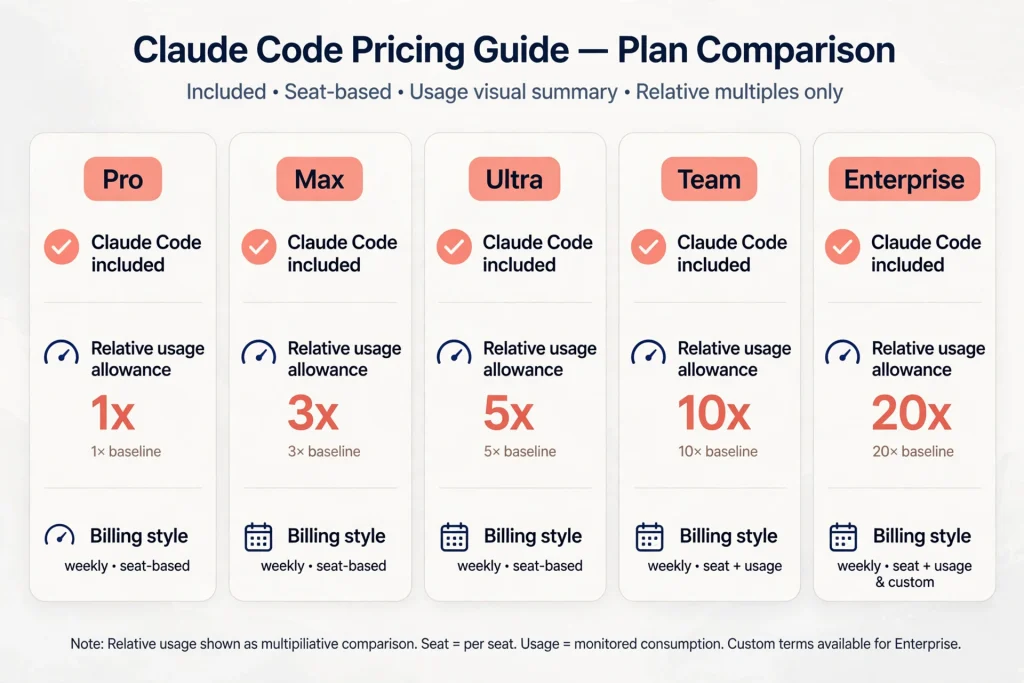
| Plan | Current Price | Claude Code Access | Billing | Usage Details |
|---|---|---|---|---|
| Free | $0 | Not included | n/a | Limited usage every 5 hours and every week; chat only |
| Pro | $17/month on annual billing ($200 up front), or $20 monthly | Included | Monthly or annual | Baseline allowance with a 5-hour and a weekly limit; Fable only via usage credits |
| Max | $100/month | Included | Monthly | 5x Pro usage every 5 hours and every week; Fable up to half of weekly limit; $100/month API credits (not valid in Claude Code) |
| Ultra | $200/month | Included | Monthly | 10x Pro usage every week; no 5-hour limit on verified accounts; $200/month API credits (not valid in Claude Code) |
| Team Standard seat | $20/seat/month annual, $25 monthly | Included | Monthly or annual | More usage than Pro; seat-based allowance |
| Team Premium seat | $100/seat/month annual, $125 monthly | Included | Monthly or annual | 5x the usage of a Standard seat |
| Enterprise | $20/seat/month billed annually (20-seat minimum) plus usage at API rates | Included on new and self-serve plans | Annual | Consumption-based with admin-set spend limits |
| Console (API) | No monthly fee | Yes, by signing in with Console credentials | Per token | Standard API rates; workspace spend limits available |
Three footnotes keep this Claude Code Pricing table honest. First, Anthropic’s prices exclude applicable tax. Second, the Ultra help article says its $200 figure is a web price and that mobile app pricing can differ by platform. Third, Max and Ultra are monthly-only, while Pro is the only individual plan with an annual option. I could not verify local-currency prices for individual countries from the official pages, so readers outside the United States should check the checkout screen for their own total.
One naming trap is worth flagging. The plan that older articles call Max 20x is now called Ultra. Existing Max 20x subscribers were moved over automatically at the same price. If a guide still describes a “20x” tier, it predates the rename, and any Claude Code Pricing figure it quotes deserves a second look.
Claude Code Pro Pricing
Claude Code Pro pricing starts at $20 per month when billed monthly and drops to an effective $17 per month if you pay $200 up front for the year. Pro is the cheapest subscription that includes Claude Code, and the same login covers the terminal, supported IDEs, and the desktop app. That makes Claude Code Pricing at the Pro level the lowest entry point in Anthropic’s lineup.
Usage limits. Pro has a five-hour session limit and a weekly limit. Both are shared between chat and coding, so a long afternoon of conversation leaves less room for a refactor. Opus models are included. Fable, Anthropic’s top model, is available on Pro only when you pay for it through usage credits.
Who should choose it. Pro suits students, hobbyists, and professionals who code with an agent for a few focused hours a day rather than all day. It is also the sensible place to learn how fast your own habits consume an allowance before paying more, which is the real test of Claude Code Pricing for you.
Important exclusions. Pro does not include the monthly API credits that come with Max, Ultra, and Team. It has no priority access at busy times. When you hit a limit, Anthropic’s guidance is to enable usage credits, switch to a Console account with purchased API credits for an intensive sprint, upgrade, or wait for the reset.
One warning applies to every individual plan. If an ANTHROPIC_API_KEY environment variable is set on your machine, Claude Code uses that key instead of your subscription, and you are billed per token rather than drawing on the plan you pay for. Check your shell before blaming the plan.
Claude Code Max Pricing
Claude Code Max pricing is $100 per month, billed monthly. As of this verification date there is exactly one Max tier, because the former 20x version became Ultra.
What the extra money buys. Within Claude Code Pricing as a whole, Max is the first tier aimed at all-day use. It gives five times the Pro allowance, both per five-hour window and per week. It includes Fable for up to half of your weekly limit, which is tracked as a separate Fable weekly limit. It adds priority access when traffic is high and early access to advanced features. When a five-hour limit lands mid-task, Anthropic’s wrap-up allowance (rolling out gradually) can let Claude Code finish the step in progress, and on Max it can apply each time you reach a session limit within your weekly cap.
The bundled $100 API credit. Max also includes $100 per month in credits for the Claude Platform. This is where readers get confused, so read the next sentence twice: those credits do not apply to interactive Claude Code in the terminal, IDE, desktop app, or web, and they cannot fund extra usage in Claude Code either. They are meant for apps and agents you build yourself. The dedicated section below explains the rules.
Is it justified? Anthropic’s own advice is that Pro users who consistently hit limits, particularly on larger repositories, should consider Max. If you rarely brush against a limit, the $100 is hard to justify for Claude Code alone, so Claude Code Pricing at the Max level only pays off when limits are your genuine bottleneck. If you run agent sessions most of the working day, the arithmetic changes, because the alternative to a higher plan is waiting for resets or paying per token.
Claude Code Ultra Pricing
Ultra is currently offered and officially priced, so it earns its own section. Claude Code Ultra pricing is $200 per month, monthly billing only. Put simply, Claude Code Pricing tops out for individuals at $200 a month.
What it includes. Ultra grants ten times the Pro allowance every week and removes the five-hour limit for verified accounts. Verification is automatic and based on factors such as account and payment history, so there is nothing to submit. Until an account is verified, a temporary limit applies. You can check your status in Settings and then Usage: if no Current session bar appears, your account is verified. Ultra also carries a general weekly limit across models plus a separate weekly limit for Fable, and it includes a $200 monthly API credit that, like the Max credit, cannot be spent in Claude Code.
Who benefits. Ultra is built for people who delegate long, uninterrupted work, such as multi-hour migrations or several parallel agents, and who find the five-hour window to be the bottleneck rather than the weekly total. Anthropic reserves the right to apply additional caps for fairness, so even Ultra is not a promise of unlimited use. Anthropic’s help pages say plainly that uninterrupted service is not guaranteed, and that caveat belongs in any honest discussion of Claude Code Pricing.
Claude Code Team Pricing
Claude Code Team pricing is seat-based, and of all the Claude Code Pricing options it is the first to add shared billing and administration. Standard seats cost $20 per seat per month on annual billing or $25 month to month. Premium seats cost $100 per seat per month on annual billing or $125 monthly. Anthropic describes the Team plan as designed for teams of 2 to 150 people, and administrators can mix seat types, which makes it practical to give heavy coders a Premium seat and everyone else a Standard one.
Claude Code access. Anthropic’s help center states that Claude Code is included with every Team seat. Premium seats offer more usage for people with heavier workloads, and the pricing page puts a Premium seat at five times the usage of a Standard seat. Standard seats receive more than Pro.
Administration and billing. Team adds central billing, single sign-on, domain verification, admin controls for connectors, usage analytics, and organization-wide skill deployment. Each member’s Claude Code usage draws from a per-seat allowance that resets on a rolling five-hour window and a weekly window, shared with chat and Cowork. The seat allowance is the default ceiling. To let members continue past it, an admin can switch on usage credits and set spend limits for the organization, a group, or a single member.
The pooled API credit. Team also includes pooled monthly Claude Platform credits: $20 for each Standard seat and $100 for each Premium seat, capped at $500 a month for the whole team. Three Standard seats plus two Premium seats would produce $260. As with Max and Ultra, this pool cannot be used for Claude Code or for extra usage in Claude’s apps.
Who it fits. Small engineering groups, agencies, and startups that want predictable per-seat spending with an admin console, since Claude Code Pricing at the seat level is simple to forecast. For a view of how another vendor packages its business tier, see our guide to the ChatGPT Business plan.
Claude Code Enterprise Pricing
Claude Code Enterprise pricing combines a seat fee with consumption, so Enterprise Claude Code Pricing differs from the other tiers because the seat fee is only part of the bill. Anthropic lists $20 per seat per month, billed annually, with a 20-seat minimum, and states that usage is billed at API rates, so the cost scales with the models and tasks your developers run. On new and self-serve Enterprise plans, Claude Code comes with the single Enterprise seat, and there are no per-seat usage limits because billing follows consumption. Older Enterprise contracts may still use Chat plus Claude Code seats billed by usage, and Premium seats billed per seat.
Controls that matter to finance and security teams. Enterprise adds admin-set spend limits at the user and organization level, role-based access, SCIM, audit logs, a Compliance API, custom data retention, network-level access control, IP allowlisting, and a HIPAA-ready option. One caution from Anthropic’s help center: on a HIPAA-ready plan, Claude Code in the VS Code and JetBrains extensions is available but not covered under the Business Associate Agreement, and terminal and desktop coverage depends on applying the HIPAA configuration. Check that fine print before connecting protected health information.
Billing mechanics. Self-serve Enterprise is billed annually and supports credit card and ACH. The sales-assisted route adds invoicing and net terms, AWS Marketplace availability, and committed-spend incentives. Anthropic says it does not publish discount rates, so any percentage you read elsewhere is unverified. For budgeting, the cost documentation links to an Enterprise consumption guide and warns to allow more for a coding seat than a chat seat, since one debugging session can consume more than a day of chat. If Enterprise is on your shortlist across vendors, our write-up on ChatGPT Enterprise features, pricing and security offers a useful side-by-side reference.
Claude Code API Pricing Explained
The alternative to a subscription is a Claude Console account. Anthropic’s product page says that when you use Claude Code with a Console account, it consumes API tokens at standard API pricing. There is no plan fee, which makes Claude Code Pricing through the API the most flexible and the least predictable route. You sign in with Console credentials, and Anthropic automatically creates a workspace named “Claude Code” to track the spend.
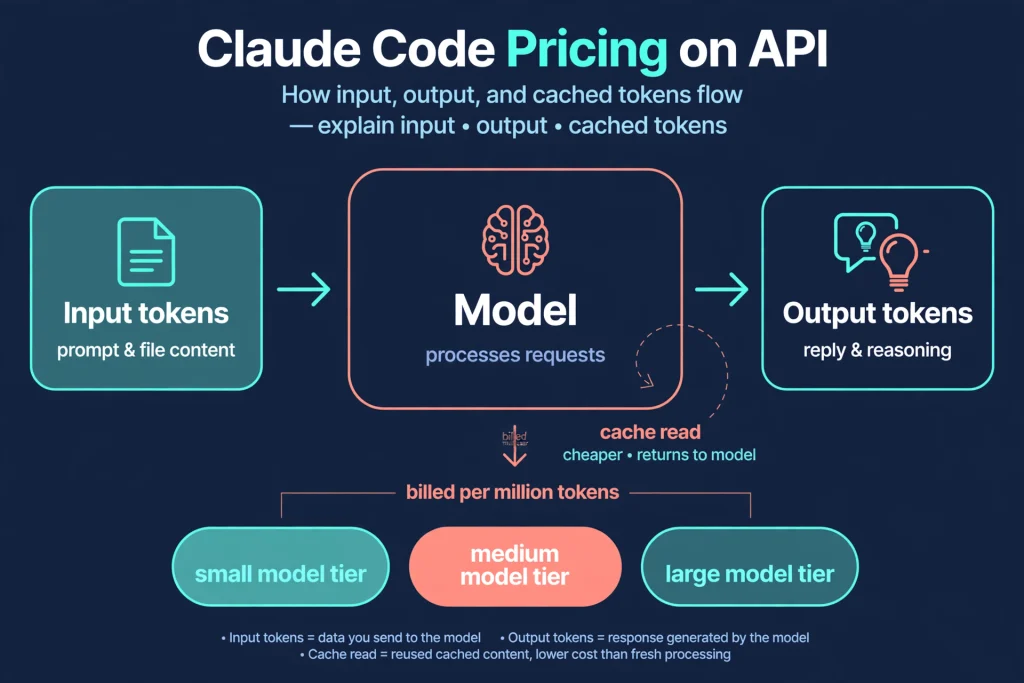
How tokens are billed. Input tokens are everything Claude reads on a request: your prompt, the conversation so far, file contents, and tool results. Output tokens are everything Claude writes, and that includes its reasoning. Anthropic’s documentation notes that thinking tokens are billed as output, and that thinking cannot be switched off on the Opus 5.5, Sonnet 5.5, Haiku 5.5, and Fable models. All rates below are per million tokens (MTok), in US dollars. Because Claude Code Pricing on this route is purely token-based, the model you select matters more than any other setting.
| Model | Input Price | Output Price | Additional Pricing Notes |
|---|---|---|---|
| Claude Fable 5.1 | $10 / MTok | $50 / MTok | Cache read $0.25; 5-minute cache write $12.50 |
| Claude Opus 5.5 | $4 / MTok | $20 / MTok | Cache read $0.20; 5-minute write $5; fast mode $8 input / $40 output |
| Claude Sonnet 5.5 | $2 / MTok | $10 / MTok | Cache read $0.10; 5-minute write $2.50 |
| Claude Haiku 5.5 | $0.10 / MTok for prompts up to 100K tokens; $0.50 above | $0.50 / MTok up to 100K; $2.50 above | Cache read $0.01 (up to 100K) or $0.05 (above); 5-minute write $0.125 or $0.625 |
Prompt caching. Claude Code reuses earlier context through prompt caching. According to the pricing documentation, a five-minute cache write costs 1.25 times the base input price, a one-hour write costs 2 times, and a cache read costs a small fraction of the input price: 5 percent on Opus 5.5 and Sonnet 5.5, and 2.5 percent on Fable 5.1. That fraction is why a long session is not billed as though it re-sent everything at full price, and also why a first message after a long idle gap, which misses the cache, can cost noticeably more than the one before it.
Other modifiers. US-only inference carries a 1.1 times multiplier on token prices. Fast mode for Opus 5.5 is listed at $8 input and $40 output per MTok and is not available through the Batch API. Batch processing, a separate feature for asynchronous jobs, takes 50 percent off, but it is a different tool from an interactive coding session. Models from 4.7 onward also use a newer tokenizer that Anthropic says produces roughly 30 percent more tokens for the same text, so comparing token counts across model generations is not apples to apples.
An arithmetic illustration, not a forecast. Suppose a hypothetical session sends 2 million input tokens and receives 200,000 output tokens, with no caching. On Sonnet 5.5 that is 2 × $2 plus 0.2 × $10, which equals $6. The same volume on Opus 5.5 is 2 × $4 plus 0.2 × $20, or $12. Now imagine 1.8 million of those input tokens are cache reads on Sonnet 5.5: the input portion becomes 0.2 × $2 plus 1.8 × $0.10, or $0.58, and the total falls to $2.58 before counting cache-write charges. These figures only show how Claude Code Pricing behaves under the API formula. Real sessions differ.
Monitoring and managing spend. Tracking Claude Code Pricing on the API route starts inside the tool, where the usage screen shows a session cost computed locally at list price. Anthropic calls it an estimate and points to the Usage page in the Claude Console for authoritative billing. Console administrators can set workspace spend limits on the Claude Code workspace, view cost reporting, and see per-member spend in a Console dashboard or through the Claude Code Analytics API. For payment, you buy prepaid credits on the Console Billing page and can switch on auto-reload; teams that need custom rate limits or monthly invoicing are directed to Anthropic’s sales team.
Subscription vs API Pricing: Which Is Better?
Neither route wins universally when you compare Claude Code Pricing this way. They trade predictability against flexibility.
Predictability. A subscription caps your financial exposure. You know the monthly fee, and when the allowance runs out you wait, upgrade, or opt into usage credits. API billing has no such cap by default. The meter runs for as long as Claude works, which is why Anthropic provides workspace spend limits and why you should set one on day one.
Allowance versus consumption. A subscription draws on one shared pool across Claude on the web, desktop, mobile, and Claude Code. API usage is a straight conversion of tokens to dollars, with no five-hour window and no weekly reset to manage.
Best-fit examples of Claude Code Pricing choices, without invented totals.
- A student building a weekend project suits Pro, since the fee is fixed and a limit just means taking a break.
- A full-time developer who hits Pro limits mid-afternoon every day has a clear reason to price Max or Ultra against metered use.
- A team automating pull request checks or running agents in continuous integration generally belongs on Console billing or usage-based Enterprise, because that work arrives in bursts and does not map neatly onto seats.
- A freelancer with irregular months might keep Pro and add usage credits only in busy weeks.
Monthly API Credits Are Not Claude Code Credits
The $100 on Max, $200 on Ultra, and up to $500 pooled on Team are Claude Platform credits. Anthropic’s help center lists what they cover: the Claude API (including the Message Batches API), the Console Playground, Claude Managed Agents, and the Claude Agent SDK. It also lists what they do not cover: interactive Claude Code in the terminal, IDE, desktop, or web; extra usage in Claude, Claude Code, or Cowork; and Claude on Amazon Bedrock, Google Cloud Vertex AI, or Microsoft Foundry.
The mechanics are as follows. Max, Ultra, and Team subscribers can claim after seven days on an eligible plan, by linking a Console organization from Settings and then Billing on claude.ai in a web browser. Max and Ultra claimants must be the subscriber, and Team claimants must be an Owner or Primary Owner. No card is needed on the Claude Platform to claim or use the credit. Only one Console organization can be linked, and changing it later requires contacting support. The credit refreshes each billing cycle, does not roll over, is spent before any credits you purchased, and is shared by everyone holding an API key in the linked organization. When it runs out and there are no purchased credits, API requests stop until the next grant. Free, Pro, and Enterprise plans are not eligible. Keeping this distinction clear is essential to understanding Claude Code Pricing correctly.
One nuance concerns claude -p and the Agent SDK. When you run them yourself with an API key from the linked organization, that usage is billed as Agent SDK usage and can draw on the credits. When you are signed in with your plan instead, the same commands use your plan limits. Runs started by the Claude Code GitHub Action, an IDE extension, or the desktop app count as Claude Code, so the credits do not apply.
If you are also weighing Claude against other assistants, the comparison of ChatGPT subscriptions on our site explains how a competitor handles tiers and allowances.
Is Claude Code Free?
No. The pricing page’s feature table marks Claude Code as not included on the Free plan, while Pro, Max, Ultra, Team, and Enterprise all include it. A free Claude account still gives you chat on web, desktop, and mobile, web search, file creation, memory, and Artifacts, with limited usage every five hours and every week. That is a different product experience from the coding agent, and a free login does not unlock it. In Claude Code Pricing terms, the Free plan offers no coding agent at all.
Anthropic’s API pricing page adds that new Console users receive a small amount of free credits to test the API. The official pages I reviewed do not say those credits apply to Claude Code, so do not plan on them for coding sessions. The practical answer to “is Claude Code free” is therefore a firm no for the Free plan, with the Console route as the only way in without a subscription, and that route is metered.
Claude Code Usage Limits Explained
Usage limits are the other half of Claude Code Pricing on any subscription, because the fee buys an allowance rather than unlimited use. Think of them as a “conversation budget” and not a message count. Paid plans have two kinds. The five-hour session limit begins when you send your first message and resets in full five hours later. Weekly limits reset at a fixed time assigned to your account, which stays the same regardless of when you subscribed. You can see both under Settings and then Usage on claude.ai.
Several details are easy to miss:
- One pool, many surfaces. Activity in claude.ai, Claude Desktop, and Claude Code draws on the same limits.
- What drains it. Conversation length, features used, the model, and the effort level all matter. Long sessions resend context on every request, so a one-line follow-up in an all-day session still draws on the whole history.
- Model switching. If you hit a session or weekly limit, switching models will not help because those windows are shared across models. If you see a model-specific message, such as an Opus limit, moving to a model outside that family does keep you working.
- Separate Fable limit. Max and Ultra track a weekly limit for Fable alongside the general weekly limit.
- Ultra’s exception. Verified Ultra accounts have no five-hour limit.
- Going past a limit. On paid plans you can turn on usage credits to continue at standard API rates, with a spend limit you control. Claude Code can also wait and continue automatically after a reset on recent versions.
- No fixed promise. Anthropic says it may adjust limits to manage capacity, so no two users should assume the same allowance and the numbers can change.
Because limits can change, revisit Claude Code Pricing and your limits together at renewal time. Inside Claude Code, the usage screen shows plan usage bars and a breakdown by skills, subagents, plugins, and MCP servers, with recommendations when a behavior accounts for a large share of recent use.
How to Reduce Claude Code Costs
Anthropic does not quantify savings from these habits, so none are promised here. They are the levers its documentation points to, whether you pay in tokens or in allowance. Each one reduces your exposure to Claude Code Pricing whichever billing route you picked.
- Match the model to the job. Anthropic suggests Sonnet for most coding work, with Opus reserved for complex architecture or multi-step reasoning, and Haiku for simple subagent tasks. Given the table above, the price gap between tiers is large.
- Clear context between unrelated tasks. Stale history is re-read on every later message. Use the clear command when you change topics, and compact with instructions when you must keep continuity.
- Write specific prompts. A request such as “add input validation to the login function” triggers far less file scanning than “improve this codebase.”
- Plan before you build. Plan mode lets Claude propose an approach for approval, which avoids expensive rework down the wrong path. Pressing Escape early to redirect also helps.
- Trim tool overhead. Disable MCP servers you are not using, and prefer command-line tools such as gh or aws, which add no per-tool listing to context.
- Filter noise with hooks and skills. A hook can return only the failing lines of a test run rather than ten thousand lines of log. Moving specialized instructions from a long CLAUDE.md into skills keeps the base context small.
- Adjust effort and thinking. Lower the effort level for easy tasks. Where thinking can be disabled, doing so removes those output tokens, though it cannot be turned off on the newest models.
- Watch background consumers. Scheduled tasks, idle check-ins, subagents, and agent teams all spend tokens. Anthropic notes agent teams can use roughly seven times the tokens of a standard session when teammates run in plan mode.
- Set limits before you need them. Use workspace spend limits on the Console, or user and organization spend limits on Team and Enterprise, and check your usage screen regularly.
- Choose the plan that fits your Claude Code Pricing profile. If you reach limits constantly, price the next plan against usage credits. If you rarely do, a lower plan may be enough. Prompt caching helps automatically, so avoid unnecessary long idle gaps in the middle of a big task when the cache would expire.
Is Claude Code Worth the Price?
Value is relative to the hours it returns and the way you work, so here is a balanced reading of Claude Code Pricing by audience.
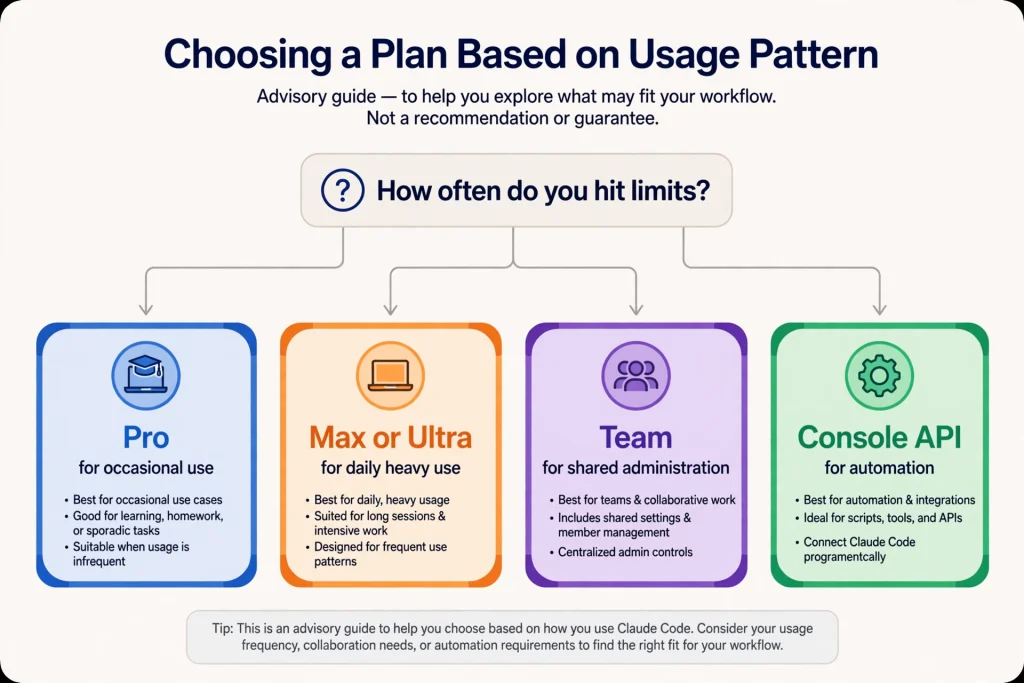
- Beginner developers: Pro is the low-risk entry. The fixed fee and built-in limits prevent surprise bills, and the same subscription covers chat, which is useful while learning. Metered billing is riskier for someone still discovering how many tokens a session eats.
- Professional developers: The decision usually turns on how often you hit limits. If you rarely do, Pro is enough. If you do daily, compare Max and Ultra against usage credits for your actual pattern.
- Freelancers: Irregular income argues for flexibility. A monthly Pro plan, with usage credits switched on only during crunch weeks, avoids paying for capacity in quiet months. Whether the tool earns its fee depends on billable hours saved, which only you can measure.
- Software teams: Team’s seat structure makes spending visible and administrable. Giving Premium seats to heavy users and Standard seats to light users aligns cost with need.
- Startups: A mix of Team seats for interactive work and Console billing for automation keeps interactive Claude Code Pricing predictable while letting pipelines scale separately. The bundled pooled credit can fund your own product’s API use but not coding sessions.
- Enterprise organizations: Consumption-based billing plus spend limits, analytics, and compliance controls suit large deployments, which is how Claude Code Pricing scales at that size, though budget owners should pilot first, as Anthropic itself advises.
Claude Code Pricing: Final Verdict
As of November 3, 2026, Claude Code Pricing comes down to a choice between two billing philosophies. Subscriptions (Pro at $17 to $20, Max at $100, Ultra at $200, and Team or Enterprise seats) give you a known fee and a limited allowance that resets. API billing through a Console account gives you no plan fee and a bill that scales with tokens, which suits automation and bursty work but demands spend limits.
The single most important fact to carry away is that the monthly API credits bundled with Max, Ultra, and Team are for building on the Claude Platform, not for interactive Claude Code. Start with Pro if you are unsure, move up only when limits genuinely slow you down, choose Team when several people need administration and shared billing, and use Console or Enterprise consumption billing when workloads are automated. Check the official pricing page again before purchasing, since plans can change at Anthropic’s discretion. In short, the best Claude Code Pricing choice is the one that matches how you actually work.
Frequently Asked Questions
How much does Claude Code cost per month?
Claude Code Pricing for individual plans starts at $17 per month (Pro on annual billing, $200 charged up front), $20 per month (Pro billed monthly), $100 per month (Max), and $200 per month (Ultra). Team seats cost $20 or $100 per seat per month on annual billing, and Enterprise is $20 per seat plus usage at API rates. Console billing has no monthly fee and charges per token.
Is Claude Code included in Claude Pro?
Yes. Under current Claude Code Pricing, Anthropic’s pricing page lists Claude Code as included on Pro, Max, Ultra, Team, and Enterprise, and not on the Free plan. It shares Pro’s usage limits with the rest of your Claude activity.
Is Claude Code free?
No. A free Claude account covers chat and some tools with limited usage, but Claude Code Pricing has no zero-dollar tier for the agent, so Claude Code is not part of the Free plan. You need a paid plan or a Console account with API billing.
What is the difference between Claude Code Pro and Max?
Max costs $100 per month against Pro’s $17 to $20. Max provides five times the Pro usage every five hours and every week, includes Fable for up to half of the weekly limit, gives priority access at busy times, and bundles $100 in monthly API credits that cannot be used in Claude Code. Ultra, at $200, goes further with ten times Pro usage weekly and no five-hour limit for verified accounts.
Does Claude Code use API credits?
It depends on how you sign in. With a Console account, Claude Code consumes API tokens at standard rates, paid from your Console balance. With a subscription, usage comes from your plan allowance, and the monthly API credits bundled with Max, Ultra, and Team do not cover interactive Claude Code or extra usage.
How does Claude Code API pricing work?
Claude Code Pricing on the API is charged per million tokens, with separate rates for input and output, and discounted rates for cache reads. At the time of verification, Sonnet 5.5 was $2 input and $10 output, Opus 5.5 was $4 and $20, and Fable 5.1 was $10 and $50 per million tokens. Your total depends on the model, context size, caching, and workload.
Is Claude Code included in the Team plan?
Yes. Anthropic states that Claude Code is included with every Team seat, and Premium seats provide more usage for heavy users. Standard seats cost $20 and Premium seats $100 per seat per month on annual billing.
Does Claude Code have usage limits?
On subscription plans, yes. There is a five-hour session limit and a weekly limit, shared across Claude and Claude Code, with a separate Fable limit on Max and Ultra. Verified Ultra accounts have no five-hour limit. Usage credits can extend work past a limit, at standard API rates.
Can I use Claude Code without a subscription?
Yes. You can sign in with a Claude Console account and pay for tokens at standard API rates, with no monthly plan fee. Setting a workspace spend limit is wise, since metered usage has no inherent ceiling.
Which Claude Code plan is best for developers?
There is no single best plan, because Claude Code Pricing rewards matching the plan to your pattern. Pro is a reasonable starting point for most individual developers, Max or Ultra make sense when you consistently reach limits, Team fits groups that need shared administration, and Console billing suits automated or irregular workloads. Compare plans against your actual usage pattern before upgrading.
Sources and References
- Plans & Pricing, Claude by Anthropic
- Claude Code by Anthropic, product page
- Use Claude Code with your Pro, Max, or Ultra plan, Claude Help Center
- Use Claude Code with your Team or Enterprise plan, Claude Help Center
- What is the Ultra plan?, Claude Help Center
- Monthly API credits for Max, Ultra, and Team plans, Claude Help Center
- How do usage and length limits work?, Claude Help Center
- How do I pay for my Claude API usage?, Claude Help Center
- Pricing, Claude Platform Docs
- API credits for Max, Ultra, and Team plans, Claude Platform Docs
- Manage costs effectively, Claude Code Docs