
Plan details and prices checked on October 30, 2026. Figures are OpenAI’s US-dollar list prices and can change after publication.
ChatGPT Subscriptions now come in six tiers: Free, Go, Plus, Pro, Business and Enterprise. For one person, the monthly ladder runs from $0 to $500. For a team, it starts at $20 per seat on annual billing.
The most expensive option is rarely the right one, so this guide to ChatGPT Subscriptions explains what each plan costs, what you gain by paying more, who each tier suits, and how to subscribe, switch or cancel without surprises.
If you are new to the technology underneath, our explainer on how ChatGPT works covers the basics; the plans mostly differ in capacity and tools, not in what ChatGPT fundamentally is.
Table of Contents
Quick Answer: What Do ChatGPT Subscriptions Cost?
As of October 30, 2026, these are the US list prices:
- Free: $0, the starting point for all ChatGPT Subscriptions
- Go: $8 per month
- Plus: $20 per month
- Pro: $100, $200 or $500 per month, depending on the usage tier
- Business: $25 per Standard seat monthly, or $20 per seat per month billed annually, with a two-seat minimum
- Enterprise: custom quote through OpenAI’s sales team
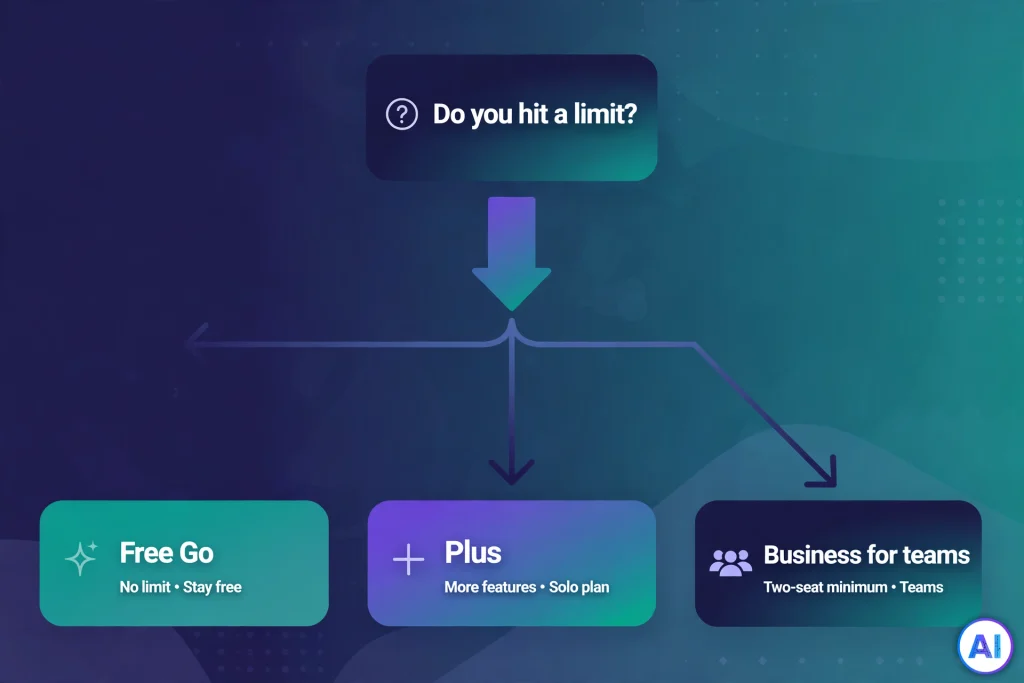
Our recommendation (editorial, not an OpenAI claim): among ChatGPT Subscriptions, most individuals should begin with Free, move to Go or Plus only after hitting a limit they can name, and treat Pro as a tool for people whose paid work keeps stalling at Plus limits.
What ChatGPT Subscriptions Cover, and What They Don’t
Each of the ChatGPT Subscriptions buys capacity and features inside ChatGPT on the web, desktop and mobile apps: more messages, more file uploads, stronger reasoning options, research and coding tools, and, on some tiers, removal of ads. It does not buy API access. OpenAI bills API usage separately, and a Business subscription explicitly excludes it.
If you are building software that calls OpenAI models, you are shopping in a different aisle with token-based pricing.
Two cautions apply to every number about ChatGPT Subscriptions in this article. First, OpenAI publishes most prices in US dollars and localizes them in some markets, so your checkout may differ because of currency, tax or the app store you use.
Second, OpenAI describes usage as “expanded” or “higher” rather than publishing message counts for chat, so no honest guide can tell you exactly how many prompts a plan allows.
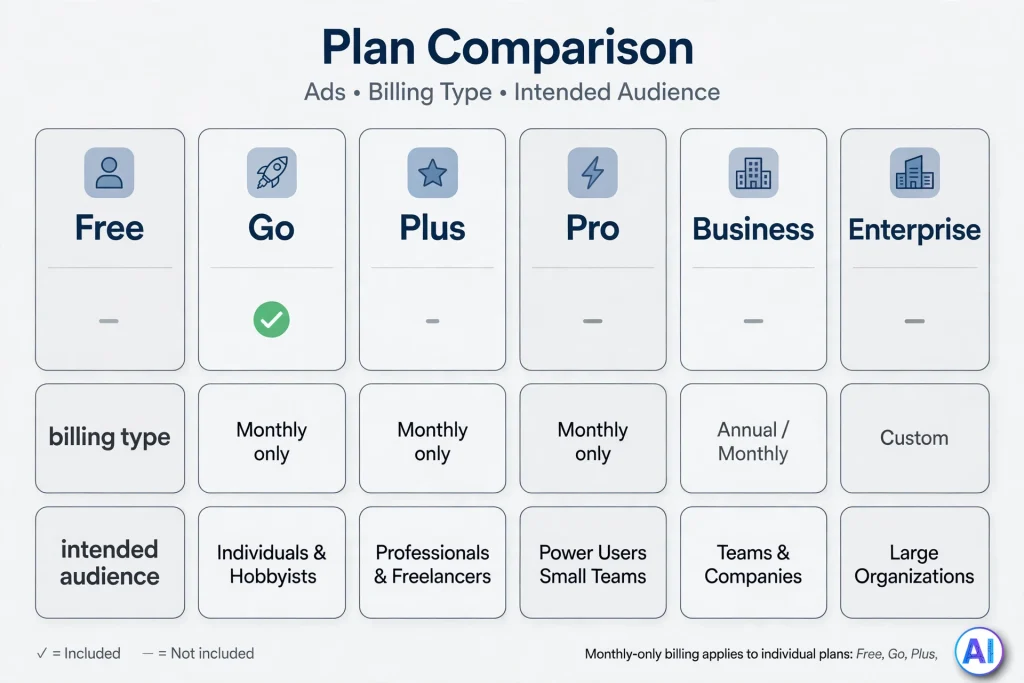
ChatGPT Subscriptions Compared at a Glance
| Plan | US price | Billing | Ads | Built for | Key limit to know |
|---|---|---|---|---|---|
| Free | $0 | None | May appear | Trying ChatGPT, occasional questions | Tools such as uploads, images and voice are limited |
| Go | $8/month | Monthly only | May appear | Heavy free users on a budget | Lacks the stronger reasoning options of Plus |
| Plus | $20/month | Monthly only | No | Regular personal or professional use | Limits still apply |
| Pro 100 / 200 / 500 | $100 / $200 / $500 per month | Monthly only | No | Heavy individual use | Usage rises by tier; Ultrafast only on Pro 500 |
| Business | $25 monthly or $20 annual, per Standard seat | Monthly or annual | No | Teams of two or more | Two-seat minimum; API not included |
| Enterprise | Custom | Contract | No | Large or regulated organizations | Sales-led purchase |
Plan-by-Plan Breakdown
Free: Useful, With Strings Attached
Free is the zero-cost end of ChatGPT Subscriptions and covers everyday text chat, which OpenAI describes as unlimited subject to abuse guardrails. Everything around the chat window is capped: file uploads, image creation, voice, deep research and coding tools.
Ads may appear on Free in supported regions, and OpenAI says it does not show ads to accounts identified as belonging to people under 18.
Go: The Budget Step
Go is the cheapest paid option among ChatGPT Subscriptions, sitting between Free and Plus at $8 a month in the US, billed monthly.
At launch OpenAI described it as offering roughly ten times Free’s messages, uploads and image creation, plus longer memory, and an independent reading of OpenAI’s comparison grid marks scheduled tasks as included from Go upward. It still shows ads, and it does not unlock the heavier reasoning options reserved for Plus and above.
One regional wrinkle: OpenAI announced Go as available wherever ChatGPT is supported in January 2026, yet at least one report of OpenAI’s current plan page describes it as available “in select regions.” Treat your own upgrade screen as the deciding authority.
Plus: The Default Paid Choice
Plus costs $20 a month, billed monthly, with no annual discount. It is the first tier of ChatGPT Subscriptions without ads, and it adds stronger reasoning models, expanded deep research, and access to Codex and ChatGPT Work, which draw from one shared allowance.
OpenAI’s own wording is that limits apply, and the five-hour caps on coding and agent work are where many heavy users first feel them. Our deeper analysis of whether ChatGPT Plus is worth it walks through that decision in detail.
Pro: Three Tiers for Heavy Use
Pro is no longer a single $200 plan, which is the biggest change to ChatGPT Subscriptions at the top end this year. OpenAI’s help center lists Pro 100 at $100, Pro 200 at $200 and Pro 500 at $500, all billed monthly with no annual or prepaid option. Only Pro 500 includes Ultrafast mode.
OpenAI says Pro 200 includes more usage than Pro 100 and Pro 500 the most, but it publishes no multiplier, and it has adjusted the Pro 200 allowance more than once this autumn. Read the current allowance on the Pro tiers help page before paying.
Pro is also not truly unlimited: OpenAI states that the strongest Pro-level model has its own usage limits. We cover the trade-offs in our ChatGPT Pro review.
Business and Enterprise: Subscriptions for Organizations
Business is the team-oriented member of ChatGPT Subscriptions, and it is the former Team plan, renamed on August 29, 2025. A Standard seat costs $25 per month on monthly billing or $20 per month billed annually, and a workspace needs at least two paid seats.
Premium seats, priced at $125 monthly or $100 annually, carry five times the usage of Standard seats. Business gives an owner central billing, admin tools and data terms under which OpenAI does not train on workspace content by default. Enterprise has no public price and adds sales-led contracts, invoicing and stricter security controls.
Our ChatGPT Business guide and ChatGPT Enterprise explainer cover each in depth.
Free vs Paid: What You Will Actually Notice
The difference between free and paid ChatGPT Subscriptions is less about one plan being “smarter” and more about friction. On Free you will run into caps on uploads, images and research long before you run out of plain text chat.
Paying for ChatGPT Subscriptions removes some of that friction, adds reasoning options for harder problems, and, from Plus upward, removes ads.
What paying does not do is guarantee correct answers. A stronger model still makes mistakes, so anything important, such as citations, figures or code, deserves checking regardless of the plan. Also remember that new features often roll out gradually, so a capability listed for your tier may not appear on your account on day one.
How to Choose Among ChatGPT Subscriptions
These are editorial suggestions for choosing ChatGPT Subscriptions, based on the verified differences above, not rules.
- Casual users: stay on the free tier of ChatGPT Subscriptions. If you ask a handful of questions a week, nothing here is worth paying for.
- Students and light daily users: try Go if message or upload caps are what annoy you, and ads do not. Move to Plus only when you need deeper reasoning or research.
- Writers, analysts and professionals: Plus is the sensible center. Run it for one billing month and note which limit, if any, interrupts you.
- Developers and researchers hitting walls: compare buying extra credits on Plus, where OpenAI allows it, with moving to Pro 100. Choose Pro 200 or 500 only if you can state what the extra allowance or Ultrafast would save.
- Freelancers: a Business workspace’s two-seat minimum usually makes an individual plan simpler.
- Teams of two or more: Business, with Standard seats for most people and a Premium seat for whoever hits limits daily.
- Regulated or large organizations: talk to OpenAI sales about Enterprise.
When You Probably Don’t Need a Paid Plan
Paid ChatGPT Subscriptions are optional. Skip the upgrade if you rarely see a limit message, if plain text answers cover your needs, or if ads do not bother you. Because individual ChatGPT Subscriptions bill monthly, there is no penalty for waiting: you can subscribe the week a project demands it and cancel afterward.
Some people also find that a shared workspace provided by an employer or school already covers their needs, so check before paying personally.
Five Questions to Ask Before Paying for ChatGPT Subscriptions
Before you enter a card number for any of the ChatGPT Subscriptions, run through this short checklist. It is an editorial tool, not an OpenAI requirement.
- Which specific limit did I hit? If you cannot name one, Free is probably enough.
- Does the missing feature exist on a cheaper tier? Check whether Go covers the gap before paying for Plus.
- Do ads matter to me? Only Free and Go may show them, so ad-free use is part of what Plus costs.
- Am I buying for one person or several? Individual plans and Business workspaces are different products, and Business needs two seats.
- Can I test for one billing month? Monthly billing means a trial period costs only one payment, provided you cancel before renewal.
Answering honestly usually shows that ChatGPT Subscriptions are a tool you rent when work demands it, not a fixture you must keep forever.
What ChatGPT Subscriptions Cost Over a Full Year
Monthly prices hide the real commitment, so it helps to multiply them out. The figures below are simple arithmetic on the US list prices above, not additional OpenAI claims, and they exclude tax and any optional credits.
| Plan | Monthly price | Twelve months |
|---|---|---|
| Go | $8 | $96 |
| Plus | $20 | $240 |
| Pro 100 | $100 | $1,200 |
| Pro 200 | $200 | $2,400 |
| Pro 500 | $500 | $6,000 |
| Business Standard seat, annual billing | $20 per seat | $240 per seat |
| Business Standard seat, monthly billing | $25 per seat | $300 per seat |
Two lessons stand out. First, the jump from Plus to the lowest Pro tier is $80 a month, or $960 a year, so it should solve a problem you can describe in one sentence.
Second, because Business requires two seats, the smallest annual Business bill is $480, which only makes sense when two people genuinely share a workspace. Seen this way, ChatGPT Subscriptions reward people who measure their own usage before upgrading.
Billing, Taxes and Regional Differences
Three billing facts shape the real cost of ChatGPT Subscriptions. Individual plans (Go, Plus and Pro) bill monthly only, so a year of Plus is simply $240 and a year of Go is $96. Annual billing exists for Business and Enterprise.
And the checkout is the final authority on price, since taxes, currency and the purchasing channel can all change what you pay.
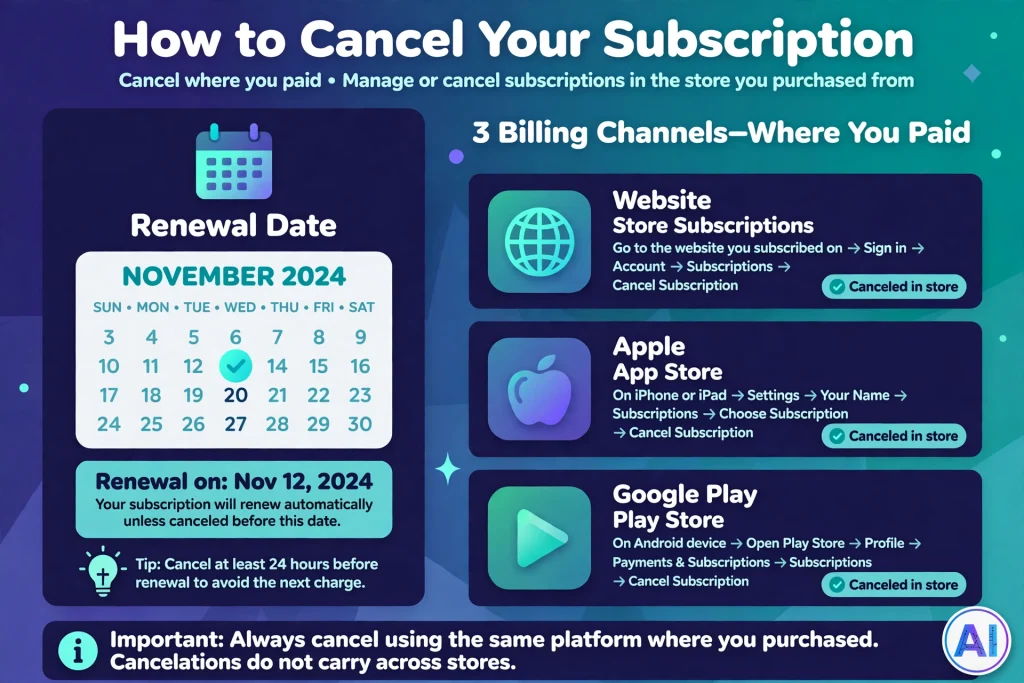
The channel matters for managing ChatGPT Subscriptions too. A subscription bought on chatgpt.com is managed on chatgpt.com, while one bought through Apple or Google Play is managed in that store. Business workspaces are managed by the workspace owner and accept cards for self-serve purchases.
How to Subscribe, Change Plans and Cancel ChatGPT Subscriptions
Subscribing
To start any of the paid ChatGPT Subscriptions, sign in to ChatGPT, open the upgrade or pricing option from your account menu, then choose a plan. Menu labels shift between web and mobile, so follow the on-screen prompts.
Buying through the website keeps billing under your OpenAI account; buying in an app store ties it to Apple or Google.
Changing Plans
OpenAI’s Pro help page says to sign in, open the pricing page and select the plan you want, using your existing account when changing. Moving between tiers follows the same route.
Cancelling
Cancelling ChatGPT Subscriptions is simple if you remember where you paid. For a personal subscription bought on the website, OpenAI’s cancellation guide says to select your profile icon, open Settings, choose Billing, and select Cancel under Cancel plan.
For Business, the workspace owner opens Workspace settings, then the Billing tab, then Manage plan, then Cancel subscription. If you subscribed through the App Store or Play Store, you must cancel there.
Cancellation takes effect the day after your next billing date, so you keep access until then, and OpenAI advises canceling at least 24 hours before renewal. Deleting your account also cancels web-billed subscriptions, though store-managed ones should be canceled in the store first.
Refunds
Refunds for ChatGPT Subscriptions are limited. OpenAI’s refund article says payments are generally non-refundable. A discretionary refund may be possible for an unused individual purchase if you contact OpenAI within seven days, subject to eligibility rules, and residents of the EU, UK and Turkey may qualify for a prorated refund within 14 days.
Apple purchases are refunded by Apple, and unused Business seats are generally non-refundable. Several differing versions of that article have surfaced, so confirm the live one.
Common Misconceptions About ChatGPT Subscriptions
A few persistent myths cause most of the billing confusion around ChatGPT Subscriptions.
- “Pro is unlimited.” Everyday chat is described that way, but the top Pro model carries usage limits.
- “Plus includes the API.” It does not; API billing is separate.
- “Go removes ads.” OpenAI says ads may appear on Free and Go.
- “Annual Plus saves money.” There is no annual Plus plan.
- “Uninstalling the app cancels billing.” It does not; cancel where you subscribed.
- “Team is a different plan.” Team became Business.
Conclusion
ChatGPT Subscriptions are best understood as a ladder of capacity rather than a menu of different products. When you are weighing ChatGPT Subscriptions, start where the cost is zero, climb one rung only when a specific limit blocks real work, and remember that Business and Enterprise solve organizational problems, not personal ones.
Because prices, allowances and regional availability for ChatGPT Subscriptions keep moving, confirm the figures here against OpenAI’s pricing page and your own checkout before committing.
Frequently Asked Questions
What are ChatGPT Subscriptions?
They are OpenAI’s paid and free access tiers for ChatGPT: Free, Go, Plus, Pro, Business and Enterprise. Each changes usage capacity, tool access, ads and administrative features.
How much does each plan cost?
As of October 30, 2026, in US dollars: Free $0, Go $8, Plus $20, Pro $100, $200 or $500 per month, Business from $20 per seat monthly-equivalent on annual billing ($25 monthly), and Enterprise by quote.
Do I need a subscription to use ChatGPT?
No. Free is available to everyone, with limits on tools and possible ads.
Which plan suits everyday use?
For regular work, Plus is the usual choice; for light use, Free or Go may be enough. This is a recommendation, not an OpenAI statement.
Are ChatGPT Subscriptions and API billing the same?
No. They are separate products with separate bills.
Do ChatGPT Subscriptions cost the same in every country?
No. OpenAI localizes prices in some markets, and taxes or app-store fees can alter the total.
Is Go or Plus the better value among ChatGPT Subscriptions?
It depends on what blocks you. Go costs $12 less per month and raises message, upload and image limits over Free, but it still shows ads and lacks Plus’s stronger reasoning options. Plus is ad-free and adds those options. This is an editorial view, not an OpenAI statement.
Do any ChatGPT Subscriptions remove ads?
Yes. OpenAI says ads may appear on Free and Go, while Plus, Pro, Business, Enterprise and Edu accounts do not have ads.
Can I get a refund on ChatGPT Subscriptions?
Sometimes. Payments are generally non-refundable, but limited discretionary and regional refund rights exist, so read OpenAI’s current refund article.
Sources and References
- OpenAI Help Center, “About ChatGPT Pro tiers”: https://help.openai.com/en/articles/9793128-about-chatgpt-pro-tiers (read via search excerpt; the page itself blocked automated access)
- OpenAI Help Center, “How do I cancel my ChatGPT subscription?”: https://help.openai.com/en/articles/7232927
- OpenAI Help Center, “How do I request a refund for my ChatGPT subscription?”: https://help.openai.com/en/articles/7232895-how-do-i-request-a-refund-for-my-chatgpt-subscription (several versions surfaced; wording differs)
- OpenAI Help Center, “Ads in ChatGPT”: https://help.openai.com/articles/20001047
- Gravity, “ChatGPT Pricing Explained (2026),” an independent review of OpenAI’s pricing pages dated October 13, 2026: https://gravity.fast/blog/chatgpt-pricing-explained/
- AIVibesOfficial, “ChatGPT Business” guide (checked October 29, 2026), for Premium seat pricing and Team rename: https://aivibesofficial.com/chatgpt-business/