
Checked against Anthropic’s Claude Code documentation on November 3, 2026. Claude Code changes quickly, so confirm anything version-specific with claude --version and the linked pages before you rely on it.
Claude Code Skills are folders that teach Claude Code a repeatable procedure. Each one is built around a single SKILL.md file that holds a small settings block and plain-Markdown instructions. Claude Code can load a skill by itself when your request matches it, or you can run it directly by typing / followed by its name. If you have pasted the same review checklist or release routine into the chat for the fifth time, a skill is the fix.
This guide covers how Claude Code Skills are discovered, what belongs inside SKILL.md, where the files go, how to build and test a first custom skill, and how skills differ from slash commands, MCP servers, subagents and hooks. It also corrects a few claims that still circulate in older tutorials, such as the idea that every skill needs a name, or that every edit forces a restart. If you want a map of Anthropic’s wider documentation first, our Claude Docs guide lists where each official resource lives, and more tool walkthroughs sit in the AI Tools category.
Table of Contents
What Are Claude Code Skills?
Claude Code Skills are reusable, file-based instruction packages: a folder with a SKILL.md file, plus optional supporting files, that Claude Code can apply to specialized or repeatable work. Anthropic’s own advice on when to write one is practical: create a skill when you keep re-pasting the same procedure, or when a section of your CLAUDE.md has grown from a fact into a multi-step routine.
The saving comes from how loading works. A CLAUDE.md file is read at the start of every session, so every line in it costs context every time. A skill’s body loads only when the skill is used, which means long reference material costs almost nothing until the moment it matters.
What Claude Code Skills can contain
A skill is more than a saved prompt. Depending on what you put in the folder, Claude Code Skills can provide:
- Task-specific instructions, such as the exact order of steps for a release or a bug report.
- Reusable workflows that you trigger by name instead of retyping.
- Supporting reference files, like an API summary or a style guide, that Claude reads only when needed.
- Templates and scripts that sit beside
SKILL.md; scripts are run rather than loaded into context. - Consistent project procedures, because the same written steps apply to every teammate who has the skill.
Bundled skills already ship with Claude Code
Claude Code includes bundled skills such as /debug, /code-review, /batch, /loop, /doctor and /claude-api. They are prompt-based: they hand Claude detailed instructions and let it orchestrate the work with its normal tools, whereas most other built-in commands run fixed logic. You call them the same way you call your own skills, which is a good reason to treat a custom skill as “a bundled skill for my team’s rules.”
How Claude Code Skills relate to Agent Skills
Claude Code Skills follow the open Agent Skills standard, which several AI tools share, and Claude Code adds extras on top: invocation control, subagent execution and dynamic context injection. The distinction matters in practice. When you upload a skill to claude.ai or package it for the Skills API, only the six standard frontmatter fields (name, description, license, compatibility, metadata, allowed-tools) are accepted, and anything else fails with a hard error. Features that depend on the Claude Code runtime, such as shell injection, do not work in claude.ai chat or through the API.
How Do Claude Code Skills Work?
Three questions cover the mechanics: how skills are found, when they run, and what they leave behind in your conversation.
Discovery. At the start of a session Claude Code builds a listing of skill names and descriptions and keeps it in context so Claude knows what exists. The full body is not loaded at that stage. Claude Code scans your personal folder, the project’s .claude/skills/ folder and every parent folder up to the repository root, plus any plugins and added directories. Skills in a deeper .claude/skills/ folder do not appear at startup; they load the first time Claude reads or edits a file in that subdirectory.
Invocation. By default both of you can trigger a skill. You type /skill-name at the very start of a message, or you describe the task and Claude decides the skill fits. A subtle rule: if you write the name after other text, as in “go ahead and /deploy to staging”, nothing runs directly. The name only counts as your permission, and Claude judges from your wording whether you actually asked for it.
Descriptions steer automatic use. The documentation says Claude uses the description to decide when a skill applies. Anthropic has not published the exact ranking logic, so treat any “magic phrase” advice as an informed guess. What is documented is concrete: put the main use case first, because the combined description and when_to_use text is cut at 1,536 characters in the listing, and the whole listing is held to a budget of about one percent of the model’s context window. When a crowded listing overflows, the least-used skills lose their descriptions first.
Loading and context. Once a skill runs, its rendered text enters the conversation as one message and stays there; Claude Code does not re-read the file on later turns. After auto-compaction, Claude Code re-attaches the most recent invocation of each skill, but only the first 5,000 tokens of each and within a shared 25,000-token budget. The practical lesson: write guidance as standing rules (“run the tests after every edit”) and put the most important lines at the top.
Project context. Skills do not replace your project instructions; they sit alongside CLAUDE.md and the files Claude is already reading. A skill can also pull live project data into itself before Claude sees it, which the advanced section covers.
What Is a SKILL.md File?
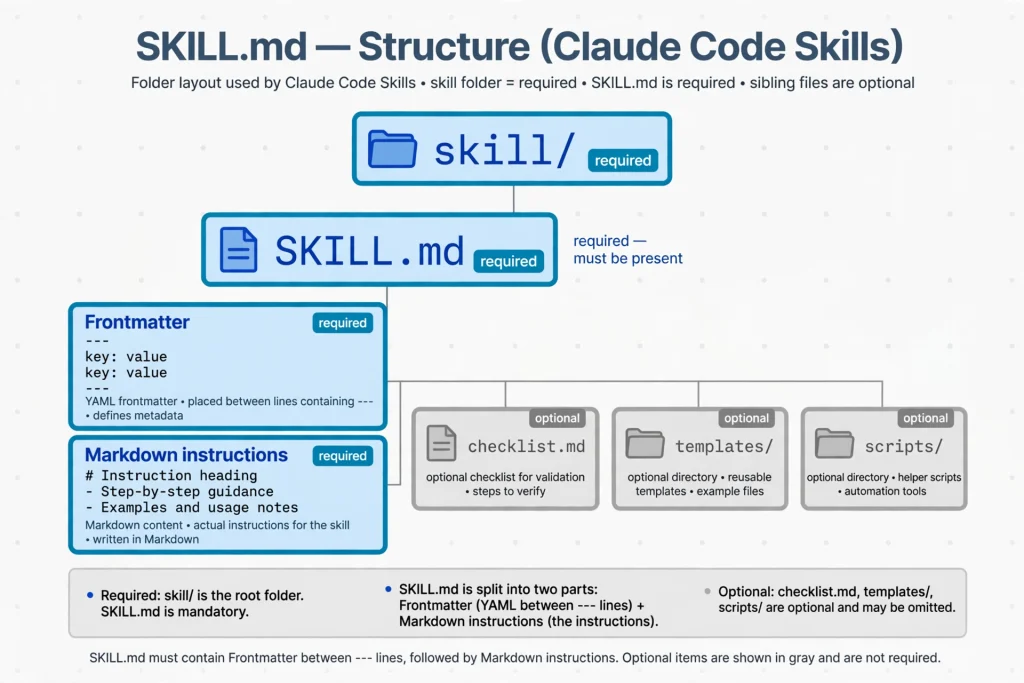
SKILL.md is the one mandatory file in a skill folder. It has two parts: YAML frontmatter between two --- lines, then Markdown instructions that Claude follows when the skill runs. Think of the frontmatter as the label on the box and the Markdown as the contents.
Which Claude Code SKILL.md fields are required?
Under the current documentation, none. Every frontmatter field is optional, and only description is recommended. If you leave it out, Claude Code uses the first non-empty line of the body. If you skip name, the folder name becomes the command. This is a real correction to older tutorials that list name and description as required.
Three behaviors catch beginners:
- The opening
---must be the first line of the file. Otherwise the whole file, markers included, is treated as plain skill text. - If the YAML does not parse, the skill still loads, but with no fields set.
/skill-nameworks while automatic matching quietly stops. - Misspelled field names are ignored without an error. Match the documented spelling exactly, hyphens included (
disable-model-invocation, notdisable_model_invocation; the one exception iswhen_to_use, which uses underscores).
The supported frontmatter fields, grouped
| Purpose | Fields |
|---|---|
| Identity and discovery | name, description, when_to_use, argument-hint, arguments |
| Who can trigger it | disable-model-invocation, user-invocable, paths |
| Tools and execution | allowed-tools, disallowed-tools, model, effort, shell, hooks |
| Running in isolation | context, agent, background |
| Standard and bookkeeping | license, compatibility, metadata |
The Markdown body and supporting files
The body is ordinary Markdown. Two habits keep it healthy. Keep SKILL.md under roughly 500 lines, as the documentation advises, and move long reference material into sibling files that SKILL.md links to, with a sentence saying when each should be opened. Because the body stays in context after it loads, every line is a recurring cost, so state what to do rather than narrating why.
Claude Code Skills Directory Structure
Where you save a skill decides who gets it. These locations are documented:
| Scope | Path | Who loads it |
|---|---|---|
| Enterprise | .claude/skills/<skill-name>/SKILL.md inside the managed settings directory | Everyone on machines where the organization deploys it |
| Personal | ~/.claude/skills/<skill-name>/SKILL.md | All your projects on this machine |
| Project | .claude/skills/<skill-name>/SKILL.md | Sessions in that repository; commit it to share |
| Nested | <subdir>/.claude/skills/<skill-name>/SKILL.md | Sessions in or below that subdirectory |
| Added directory | .claude/skills/ inside a folder passed with --add-dir | That session |
| Plugin | <plugin>/skills/<skill-name>/SKILL.md | Wherever the plugin is enabled, as /plugin-name:skill-name |
| claude.ai account | Skills enabled on your claude.ai account | Cowork, cloud sessions, and signed-in terminal sessions |
When two skills share a name, enterprise beats personal, and personal beats project. Plugin skills never clash because they carry the plugin name as a prefix. A skill that shares a name with a built-in command replaces that command in a local terminal session, though not its aliases.
An illustrative skill folder
Only SKILL.md is required by Claude Code. The other names below are my recommended organization, so rename them freely:
text
~/.claude/skills/
└── review-changes/
    ├── SKILL.md            # required: settings + instructions
    ├── checklist.md        # recommended: reference Claude opens when needed
    ├── templates/
    │   └── report.md       # recommended: a layout Claude can fill in
    └── scripts/
        └── summarize.sh    # recommended: a helper that gets executed
The official documentation shows a similar tree with reference.md, examples.md and scripts/helper.py, labeled as an example rather than a required layout. Three reserved names are worth remembering: a folder called synced (any capitalization) is where skills downloaded from claude.ai are stored, and anything named anthropic-skills outside a plugin will not load. Finally, the older .claude/commands/ folder still works, but new work belongs in .claude/skills/.
How to Create Your First Claude Code Skill
This tutorial builds a skill called review-changes in your personal folder, so it is available in every project. The same steps work at project level if you swap the path.
- Open the terminal and check that Claude Code is installed with
claude --version. - Choose the scope. Use
~/.claude/skills/for a personal skill. For a skill your team shares, work from the repository root and use.claude/skills/instead. - Create the skill directory:
bash
mkdir -p ~/.claude/skills/review-changes
- Create
SKILL.mdin that folder with any editor, for examplenano ~/.claude/skills/review-changes/SKILL.md. - Add valid frontmatter at the very top of the file (the full file appears in the next section).
- Write clear task instructions below the closing
---: what to examine, how to organize findings, and what not to do. - Add a supporting file if the instructions need reference material. Here that is
checklist.md, saved next toSKILL.md. - Save both files.
- Start or refresh Claude Code. Run
claudefrom a git repository. Claude Code watches skill folders during a session, so edits to an existing skill are picked up without a restart. The exception is a top-level skills folder that did not exist when the session began; in that case run/reload-skillsonce. - Test it. Make a small edit to any tracked file, then ask
What skills are available?to confirm the skill is listed. Run it directly with/review-changes, and run it automatically by askingCan you look over my changes before I commit?
Because /review-changes is typed inside Claude Code, it is not a shell command. Typing it in your normal terminal prompt does nothing.
Claude Code SKILL.md Example
Here is the complete skill. Save it as ~/.claude/skills/review-changes/SKILL.md:
markdown
---
name: review-changes
description: Reviews uncommitted changes for bugs, missing tests, risky patterns and unclear naming. Use when the user asks for a code review, a pre-commit check, or feedback on their diff.
when_to_use: Example requests include "review my changes", "is this safe to commit?", and "look over my diff before I push".
argument-hint: "[focus-area]"
allowed-tools: Bash(git status *) Bash(git diff *)
---

## Working tree status

!`git status --short`

## Diff against the last commit

!`git diff HEAD`

## What to do

Review only the changes shown above. Optional focus from the user: $ARGUMENTS

1. Group findings under Bugs, Missing tests, Risky patterns and Readability.
2. For each finding, name the file and hunk, then explain the consequence in one sentence.
3. Apply the team rules in [checklist.md](checklist.md) before you answer.
4. If the diff is empty, say so and stop.
5. Do not edit any files. Offer fixes as short snippets or plain prose.
And a minimal checklist.md beside it:
markdown
# Team review checklist

- New behavior has a test, or the finding says why none is needed.
- No secrets, tokens or personal data appear in the diff.
- Errors are handled where they happen, not swallowed.
- Names say what a thing is, not how it is built.
What each part does.
namesets the command, so/review-changesworks. Omit it and the folder name does the same job.descriptionis what Claude reads when deciding whether your request matches. It states the job first, then the situations that should trigger it.when_to_useadds trigger phrases. It is appended to the description and shares the same 1,536-character cap.argument-hintshows what to type after the name. It is quoted because an unquoted[focus-area]is valid YAML for a list, not text.allowed-toolspre-approves the two read-only git commands for the turn in which the skill runs. It does not restrict other tools.- The two lines starting with
!use dynamic context injection: Claude Code runs each command first and replaces the line with its output, so Claude sees the real diff. The pre-approval matters here, because an injected command that would otherwise need permission aborts the whole invocation. $ARGUMENTSreceives whatever follows the name, so/review-changes error handlingpasses “error handling” as the focus.- The numbered steps are the contract: grouped findings, cited locations, a clear stop condition and a no-edit rule.
Usage notes. Run it inside a git repository, because git status outside one fails and a failed injected command cancels the skill. If you need a command that may exit non-zero, append || true to it.
Best Claude Code Skills Examples for Developers
None of the following are official Anthropic skills. They are patterns I would build, shown as Claude Code skills examples you can adapt. Anthropic’s bundled skills already cover generic review and debugging, so a custom version earns its place by encoding your team’s rules.
- Code review. Reads a diff and returns prioritized findings. Useful before every commit. Instructions: severity tiers, cite file and hunk, no edits. Supporting file: a team checklist.
- Documentation writing. Drafts or updates README sections and docstrings from changed code. Useful after a feature lands. Instructions: audience, tone, required sections, a “don’t invent behavior” rule. Supporting file: a docs template.
- Unit testing. Writes tests for a named function or module in your framework’s style. Useful for untested legacy code. Instructions: naming scheme, mocking policy, run the tests and report failures. Supporting file: one exemplar test.
- Bug investigation. Walks from symptom to root cause. Useful when a report is vague. Instructions: reproduce first, form hypotheses, change one thing at a time, summarize evidence. Supporting file: a short triage log format.
- Refactoring. Restructures code without changing behavior. Useful for cleanup sprints. Instructions: tests must pass before and after, small steps, stop if behavior changes. Supporting file: project naming conventions.
- API documentation. Turns route handlers into endpoint reference pages. Useful for services that drift from their docs. Instructions: one entry per endpoint, parameters, errors, examples. Supporting file: an endpoint template.
- Security review. Looks for injection risks, secrets and unsafe defaults in a change. Useful before merging risky code. Instructions: a vulnerability checklist, severity labels, no exploit code. Supporting file: your internal security policy summary.
- Database query review. Reads queries and migrations for missing indexes, unbounded scans and destructive statements. Useful when several people write SQL. Instructions: explain-plan habits, rollback notes. Supporting file: schema notes. Pair it with a read-only account.
- Project onboarding. Explains the repository to a newcomer: layout, how to run it, where tests live. Useful on a new hire’s first day. Instructions: answer from the actual files, flag anything that looks stale. Supporting file: a glossary.
- Release preparation. Collects merged changes, drafts notes and runs the checks in a fixed order. Useful for repeatable releases. Because it has side effects, set
disable-model-invocation: trueso only you start it. Supporting file: a release checklist.
How to Install and Share Claude Code Skills
There is no installer for hand-written Claude Code Skills. Copying a folder into the right location is the installation.
Add a skill for yourself. Place the folder in ~/.claude/skills/. It then loads in all your projects on that machine. Folders in the enterprise, personal and project locations may also be symlinks, which is a tidy way to keep one source folder and point several places at it.
Add a project skill. Put it in .claude/skills/ inside the repository.
Share with teammates. Commit .claude/skills/ to version control. Everyone who pulls the repository gets the same skills, and changes go through the same review as code. For wider reach, package skills in a plugin, or have an administrator deploy them through managed settings.
Reuse across projects. Personal skills cover your own machines. A plugin covers other people’s. A skill that exists only in ~/.claude/skills/ will not be found by a cloud scheduled task, because each run starts as a fresh cloud session; enable the skill on your claude.ai account or commit it to the repository instead.
Install from a marketplace. Plugins can bundle skills. For example, Anthropic’s docs show installing the skill-creator plugin from the official marketplace with /plugin install skill-creator@claude-plugins-official, and adding that marketplace first with /plugin marketplace add anthropics/claude-plugins-official if Claude Code reports it missing.
Evaluating community Claude Code Skills
Third-party collections are useful for ideas, but a skill is instructions plus, possibly, scripts, tool permissions and hooks. Treat it like code you are about to run:
- Prefer official or well-known sources, and read the whole
SKILL.mdand every script before enabling anything. - Check the frontmatter for
allowed-toolsandhooks, since those change what runs without a prompt. - Look for
!injection lines, because they execute commands when the skill loads. - Never pipe an unknown install script into a shell, and do not run bundled scripts you have not read.
How to Use Claude Code Skills
Invoke a skill manually. Type /skill-name at the very start of a message in the Claude Code prompt. Add arguments after the name: /fix-issue 123 fills $ARGUMENTS with 123. Wrap multi-word values in quotes so they count as one argument, as in /my-skill "hello world" second. To see everything available, run /skills.
Allow automatic use. Write a description that contains the words people actually say, then ask for the task in plain language. If a skill triggers too eagerly, tighten the description or set disable-model-invocation: true.
Provide context. Name the files, branch or ticket in the same message. Skill text applies to the work in front of Claude, so a vague request produces a vague result no matter how good the skill is.
Stack skills. At the terminal prompt you can chain skills at the start of one message, such as /write-tests /fix-issue 123; the trailing text is passed to each as arguments. Through claude -p or the Agent SDK, only the first skill loads.
Combine with normal workflows. Skills fit the ordinary loop: ask Claude to implement, run a review skill, run tests, then commit. If that loop includes checking a page in a real browser, our guide to Claude in Chrome explains how the extension works and how it connects with Claude Code. Keep skills for procedures and leave one-off requests as normal prompts.
Review the output. A skill raises consistency, not correctness. Read the diff, run the tests and confirm that the result matches what you intended. Anthropic’s own advice is to compare runs with and without the skill on realistic prompts in fresh sessions, since a skill that triggers has not necessarily improved anything.
Claude Code Skills vs Slash Commands
The old distinction no longer holds. Custom commands have been merged into skills: a file at .claude/commands/deploy.md and a skill at .claude/skills/deploy/SKILL.md both create /deploy and behave the same way. Existing command files keep working, and if a skill and a command file share a name, the skill wins. Built-in commands such as /help and /compact are a separate category, since they run fixed logic rather than prompts.
| Feature | Skills | Slash commands (legacy command files) |
|---|---|---|
| Main purpose | Packaged procedure or knowledge Claude Code can load or you can trigger | A single prompt file you trigger by name |
| Instruction format | SKILL.md in its own folder, with frontmatter | One Markdown file in .claude/commands/, accepting the same frontmatter except name and paths |
| Invocation | /name, or automatic when relevant | /name |
| Reusability | Personal, project, nested, plugin, managed | Same file-based scopes; a subfolder becomes a folder:name prefix |
| Supporting resources | A folder of reference files, templates and scripts | None beyond the one file |
| Best use case | New work, anything needing resources or invocation control | Existing commands that already work |
The practical rule from the documentation is simple: prefer a skill for new work.
Claude Code Skills vs MCP Servers
These solve different problems, and they are often used together. A skill teaches Claude a procedure. An MCP server gives Claude access to something outside the machine: Anthropic’s documentation describes MCP as an open standard that connects Claude Code to tools, databases and APIs.
| Aspect | Skills | MCP servers |
|---|---|---|
| Reusable task instructions | Yes, that is the point | No; servers expose tools and data |
| External tools and integrations | Only what Claude can already reach, plus scripts you bundle | Yes: issue trackers, databases, monitoring, design tools |
| Access to external systems | Indirect | Direct, often through OAuth or tokens |
| Workflow execution | Claude follows written steps | Claude calls tools the server provides |
| Configuration | A folder with SKILL.md | claude mcp add ..., .mcp.json, or a plugin |
| Typical use | Checklists, conventions, multi-step routines | “Read this ticket”, “query this database” |
A good pairing: an MCP server lets Claude read an issue tracker, and a skill describes exactly how your team triages what it finds. Security differs too. The MCP documentation warns that servers fetching external content can expose you to prompt injection, so verify you trust a server before connecting it.
Claude Code Skills vs Subagents and Hooks
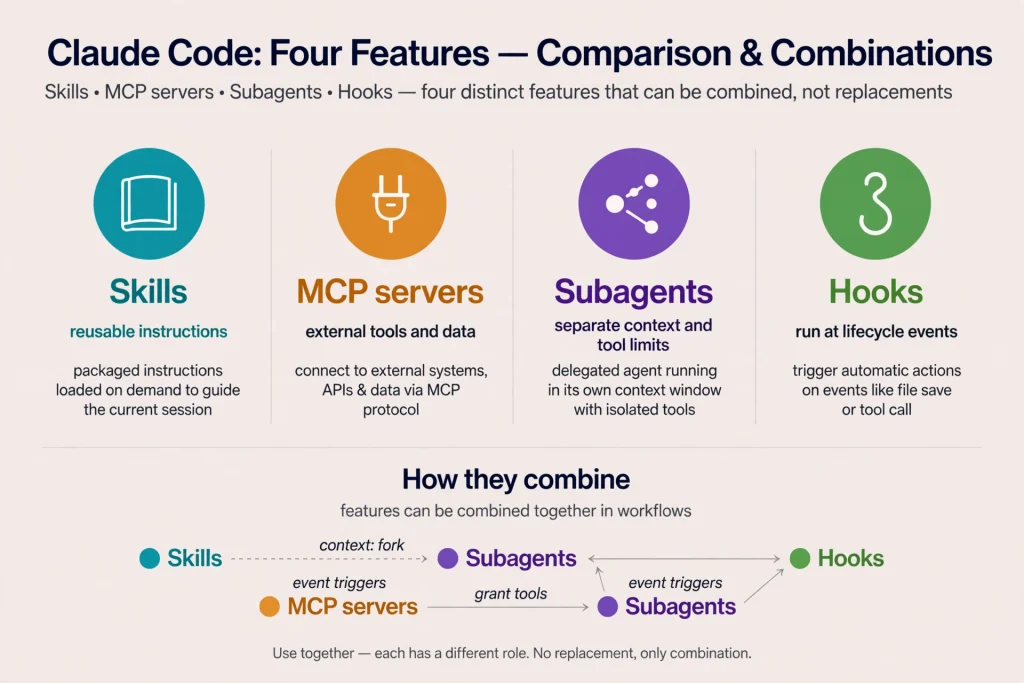
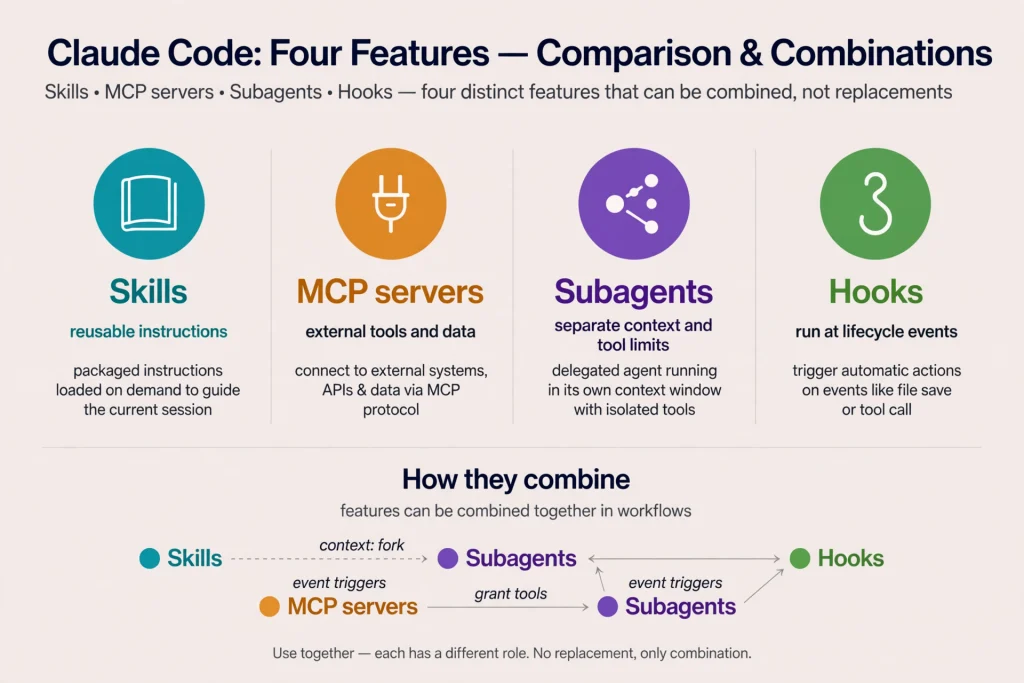
Four features get confused because they all customize Claude Code. Each answers a different question.
| Feature | What it is | Where it lives | Reach for it when |
|---|---|---|---|
| Skills | Reusable task instructions and resources, loaded on demand | SKILL.md folders | You repeat a procedure |
| Subagents | Specialized assistants with their own context window, system prompt and tool access | Markdown files in .claude/agents/ or ~/.claude/agents/ | A side task would flood the main conversation, or needs tool limits |
| Hooks | Commands, HTTP calls, MCP tool calls, prompts or agents that run automatically at lifecycle events | settings.json, plugins, or skill and subagent frontmatter | A rule must hold every time |
| MCP servers | External tools and data exposed to Claude | .mcp.json, claude mcp add, plugins | Claude needs outside systems |
A subagent file needs only name and description. A skill needs neither. A hook is deterministic: Claude Code runs it whenever its event fires, whether or not Claude remembers the instruction. That makes hooks the right home for must-always-happen rules, and a skill the right home for guidance that needs judgment. Anthropic’s troubleshooting advice says the same thing when Claude drifts from a skill: move the unbreakable rule into a hook.
They combine cleanly:
- A skill with
context: forkruns in an isolated subagent, withagentchoosing the type. - A subagent can preload skills through its
skillsfield, so domain knowledge is present from the first turn. - A skill can register hooks in its own frontmatter that stay active for the rest of the session once it runs.
- A skill can describe how to use an MCP server’s tools without configuring the server itself.
For a look at how another vendor frames delegated, multi-step agent work, compare these ideas with our explainer on agent features in other assistants; the vocabulary differs but the instruction-versus-automation split carries over.
Advanced Claude Code Skills Techniques
Everything below appears in Anthropic’s documentation for Claude Code Skills; syntax is reproduced from there in simplified form.
Dynamic context. !`command` on its own line runs before Claude sees the skill. A fenced block opened with three backticks and ! handles several commands. Set shell: powershell for PowerShell. Administrators can disable the feature with disableSkillShellExecution.
Arguments. Use $ARGUMENTS for everything typed, $0 and $1 (or $ARGUMENTS[0]) for positions, and declare names with arguments: [issue, branch] to use $issue and $branch. If you pass arguments and the body has no placeholder, Claude Code appends ARGUMENTS: <value> so nothing is lost.
Bundled paths. ${CLAUDE_SKILL_DIR} points at the skill’s folder, so a script can be called from anywhere. Using the same variable in an allowed-tools rule, such as Bash(${CLAUDE_SKILL_DIR}/scripts/render.sh *), lets the script run without a prompt.
Tool controls. allowed-tools pre-approves tools for the turn. disallowed-tools removes tools from Claude’s pool while the skill is active. Both clear when you send your next message.
Invocation controls. disable-model-invocation: true suits anything with side effects. user-invocable: false hides background knowledge from the / menu while leaving Claude able to use it. paths limits automatic activation to matching files.
Model and effort. model and effort override the session for the turn the skill runs.
Isolation. context: fork plus agent runs the body as a subagent’s task. The body must contain an actual task, since a skill made only of guidelines gives the subagent nothing to do.
Organization and visibility. skillOverrides in settings can set a skill to "on", "name-only", "user-invocable-only" or "off" without editing the file. /skill-doctor reports what each skill costs in context and how often it is used.
Evaluation. The skill-creator plugin runs test prompts with and without a skill, and claude plugin eval does a similar job for plugin skills. Some commands need recent Claude Code versions, so check the version note in the documentation before relying on them.
Common Claude Code Skills Problems and Fixes
- Skill not appearing. Ask
What skills are available?. If it is missing, check the location and spelling. A skill in a subdirectory below where you started only loads after Claude touches a file there;/add-dirloads it sooner. - Wrong directory. The pattern is exactly
<skills-root>/<skill-name>/SKILL.md. ASKILL.mdplaced directly inskills/is not picked up. - Invalid frontmatter. Confirm the opening
---is line one and the YAML parses. Runclaude plugin validate .claude/skills(or~/.claude/skills) to find broken files, andclaude --debugto see parse errors. - Missing or vague description. Without a useful description Claude cannot match the skill, so rewrite it with the words users really type.
- Invocation problems. Check
disable-model-invocationanduser-invocable. Put the slash name at the start of the message. Also look for a reserved or unsupported character in the name. - Incorrect file paths. Reference supporting files relative to
SKILL.md, and use${CLAUDE_SKILL_DIR}for scripts. - Supporting files not found. Link each file from
SKILL.mdwith a sentence about when to open it. - Outdated instructions. The body is not re-read after loading, and compaction keeps only the start. Re-invoke the skill after compaction and keep key rules near the top.
- Permission failures. An injected command that is not allowed aborts the invocation. Add a narrow
allowed-toolsrule, remember deny rules still win, and note that organizations can restrict skill permissions through managed settings.
Security Best Practices for Claude Code Skills
Installing Claude Code Skills is never automatically safe. Anthropic notes that a skill can grant itself broad tool access through allowed-tools, and that workspace trust does not gate that field, so review it before running Claude Code in a repository you did not write.
- Read
SKILL.mdand every bundled file before first use, including the frontmatter. - Inspect scripts line by line; do not execute anything you cannot explain.
- Avoid unknown repositories, and prefer official or reviewed sources.
- Grant the narrowest permissions: specific
Bash(...)patterns rather than broad ones. - Keep API keys out of skill files, and do not paste secrets into skill text.
- Review commands before approving them, especially anything involving deletion or network access.
- Understand prompt injection: content a skill fetches, such as a pull request description, can contain instructions aimed at Claude.
- Keep important skills in version control and review changes like any code change.
- For team-wide control, administrators can disable shell injection or restrict where skills load.
Are Claude Code Skills Worth Using?
For beginners, skills provide guardrails and a written record of how a task should go. Professional engineers gain consistency without repeating themselves. Freelancers can carry personal conventions between client projects through ~/.claude/skills/. Development teams get shared, reviewable procedures. Open-source maintainers can commit contributor-facing routines such as triage and release steps. In AI-assisted workflows generally, skills turn habits into assets.
Limits are real. A skill is still instructions, so Claude can misread or skip them; the documentation itself suggests hooks for rules that must always run. A tiny, one-time request does not deserve a folder. A short fact that applies to everything, such as the test command, belongs in CLAUDE.md, and a quick prompt is fine for unrepeatable work. Claude Code Skills also cost a little context each turn through their listing entries, which is why unused ones are worth pruning. Plan limits matter here too, so our Claude Code pricing guide is worth a look before you build a large library of skills.
Conclusion
Claude Code Skills are folders with a SKILL.md file that Claude Code loads on demand. To create one, make ~/.claude/skills/<name>/ or .claude/skills/<name>/, write a clear description and focused steps, add supporting files where needed, and test it by asking for the task in plain language and by running /name. Slash commands have been merged into skills, MCP servers connect outside systems, subagents isolate work, and hooks enforce rules. Start with one procedure you repeat weekly, keep it short, review it like code, and your recurring tasks will become more consistent.
Frequently Asked Questions
What are Claude Code Skills? They are folders containing a SKILL.md file, and optionally supporting files, that give Claude Code a repeatable procedure or reference knowledge. Claude loads them when relevant, or you run them with /skill-name.
How do I create a Claude Code Skill? Create a folder such as ~/.claude/skills/my-skill/, add a SKILL.md with a description in the frontmatter and instructions below it, then test with /my-skill or a matching request.
What is a SKILL.md file? It is the required file in every skill folder: optional YAML frontmatter between --- markers, followed by Markdown instructions.
Where should Claude Code Skills be stored? Personal skills go in ~/.claude/skills/<skill-name>/, project skills in .claude/skills/<skill-name>/. Plugins, managed settings, nested folders and --add-dir directories are also supported.
Can Claude Code Skills run automatically? Yes. Claude Code Skills can load automatically when your request matches the description. Set disable-model-invocation: true to prevent that, and user-invocable: false to stop manual calls.
How do I install community Claude Code Skills? Copy a reviewed skill folder into one of the skill locations, or install a plugin that bundles skills from a marketplace. Read everything first, including scripts and permissions.
What is the difference between Claude Code Skills and slash commands? Custom commands have been merged into skills. Both create /name, but skills add a folder for supporting files and are preferred for new work. Built-in commands like /help are separate.
Are Claude Code Skills the same as MCP servers? No. Skills hold instructions and resources, while MCP servers expose external tools and data. They work well together.
Can I share Claude Code Skills with my team? Yes. Commit .claude/skills/ to your repository, bundle skills in a plugin, or have administrators deploy them through managed settings.
Are third-party Claude Code Skills safe? Not automatically. A skill can include scripts, tool permissions and hooks. Review the files, avoid unknown sources, and grant minimal permissions.
Sources and References
All pages were opened on November 3, 2026.
- Anthropic, “Extend Claude with skills”: https://code.claude.com/docs/en/skills
- Anthropic, “Claude Code overview”: https://code.claude.com/docs/en/overview
- Anthropic, slash commands URL (currently serves the skills guide): https://code.claude.com/docs/en/slash-commands
- Anthropic, “Create custom subagents”: https://code.claude.com/docs/en/sub-agents
- Anthropic, “Hooks reference”: https://code.claude.com/docs/en/hooks
- Anthropic, “Connect Claude Code to tools via MCP”: https://code.claude.com/docs/en/mcp